To count how many times a specific character appears in a string in JavaScript, you can use:
const count = str.split('a').length - 1;
This method splits the string by the target character and subtracts one from the resulting array length.
Alternatively, you can use a loop or a regular expression to achieve the same result.
In this article, you’ll explore several reliable methods to count character occurrences in JavaScript — and understand when to use each.
Counting the number of occurrences of a character in a string might sound basic, but it’s one of the most practical operations in real-world coding.
Developers often perform this task when processing user input, validating data, analyzing text, or building utilities like search bars or analytics tools.
Whether you’re cleaning up datasets, checking input formats, or debugging text-based logic, mastering this simple operation can save you time and make your code more efficient.
Key Takeaways of Count occurrences of character in string JavaScript
| Method | Description | When to Use |
|---|---|---|
| split() method | Quick and simple — str.split(char).length - 1 | When you need a fast one-liner solution |
| for loop / iteration | Loops through each character to count matches | Works in older browsers or for custom logic |
| match() with RegExp | Uses regex to find all matches | Ideal for pattern searches or case-insensitive counting |
| reduce() / Map / Object approaches | Counts all characters in one pass | Best when you need a frequency map of all characters |
Why Count a Character’s Occurrences in a String?
Counting how many times a character appears in a string is useful in many JavaScript applications. It helps in data validation, such as checking how many times a particular symbol or delimiter is used. Developers also use it for text analysis, search optimization, or analytics reporting, such as counting hashtags, commas, or spaces in user input.
In short, this operation makes it easier to clean, parse, and structure string data effectively.
Method 1 – Using split() and length
The easiest way to count occurrences of a character is by using the split() method. This splits the string into an array using the target character as the separator.
const str = "banana";
const char = "a";
const count = str.split(char).length - 1;
console.log(count); // Output: 3
How it works:
- The string
"banana"is split by the character"a"→["b", "n", "n", ""]. - The resulting array has 4 elements, so subtracting one gives 3 occurrences.
Pros: Short, clean, and easy to remember.
Cons: Creates a new array, which may not be optimal for very large strings.
Method 2 – Classic for-loop Traversal
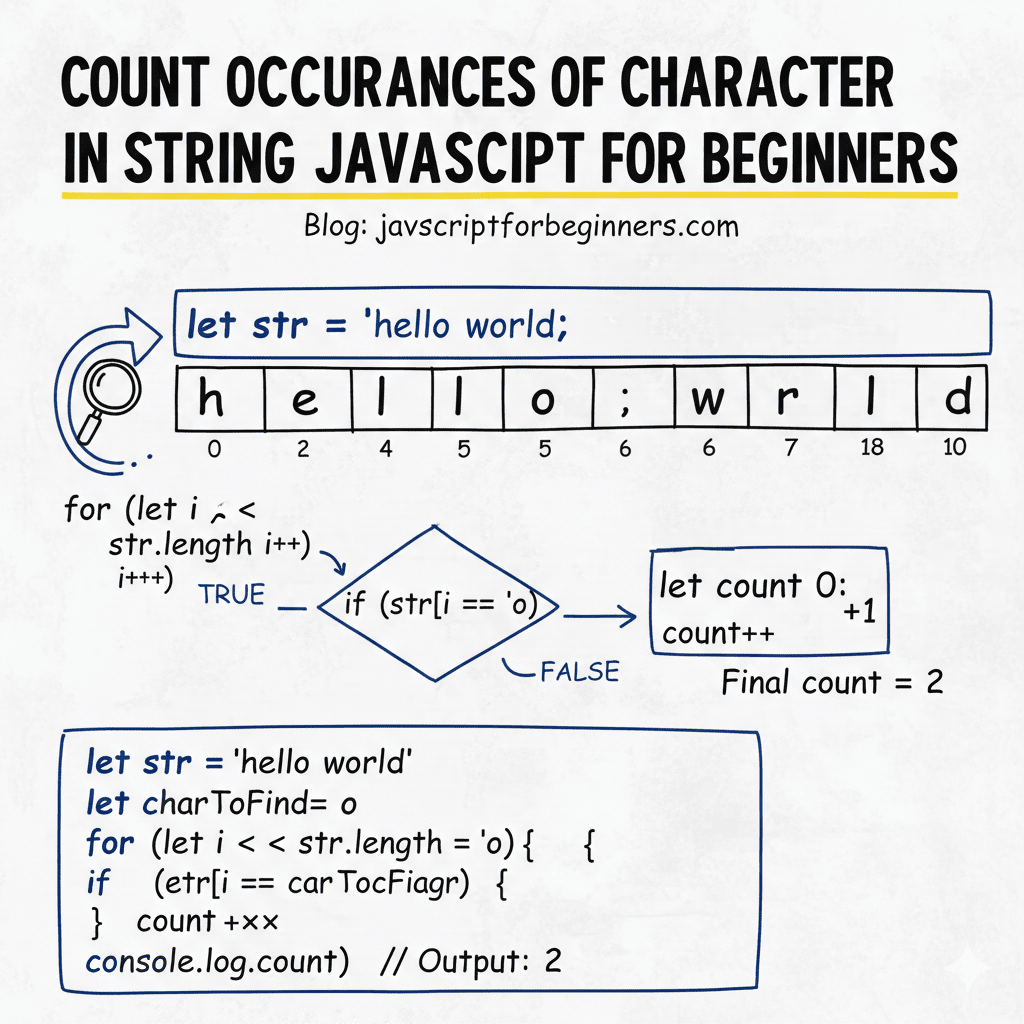
A traditional and reliable way is to loop through the string and manually count matches.
const str = "banana";
const char = "a";
let count = 0;

for (let i = 0; i < str.length; i++) {
  if (str[i] === char) count++;
}

console.log(count); // Output: 3
Why it works:
It checks each character one by one — giving full control for extra logic (like case-insensitive counting or skipping certain indices).
Pros: Works in all browsers, even older ones.
Cons: Slightly more verbose than split().
Method 3 – Using match() with RegExp
Regular expressions are powerful when you need to count patterns or perform case-insensitive matches.
const str = "Banana";
const char = "a";
const regex = new RegExp(char, "gi"); // 'g' for global, 'i' for ignore case
const matches = str.match(regex);
const count = matches ? matches.length : 0;

console.log(count); // Output: 3
How it works:
match()returns an array of all matches.- If there are no matches, it returns
null, so you must check before accessing.length.
Pros: Perfect for case-insensitive or complex searches.
Cons: Slightly slower for small strings; regex needs escaping for special characters.
Method 4 – Advanced: Counting All Characters via reduce() or Object
If you want to find the count of every character, not just one, you can use Array.prototype.reduce() to build an object map.
const str = "banana";
const charCount = [...str].reduce((acc, ch) => {
  acc[ch] = (acc[ch] || 0) + 1;
  return acc;
}, {});

console.log(charCount); // Output: { b: 1, a: 3, n: 2 }
Why it works:
- The spread operator
[...]converts the string into an array of characters. reduce()iterates and builds a frequency map for each unique character.
Pros: Great for analytics or character frequency analysis.
Cons: More advanced — not needed for a single character.
When to Choose Which Method?
| Method | Best For | Performance | Readability |
|---|---|---|---|
| split() | Simple, one-off counting | Fast for small strings | Very easy |
| for-loop | Custom logic, legacy code | Slightly slower | Moderate |
| match() + RegExp | Case-insensitive or pattern search | Moderate | Clean but regex-based |
| reduce()/object | Counting all characters | Fast and scalable | Advanced |
Best Practice:
Use split() for simple cases, match() for regex or case-insensitive searches, and reduce() when you need complete frequency maps for analytics or text processing.
Pros & Cons of Count Occurences of character in String Javascript
| Method | Pros | Cons |
|---|---|---|
| split() | Very concise | Creates array, memory cost |
| for loop | Straightforward, no extra objects | More verbose |
| match() with RegExp | Powerful, pattern-based | Needs care for null, regex cost |
| reduce()/object count | Gets full frequency map | Slightly more complex |
Real-life Uses of Counting Character Occurrences in JavaScript
- User Input Validation at Facebook
Facebook uses the function to verify the number of specific characters in usernames. For instance, ensuring no username is flooded with special characters like ‘@’ or ‘!’.
The function aids in validating user inputs, making certain they adhere to guidelines.function countOccurrence(string, char) {
return string.split(char).length - 1;
}
// Example Usage
let count = countOccurrence('User!@!Name1', '!');
console.log(count); // Output: 2
- Improving Search Algorithms at Amazon
Amazon optimises its product search functionality by counting the occurrences of search keywords within product descriptions. This aids in boosting search relevance.
By doing this, products with more keyword matches are ranked higher in results.function countOccurrence(description, keyword) {
return description.split(keyword).length - 1;
}
// Example Usage
let keywordCount = countOccurrence('This product is the best product.', 'product');
console.log(keywordCount); // Output: 2
- Character Limit Visualisation in Twitter
Twitter ensures tweets do not exceed character limits. Counting occurrences of characters helps dynamically indicate remaining characters as a user types a tweet.
This real-time feature enhances user experience by visually guiding users.function countOccurrence(tweet, char) {
return tweet.length;
}
// Example Usage
let charCount = countOccurrence('Hello Twitter!', '');
console.log(charCount); // Output: 14
Common Interview Queries
- How do you count the number of vowels in a string using JavaScript?
You can use theString.prototype.match()method in conjunction with a regular expression:const str = 'Hello world!';
const vowelsCount = (str.match(/[aeiou]/gi) || []).length;
console.log(vowelsCount); // Output: 3 - Can you count a specific character without using loops in JavaScript?
A simple way to achieve this is by using thesplit()method:const str = 'Hello world!';
const count = str.split('l').length - 1;
console.log(count); // Output: 3 - What about case sensitivity when counting character occurrences?
To count both uppercase and lowercase versions of a character, convert the string to a single case usingtoLowerCase():const str = 'Hello World!';
const count = (str.toLowerCase().match(/l/g) || []).length;
console.log(count); // Output: 3 - Is there a way to count multiple character occurrences at once in JavaScript?
Yes, you can write a function that utilizes a map to store the characters and their counts:const countCharacters = (str) => {
return [...str].reduce((acc, char) => {
acc[char] = (acc[char] || 0) + 1;
return acc;
}, {});
};
console.log(countCharacters('hello world')); // Output: {h: 1, e: 1, l: 3, o: 2, ' ': 1, w: 1, r: 1, d: 1} - What is the most efficient way to count characters in a large string?
For large strings, consider using a similar map approach but optimizing with fewer method calls:const str = '...'; // very long string
const charMap = {};
for (let char of str) {
charMap[char] = (charMap[char] || 0) + 1;
}
console.log(charMap) - Is it possible to count occurrences of a word instead of a character?
Certainly! Utilize thesplit()method with the specific word as the separator:const str = 'hello world, hello universe';
const count = str.split('hello').length - 1;
console.log(count); // Output: 2 - How can I count non-alphabetic characters in a string?
Use a regular expression to match characters that are not alphabetic:const str = '1234!@#abc';
const nonAlphaCount = (str.match(/[^a-zA-Z]/g) || []).length;
console.log(nonAlphaCount); // Output: 7 - Does JavaScript have a built-in method for counting character frequencies?
Not directly, but you can use a combination of ES6 features such asreduce()to build your own:const frequencyCounter = (str) => {
return [...str].reduce((freq, char) => {
freq[char] = (freq[char] || 0) + 1;
return freq;
}, {});
};
console.log(frequencyCounter('sample string'))
Discover our AI-powered js online compiler, where you can instantly write, run, and test your code. Our intelligent compiler simplifies your coding experience, offering real-time suggestions and debugging tips, streamlining your journey from coding novice to expert with ease. Explore it today and boost your coding skills!
Conclusion
Learning to ‘Count occurrences of character in string Javascript’ sharpens your problem-solving skills and boosts your confidence in coding. It’s a fundamental concept that once mastered, opens doors to complex problems. Try it out! For more programming insights, explore Newtum and broaden your coding horizon.
Edited and Compiled by
This article was compiled and edited by @rasikadeshpande, who has over 4 years of experience in writing. She’s passionate about helping beginners understand technical topics in a more interactive way.
About The Author