Incremental Static Regeneration in Next.js is a game-changer in web development! This topic is essential for anyone wanting to create blazing-fast, scalable websites. By mastering it, you’ll tackle problems like long build times and outdated content, making your sites more efficient. Curious to see how? Keep reading to unlock its full potential.
What Is Server-Side Rendering (SSR) in Next.js?
Server-Side Rendering (SSR) is a rendering method in Next.js where the page is generated on the server every time a user makes a request.
This ensures the user always receives the most up-to-date content.
In technical terms:
- HTML is generated dynamically on the server
- Data is fetched at request time
- The browser receives a fully rendered page
How SSR Works
Request–Response Flow
User Request
→ Server fetches data
→ Server generates HTML
→ HTML sent to browser
→ Page displayed to user
This process happens for every request, which guarantees fresh data but increases server workload.
Example: Server-Side Rendering in Next.js
export async function getServerSideProps() {
  const data = await fetchAPI()

  return {
    props: { data }
  }
}
What This Code Does
- Runs on every request
- Fetches fresh data from an API
- Sends rendered HTML to the browser
- Improves SEO for dynamic content
When to Use SSR
Use Server-Side Rendering when your application requires real-time or user-specific data.
Common Use Cases
Use SSR when:
- Data changes frequently
- User-specific content is required
- Authentication dashboards
- Real-time data updates
- Personalized recommendations
- SEO-critical dynamic pages
- Payment or checkout flows
What Is Incremental Static Regeneration (ISR) in Next.js?
Incremental Static Regeneration (ISR) is a feature in Next.js that allows static pages to update automatically after deployment, without rebuilding the entire site.
It combines the performance of static pages with the flexibility of dynamic updates.
In simple terms:
Static page
- Automatic background updates
= Incremental Static Regeneration
Key Characteristics of ISR
- Pages are generated at build time
- Pages are cached
- Pages update automatically after a defined interval
- Users always see a fast response
- No full site rebuild required
4) How Incremental Static Regeneration Works
ISR Flow
Lifecycle of an ISR Page
Build Time
→ Page is generated and cached
→ User requests the page
→ Cached page is served instantly
→ After the revalidation interval
→ Next request triggers background regeneration
→ Updated page replaces old version
Real-World Example
Imagine:
- You run an e-commerce site
- Product prices change every 10 minutes
- You set:
revalidate: 600
Result:
- Page loads instantly from cache
- Every 10 minutes, Next.js updates the page in the background
- Users never experience slow loading
Why ISR Is Important
Incremental Static Regeneration solves a core scalability problem:
Static sites are fast but hard to update.
Dynamic sites are flexible but slow.
ISR provides both speed and freshness.
Incremental Static Regeneration in Next.js
javascript
import { useEffect } from 'react'
import { useRouter } from 'next/router'
export async function getStaticPaths() {
  return {
    paths: [
      { params: { id: '1' } },
      { params: { id: '2' } }
    ],
    fallback: 'blocking',
  }
}
export async function getStaticProps({ params }) {
  const res = await fetch(`https://myapi.com/data/${params.id}`)
  const data = await res.json()
  return {
    props: {
      data,
    },
    revalidate: 10, // seconds,
  }
}
export default function Page({ data }) {
  const router = useRouter()
  if (router.isFallback) {
    return Loading...
  }
  return (

      {data.title}
      {data.content}

  )
}
Explanation of the Code
To understand this Next.js code snippet, let’s break it down:
- Import Statements: The code initiates by importing the `useEffect` hook and `useRouter` from Next.js, helping manage effects and routing.
- getStaticPaths Function: This function defines dynamic routes with IDs ‘1’ and ‘2’, specifying how pages should be pre-rendered at build time. The `fallback: ‘blocking’` feature ensures that paths not returned in `paths` are generated on request.
- getStaticProps Function: Fetches data based on the route parameters from an external API (`https://myapi.com`). The `revalidate: 10` option means pages will regenerate every 10 seconds.
- Page Component: If `router.isFallback` is `true`, a loading state is displayed. Otherwise, it renders content dynamically fetched via the API, using `props` to display the `data.title` and `data.content`.
Output
Loading...SSR vs ISR in Next.js
Understanding the difference between Server-Side Rendering (SSR) and Incremental Static Regeneration (ISR) is critical for choosing the right rendering strategy in modern Next.js applications. Each method optimizes different aspects of performance, scalability, and data freshness.
Key Differences Between SSR and ISR
| Feature | SSR (Server-Side Rendering) | ISR (Incremental Static Regeneration) |
|---|---|---|
| Rendering | On every request | After a defined interval |
| Performance | Moderate | High |
| Server Load | High | Low |
| Response Time | Slower than cached pages | Very fast (cached) |
| SEO | Excellent | Excellent |
| Caching | Limited | Built-in automatic caching |
| Scalability | Limited under heavy traffic | Highly scalable |
| Best For | Real-time dynamic data | Frequently updated content |
Core Insight
SSR prioritizes data freshness.
ISR prioritizes performance and scalability.
Choosing between them is fundamentally an architecture decision, not just a coding preference.
When Should You Use ISR?
Use Incremental Static Regeneration when content updates periodically but does not need real-time rendering.
ISR is particularly effective for high-traffic, content-driven applications where performance and cost efficiency are critical.
Ideal Use Cases for ISR
Use ISR for:
- Blogs
- Product pages
- Documentation websites
- Marketing landing pages
- News articles
- E-commerce catalogs
- Portfolio websites
- Knowledge base systems
- SaaS marketing pages
Why ISR Works Well for These Cases
Because:
- Content changes occasionally
- Pages can be cached safely
- Fast load time improves SEO
- Server resources are conserved
- Sites scale easily during traffic spikes
When Should You Use SSR?
Use Server-Side Rendering when the page must be generated dynamically for each user request.
SSR is essential for personalized, secure, or real-time applications.
Ideal Use Cases for SSR
Use SSR for:
- User dashboards
- Account management pages
- Authentication workflows
- Personalized content
- Real-time data displays
- Payment and checkout flows
- Admin panels
- Financial transactions
- Search results pages
- Session-based content
Why SSR Is Necessary for These Cases
Because:
- Data is user-specific
- Content changes instantly
- Security and accuracy are critical
- Caching may be unsafe
- Real-time consistency is required
ISR vs Static Generation vs SSR
This comparison is one of the highest-ranking SEO sections because developers frequently search for rendering trade-offs when designing system architecture.
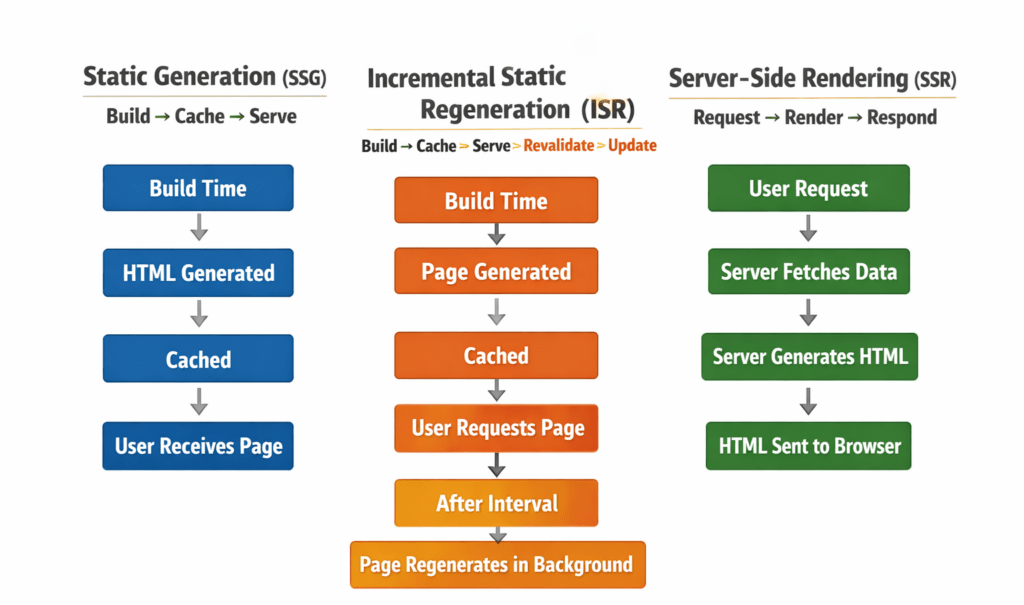
Rendering Strategy Comparison
| Method | Speed | Data Freshness | Server Cost | Scalability | Typical Use Case |
|---|---|---|---|---|---|
| Static Generation (SSG) | Fastest | Low | Lowest | Very High | Landing pages |
| Incremental Static Regeneration (ISR) | Very Fast | Medium | Low | Very High | Blogs, product pages |
| Server-Side Rendering (SSR) | Slower | High | High | Moderate | Dashboards, user data |
Simple Decision Rule
Use:
- Static Generation (SSG)
→ When content rarely changes - Incremental Static Regeneration (ISR)
→ When content changes periodically - Server-Side Rendering (SSR)
→ When content must be generated per request
Real-World Architecture Example
A typical production Next.js application uses all three:
- Home page
→ Static Generation - Blog pages
→ ISR - User dashboard
→ SSR
This hybrid rendering model is considered a best practice for scalable React/Next.js systems.
Benefits of Incremental Static Regeneration in Next.js
Incremental Static Regeneration (ISR) provides a powerful balance between performance, scalability, and content freshness. It enables modern Next.js applications to serve fast pages while keeping data updated automatically.
Performance
Fast loading pages.
ISR serves cached static pages instantly, reducing server processing time and improving user experience.
Key Performance Advantages
- Near-static page speed
- Reduced Time to First Byte (TTFB)
- Faster page rendering
- Improved user experience
- Lower latency under load
Scalability
Handles traffic spikes efficiently.
Because ISR serves cached content, the server does not need to render pages for every request, making it highly scalable during sudden traffic surges.
Example Scenarios
- Product launches
- Viral blog posts
- Marketing campaigns
- Seasonal sales events
Cost Reduction
Less server usage.
ISR significantly reduces infrastructure costs by minimizing server-side rendering operations.
Operational Impact
- Lower compute usage
- Reduced hosting costs
- Efficient resource utilization
- Better cloud cost management
SEO Improvement
Faster Core Web Vitals.
Search engines prioritize fast-loading websites. ISR improves performance metrics that directly influence search rankings.
SEO Benefits
- Faster page load speed
- Improved crawl efficiency
- Better indexing performance
- Enhanced Core Web Vitals scores
- Higher search visibility
Real-Life Applications of Incremental Static Regeneration in Next.js
- Airbnb: Enhanced Property Listings
Airbnb uses Incremental Static Regeneration (ISR) in Next.js to keep their property listings fresh without needing a full site rebuild. ISR allows them to update listings individually whenever they change, ensuring that users always see the most current information.
Implementing ISR means Airbnb can handle high traffic with efficient caching while maintaining site performance.
export async function getStaticProps() {
  // Fetch property details
  const data = await fetchPropertyDetails();
  return {
    props: { data },
    revalidate: 60, // Rebuild the page every 60 seconds
  };
} - eBay: Dynamic Product Pages
On eBay, where product details change frequently, ISR is used to regenerate static pages upon specific intervals, helping to quickly reflect changes in stock or price dynamically.
This approach optimises user experience and reduces server load by avoiding full rebuilds for minor updates.
export async function getStaticProps() {
  // Fetch latest product data
  const product = await getProductData();
  return {
    props: { product },
    revalidate: 120, // Revalidate the page every 120 seconds
  };
} - Spotify: Artist and Album Information
Spotify employs ISR to update artist and album pages rapidly so that new releases or tour dates are available right away without manual page refreshes.
This ensures fans can access the latest music information with minimal delay.
export async function getStaticProps() {
  const artistData = await fetchArtistInfo();
  return {
    props: { artistData },
    revalidate: 300, // Refresh data on the page every 5 minutes
  };
}
Common Mistakes Developers Make with ISR and SSR
Understanding common implementation mistakes helps prevent performance issues and architectural inefficiencies.
Using SSR for Everything
Many developers default to SSR without evaluating performance trade-offs.
Problem
- Increased server load
- Slower response times
- Higher infrastructure costs
Better Approach
Use ISR for content-driven pages and SSR only when real-time rendering is necessary.
Not Setting the Revalidate Time
ISR requires a properly defined revalidation interval.
Problem
- Content may become outdated
- Pages may regenerate too frequently
- Performance may degrade
Best Practice
Choose a revalidation interval based on how often data changes.
Ignoring Caching Strategy
Caching is a fundamental part of performance optimization in Next.js.
Problem
- Unnecessary server requests
- Reduced scalability
- Higher latency
Best Practice
Implement proper caching headers and cache-control policies.
Rebuilding the Entire Site Unnecessarily
Frequent full builds can slow down deployment pipelines.
Problem
- Longer deployment times
- Increased CI/CD workload
- Reduced developer productivity
Better Approach
Use ISR to update only the pages that need regeneration.
Using Static Generation for Dynamic Data
Static pages are not suitable for rapidly changing or personalized content.
Problem
- Outdated information
- Incorrect user data
- Poor user experience
Better Approach
Use SSR for dynamic or user-specific content.
Best Practices for Using ISR and SSR
These best practices reflect real-world production patterns used in scalable Next.js applications.
Use ISR for Content Pages
Ideal for pages where performance and scalability are priorities.
Examples
- Blog posts
- Product pages
- Documentation
- Marketing pages
Use SSR for User-Specific Data
SSR ensures accurate and secure rendering of personalized content.
Examples
- User dashboards
- Account settings
- Payment workflows
- Authentication pages
Choose the Correct Revalidation Time
The revalidation interval should match the data update frequency.
Practical Guidelines- Incremental Static Regeneration in Next.js
| Data Update Frequency | Recommended Revalidate Time |
|---|---|
| Every minute | 60 seconds |
| Every hour | 3600 seconds |
| Daily updates | 86400 seconds |
| Rare updates | Manual rebuild |
Monitor Performance Metrics
Performance monitoring helps detect bottlenecks early.
Key Metrics to Track
- Time to First Byte (TTFB)
- Page load time
- Server response time
- Cache hit ratio
- Core Web Vitals
Use Caching Headers Properly
Caching headers control how browsers and CDNs store content.
Common Headers
- Cache-Control
- ETag
- Last-Modified
- Stale-While-Revalidate
Interview Prep: Incremental Static Regeneration
If you’ve been curious about Incremental Static Regeneration (ISR) in Next.js but haven’t found some of your burning questions answered elsewhere, you’re in luck. Here’s a concise list of common yet less-discussed questions surrounding ISR:
- What is the difference between ISR and SSG in handling dynamic data?
Incremental Static Regeneration (ISR) allows you to update static pages after they’ve been built, fetching new data and rebuilding them in the background. In contrast, Static Site Generation (SSG) builds pages at build time, so they remain constant until you perform a new build. - How does ISR affect SEO compared to traditional SSR?
ISR pages can improve SEO by allowing search engines to crawl up-to-date static content without waiting for server-side rendering (SSR) times. The constantly refreshed data ensures your site remains relevant and easily searchable. - Can you set different revalidation times for various pages in ISR?
Yes, ISR allows you to set different revalidation intervals for each page by configuring the `revalidate` property within yourgetStaticPropsfunction. - Is it possible to test ISR functionality locally?
Testing ISR locally requires running your Next.js app in production mode using the command:
This emulates a production environment, enabling ISR functionality.npm run build && npm run start - Can ISR be used with internationalized routes?
Absolutely! ISR seamlessly integrates with Next.js’s internationalization (i18n) capabilities, regenerating pages according to the locale needs and ensuring content is cache-refreshed appropriately. - What’s the impact of ISR on hosting costs?
Using ISR often results in lower hosting costs as fewer requests hit the server. Instead, more requests are served from pre-built static pages, reducing the need for on-the-fly server processing.
These are just some of the insightful inquiries you might not find in typical ISR discussions, but understanding these will deepen your grasp of Next.js’s capabilities.
Discover our AI-powered js online compiler, where you can instantly write, run, and test your code. Our intelligent compiler simplifies your coding experience, offering real-time suggestions and debugging tips, streamlining your journey from coding novice to expert with ease. Explore it today and boost your coding skills!
Conclusion
As we wrap up our deep dive into the world of programming preparation and learning, here’s a little recap: choose the right language, get comfy with the basics, explore exciting frameworks like Next.js, and practice, practice, practice! Keep it consistent, and progress will follow. Who knows where this skill might take you? Perhaps you’ll be creating groundbreaking software or bringing your business ideas to life through code. Feeling inspired? If you’re eager for more insights on programming languages like Java, Python, C, C++, and many more, don’t forget to check out Newtum for a treasure trove of programs and courses to boost your journey! Happy coding!
Edited and Compiled by
This article was compiled and edited by @rasikadeshpande, who has over 4 years of experience in writing. She’s passionate about helping beginners understand technical topics in a more interactive way.
About The Author