You can avoid a full table scan in SQL by using proper indexing, writing optimized WHERE clauses, and analyzing execution plans. Full table scans occur when the database engine checks every row, which slows query performance significantly on large tables.
As databases grow, even small inefficiencies can turn into major performance bottlenecks. Full table scans are one of the most common reasons behind slow SQL queries—especially in high-traffic applications, analytics dashboards, and enterprise systems.
Understanding how and why full table scans happen helps developers write faster, scalable SQL queries that save both time and infrastructure cost.
Key Takeaways: Avoid full table scan in SQL
- Full table scan → Database reads every row ❌
- Indexed scan → Database reads only relevant rows ✅
- Missing or unused indexes → Primary cause of table scans
- Execution plans → Best way to detect performance issues
- Optimized SQL → Faster queries, lower CPU & I/O usage
What Is a Full Table Scan in SQL?
A full table scan occurs when a SQL query forces the database engine to read every row in a table to find matching results.
Instead of using an index to jump directly to relevant data, the database checks rows one by one, which increases CPU usage, disk I/O, and query execution time—especially for large tables.
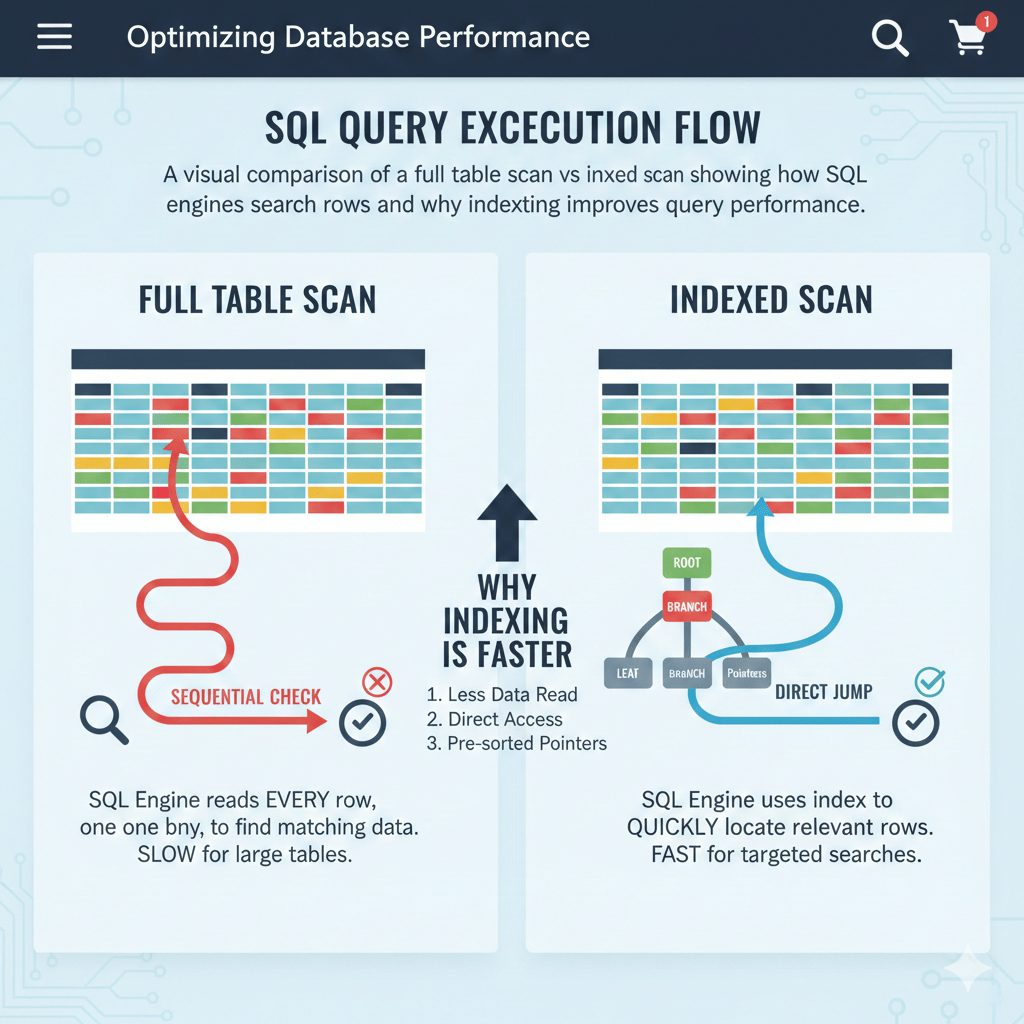
Full table scans are common in:
- Large transactional tables
- Analytics queries without filters
- Poorly indexed databases
Why Does SQL Use Full Table Scans?
SQL engines choose execution strategies based on cost estimation. A full table scan is used when the optimizer believes it is cheaper than using an index.
1. No Index on Filtered Columns
If the column used in the WHERE, JOIN, or ORDER BY clause is not indexed, the database has no shortcut and must scan the entire table.
Example:
SELECT * FROM orders WHERE customer_id = 1024;
Without an index on customer_id, a full table scan is unavoidable.
2. Using Functions in the WHERE Clause
Applying functions to indexed columns prevents index usage.
Example:
SELECT * FROM users WHERE YEAR(created_at) = 2024;
Here, the function disables index access and triggers a full table scan.
3. Low Data Selectivity
If a query returns a large percentage of rows, the optimizer may decide that scanning the table is faster than jumping through an index.
Example:
SELECT * FROM employees WHERE status = 'ACTIVE';
If most rows are ACTIVE, a full table scan may be chosen.
4. Small Tables (Sometimes Intentional)
For very small tables, reading the entire table is faster than using an index.
This is not a performance issue and is often an intentional optimization by the database engine.
How to Avoid Full Table Scan in SQL?
Avoiding full table scans is a key part of SQL performance optimization.
1. Create Proper Indexes
Index columns frequently used in:
WHEREJOINORDER BYGROUP BY
Example:
CREATE INDEX idx_customer_id ON orders(customer_id);
2. Rewrite Inefficient WHERE Conditions
Avoid applying functions on indexed columns.
❌ Bad:
WHERE LOWER(email) = 'test@example.com';
✅ Good:
WHERE email = 'test@example.com';
3. Use EXPLAIN or EXPLAIN ANALYZE
Execution plans show how SQL executes your query and whether an index is being used.
This is the fastest way to confirm a full table scan before it becomes a production issue.
4. Avoid SELECT *
Fetching unnecessary columns increases I/O and memory usage.
Use only required columns:
SELECT order_id, total_amount FROM orders;
5. Optimize JOIN Conditions
Ensure joined columns have indexes and matching data types.
Example:
CREATE INDEX idx_user_id ON orders(user_id);
Poorly optimized joins often cause hidden full table scans.
How to Detect Full Table Scans Using Execution Plans?
Execution plans reveal whether SQL is performing an index scan or a full table scan.
MySQL
EXPLAIN SELECT * FROM orders WHERE customer_id = 1024;
Look for type: ALL → indicates a full table scan.
PostgreSQL
EXPLAIN ANALYZE SELECT * FROM orders WHERE customer_id = 1024;
Watch for Seq Scan → sequential (full table) scan.
Oracle
EXPLAIN PLAN FOR
SELECT * FROM orders WHERE customer_id = 1024;
TABLE ACCESS FULL confirms a full table scan.
SQL Server
Enable Actual Execution Plan and check for:
- Table Scan
- Clustered Index Scan
These indicate full table or near-full table reads.
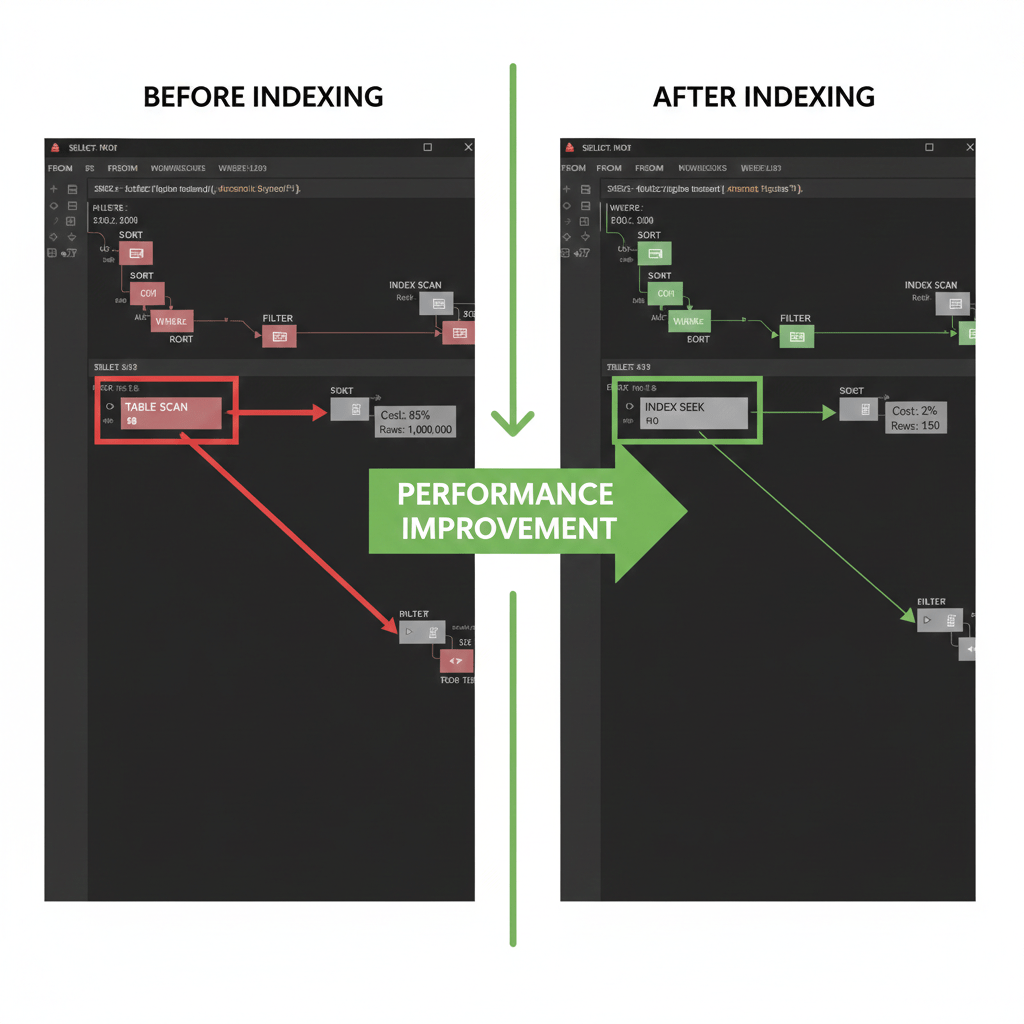
Comparison of Full Table Scan vs Indexed Scan
Avoid full table scan in SQL
| Factor | Full Table Scan | Indexed Scan |
|---|---|---|
| Rows Read | All rows | Only matching rows |
| Performance | Slow on large tables | Fast |
| Resource Usage | High CPU & I/O | Optimized |
| Scalability | Poor | Excellent |
Real-Life Applications of Avoiding Full Table Scans in SQL
- Retail Giant: Optimising Warehouse Queries
A leading UK retail company often queries its massive warehouse database to track stock levels without performance bottlenecks. By avoiding full table scans, they sped up their transactions.
For them, using proper indexing meant their lookup time reduced significantly from minutes to milliseconds!SELECT item_name, quantity
FROM stock
WHERE item_id = 12345; - Online Streaming Services: Enhancing User Experience
An online streaming service was keen on enhancing user experience by quickly fetching users’ watch histories. With millions of records, a full table scan was slowing down the process.
Implementing indexing on `user_id` helped them fetch data in the blink of an eye, ensuring seamless streaming.SELECT user_id, last_watched
FROM user_history
WHERE user_id = 98765; - Financial Institutions: Securing Transaction Data Perks
Banks need to access transaction details efficiently for quick verifications. In one scenario, avoiding full scans ensured secure, rapid checks.
Using indexed queries meant transaction retrieval became faster, secure, and more consistent.SELECT transaction_id, amount
FROM transactions
WHERE account_id = 'ACC123456';
Avoid full table scan in SQL: Queries
Understanding SQL and optimising your queries can be tricky, can’t it? One of the hot topics around SQL performance is the dreaded full table scan, which can slow down your database operations significantly. So, what kinds of questions do people often have about avoiding full table scans that aren’t covered by the usual suspects like GeeksforGeeks or Baeldung? Let’s dive into those questions:
- How can I determine if my SQL query is performing a full table scan? Use the `EXPLAIN` statement before your query to see how the database is executing it. You’ll notice phrases like “TABLE SCAN” if a full scan is happening.
This will provide insights into which part of your query might be causing the full scan.EXPLAIN SELECT * FROM my_table WHERE condition; - What are some common misconceptions about indexing and full table scans? Many believe that adding more indexes will always solve the problem. However, the key is to create the right indexes based on query patterns. Over-indexing can actually lead to inefficient performance.
- Can query optimisation tools solve all full table scan issues? They can certainly help identify potential problems, but manual query optimisation is often necessary to fine-tune performance and ensure you’re not just masking underlying issues.
- What’s the role of MySQL buffer pool in avoiding full table scans? The buffer pool stores indexes, and frequently accessed data, reducing the need for full table scans. Tuning the buffer size can significantly improve performance.
- Do foreign key constraints impact full table scans’ likelihood? Yes, foreign key constraints can sometimes lead to full table scans during JOIN operations if the associated columns aren’t properly indexed.
- Are there cases when full table scans are actually necessary? Absolutely, a full table scan might be the best choice for queries retrieving a large portion of a table’s data. It’s not always the enemy!
- How does SQL server cache impact full table scans? SQL Server caches data pages in memory, reducing the need for full scans. Properly understanding how this caching works helps in predicting when a full scan might occur.
- Which SQL clauses most frequently trigger full table scans? Clauses like `LIKE ‘%x%’` with wildcards or `ORDER BY` without a matching index can lead to full table scans. Analyse your query structure to avoid these pitfalls where possible.
These questions peek into nuanced areas that might not always be addressed in popular blogs but are pivotal for anyone serious about SQL optimisation. Understanding the intricacies of these elements can really help fine-tune your approach and boost database performance.
Our AI-powered sql online compiler makes coding a breeze! Instantly write, run, and test your SQL queries with smart assistance from AI. It’s your go-to tool for real-time coding; efficient, powerful, and perfect for all skill levels. Say goodbye to tedious setups and hello to productivity!
Conclusion
Completing “Avoid full table scan in SQL” empowers you to optimise database queries, making your applications faster and more efficient. Ready to see the difference in your coding skills? Try it yourself and experience the improvements. For more programming insights, explore Newtum.
Edited and Compiled by
This article was compiled and edited by @rasikadeshpande, who has over 4 years of experience in writing. She’s passionate about helping beginners understand technical topics in a more interactive way.
About The Author