You can write JSON data to a file in Python using the built-in json module. The most common approach is using json.dump() to store Python dictionaries or lists directly into a .json file. This method ensures proper formatting and easy data exchange.
JSON is the backbone of modern APIs, configuration files, and data storage. Whether you are building web apps, automation scripts, or data pipelines, knowing how to write JSON to a file in Python is a must-have skill for today’s developers.
Key Takeaways about how to Write json to file in python
json.dump()→ Writes JSON directly to a filejson.dumps()→ Converts JSON to string before saving- Supports dictionaries, lists, and nested data
- Widely used in APIs, logging, and configuration files
Let Understand What is JSON in Python?
JSON (JavaScript Object Notation) is a lightweight data-interchange format widely used for storing and exchanging data between systems. In Python, JSON is commonly used to handle API responses, configuration files, and structured data storage.
It is easy to read and write for humans and easy to parse and generate for machines, which makes it ideal for modern applications where data needs to move between different platforms and languages.
Python provides a built-in json module that allows seamless conversion between Python objects (like dictionaries and lists) and JSON data.

How to Write JSON to a File in Python?
Using json.dump() (Recommended)
json.dump() is the most direct and efficient way to write JSON data to a file in Python. It takes a Python object and writes it directly into a file in JSON format.
Explanation
- Converts Python dictionaries or lists into JSON
- Writes data directly to a
.jsonfile - Best choice for saving structured data
Syntax
json.dump(python_object, file_object)
Example Code
import json

data = {
    "name": "Alice",
    "role": "Developer",
    "skills": ["Python", "APIs", "Data Processing"]
}

with open("data.json", "w") as file:
    json.dump(data, file)
Output File Structure (data.json)
{"name": "Alice", "role": "Developer", "skills": ["Python", "APIs", "Data Processing"]}🔹 How to Write JSON Using json.dumps()?
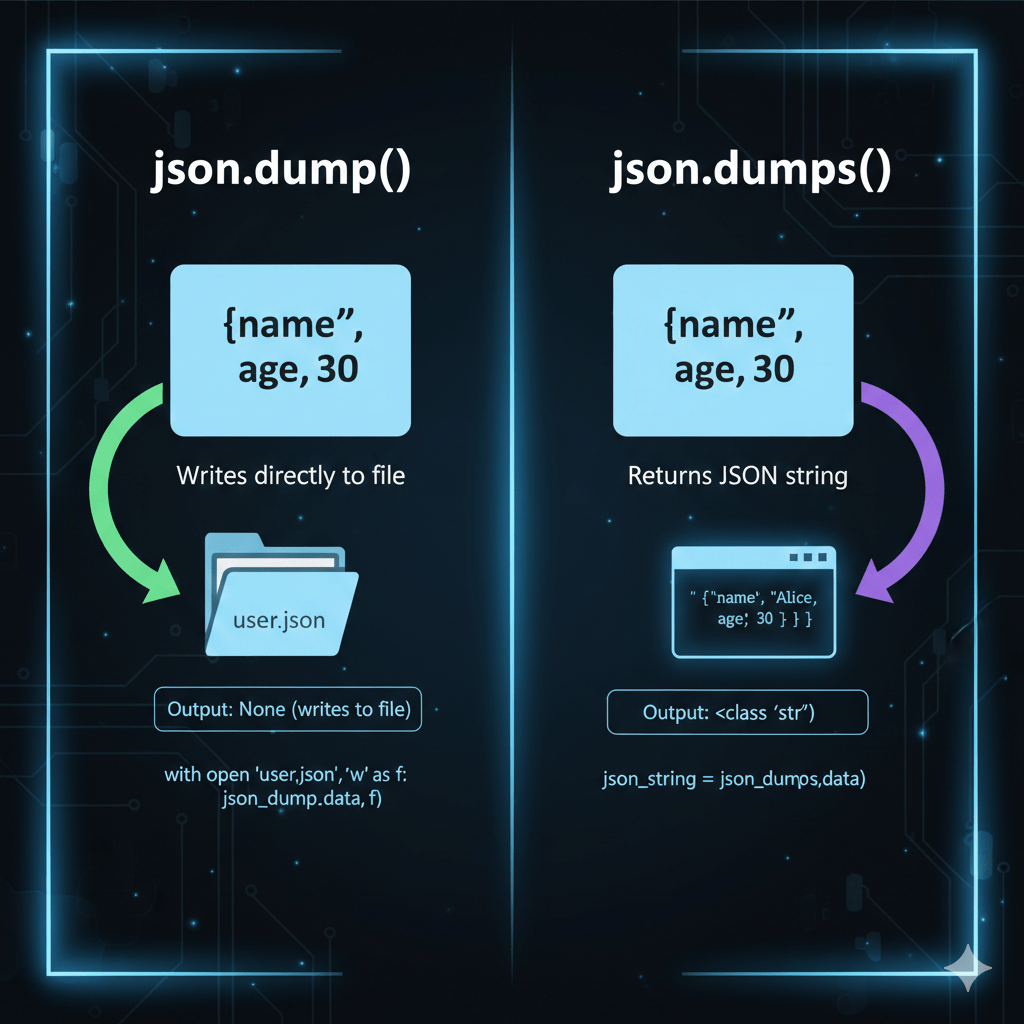
Unlike json.dump(), the json.dumps() method converts Python objects into a JSON-formatted string, instead of writing directly to a file.
Difference from json.dump()
json.dump()→ Writes JSON directly to a filejson.dumps()→ Returns JSON as a string
When to Use It
- When you need to manipulate JSON as a string
- When sending JSON data over APIs
- When logging or storing JSON in databases
Example with File Handling
import json

data = {"project": "AI Platform", "status": "Active"}

json_string = json.dumps(data)

with open("project.json", "w") as file:
    file.write(json_string)
🔹 How to Format JSON While Writing to a File?
Formatting JSON improves readability, especially for configuration files and debugging.
Common Formatting Options
indent
Adds spacing to make JSON human-readable.
json.dump(data, file, indent=4)
sort_keys
Sorts keys alphabetically.
json.dump(data, file, sort_keys=True)
ensure_ascii
Allows Unicode characters to be stored properly.
json.dump(data, file, ensure_ascii=False)
Example (Well-Formatted JSON)
{
    "name": "Alice",
    "role": "Developer",
    "skills": [
        "Python",
        "APIs",
        "Data Processing"
    ]
}
🔹 How to Append JSON Data to an Existing File?
Common Misconception
Many developers believe JSON files can be appended like text files. This breaks JSON structure, because a JSON file must contain a single valid object or array.
Correct Practical Approach
- Read existing JSON data
- Modify it in Python
- Write the updated data back to the file
Example
import json

with open("data.json", "r") as file:
    existing_data = json.load(file)

existing_data["experience"] = "5 years"

with open("data.json", "w") as file:
    json.dump(existing_data, file, indent=4)
Real-World Scenario
In production systems, this approach is used for:
- Updating user profiles
- Storing application logs
- Maintaining configuration settings without corrupting files
This method ensures data integrity while keeping the JSON file valid.
Practical Uses for Writing JSON to a File in Python
- E-commerce Data Logging by Amazon
Amazon deals with massive amounts of user data daily. To manage and log customer transactions efficiently, Amazon uses ‘Write JSON to file in Python’ to store purchase details in a structured format.import json
transaction_data = {
'user_id': 12345,
'product': 'Smartphone',
'price': 699.99,
'currency': 'USD'
}
with open('transaction_log.json', 'w') as json_file:
json.dump(transaction_data, json_file, indent=4)
Output: A neatly formatted ‘transaction_log.json’ file storing the transaction details. - User Preferences Management by Spotify
Spotify uses JSON files to save user preferences and playback histories. This helps personalise the user’s music experience with curated playlists and recommendations.
Output: A ‘user_prefs.json’ file that aids in delivering customised music content based on the user’s interests.import json
preferences = {
'user_id': 'user_001',
'favourite_genres': ['rock', 'jazz'],
'dark_mode': True
}
with open('user_prefs.json', 'w') as json_file:
json.dump(preferences, json_file, indent=4)
- Configuration Storage by Netflix
Netflix uses JSON files to store configuration details of their streaming services, enabling smooth updates and environment control.
Output: A ‘config.json’ file that is essential for maintaining streaming settings.import json
config = {
'resolution': '1080p',
'subtitles_enabled': True,
'audio_language': 'English'
}
with open('config.json', 'w') as json_file:
json.dump(config, json_file, indent=4)
Pros & Cons of json.dump() vs json.dumps()
Understand the pro’s and cons of json.dump() vs json.dumps() is important when we write JSON to a file in Python
| Feature | json.dump() | json.dumps() |
|---|---|---|
| Writes directly to file | ✅ | ❌ |
| Returns string | ❌ | ✅ |
| Best for large files | ✅ | ❌ |
| Beginner-friendly | ✅ | ⚠️ |
🔐 Best Practices for Writing JSON Files in Production Python
Writing JSON files in real-world Python applications requires more than just using json.dump(). Following these best practices helps ensure data integrity, security, and maintainability in production environments.
✅ Always Use Context Managers (with open())
Context managers automatically handle file closing, even if an error occurs. This prevents file corruption and memory leaks.
with open("config.json", "w") as file:
    json.dump(data, file)
✔ Safer file handling
✔ Cleaner, more readable code
✅ Validate Data Before Writing
Not all Python objects can be serialized to JSON. Validate data types and structure before writing to avoid runtime errors.
import json

try:
    json.dumps(data)
except TypeError:
    print("Invalid data for JSON serialization")
✔ Prevents broken JSON files
✔ Avoids unexpected crashes in production
✅ Handle File Overwrite vs Versioning Carefully
Overwriting files blindly can cause data loss. In production systems:
- Use timestamps or version numbers
- Keep backups of critical JSON files
import time

filename = f"data_{int(time.time())}.json"
✔ Safer updates
✔ Easy rollback during failures
✅ Avoid Storing Sensitive Data in Plain JSON
JSON files are plain text and easy to read. Avoid storing:
- Passwords
- API keys
- Tokens
✔ Use environment variables
✔ Encrypt data if storage is unavoidable
✅ Use Logging and Exception Handling
Always log file operations and handle exceptions gracefully to aid debugging and monitoring.
import json
import logging

logging.basicConfig(level=logging.INFO)

try:
    with open("data.json", "w") as file:
        json.dump(data, file)
    logging.info("JSON file written successfully")
except Exception as error:
    logging.error(f"Failed to write JSON file: {error}")
✔ Better observability
✔ Faster issue resolution in production
Interview Questions about how to write JSON to file in Python
If you’re looking to get your hands dirty with some Python programming and want to write JSON data to a file, you’re not alone! Loads of folks have questions about this essential skill. Here’s a list of some frequently asked questions you might not find answers to in typical programming tutorials:
- How do I handle Unicode when writing JSON to a file in Python?
Python’s `json.dump()` automatically encodes strings as UTF-8. To ensure proper Unicode handling, make sure your file is opened with `encoding=’utf-8’`.
with open('data.json', 'w', encoding='utf-8') as file:
json.dump(data, file, ensure_ascii=False) - Can I append JSON data to an existing file instead of overwriting it?
Absolutely! Read the existing data, update it in Python, then write it back. Just be cautious with file sizes.with open('data.json', 'r+', encoding='utf-8') as file:
data = json.load(file)
data.update(new_data)
file.seek(0)
json.dump(data, file) - What are some common mistakes to avoid when writing JSON to a file?
Watch out for JSON serialization errors due to complex data types like Python sets or custom objects that aren’t JSON serializable.
Transform them into lists or dictionaries before attempting to serialize - How do I pretty-print JSON to a file by default?
Use the `indent` parameter to make your JSON easy to read when stored. Perfect for log files!json.dump(data, file, indent=4) - Can I write JSON data to a file asynchronously in Python?
Using libraries like `aiofiles`, you can perform asynchronous file operations, suitable for I/O heavy tasks.import aiofiles
async with aiofiles.open('data.json', 'w') as file:
await file.write(json.dumps(data)) - What’s the best way to handle large JSON data sets?
Use streaming libraries or handle data in chunks to avoid running out of memory, facilitating smooth and efficient processing. - How to handle file exceptions when writing JSON data?
Wrap your code with try-except blocks to handle potential errors like IO interruptions or permission issues.
try:
    with open('data.json', 'w') as file:
        json.dump(data, file)
    except IOError as e:
print(f"Error: {e}") - What is `ensure_ascii=False` doing in json.dump() method?
Setting `ensure_ascii=False` allows non-ASCII characters to be displayed properly instead of escaping them. Perfect for international applications!
With our AI-powered python online compiler, users can instantly write, run, and test code efficiently. It’s equipped with AI to enhance coding precision, reduce errors, and speed up debugging. Experience seamless coding sessions without the hassle of setting up a local environment, all within your browser.
Conclusion
Completing ‘Write json to file in python’ equips you with essential data handling skills, empowering you to manage JSON files confidently. Imagine the satisfaction when your code works like a charm! Ready to level up? Explore more programming languages at Newtum and broaden your coding horizons.
Edited and Compiled by
This article was compiled and edited by @rasikadeshpande, who has over 4 years of experience in writing. She’s passionate about helping beginners understand technical topics in a more interactive way.
About The Author