Custom hooks in React are functions that let you reuse stateful logic across multiple components using built-in React hooks. In 2026, they matter more than ever because modern React relies heavily on Server Components, composability, and clean separation of logic, making reusable hooks essential for scalable and maintainable applications.
Custom hooks help teams reduce duplication, keep components lightweight, and adapt faster as React continues to evolve toward performance-first architectures.
What Is a Custom Hook in React?
Definition
A custom hook is a JavaScript function that uses one or more React hooks internally and allows you to share logic between components without repeating code.
Unlike components, custom hooks do not render UI — they only manage logic such as state, side effects, subscriptions, or calculations.
use Naming Convention
Every custom hook must start with use (for example, useFetch, useAuth, useDebounce).
This is not just a convention — it allows:
- React to enforce the Rules of Hooks
- ESLint to catch incorrect hook usage
- Developers to instantly recognize hook-based logic
How React Identifies Hooks Internally
React doesn’t track hooks by name, but by call order during rendering.
Because of this:
- Hooks must be called at the top level
- Hooks must never be called conditionally or inside loops
The use prefix enables React’s tooling to validate these rules at build time.
Custom Hooks vs Utility Functions
| Utility Function | Custom Hook |
|---|---|
| Pure logic | Stateful or side-effect logic |
| No React hooks | Uses React hooks |
| Can be called anywhere | Must follow Rules of Hooks |
| Framework-agnostic | React-specific |
If your function uses useState, useEffect, or similar — it should be a custom hook, not a utility.
When Should You Create a Custom Hook?
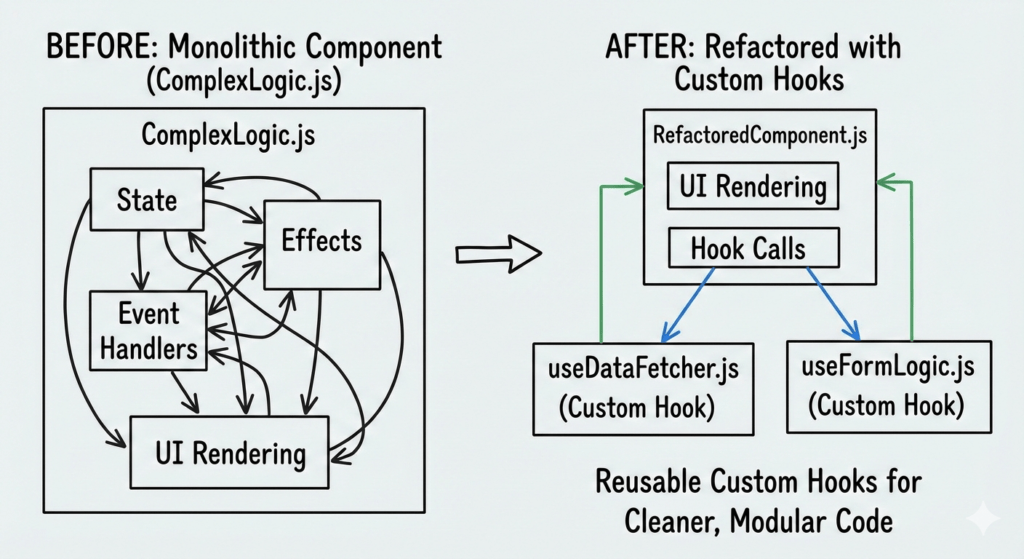
You should create a custom hook when logic becomes repetitive, stateful, or difficult to maintain across components.
Common Scenarios
- Repeated state logic across multiple components
- Side effects reused in different parts of the app
- Need to separate business logic from UI
- Components becoming bloated and hard to read
Custom hooks help keep components focused on rendering, not managing complex logic.
📌 Decision Checklist (Quick Test)
Create a custom hook if:
- ✅ The same logic appears in more than one component
- ✅ The logic uses React state or effects
- ✅ The component feels cluttered or hard to scan
- ✅ You want logic to be testable and reusable
Avoid a custom hook if:
- ❌ Logic is used only once
- ❌ It adds unnecessary abstraction
- ❌ It hides important side effects
Basic Example of a Custom Hook
Before: Logic Inside the Component
function Users() {
  const [users, setUsers] = useState([]);
  const [loading, setLoading] = useState(true);

  useEffect(() => {
    fetch("/api/users")
      .then(res => res.json())
      .then(data => {
        setUsers(data);
        setLoading(false);
      });
  }, []);

  if (loading) return <p>Loading...</p>;
  return users.map(user => <p key={user.id}>{user.name}</p>);
}
After: Refactored into a Custom Hook
function useFetch(url) {
  const [data, setData] = useState(null);
  const [loading, setLoading] = useState(true);

  useEffect(() => {
    fetch(url)
      .then(res => res.json())
      .then(result => {
        setData(result);
        setLoading(false);
      });
  }, [url]);

  return { data, loading };
}
function Users() {
  const { data: users, loading } = useFetch("/api/users");

  if (loading) return <p>Loading...</p>;
  return users.map(user => <p key={user.id}>{user.name}</p>);
}
Explaining Return Values & Dependencies
- Returned object exposes reusable state and behavior
- Dependencies ensure effects rerun only when necessary
- Hook remains generic and reusable across components
This pattern leads to:
- Cleaner components
- Easier testing
- Better scalability as the app grows
Best Practices for Building Custom Hooks in 2026
Building custom hooks well is less about syntax and more about design discipline. In 2026, with React leaning heavily into composability and performance, these practices are no longer optional.
✅ Keep Hooks Single-Responsibility
A custom hook should do one thing well.
Bad example:
- Fetch data
- Transform data
- Handle UI state
- Log analytics
Good example:
useFetchUsersusePaginationuseAnalyticsEvent
Why this matters:
Single-purpose hooks are easier to reuse, test, and compose together without creating hidden coupling.
✅ Always Prefix with use
Every custom hook must start with use.
function useAuth() {}
This allows:
- React’s hook rules to work correctly
- ESLint to catch misuse
- Other developers to instantly understand intent
If it doesn’t start with use, it’s not a hook — it’s a utility.
✅ Avoid Unnecessary Re-Renders
Custom hooks can accidentally become re-render factories.
Common mistakes:
- Returning new objects on every render
- Creating functions inline without memoization
Best practice:
- Keep returned values stable
- Memoize where necessary (not everywhere)
✅ Use useCallback and useMemo Wisely
Do not blanket-wrap everything in useCallback.
Use them when:
- A function is passed to child components
- A value is expensive to compute
- Referential equality matters
Avoid them when:
- Logic is cheap
- Hook readability suffers
- Premature optimization adds noise
In 2026, clarity > micro-optimizations.
✅ Handle Cleanup Properly
Any hook that:
- Subscribes
- Listens
- Sets intervals
- Observes DOM or browser APIs
Must clean up.
useEffect(() => {
  const id = setInterval(refresh, 5000);
  return () => clearInterval(id);
}, []);
Uncleaned hooks cause memory leaks — especially visible under Concurrent Rendering.
✅ Make Hooks Composable
Hooks should work well together.
Example:
useAuth()
useUserPermissions()
useFeatureFlags()
Composable hooks:
- Don’t assume UI structure
- Don’t depend on specific components
- Return logic, not JSX
This makes them future-proof across platforms and architectures.

⚠️ VERY IMPORTANT: Rules & Pitfalls Developers Still Break
This is where even experienced developers slip — and where bugs quietly enter production.
❌ Never Call Hooks Conditionally
🚨 This still breaks apps in 2026.
if (isLoggedIn) {
  useAuth();
}
Why this fails:
- React relies on call order
- Conditional hooks shift that order
- State becomes corrupted
✅ Always call hooks at the top level.
❌ Avoid Hiding Side Effects Inside Hooks
Bad pattern:
- Custom hook silently fires API calls
- Triggers navigation
- Writes to storage without clarity
Why it’s dangerous:
- Components lose control
- Side effects become invisible
- Debugging becomes painful
Best practice:
- Make side effects explicit
- Expose actions clearly via returned functions
❌ Don’t Over-Abstract Logic
Over-engineering hooks is a real problem.
Smell test:
- Hook has 10+ parameters
- Hook tries to solve multiple business cases
- Only used in one component
If a hook is harder to understand than the component — it’s not helping.
❌ Dependency Array Mistakes (Still #1 Bug Source)
useEffect(() => {
  fetchData(query);
}, []); // ❌ missing dependency
Results in:
- Stale values
- Incorrect API calls
- Bugs that appear “random”
Rule:
If you use it inside
useEffect, it belongs in the dependency array — or must be intentionally stabilized.
❌ Sharing State vs Sharing Logic (Major Confusion)
Custom hooks do NOT share state by default.
useCounter(); // each call = new state
To share state:
- Use Context
- Or external state libraries
Hooks share logic, not memory — misunderstanding this leads to broken assumptions.
Performance Optimization in Custom Hooks
In modern React, performance issues often start inside hooks, not components.
Prevent Unnecessary Re-Renders
Avoid returning fresh objects/functions on every render.
Bad:
return { data, loading };
Better:
return useMemo(() => ({ data, loading }), [data, loading]);
Maintain Stable References
- Memoize callbacks passed downstream
- Stabilize values consumed by effects
- Avoid inline object creation
This is critical under Concurrent Rendering.
Avoid Creating New Functions Unnecessarily
If a function does not depend on changing values, define it outside or memoize it.
Unstable references = wasted renders.
Measure with React DevTools
Use:
- Highlight updates
- Profiler tab
- Re-render tracing
If a hook causes excessive renders, you’ll see it immediately.
Measure first. Optimize second.
Custom Hooks with Modern React (2026)
React in 2026 is not the same React most tutorials still assume.
✅ Server Components Compatibility
Custom hooks:
- ❌ Cannot use client-only APIs in Server Components
- ❌ Cannot rely on browser effects
- ✅ Should remain client-safe or explicitly client-only
Use "use client" intentionally.
✅ Suspense Awareness
Hooks that fetch data:
- Should integrate with Suspense
- Should not manually manage loading everywhere
- Should be predictable under fallback states
✅ Concurrent Rendering Safe
Hooks must:
- Be idempotent
- Avoid side effects during render
- Handle re-renders gracefully
Concurrent React will re-run logic more often than you expect.
❌ What Should NOT Go into Custom Hooks Anymore
In 2026, avoid putting these in hooks:
- UI rendering logic
- Navigation side effects
- Global mutable state
- Business rules tightly coupled to screens
Hooks should enable flexibility — not lock it down.
Testing Custom Hooks
Testing custom hooks matters because hooks often contain business logic, side effects, and state transitions that directly impact application behavior. Without tests, bugs inside hooks can silently affect multiple components at once.
The recommended approach in 2026 is using React Testing Library by rendering a small test component that consumes the hook. This aligns with React’s philosophy of testing behavior rather than implementation details and works seamlessly with concurrent rendering.
Focus tests on:
- Returned values and state changes
- Side effects (API calls, subscriptions)
- Edge cases such as loading, error, and cleanup behavior
Avoid testing:
- Internal implementation details
- Hook call order
- React’s built-in behavior
A good rule: test what the hook promises to return, not how it achieves it. Well-tested hooks act as reliable building blocks, allowing teams to refactor components confidently without fear of breaking shared logic.
Reusable vs App-Specific Hooks
Not all custom hooks should be reusable across projects. Understanding this distinction helps prevent over-engineering.
Reusable hooks are generic and framework-focused, such as useFetch, useDebounce, or useMediaQuery. These should live in a shared hooks/ or shared/hooks/ directory and follow neutral naming without business context.
App-specific hooks are tightly coupled to domain logic, such as useUserOnboarding or useCheckoutFlow. These belong close to the feature they support, typically inside feature-based folders.
Naming conventions should remain descriptive and intention-driven. When sharing hooks across teams or packages, prioritize:
- Clear documentation
- Minimal dependencies
- Stable public APIs
Reusable hooks should evolve slowly; app-specific hooks can change rapidly.
Creating Real-World Applications with Custom React Hooks
- Facebook – State Management
Facebook uses custom hooks to manage complex state logic across their various applications. By doing this, they encapsulate and reuse specific logic that multiple components need.
This allows them to efficiently fetch and manage data with minimal boilerplate code.import { useState, useEffect } from 'react';
function useFetchData(apiEndpoint) {
const [data, setData] = useState(null);
useEffect(() => {
fetch(apiEndpoint)
.then(res => res.json())
.then(data => setData(data));
}, [apiEndpoint]);
return data;
};
const posts = useFetchData('https://api.facebook.com/posts'); - Netflix – Media Queries
At Netflix, custom hooks like media queries help dynamically adjust video player components based on screen size, enhancing user experience.
This ensures consistent layouts across devices, vital for streaming platforms.import { useState, useEffect } from 'react';
function useMediaQuery(query) {
const [matches, setMatches] = useState(false);
useEffect(() => {
const media = window.matchMedia(query);
if (media.matches !== matches) {
setMatches(media.matches);
}
const listener = () => setMatches(media.matches);
media.addListener(listener);
return () => media.removeListener(listener);
}, [matches, query]);
return matches;
};
const isLargeScreen = useMediaQuery('(min-width: 1024px)'); - Uber – User Authentication
Uber employs custom hooks to streamline user authentication processes, making login components more maintainable and secure.
This approach simplifies managing user sessions dynamically throughout their app.import { useState } from 'react';
function useAuth() {
const [isAuthenticated, setIsAuthenticated] = useState(false);
const login = () => setIsAuthenticated(true);
const logout = () => setIsAuthenticated(false);
return { isAuthenticated, login, logout };
};
const { isAuthenticated, login, logout } = useAuth();
Custom Hooks Interview Guide
- Why would you want to build custom hooks in React?
Custom hooks are great for extracting logic that is used across multiple components. This makes your codebase more reusable and easier to maintain. By building your own hooks, you ensure that any shared logic is neatly wrapped up in one place, reducing duplication and enhancing the readability of your code. - How do you ensure a custom hook is side-effect free?
To keep your custom hook side-effect free, avoid using `useEffect` within the hook itself unless necessary. If you must have a side-effect, consider placing it in the component using the hook instead. This separation helps maintain testability and predictability within your hook. - What’s the best way to handle asynchronous data in a custom hook?
You can manage asynchronous data by using `useState` along with `useEffect` to handle fetching. Here’s a basic example:
function useFetchData(url) {
  const [data, setData] = useState(null);
  useEffect(() => {
    async function fetchData() {
      const response = await fetch(url);
      const result = await response.json();
      setData(result);
    }
    fetchData();
  }, [url]);

  return data;
} - Can custom hooks be conditionally rendered?
Just like React hooks, custom hooks should not be rendered conditionally. This is because hooks maintain state across renders, and conditional usage could break your application’s state sync. Hooks should always be called in the same order. - How do you test a React custom hook?
Testing custom hooks typically involves using a utility library like `react-hooks-testing-library`. By using this library, you can render your hook in an isolated environment and make assertions about the output.
Discover our AI-powered js online compiler, where you can instantly write, run, and test your code. Our intelligent compiler simplifies your coding experience, offering real-time suggestions and debugging tips, streamlining your journey from coding novice to expert with ease. Explore it today and boost your coding skills!
Conclusion
Custom hooks improve code when they simplify repeated logic and clarify intent. They become harmful when they hide complexity or over-abstract simple behavior. In 2026, teams should treat hooks as composable building blocks, created deliberately, tested properly, and used only when they genuinely improve maintainability. Dive in, try it out, and for more programming insights, visit Newtum.
Edited and Compiled by
This article was compiled and edited by @rasikadeshpande, who has over 4 years of experience in writing. She’s passionate about helping beginners understand technical topics in a more interactive way.
About The Author