Learning to code a ‘C# Program to Generate the Marksheet of the Student’ isn’t just a coding exercise- it’s a practical tool that tackles real-world challenges. Understanding this can streamline calculating grades, reduce errors, and save time. Curious how it all works? Stick around to discover how to master this skill!
Problem Statement
Write a C# Program to generate the Marksheet of the Student using subject marks and calculate total, percentage, and grade.
Algorithm
Step-by-step logic:
- Start
- Input student name
- Input marks for subjects
- Calculate total marks
- Calculate percentage
- Assign grade
- Display marksheet
- End
Formula Used
Percentage Formula
Percentage = (Total Marks / Maximum Marks) × 100
Grading Criteria Example
| Percentage | Grade |
|---|---|
| 90 and above | A |
| 75 – 89 | B |
| 60 – 74 | C |
| 50 – 59 | D |
| Below 50 | Fail |
C# Program to Generate the Marksheet of the Student
csharp
using System;

namespace StudentMarksheet
{
    class Program
    {
        static void Main(string[] args)
        {
            Console.Write("Enter Student Name: ");
            string studentName = Console.ReadLine();

            Console.Write("Enter Roll Number: ");
            int rollNumber = int.Parse(Console.ReadLine());

            Console.Write("Enter Marks for Subject 1: ");
            float subject1 = float.Parse(Console.ReadLine());
            Console.Write("Enter Marks for Subject 2: ");
            float subject2 = float.Parse(Console.ReadLine());
            Console.Write("Enter Marks for Subject 3: ");
            float subject3 = float.Parse(Console.ReadLine());

            float totalMarks = subject1 + subject2 + subject3;
            float averageMarks = totalMarks / 3;
            string grade = string.Empty;

            if (averageMarks >= 90)
                grade = "A+";
            else if (averageMarks >= 80)
                grade = "A";
            else if (averageMarks >= 70)
                grade = "B";
            else if (averageMarks >= 60)
                grade = "C";
            else if (averageMarks >= 50)
                grade = "D";
            else
                grade = "F";

            Console.WriteLine("
Student Marksheet");
            Console.WriteLine("------------------");
            Console.WriteLine("Name: " + studentName);
            Console.WriteLine("Roll Number: " + rollNumber);
            Console.WriteLine("Marks for Subject 1: " + subject1);
            Console.WriteLine("Marks for Subject 2: " + subject2);
            Console.WriteLine("Marks for Subject 3: " + subject3);
            Console.WriteLine("Total Marks: " + totalMarks);
            Console.WriteLine("Average Marks: " + averageMarks);
            Console.WriteLine("Grade: " + grade);
        }
    }
}
Explanation of the Code
This C# program is designed to generate a student’s marksheet. Let’s break it down step by step:
- The program first prompts the user to input the student’s name and roll number. These inputs are stored as strings and an integer, respectively.Next, it asks for the marks obtained in three subjects. These are captured as floating-point numbers to handle any decimal scores.The program calculates the total marks by summing up the scores of the three subjects. Then, it calculates the average by dividing total marks by three.It determines the grade based on average marks using a series of conditional statements. If the average is 90 or above, the grade is ‘A+’, and it goes down from there.Finally, the program prints out the student’s details, including the input information, total marks, average marks, and the grade, forming a complete marksheet.
Output
plaintext
Enter Student Name:
Enter Roll Number:
Enter Marks for Subject 1:
Enter Marks for Subject 2:
Enter Marks for Subject 3:
Student Marksheet
------------------
Name: [Student Name]
Roll Number: [Roll Number]
Marks for Subject 1: [Marks for Subject 1]
Marks for Subject 2: [Marks for Subject 2]
Marks for Subject 3: [Marks for Subject 3]
Total Marks: [Total Marks]
Average Marks: [Average Marks]
Grade: [Grade]
C# Program to Generate the Marksheet of the Student
This program demonstrates how to accept student marks, calculate the total and percentage, assign a grade, and display a formatted marksheet.
using System;

class Marksheet
{
    static void Main()
    {
        string name;
        int math, science, english;
        int total;
        double percentage;
        string grade;

        // User input
        Console.Write("Enter Student Name: ");
        name = Console.ReadLine();

        Console.Write("Enter Math Marks: ");
        math = Convert.ToInt32(Console.ReadLine());

        Console.Write("Enter Science Marks: ");
        science = Convert.ToInt32(Console.ReadLine());

        Console.Write("Enter English Marks: ");
        english = Convert.ToInt32(Console.ReadLine());

        // Total calculation
        total = math + science + english;

        // Percentage calculation
        percentage = (total / 300.0) * 100;

        // Grade logic
        if (percentage >= 90)
            grade = "A";
        else if (percentage >= 75)
            grade = "B";
        else if (percentage >= 60)
            grade = "C";
        else if (percentage >= 50)
            grade = "D";
        else
            grade = "Fail";

        // Output formatting
        Console.WriteLine("\n----- Student Marksheet -----");
        Console.WriteLine("Student Name: " + name);
        Console.WriteLine("Math: " + math);
        Console.WriteLine("Science: " + science);
        Console.WriteLine("English: " + english);
        Console.WriteLine("Total: " + total);
        Console.WriteLine("Percentage: " + percentage.ToString("0.00") + "%");
        Console.WriteLine("Grade: " + grade);
    }
}
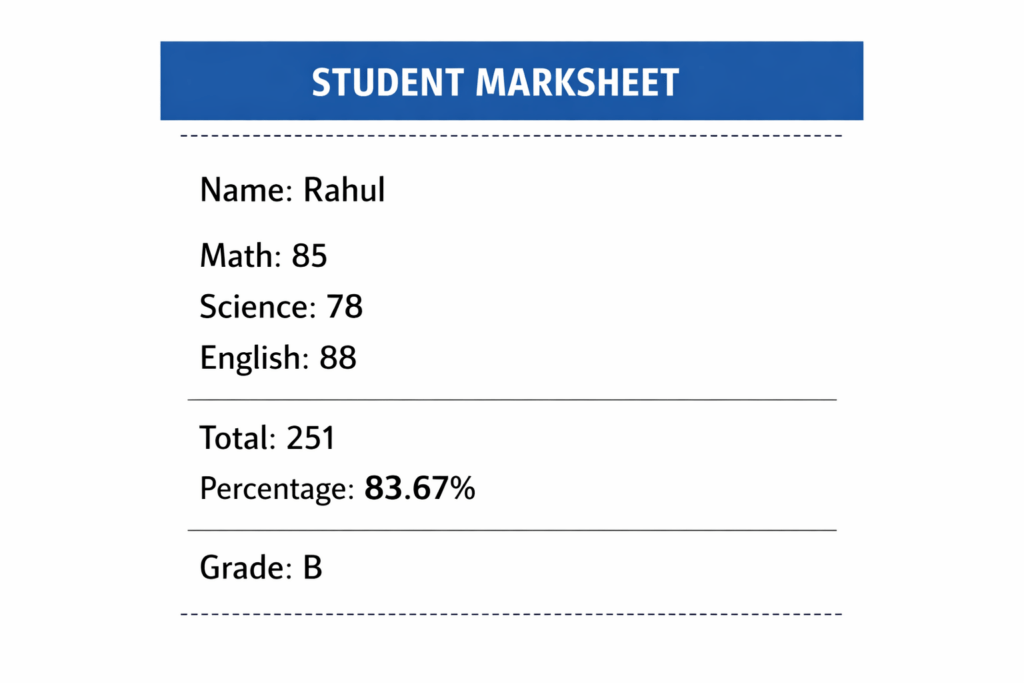
Program Output
Example:
How the Program Works of C# Program to Generate the Marksheet of the Student
1) Input Handling
The program uses Console.ReadLine() to accept input from the user.
Example:
math = Convert.ToInt32(Console.ReadLine());
Explanation:
- Reads input as text
- Converts text into an integer
- Stores the value in a variable
This allows the program to process numerical marks entered by the user.
2) Arithmetic Operations
The program performs basic mathematical calculations to compute the total and percentage.
Total Calculation
total = math + science + english;
Percentage Calculation
percentage = (total / 300.0) * 100;
Purpose:
- Adds subject marks
- Converts total into percentage
- Uses decimal division for accuracy
3) Conditional Statements
The program uses if-else statements to evaluate the percentage and determine the grade.
Example:
if (percentage >= 90)
This checks whether the student’s percentage meets the required condition.
4) Grade Assignment Logic
The grading system is implemented using multiple conditions.
Logic Flow:
- If percentage is 90 or above → Grade A
- If percentage is 75 to 89 → Grade B
- If percentage is 60 to 74 → Grade C
- If percentage is 50 to 59 → Grade D
- If percentage is below 50 → Fail
This structure ensures only one grade is assigned based on performance.
Time Complexity Analysis
| Operation | Complexity |
|---|---|
| Input | O(1) |
| Calculation | O(1) |
| Display | O(1) |
Overall Time Complexity:
O(1)
Explanation:
- The number of subjects is fixed
- No loops or recursion are used
- Execution time remains constant
Therefore, the program runs in constant time complexity.
Real-World Use Cases
These types of programs are commonly used in real systems such as:
- Student Result Systems
Used to calculate and display academic results automatically. - School Report Cards
Generates marksheets for students in schools. - College Grading Systems
Processes semester results and assigns grades. - Academic Management Software
Integrated into ERP and school management platforms. - Education Portals
Displays student performance online.
Variations of This Program
You can extend this program to build more advanced academic systems.
Add More Subjects
Instead of 3 subjects:
- Add 5 or 6 subjects
- Update maximum marks dynamically
Use Arrays
Store marks in an array:
int[] marks = new int[5];
Benefits:
- Cleaner code
- Scalable design
- Easier calculations
Use Classes and Objects (OOP)
Create a Student class:
class Student
{
    public string Name;
    public int Total;
}
Benefits:
- Better structure
- Reusable code
- Real-world design
Store Data in File
Save marksheet data using:
- Text file
- CSV file
- Database
Example technologies:
- File handling
- SQL database
- JSON storage
Calculate GPA
Enhance grading logic to:
- Convert marks to grade points
- Calculate GPA
- Support semester systems
Generate Multiple Student Marksheet
Use loops to process multiple students.
Example:
for(int i = 1; i <= n; i++)
This is commonly used in:
- School software
- Result processing systems
- Batch student evaluation
Practical Applications of Student Marksheet Generation in C#
- University Management Systems:
Renowned universities often use C# programs to generate students’ marksheets efficiently. These programs help in calculating grades and percentages based on students’ scores.
Output: Student: Alice, Total: 245, Percentage: 81.67%
      using System;

      class MarksheetGenerator
      {
          static void Main()
          {
              string studentName = "Alice";
              int[] marks = { 80, 75, 90 };
              int totalMarks = 0;

              foreach (int mark in marks)
                  totalMarks += mark;

              double percentage = (totalMarks / (double)(marks.Length * 100)) * 100;
              Console.WriteLine($"Student: {studentName}, Total: {totalMarks}, Percentage: {percentage}%");
          }
} - Online Education Platforms:
Companies like Coursera or edX employ similar programs to promptly generate detailed analysis for learners to track their progress after quizzes and exams.
Output: Student: John, Total: 256, Percentage: 85.33%using System;
class MarksheetGenerator
{
static void Main()
{
string studentName = "John";
int[] marks = { 88, 92, 76 };
int totalMarks = 0;
foreach (int mark in marks)
totalMarks += mark;
double percentage = (totalMarks / (double)(marks.Length * 100)) * 100;
Console.WriteLine($"Student: {studentName}, Total: {totalMarks}, Percentage: {percentage}%");
}
} - Private Tutoring Apps:
Private tutoring apps such as Preply use these kinds of programs to produce personalized marksheets that help tutors and students visualize performance over time.
      using System;

      class MarksheetGenerator
      {
          static void Main()
          {
              string studentName = "Emma";
              int[] marks = { 70, 85, 80 };
              int totalMarks = 0;

              foreach (int mark in marks)
                  totalMarks += mark;

              double percentage = (totalMarks / (double)(marks.Length * 100)) * 100;
              Console.WriteLine($"Student: {studentName}, Total: {totalMarks}, Percentage: {percentage}%");
          }
      }
Output: Student: Emma, Total: 235, Percentage: 78.33%
Interview Prep: C# Program to Generate the Marksheet of the Student
- How do you structure the classes and methods in a C# program to generate a student’s marksheet?
When structuring your C# program, define a `Student` class that holds details like name, roll number, and marks. Create methods to calculate total, average, and grade. Keep methods short and focused on single tasks to enhance readability and maintainability.
- What data types should be used for storing marks and student details?
Use `int` for roll numbers and marks as they’re typically whole numbers. Strings are ideal for names and subjects. This choice ensures efficient storage and operations on these values.
- How can we handle input validation when entering marks?
Use `try-catch` blocks to catch invalid inputs. Employ `int.TryParse()` to safely convert strings to integers, ensuring that entered marks are numeric.
- Why might we choose to use a List instead of an Array for storing multiple students’ data?
A `List` provides dynamic resizing, making it ideal when the number of students isn’t predetermined. Lists offer more flexibility with methods to add, remove, and manage data.
- How can the program be modified to generate a summary of class performance?
Add methods to iterate through student data, compute aggregate statistics like average class marks, and display highest and lowest performers. This helps in analyzing overall class performance.
- What’s the advantage of separating logic for input, processing, and output in the program?
Separating these concerns improves code organization, makes debugging easier, and allows sections of the code to be changed independently without affecting others.
Keep logic segregated for better maintenance and scalability of the program.class Student { /* encapsulates student data and methods */ }
Our AI-powered csharp online compiler lets users instantly write, run, and test code, making coding seamless and efficient. With AI guidance, it’s like having your own coding assistant. This innovative tool helps coders of all levels improve and succeed faster, ensuring a smooth coding journey. Happy coding!
Conclusion
‘C# Program to Generate the Marksheet of the Student’ enhances your coding skills by offering hands-on experience in logic building and data handling. By completing it, you’ll gain a sense of achievement and a solid foundation in C#. Eager for more programming knowledge? Visit Newtum for insights into Java, Python, C, C++, and more.
Edited and Compiled by
This article was compiled and edited by @rasikadeshpande, who has over 4 years of experience in writing. She’s passionate about helping beginners understand technical topics in a more interactive way.
About The Author