“Check if String Starts with another String Javascript” is a crucial topic for any coder diving into JavaScript. Understanding this helps address issues like validating user inputs or filtering data lists. Keen to learn how checking string beginnings can streamline your code? Let’s explore practical examples and solutions. Keep reading!
What Does It Mean for a String to Start With Another String?
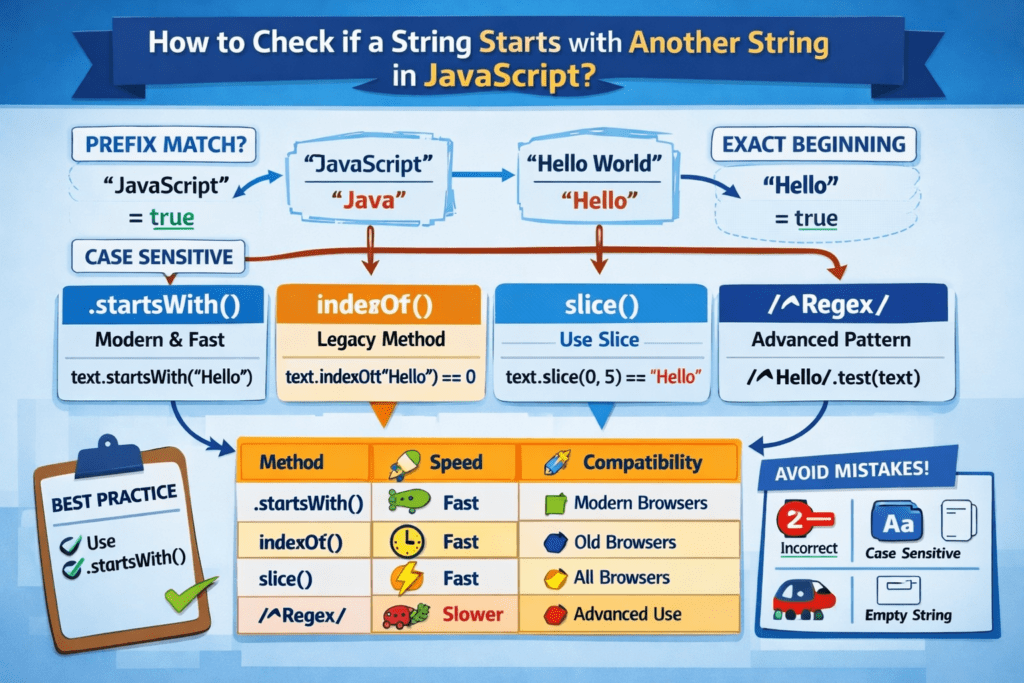
When we say a string starts with another string, we are checking whether the beginning portion of a text matches a specific sequence of characters. This is commonly called a prefix check in programming.
Prefix Concept
A prefix is a sequence of characters that appears at the very start of a string.
Example
- String:
"JavaScript" - Prefix:
"Java"
Since "Java" appears at the beginning, the string starts with that prefix.
"JavaScript".startsWith("Java")
Result
true
Case Sensitivity
JavaScript string comparisons are case-sensitive, meaning uppercase and lowercase letters are treated as different characters.
Example
"JavaScript".startsWith("java")
Result
false
Because:
J ≠ j
To perform a case-insensitive check, convert both strings to the same case:
"JavaScript".toLowerCase().startsWith("java")
Exact Matching
The match must be exact from the first character onward.
Example
"Hello World".startsWith("Hell")
Result
true
But:
"Hello World".startsWith("ello")
Result
false
Because the substring does not begin at position 0.
Method 1 — Using startsWith()
The startsWith() method is the modern and most readable way to check if a string begins with a specific value.
Syntax
string.startsWith(searchString, position)
Parameters
| Parameter | Description |
|---|---|
| searchString | The text to search for |
| position | Optional starting index (default is 0) |
Example
let text = "Hello World";

if (text.startsWith("Hello")) {
    console.log("String starts with Hello");
}
Output
String starts with Hello
Why This Method Is Best
Modern JavaScript
- Introduced in ES6
- Standard method for prefix checking
Clean Syntax
- Easy to read and maintain
- Minimal logic required
Fast Execution
- Optimized native string method
Readable Code
- Clearly communicates intent
- Preferred in production codebases
Method 2 — Using indexOf() (Legacy Compatibility)
Before startsWith() was introduced, developers commonly used indexOf() to check prefixes. This method is still useful when supporting older JavaScript environments.
How It Works
If the substring starts at index 0, the string begins with that value.
Example
let text = "Hello World";

if (text.indexOf("Hello") === 0) {
    console.log("Starts with Hello");
}
When to Use
Use indexOf() when:
- Supporting very old browsers
- Working with legacy systems
startsWith()is unavailable
Method 3 – Using slice()
The slice() method extracts a portion of the string and compares it with the expected prefix.
Example
let text = "Hello World";

if (text.slice(0, 5) === "Hello") {
    console.log("Match found");
}
How It Works
slice(start, end)
Here:
slice(0, 5)
means:
Take characters from position 0 to 4
When to Use
This method is useful when:
- You know the exact prefix length
- You need manual substring control
- Working in constrained environments
Method 4 – Using Regular Expressions
Regular expressions (regex) allow advanced pattern matching at the start of a string.
The caret symbol:
^
means:
Start of string
Example
let text = "Hello World";

if (/^Hello/.test(text)) {
    console.log("Starts with Hello");
}
Pattern Matching
Regex allows matching complex patterns.
Example
/^[A-Z]/
This checks if a string starts with:
Any uppercase letter
Flexible Validation
Regex supports:
- Multiple prefixes
- Character ranges
- Optional patterns
- Dynamic rules
Example
/^(Mr|Mrs|Dr)/
Matches:
Mr Smith
Mrs Jones
Dr Brown
Advanced Use Cases
Regular expressions are useful for:
Input Validation
/^[0-9]/
Check if a string starts with a number.
URL Routing
/^\/api/
Check if a URL starts with /api.
File Name Rules
/^IMG_[0-9]+/
Check if a filename starts with:
IMG_ followed by numbers
Security Filtering
/^admin/
Detect restricted prefixes.
Quick Best Practice Summary
Use:
startsWith()
As the default choice.
Fallback options:
| Method | Use Case |
|---|---|
| startsWith() | Modern JavaScript (recommended) |
| indexOf() | Legacy compatibility |
| slice() | Manual substring checks |
| Regex | Advanced pattern matching |
String Start Check Code
javascript
function startsWith(mainString, searchString) {
  return mainString.startsWith(searchString);
}

// Example usage
let mainString = "Hello, world!";
let searchString = "Hello";

console.log(startsWith(mainString, searchString)); // true
Explanation of the Code
The code provided illustrates a JavaScript function designed to check if a given string starts with another specified string. Here’s a detailed breakdown:
- The function `startsWith` accepts two parameters: `mainString` and `searchString`. These parameters represent the string you’re examining and the string you’re checking for at the beginning, respectively.
- The `startsWith` method is a built-in JavaScript function that swiftly checks if `mainString` begins with `searchString`. It traverses through `mainString` and returns a boolean value. If the start matches `searchString`, it returns `true`; otherwise, it’s `false`.
- An example is provided: `mainString` is set to “Hello, world!”, and `searchString` to “Hello”. When the function is called, it correctly returns `true` because “Hello, world!” indeed starts with “Hello”.
Output
trueCase Sensitivity in startsWith()
JavaScript string comparison is case-sensitive, meaning uppercase and lowercase characters are treated as distinct Unicode code points. As a result, "J" and "j" are not equivalent during string evaluation.
Example
let text = "JavaScript";

console.log(text.startsWith("java"));
Output
false
Why this happens:
The startsWith() method performs a strict, character-by-character comparison starting at index 0. Since the first character "J" does not match "j", the method returns false.
How to Perform a Case-Insensitive Check
To implement case-insensitive matching, normalize both strings to the same case before comparison. The most common normalization strategy is converting both values to lowercase using toLowerCase().
Example
let text = "JavaScript";

if (text.toLowerCase().startsWith("javascript")) {
    console.log("Match found");
}
Technical Note:
This approach ensures deterministic comparisons across varying user inputs, especially in validation and search workflows.
Common Use Cases
1. Form Validation
Used to enforce naming or access rules based on prefixes.
if (email.startsWith("admin"))
Typical scenarios
- Restricting reserved usernames
- Detecting system-generated accounts
- Role-based access validation
2. URL Routing
Frequently used in web frameworks and APIs to route incoming requests.
if (url.startsWith("/api"))
Typical scenarios
- API endpoint detection
- Middleware routing
- Reverse proxy logic
3. File Type Checking
Useful for validating file naming conventions or categorizing uploaded assets.
if (fileName.startsWith("IMG"))
Typical scenarios
- Image file detection
- Device-generated file identification
- Batch processing workflows
Performance Comparison
| Method | Performance | Readability | Compatibility |
|---|---|---|---|
| startsWith() | Fast | High | Modern browsers |
| indexOf() | Fast | Medium | Legacy support |
| slice() | Fast | Medium | All browsers |
| Regex | Slower | Low | Advanced matching |
Practical Interpretation
- startsWith() is optimized in modern JavaScript engines (V8, SpiderMonkey, JavaScriptCore).
- Regex introduces pattern parsing overhead, making it slower for simple prefix checks.
- indexOf() and slice() remain efficient but less expressive.
Browser Compatibility
The startsWith() method is part of the ECMAScript 2015 (ES6) specification and is widely supported across modern runtimes.
Supported Environments
- Chrome
Fully supported in all modern versions. - Firefox
Fully supported. - Safari
Fully supported. - Edge
Supported in Chromium-based versions. - Node.js
Supported starting from:
Node.js 4.0+
Key Compatibility Note
startsWith() is supported in all modern browsers and server-side JavaScript environments.
You only need alternatives like indexOf() when maintaining very old legacy systems (for example, Internet Explorer environments).
Common Mistakes Developers Make
Mistake 1 – Using == Instead of startsWith()
Incorrect:
if (text == "Hello")
This checks full equality, not whether the string begins with a value.
Correct:
if (text.startsWith("Hello"))
Mistake 2 — Ignoring Case Sensitivity
Developers often assume comparisons are case-insensitive.
Problem example:
username.startsWith("admin")
If the input is:
AdminUser
The condition will fail.
Mistake 3 – Using Regex Unnecessarily
Inefficient:
/^Hello/.test(text)
Better:
text.startsWith("Hello")
Use regex only when pattern matching is required.
Mistake 4 – Not Handling Empty Strings
Edge cases can cause logical errors.
Example:
let text = "";
text.startsWith("Hello");
Result:
false
Best practice
Always validate input before comparison:
if (text && text.startsWith("Hello"))
Best Practice Recommendation
Always use:
startsWith()
Because
- Clean syntax
Clearly communicates developer intent. - Built-in method
Native to the JavaScript language specification. - Reliable
Consistent behavior across environments. - Optimized
Implemented at the engine level for efficient execution.
Practical Uses of Checking String Start in JavaScript
- Search Functionality at Amazon
In the vast product database of Amazon, checking if a user’s search query starts with certain keywords helps to dynamically suggest relevant categories or items.
Output: “Suggesting laptop accessories and caseslet query = "laptop sleeve";
if (query.startsWith("laptop")) {
console.log("Suggesting laptop accessories and cases");
} - URL Redirection at LinkedIn
LinkedIn uses URL patterns to identify and redirect users to appropriate pages. For example, when accessing resources starting with ‘jobs’.
Output: “Redirecting to Jobs section”let url = "/jobs/software-developer";
if (url.startsWith("/jobs")) {
console.log("Redirecting to Jobs section");
} - Email Filtering in Google’s Gmail
Gmail filters incoming emails by checking if the subject line starts with specific words to apply automatic labels, like promotions or updates.
Output: “Applying Promotions label”let subjectLine = "Promo: 50% off sales";
if (subjectLine.startsWith("Promo:")) {
console.log("Applying Promotions label");
} - User Authentication Checks at Facebook
During login, Facebook checks session tokens which might start with specific strings to identify user roles or sessions.
Output: “Valid User session”let sessionToken = "user12345_abcdef";
if (sessionToken.startsWith("user")) {
console.log("Valid User session");
}
JavaScript String Starts
- How can I check if a string starts with a certain character in JavaScript without using built-in methods?
To check if a string starts with a specific character without using any built-in methods likestartsWith(), you can manually compare characters. Use the index to access the first character of the string. Here’s an example:let str = 'hello'; let character = 'h'; let result = str[0] === character; console.log(result); // Output: true
- What’s the difference between using
slice()andstartsWith()to check the beginning of a string?
Both methods can check the beginning of a string, but they’re used slightly differently.startsWith()is more direct and semantically clear for this task, whileslice()extracts parts of strings, so you’d need additional comparison logic:let str = 'hello'; let searchString = 'he'; let result = str.slice(0, searchString.length) === searchString; console.log(result); // Output: true
- How do I handle case sensitivity when checking if a string starts with another string?
To handle case sensitivity, you need to standardise the case of both strings before comparison, usually converting to lowercase or uppercase:let str = 'Hello'; let searchString = 'he'; let result = str.toLowerCase().startsWith(searchString.toLowerCase()); console.log(result); // Output: true
- What’s a common error when checking if one string starts with another in JavaScript?
A common mistake is overlooking the importance of case sensitivity; assuming'Hello'and'hello'are equal. Always convert cases if the match must be case-insensitive.
- How could regular expressions help in checking if a string starts with another string?
Regular expressions can provide a powerful way to check patterns. To check if a string starts with another, you could use something like this:let str = 'hello world'; let result = /^hello/.test(str); console.log(result); // Output: true
- What alternatives are there if
startsWith()is not supported by the browser?
In older environments wherestartsWith()isn’t supported, you can manually check withindexOf()by verifying it returns 0 for a match at the beginning:let str = 'hello'; let searchString = 'he'; let result = str.indexOf(searchString) === 0; console.log(result); // Output: true
- Is there a way to check only specific portions of a string (e.g., starting from an index)?
You can utiliseslice()starting from your desired index and then compare with the expected substring:let str = 'hello'; let startIndex = 1; let searchString = 'ell'; let result = str.slice(startIndex).startsWith(searchString); console.log(result); // Output: true
- Can I use the
startsWith()method in arrow functions effectively?
Yes, you can incorporatestartsWith()within arrow functions seamlessly when processing arrays for example:let words = ['hello', 'hi', 'hey']; let filteredWords = words.filter(word => word.startsWith('h')); console.log(filteredWords); // Output: ['hello', 'hi', 'hey']
Discover our AI-powered js online compiler, where you can instantly write, run, and test your code. Our intelligent compiler simplifies your coding experience, offering real-time suggestions and debugging tips, streamlining your journey from coding novice to expert with ease. Explore it today and boost your coding skills!
Conclusion
Mastering ‘Check if String Starts with another String Javascript’ equips you with a foundational skill crucial in real-world programming. Delve into coding and feel the thrill of problem-solving firsthand. For more in-depth programming tips across languages like Java and Python, visit Newtum. Explore, learn, and create!
Edited and Compiled by
This article was compiled and edited by @rasikadeshpande, who has over 4 years of experience in writing. She’s passionate about helping beginners understand technical topics in a more interactive way.
About The Author