HashMap in Java is a data structure that stores key–value pairs using a hashing mechanism, allowing near-constant time performance for insert, search, and delete operations. Internally, it uses a hash table where keys are converted into hash codes to determine storage locations.
This makes HashMap one of the fastest and most widely used collections in Java.
With modern applications handling millions of records—from caching systems to real-time analytics—performance matters more than ever. Java developers rely heavily on HashMap because it provides lightning-fast lookups while remaining flexible and easy to use.
Understanding how hashing actually works under the hood helps you write optimized, bug-free, and interview-ready Java code.
Key Takeaways of HashMap in Java
- Hashing → Technique to map data to fixed-size values
- Hash Table → Array-based structure using hash functions
- HashMap in Java → Implementation of hash table using key–value pairs
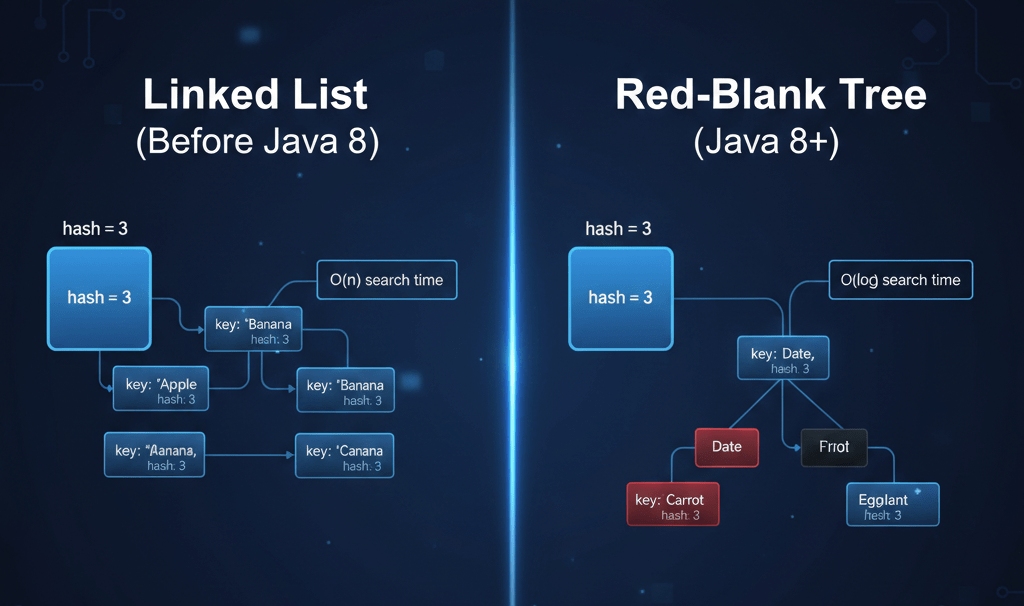
- Collision Handling → Linked List → Red-Black Tree (Java 8+)
- Average Time Complexity → O(1)
What Is Hashing in Java?
Hashing in Java is the process of converting an object (called a key) into a fixed-size integer value known as a hash code.
This hash code helps determine where the data should be stored in memory for fast access.
Java performs hashing using the built-in hashCode() method, which every object inherits from the Object class. A good hash function distributes data evenly to minimize collisions and improve performance.
What Is a Hash Table?
A hash table is a data structure that stores data in an array-based format, where each position is called a bucket.
The bucket index is calculated using a hash function applied to the key.
Simplified Hashing Formula:
index = hashCode(key) % arraySize
This approach allows hash tables to achieve O(1) average time complexity for search, insert, and delete operations.
What Is HashMap in Java?
HashMap in Java is an implementation of the Map interface from the java.util package that uses a hash table to store data as key–value pairs.
Key Features of HashMap:
- Stores data in key–value format
- Allows one null key and multiple null values
- Not thread-safe
- Does not maintain insertion order
- Provides fast performance for lookup and updates
HashMap is widely used due to its flexibility and high efficiency.
How Does HashMap Work Internally?

Internally, HashMap follows these steps to store and retrieve data:
- The key’s
hashCode()method is called - The hash code is compressed to a bucket index
- Data is stored as a
Node<K, V>inside the bucket - If multiple keys map to the same bucket, collisions occur
Collision Handling Mechanism:
- Linked List → Default structure
- Red-Black Tree → Used when bucket size exceeds a threshold (Java 8+)
This optimization improves worst-case performance from O(n) to O(log n).
What Is Hash Collision?
A hash collision happens when two different keys generate the same bucket index after hashing.
Collisions are unavoidable but can be efficiently managed.
Java Handles Collisions Using:
- Chaining (Linked List) for small bucket sizes
- Treeification (Red-Black Tree) when collisions grow beyond a limit
Efficient collision handling is what makes HashMap reliable even with large datasets.
Exploring HashMap in Java
import java.util.HashMap;

public class HashMapExample {
    public static void main(String[] args) {
        HashMap<Integer, String> map = new HashMap<>();

        map.put(101, "Java");
        map.put(102, "Python");
        map.put(103, "Go");

        System.out.println(map.get(102));
    }
}
Explanation of the Code
The key 102 is hashed internally, its bucket is found, and the value is retrieved in O(1) time.
Output
PythonComparison of HashMap vs Hashtable vs ConcurrentHashMap
| Feature | HashMap | Hashtable | ConcurrentHashMap |
|---|---|---|---|
| Thread Safe | ❌ | ✅ | ✅ |
| Performance | High | Low | High |
| Null Keys | Allowed | Not Allowed | Not Allowed |
| Synchronization | No | Yes | Segment-based |
Practical Uses of HashMap in Java
- User Authentication at Facebook:
Facebook uses HashMap for maintaining user session tokens. Each time a user logs in, a session token is generated and stored in a HashMap with the user ID as the key. This ensures that each user’s session can be efficiently accessed and validated.
import java.util.HashMap; public class UserAuth { public static void main(String[] args) { HashMap<String, String> userSessions = new HashMap<>(); userSessions.put("user123", "token4567"); // Key-Value pair: UserID-Token System.out.println("Session Token: " + userSessions.get("user123")); // Output: Session Token: token4567 } } - Inventory Management at Amazon:
Amazon utilises HashMap to track product inventory. The product ID is used as the key, and the number of items available is the value. This allows for quick updates and retrievals to manage stock effectively.
import java.util.HashMap; public class InventoryManagement { public static void main(String[] args) { HashMap<String, Integer> inventory = new HashMap<>(); inventory.put("item001", 150); // Key-Value pair: ProductID-Quantity System.out.println("Stock of item001: " + inventory.get("item001")); // Output: Stock of item001: 150 } } - Content Delivery at Netflix:
Netflix employs HashMap for caching user preferences and recently watched content. This allows for quick retrieval of data, enhancing user experience with faster content delivery.
import java.util.HashMap;

public class ContentDelivery {
    public static void main(String[] args) {
        HashMap<String, String> userPreferences = new HashMap<>();
        userPreferences.put("user456", "Sci-Fi, Drama"); // Key-Value pair: UserID-Preferences

        System.out.println("User Preferences: " + userPreferences.get("user456")); // Output: User Preferences: Sci-Fi, Drama
    }
}
HashMap in Java Interview Prep
Learning Java and diving into collections? Awesome! One crucial data structure you’ll encounter is the `HashMap.` It’s incredibly popular due to its efficacious handling of key-value pairs. But learning its intricacies might lead you to ponder over some questions. Let’s address them!
- How does a HashMap work internally?
A `HashMap` in Java essentially works by using an array of linked lists or sometimes called “buckets.” It uses the hash code of the key to determine which bucket the data goes into. If two keys produce the same hash code, they end up in the same bucket, but that’s sorted out using linked lists or even binary search trees in Java 8 for efficiency. - Can we store a null key and null values in a HashMap?
Yep, Java `HashMap` does allow one null key and multiple null values as it distinguishes null from any other key and puts it in the first bucket, using its own logic. - What’s the difference between a HashMap and a ConcurrentHashMap?
A key difference is that `ConcurrentHashMap` is thread-safe. It’s designed for concurrent access, dividing the map into segments for efficiency. On the other hand, `HashMap` is not synchronized, making it faster in scenarios where threading isn’t a concern. - What happens if we try to replace a value in a HashMap using a non-existent key?
Simple! When you use `replace()` with a key that doesn’t exist, nothing changes. The method quietly returns without throwing errors, keeping your map unaltered. - How do HashMap and Hashtable differ concerning synchronization?
Interesting! While `HashMap` is not synchronized by design, `Hashtable` is. Because of this, `Hashtable` can be slower due to built-in thread safety, whereas `HashMap` is the go-to for non-concurrent situations due to its speed.
These often-pondered questions provide clarity to Java developers working with HashMaps in dynamic coding environments. Stay curious, and keep those queries coming!
Experience the future of coding with our AI-powered Java online compiler. Instantly write, run, and test your code, harnessing the power of AI for real-time feedback and enhanced learning. Dive into seamless coding with minimal effort, letting technology streamline your programming journey and bring your Java projects to life.
Conclusion
Mastering ‘HashMap in Java’ boosts your coding skills and enhances problem-solving abilities. It’s a rewarding experience you shouldn’t miss. Dive deeper into Java and other languages like Python and C with Newtum. Get ready to level up your programming journey!
Edited and Compiled by
This article was compiled and edited by @rasikadeshpande, who has over 4 years of experience in writing. She’s passionate about helping beginners understand technical topics in a more interactive way.
About The Author