The easiest way to find the number of occurrences of a character in a JavaScript string is by looping through the string and comparing each character. You can also use modern methods like split() or regular expressions (match()) to count occurrences quickly. These methods work for any string length and are ideal for beginners.
Counting character occurrences in JavaScript is a practical task used in form validation, data cleaning, search features, and text analytics. With AI-driven applications growing, string-processing tasks like this are becoming essential for developers. The good news? JavaScript makes it simple with multiple approaches depending on your use case.
Key Takeaways of Javascript Count Character in String
- Loop Method: Best for beginners; manually checks each character.
split()Method: Quick and readable; ideal for simple counting.match()with Regex: Most powerful; supports complex conditions.- Use Cases: Search bars, validation forms, analytics, and string processing.
What Does It Mean to Count Character Occurrences in JavaScript?
Counting character occurrences means finding how many times a specific character appears in a given string. For example, in "hello", the letter 'l' appears 2 times.
This is a common task in JavaScript because:
- It helps with form validation (e.g., counting special characters).
- It’s used in search features to track repeated characters.
- It’s essential in text analytics, such as calculating frequency or formatting data.
- It builds understanding of how strings and loops work—fundamental skills for beginners.
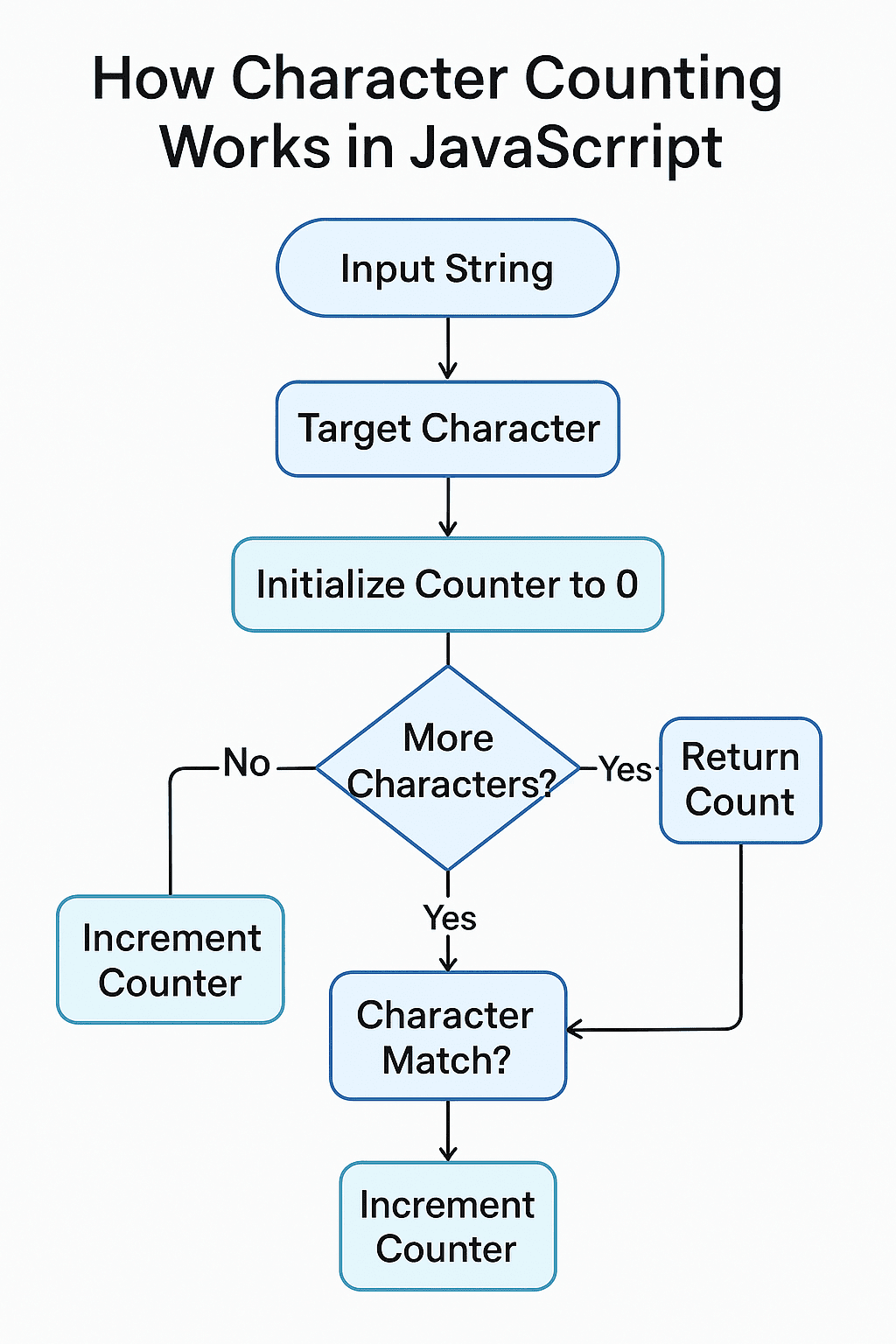
Method 1 — Count Character Using a Loop (Beginner-Friendly)
This is the simplest and most beginner-friendly approach. You manually loop through each character and compare.
Example Code
function countCharLoop(str, char) {
    let count = 0;
    for (let i = 0; i < str.length; i++) {
        if (str[i] === char) {
            count++;
        }
    }
    return count;
}

console.log(countCharLoop("hello world", "l"));
Output
3When to Use This Method
- You are a beginner.
- You want to understand how loops and string indexing work.
- You need full control over the iteration process.
Method 2 — Count Character Using split() Method
The split() method divides the string at every occurrence of your character. The count is simply one less than the number of resulting parts.
Example Code
function countCharSplit(str, char) {
    return str.split(char).length - 1;
}

console.log(countCharSplit("banana", "a"));
Output
3Why This Works
If "banana".split("a") gives["b", "n", "n", ""]
→ 4 parts → 3 occurrences.
When to Use This Method
- You prefer shorter, cleaner code.
- You want a fast solution for simple counting.
- Character is a single character (not a pattern).
Method 3 — Count Character Using Regex and match()
Regex enables more powerful counting—especially useful for case-insensitive or pattern-based searches.
Case-Sensitive Example
function countCharRegex(str, char) {
    const matches = str.match(new RegExp(char, "g"));
    return matches ? matches.length : 0;
}

console.log(countCharRegex("Hello Hello", "H"));
Output
2Case-Insensitive Example
function countCharRegexCaseInsensitive(str, char) {
    const matches = str.match(new RegExp(char, "gi"));
    return matches ? matches.length : 0;
}

console.log(countCharRegexCaseInsensitive("Hello Hello", "h"));
Output
2When to Use This Method
- You need case-insensitive counting.
- You want to count multiple characters using patterns.
- You need the most flexible and powerful solution.
Which Method Should You Use?
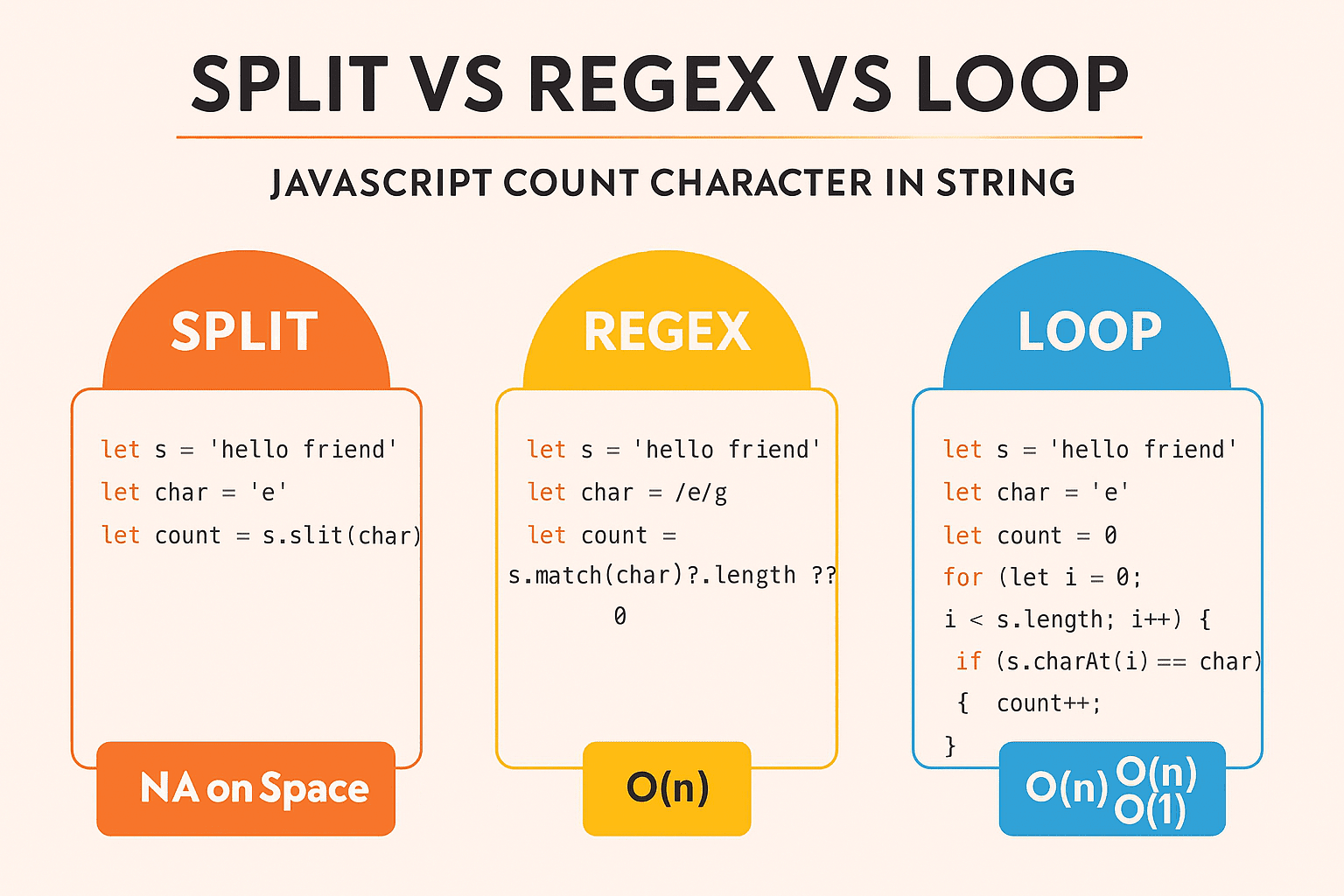
| Method | Best For | Avoid When |
|---|---|---|
| Loop | Beginners, teaching, step-by-step logic | When you want concise code |
| split() | Clean and quick counting | When using patterns or case-insensitive search |
| Regex + match() | Case-insensitive, advanced patterns, complex matching | Beginners who find regex confusing |
Verdict
- For simple counting → split()
- For learning or logic clarity → loop
- For powerful text processing → regex
When Do Developers Need This?
Counting character occurrences is used across real-world applications and companies:
- Search Engines (Google, DuckDuckGo)
Counting repeated characters helps with fuzzy search, typo detection, autocomplete. - Messaging Platforms (WhatsApp, Slack)
Counting@,#, or!symbols improves command parsing. - Form Validation (Any website with login/signup)
Checking how many special characters or numbers are in a password. - Text Editors (VS Code, Notepad++, Google Docs)
Used in extensions that highlight repeated characters or enforce formatting rules. - Data Cleaning Tools (Excel JS add-ons, Airtable Scripts)
Frequency analysis helps in preprocessing user-generated text.
Pros & Cons of Javascript Count Character in String
Loop vs Split vs Regex
| Method | Pros | Cons | Best For |
|---|---|---|---|
| Loop | Easy, beginner-friendly | Longer code | Learning fundamentals |
| split() | Clean, short | Case-sensitive issues | Simple counting |
| Regex | Most flexible | Hard for beginners | Complex pattern searching |
Practical Value — How Real Products Use Character Counting in JavaScript
Character-counting isn’t just a textbook problem. Many popular tools and platforms rely on this exact logic under the hood. Let’s see how similar code could work in real-world scenarios, with JavaScript snippets and outputs.
Twitter-Style Logic — Counting Hashtags # and Mentions @ in a Tweet
Before saving or analyzing a tweet, you may want to know how many hashtags and mentions it contains.
Example Code
function countChar(str, char) {
    return str.split(char).length - 1;
}

const tweet = "Loving #JavaScript and #coding with @newtum and @techaroha!";

const hashtagCount = countChar(tweet, "#");
const mentionCount = countChar(tweet, "@");

console.log("Hashtags:", hashtagCount);
console.log("Mentions:", mentionCount);
Expected Output
Hashtags: 2
Mentions: 2
This simple logic can then be used for analytics, spam detection, or UI hints like “You’ve used 2 hashtags”.
Google Docs–Style Analytics — Counting Specific Characters in Text
Writing tools often show stats like how many times a character (like a comma or exclamation mark) appears to help improve writing quality.
Example Code
function countCharacterOccurrences(str, char) {
    return str.split(char).length - 1;
}

const documentText = "Write clearly, code cleanly, and refactor often! Really, do it!";

const commaCount = countCharacterOccurrences(documentText, ",");
const exclamationCount = countCharacterOccurrences(documentText, "!");

console.log("Commas:", commaCount);
console.log("Exclamation marks:", exclamationCount);
Expected Output
Commas: 2
Exclamation marks: 2
This logic can power dashboards or side panels showing “punctuation overuse” or style suggestions.
Slack-Style Commands — Parsing @ and / Using Character Frequency
Chat and collaboration apps often use special characters to trigger commands, like /remind or @channel. Counting them helps validate or interpret input.
Example Code
function countSpecialChars(str, chars) {
    const counts = {};
    for (const c of chars) {
        counts[c] = str.split(c).length - 1;
    }
    return counts;
}

const message = "/remind @team to review the PRs /today @devs";

const result = countSpecialChars(message, ["/", "@"]);

console.log("Slash count:", result["/"]);
console.log("Mention count:", result["@"]);
Expected Output
Slash count: 2
Mention count: 2
This lets the system decide whether a message is a normal chat or a command with multiple flags/mentions.
VS Code Extension–Style Logic — Highlighting Repeated Characters
Extensions can highlight repeated characters, like extra spaces or too many !. To do that, they first count occurrences.
Example Code
function getCharFrequencyMap(str) {
    const freq = {};
    for (const char of str) {
        if (!freq[char]) freq[char] = 0;
        freq[char]++;
    }
    return freq;
}

const codeLine = "console.log('Error!!!  Something   went wrong');";

const frequencyMap = getCharFrequencyMap(codeLine);

console.log("Frequency map:", frequencyMap);
console.log("Spaces:", frequencyMap[" "] || 0);
console.log("Exclamation marks:", frequencyMap["!"] || 0);
Expected Output (Simplified)
Frequency map: { c: 1, o: 5, n: 3, s: 3, l: 2, e: 4, .: 1, g: 2, '': 2, E: 1, r: 4, !: 3, ' ': 6, S: 1, m: 2, t: 4, h: 1, i: 1, w: 2, a: 1 }
Spaces: 6
Exclamation marks: 3
Using this map, an extension can visually highlight “too many spaces” or “excessive exclamation marks” in the editor.
Character Count Queries
- How can I count specific characters in a string without using a loop?
If you want to avoid a loop, you can use thematch()method with a regular expression to count specific characters in a string.let charCount = (str, char) => str.match(new RegExp(char, "g")).length;
console.log(charCount("hello world", "l")); // Output: 3 - Is there a way to count characters in one line of code?
Absolutely! You can efficiently usesplit()andlengthto do this in a single line.let count = str => str.split("l").length - 1;
console.log(count("hello world")); // Output: 3 - Which method is fastest for counting characters, loops or built-in methods?
Built-in methods likesplit()andmatch()tend to be more optimised and faster for such tasks, depending on the size of the string. - Does character counting work with emojis or special symbols?
Yes, but be cautious with character encodings as they might require additional handling using Unicode aware methods. - How do I handle case sensitivity when counting characters?
You can convert the string to a consistent case usingtoLowerCase()ortoUpperCase()before counting. - Can I count multiple different characters at once?
Yes, by iterating over your list of characters and using a method likematch()for each. - How can I display the count of each character in a string?
You can loop through the string and store counts in an object.let charCount = str => {
let count = {};
for (let char of str) {
count[char] = (count[char] || 0) + 1;
}
return count;
};
console.log(charCount("hello world")); // Output: { h: 1, e: 1, l: 3, o: 2, w: 1, r: 1, d: 1 } - What is the most memory-efficient way to count characters?
Using methods likesplit()is generally memory-efficient, especially for short strings, as they lack the overhead of additional data structures like an array or object. - How to handle strings with mixed characters, such as letters and numbers?
The same methods apply—use regex or iterative approaches, and you can even add filters to count specific types like digits or alphabets.
Discover our AI-powered js online compiler, where you can instantly write, run, and test your code. Our intelligent compiler simplifies your coding experience, offering real-time suggestions and debugging tips, streamlining your journey from coding novice to expert with ease. Explore it today and boost your coding skills!
Conclusion
Mastering “Javascript Count Character in String” sharpens problem-solving skills and builds confidence in handling data effectively. It’s a rewarding exercise that enhances your coding efficiency. Dive in and experience the satisfaction of programming yourself. For more on languages like Java and Python, check out Newtum.
Edited and Compiled by
This article was compiled and edited by @rasikadeshpande, who has over 4 years of experience in writing. She’s passionate about helping beginners understand technical topics in a more interactive way.
About The Author