Optimizing joins in SQL means choosing the right join type, indexing join columns, filtering early, and understanding how the database executes your query. Poorly optimized joins are the #1 cause of slow SQL queries in production systems. As tables grow larger, inefficient joins quickly become performance bottlenecks that impact real-world applications.
Why Joins Become Slow in SQL Databases
Joins become slow due to missing or incorrect indexes on join columns, joining large tables without early filters, and inefficient join order chosen by the optimizer. Performance also drops when join columns have mismatched data types or when SELECT * pulls unnecessary data across multiple tables.
Choose the Right Join Type (INNER vs LEFT vs EXISTS)
INNER JOIN is usually faster because it returns only matching rows. LEFT JOIN is necessary when unmatched rows must be preserved. For filtering scenarios, EXISTS often outperforms joins by stopping evaluation once a match is found.
Example:WHERE EXISTS (SELECT 1 FROM orders o WHERE o.user_id = u.id)
Indexing: The Backbone of Fast Joins (under 200 words)
Indexes are the single most important factor in optimizing joins in SQL. Always index columns used in ON conditions so the database can locate matching rows efficiently instead of scanning entire tables. Foreign key columns should be indexed even if the database does not enforce foreign key constraints, as they are frequently used in joins.
For joins involving multiple columns, composite indexes can significantly improve performance when the column order matches the join condition. However, avoid blindly indexing low-cardinality columns (such as boolean or status fields), as they rarely provide performance benefits and can increase write overhead.
Before adding an index, always consider how the join is used in real queries, not in isolation.
Quick Join Indexing Checklist
- Are both join columns indexed?
- Do both columns use the same data type?
- Do both columns use the same collation?
A mismatch in any of these can silently degrade join performance.
Filter Early: Reduce Rows Before the Join
Filtering early reduces the number of rows involved in a join, which directly improves performance. WHERE conditions should eliminate as much data as possible before the join executes, especially when working with large tables.
Pushing filters into subqueries or common table expressions (CTEs) helps the optimizer process smaller result sets. Avoid joining massive datasets only to discard most rows later, as this wastes memory and CPU.
Bad pattern (joins first, filters later):SELECT * FROM orders o JOIN users u ON o.user_id = u.id WHERE o.status = 'PAID';
Good pattern (filter before join):SELECT * FROM (SELECT * FROM orders WHERE status = 'PAID') o JOIN users u ON o.user_id = u.id;
Small reductions in row count before a join can lead to massive performance gains at scale.
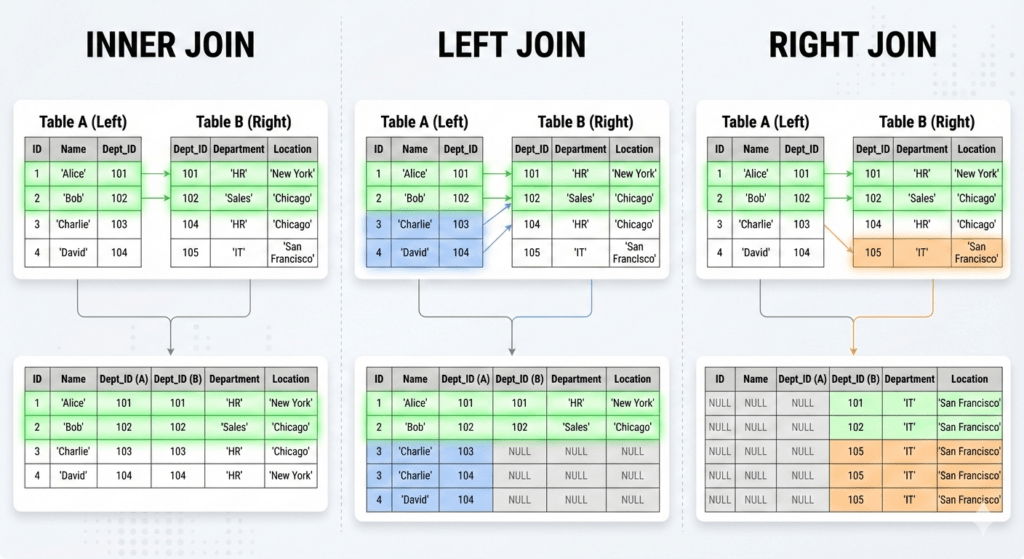
Sample Code of Optimizing Joins in SQL
sql
SELECT employees.name, departments.department_name
FROM employees
INNER JOIN departments ON employees.department_id = departments.id
WHERE departments.location = 'UK';
Explanation of the Code
Let’s break down the given SQL query step-by-step to understand what it’s doing:
- The `SELECT` statement is fetching data from two columns: `employees.name` and `departments.department_name`. This is what you’ll see in your result table if you run the query.
- The `FROM` clause specifies the `employees` table as the primary source of data that we want to fetch.
- Next, the `INNER JOIN` connects the `employees` table with the `departments` table. It’s using `ON employees.department_id = departments.id` to find rows where there’s a match between `employees.department_id` and `departments.id`.
- The `WHERE` clause filters the results to only include records where `departments.location` is ‘UK’. This means it only pulls records for employees employed in UK-based departments.
Output
+-------------+------------------+
| name        | department_name  |
+-------------+------------------+
| Alice       | HR               |
| Bob         | IT               |
| Charlie     | Finance          |
+-------------+------------------+
Real-World Example of Optimizing Joins in SQL
- E-commerce Giant Amazon: Inventory Management
Amazon handles large volumes of data from various sources, including inventory records. By optimizing SQL joins, Amazon can swiftly combine tables containing product details and sales forecasts to ensure products are always in stock.
By optimizing joins, Amazon reduces wait times in data retrieval, maintaining efficient stock levels.SELECT p.product_id, p.product_name, i.stock_quantity
FROM products p
JOIN inventory i ON p.product_id = i.product_id
WHERE i.stock_quantity < 50;
- Social Media Platform Facebook: User Engagement Analysis
Facebook utilizes SQL joins to analyze user interactions across posts and comments, improving content recommendations by linking user IDs with post engagements.
This approach helps Facebook provide tailored content, increasing user retention by keeping them engaged.SELECT u.user_id, COUNT(c.comment_id) AS total_comments
FROM users u
JOIN comments c ON u.user_id = c.user_id
GROUP BY u.user_id
HAVING total_comments > 10;
- Netflix: Content Personalization
To provide personalized viewing experiences, Netflix analyses viewing history in conjunction with user preferences using optimized SQL joins.
This allows Netflix to offer spot-on recommendations, ensuring viewers find what they love to watch faster.SELECT v.user_id, m.movie_title
FROM viewing_history v
JOIN movies m ON v.movie_id = m.movie_id
WHERE v.rating > 4;
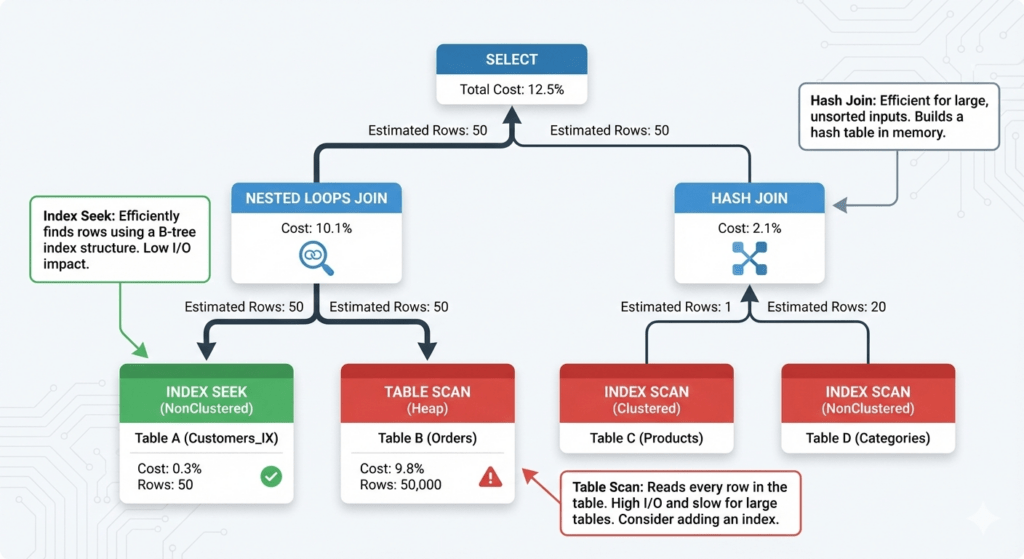
Optimizing Joins in SQL: Queries
If you’re curious about SQL and the fascinating world of optimizing joins, you’re not alone. Many people out there are asking questions that aren’t always addressed by the usual suspects over at GeeksforGeeks or Baeldung. To give you some fresh perspectives, I’ve put together a list of often-asked questions straight from good ol’ Google, Reddit, and Quora:
- How do I know which SQL join to use for which dataset?
Understanding the dataset’s structure and what you want to achieve influences which join you’ll use. Inner joins are perfect for finding matches in both tables, while outer joins can include unmatched rows from either or both tables. - What’s the impact of join order in SQL queries?
Join order can significantly affect performance. SQL engines optimize query execution, but writing joins with smaller tables first can sometimes boost speed. - Can adding indexes improve join performance?
Absolutely! Indexes on the columns that you use for joins can drastically improve query execution speed by reducing the amount of data the system needs to scan. - Is there a performance difference between “=” join and “USING” clause?
While both achieve similar results, using the “USING” clause explicitly specifies columns and can make the query more readable, though performance differences are minimal. - What role does query planning play in optimizing joins?
Query planning involves analyzing different join strategies for executing a query efficiently. Tools likeEXPLAINcan help visualize execution plans. - How do I troubleshoot slow join queries?
First, ensure indexes are in place and consider rewriting queries to reduce complexity. Utilize database-specific tools or theEXPLAINcommand to analyze performance bottlenecks. - Are nested loops or hash joins better?
It depends on your dataset size and structure. Nested loops work well for small tables, while hash joins are efficient for larger datasets needing full table scans. - Can JOIN operations be parallelized?
Yes, depending on your database system. Some databases support parallel execution, leveraging multiple CPUs, which can significantly speed up joins.
Tackling these questions can significantly streamline the way you tackle joins in SQL!
Our AI-powered sql online compiler simplifies your coding journey. Instantly write, run, and test code with AI’s help, making SQL coding a breeze. Perfect for both beginners and seasoned programmers, it offers an interactive experience that enhances learning and boosts productivity. Dive in and try it today!
Conclusion
Completing ‘Optimizing Joins in SQL’ delivers powerful insights into efficiently managing databases, enhancing query speed, and reducing server load. Experience the accomplishment and apply those skills in real-world scenarios. Curious to learn more about programming languages? Check out Newtum for Java, Python, C, C++, and beyond.
Edited and Compiled by
This article was compiled and edited by @rasikadeshpande, who has over 4 years of experience in writing. She’s passionate about helping beginners understand technical topics in a more interactive way.
About The Author