Form Error Handling in Web Development is crucial for creating seamless user experiences. By understanding this, developers can prevent common issues like incomplete submissions and incorrect data entries. Learning how to effectively handle errors improves both functionality and user satisfaction. Stick around to learn how you can enhance your web forms!
Why Form Error Handling Is Important
Form error handling is a critical component of reliable web applications. It ensures that user input is valid, systems remain stable, and data integrity is maintained throughout the submission process.
Proper error handling helps developers detect issues early, guide users to correct mistakes, and protect applications from invalid or malicious data.
Prevents Invalid Data
Invalid data can disrupt system operations, cause incorrect calculations, or lead to database inconsistencies. Form validation ensures that only accurate and properly formatted information is accepted.
Example
- Empty required fields
- Incorrect email format
- Invalid phone number
- Negative values where not allowed
Result:
The system maintains clean, consistent, and usable data.
Improves User Experience
Clear and actionable error messages help users quickly understand what went wrong and how to fix it. This reduces frustration and increases form completion rates.
Users Understand
- What went wrong
- Where the error occurred
- How to correct the issue
Example
Instead of:
Invalid input
Use:
Please enter a valid email address
Impact:
Better usability, faster form completion, and higher user satisfaction.
Enhances Security
Form error handling plays a major role in application security by validating and sanitizing user input before processing.
Prevents
- Malicious input
- Injection attacks
- Unauthorized access attempts
- Data corruption
Result:
Safer applications and protected databases.
Types of Form Errors
Understanding different categories of errors helps developers design robust validation logic and provide meaningful feedback.
Validation Errors
Validation errors occur when user input does not meet predefined rules or constraints.
Occurs When
- Required field is missing
- Incorrect data format is entered
- Input exceeds allowed limits
- Invalid characters are used
Example
Email is required
Password must be at least 8 characters
System Errors
System errors occur due to failures in backend infrastructure or services.
Occurs When
- Server crashes
- Database connection fails
- Network timeout happens
- API service becomes unavailable
Example
Unable to process request. Try again later.
Logical Errors
Logical errors occur when business rules or application logic conditions are not satisfied.
Occurs When
- Username already exists
- Account balance is insufficient
- Booking date is in the past
- Maximum limit is exceeded
Example
Username already exists
Client-Side vs Server-Side Error Handling
Both validation layers are necessary for building secure and efficient web applications.
Client-Side Error Handling
Client-side validation runs inside the user’s browser before data is sent to the server.
Runs In
Browser
Technologies
- JavaScript
- HTML5 validation
- Frontend frameworks (React, Angular, Vue)
Advantages
- Faster feedback to users
- Reduced server load
- Immediate validation response
- Improved user experience
Example
<input type="email" required>
Server-Side Error Handling
Server-side validation runs after the form is submitted to the backend system.
Runs On
Server
Technologies
- PHP
- Python
- Node.js
- Java
- ASP.NET
Advantages
- More secure validation
- Cannot be bypassed by users
- Protects database integrity
- Handles complex business rules
Example
if (empty($_POST["email"])) {
    echo "Email is required";
}
Common Form Validation Rules
Form validation rules define the conditions that user input must satisfy before submission is accepted.
Required Field Validation
Ensures mandatory fields are not left empty.
Example
Name cannot be empty
Email Format Validation
Ensures the email address follows a valid structure.
Example
Password Strength Validation
Ensures secure passwords to protect user accounts.
Rules
- Minimum length (e.g., 8 characters)
- At least one uppercase letter
- At least one number
- At least one special character
Numeric Input Validation
Ensures numeric fields contain valid numbers only.
Example
Age must be a number
Here is a polished continuation of your blog sections with improved clarity, stronger technical accuracy, better SEO readability, and consistent formatting suitable for an educational programming blog.
How Form Error Messages Should Be Designed
Effective error messages are essential for usability and successful form completion. Poorly written messages confuse users, while well-designed messages guide users to fix issues quickly.
Good error messages reduce abandonment rates and improve overall user experience.
- Good Error Message Characteristics
Error messages should follow these core design principles: - Clear
Use simple language that users can easily understand. - Specific
Explain exactly what the problem is. - Actionable
Tell users what they need to do to fix the error. - Friendly
Maintain a polite and supportive tone.
Example
- Bad Error Message
Invalid input - Good Error Message
Please enter a valid email address
Additional Best Practice Tips
- Show the error near the affected field
- Highlight the incorrect input
- Avoid technical jargon
- Provide correction guidance
- Use consistent message formatting
Example of Form Error Handling Workflow
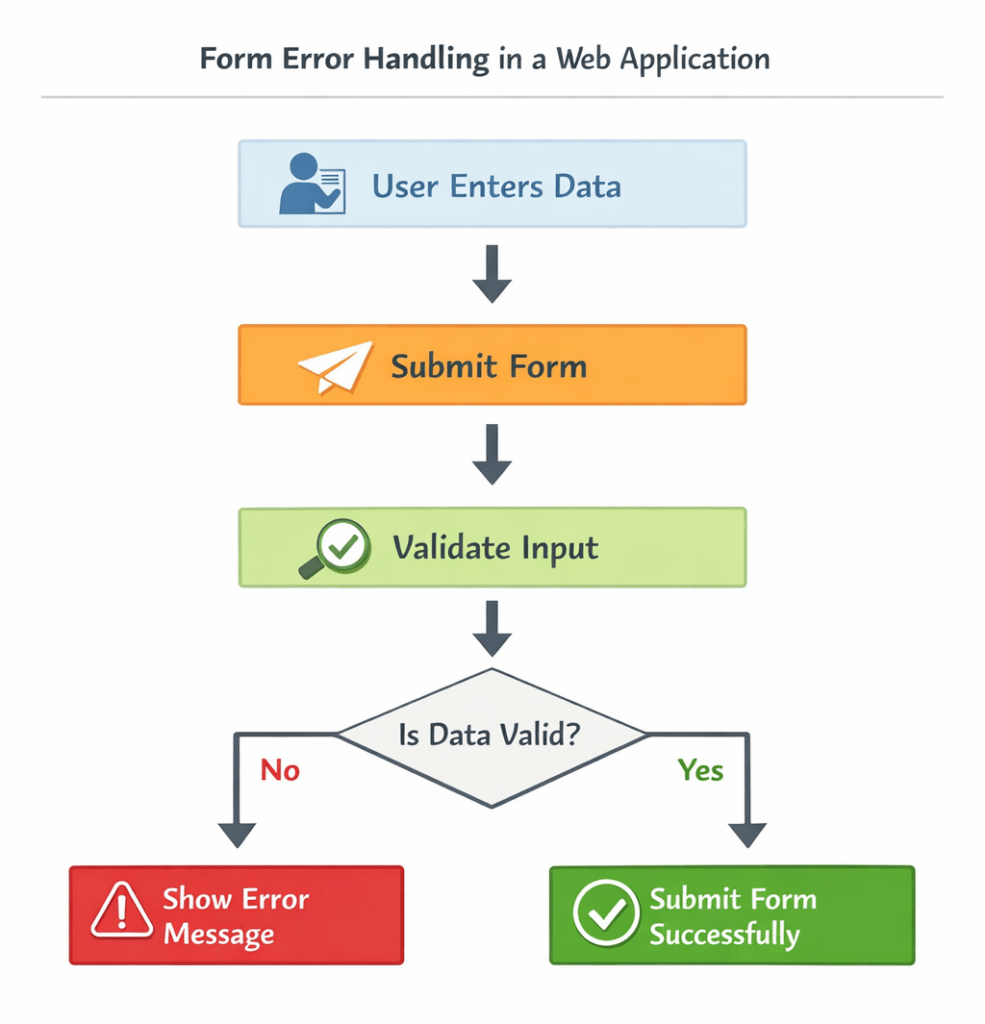
Form error handling follows a structured validation process to ensure correct data submission.
Step-by-Step Workflow
- User fills out the form
- System validates the input data
- Error is detected (if validation fails)
- Error message is displayed to the user
- User corrects the input
- Form is submitted successfully
Workflow Summary
This process ensures:
- Accurate data collection
- Reduced submission errors
- Improved system reliability
- Better user experience
Basic HTML Form with Error Handling Example
Below is a simple HTML form that uses built-in browser validation to handle required fields.
<form method="POST">

    <label>Name:</label>
    <input type="text" name="name" required>

    <br><br>

    <label>Email:</label>
    <input type="email" name="email" required>

    <br><br>

    <button type="submit">Submit</button>

</form>
Explanation
requiredensures the field cannot be left emptytype="email"validates the email format- The browser automatically displays validation messages
This is an example of client-side validation.
PHP Example – Server-Side Error Handling
Server-side validation ensures data security and cannot be bypassed by users.
Below is a basic PHP script that validates form inputs after submission.
<?php

if ($_SERVER["REQUEST_METHOD"] == "POST") {

    if (empty($_POST["name"])) {
        echo "Name is required";
    }

    if (!filter_var($_POST["email"], FILTER_VALIDATE_EMAIL)) {
        echo "Invalid email format";
    }

}
?>
How This Code Works
Step 1 — Check Request Method
$_SERVER["REQUEST_METHOD"] == "POST"
Ensures the form was submitted using the POST method.
Step 2 — Validate Required Field
empty($_POST["name"])
Checks whether the Name field is empty.
Step 3 — Validate Email Format
filter_var($_POST["email"], FILTER_VALIDATE_EMAIL)
Verifies that the email address follows a valid format.
Output Examples
If the user submits an empty name:
Name is required

If the email format is incorrect:
Invalid email format
Real-Life Uses of Form Error Handling in Web Development
- Example Company: Amazon – Handling shipping and billing errors
Situation: When customers fill out forms for shipping and billing information, errors like invalid postal codes or mismatched billing addresses can occur.
Solution: Implement form error handling to validate input and show real-time feedback.
Example Code:
    const form = document.querySelector('#checkoutForm');
    form.addEventListener('submit', function(event) {
      const postalCode = document.querySelector('#postalCode').value;
      if (!/^d{5}$/.test(postalCode)) {
        alert('Invalid postal code. Please enter a 5-digit code.');
        event.preventDefault();
      }
    });
Output: Customers receive immediate error messages, improving the accuracy of billing and shipping details and reducing order processing errors. - Example Company: Facebook – Password reset form
Situation: Users resetting their passwords often enter incorrect email formats or passwords that don’t meet security criteria.
Solution: Form error handling provides real-time feedback on input fields to prevent submission of invalid data.
Example Code:
    const resetForm = document.querySelector('#resetForm');
    resetForm.addEventListener('input', function(event) {
      const email = document.querySelector('#email').value;
      if (!/S+@S+.S+/.test(email)) {
        document.querySelector('#emailError').textContent = 'Please enter a valid email address.';
      }
    });
Output: Successful reduction in failed password reset attempts due to early detection of input errors. - Example Company: LinkedIn – Job application form
Situation: Applicants mistakenly leave mandatory fields empty or enter data inconsistently.
Solution: Utilizing form error handling, fields are monitored to ensure completion and consistency before submission.
Example Code:
Output: Enhanced application submission rates due to proactive error prompting, ensuring complete and consistent applicant data.
    const appForm = document.querySelector('#applicationForm');
    appForm.addEventListener('submit', function(event) {
      document.querySelectorAll('[required]').forEach(field => {
        if (!field.value.trim()) {
          alert('Please fill out all required fields.');
          event.preventDefault();
        }
      });
    });
Form Error Handling Questions
If you’ve ever dabbled in web development, you know that getting forms to work smoothly is often a headache. Errors can pop up out of nowhere, causing frustration. Let’s tackle some of the burning questions you might have about form error handling—a topic that’s often not fully covered by the biggest players like GeeksforGeeks or Baeldung.
- How do you detect form errors in JavaScript?
You can detect errors by adding event listeners to form elements. For example:
    const form = document.querySelector('form');
    form.addEventListener('submit', (event) => {
        if (!form.checkValidity()) {
            event.preventDefault();
            alert('Please fill out all required fields properly.');
        }
}); - What’s the best way to display custom error messages?
To display custom messages, manipulate the DOM like so:
    const field = document.getElementById('username');
field.setCustomValidity('Username must be between 3 and 10 characters.'); - How can I use CSS to highlight fields with errors?
CSS pseudo-classes can be used to style invalid fields:
    input:invalid {
        border: 2px solid red;
} - What are common pitfalls with HTML5 form validation?
One pitfall is over-relying on it, as it varies across different browsers. Always supplement with JavaScript. - How do I handle form errors server-side?
Use server-side languages like PHP or Node.js to validate inputs and return errors, ensuring security:
    if (empty($_POST['email'])) {
        $error = 'Email is required';
} - Can JavaScript promise-based functions improve error handling?
Absolutely! They ensure code readability and smoother async error handling:
    function validateData() {
        return new Promise((resolve, reject) => {
            if (isValid) {
                resolve('Data is valid');
            } else {
                reject('Data is invalid');
            }
        });
} - Are there libraries to simplify form error handling?
Indeed! Libraries like Formik and Validate.js make validation a breeze by offering custom plugins and easy-to-use APIs. - How do I prevent multiple submissions of a form?
Disable the submit button after the first click:
    const submitButton = document.getElementById('submit');
    submitButton.addEventListener('click', function() {
        this.disabled = true;
    });
Hopefully, this gives you a clearer idea of what goes on behind the scenes in form error handling. Now, go and knock those errors out!
Our AI-powered php online compiler offers a seamless coding experience. Instantly write, run, and test your ‘php’ code with the help of AI. It’s designed to streamline your coding process, making it quicker and more efficient. Try it out, and see the difference AI can make!
Best Practices for Form Error Handling in Web Development
Following best practices ensures that form validation is reliable, secure, and user-friendly. Proper error handling improves system stability and enhances the overall user experience.
Use the Following Practices
- Input Validation
Validate all user inputs using both client-side and server-side validation to ensure data accuracy and prevent invalid submissions. - Clear Error Messages
Provide precise and understandable messages that explain what went wrong and how to fix it. - Try-Catch Handling
Use exception handling mechanisms to manage unexpected runtime errors without crashing the application. - Logging Errors
Record errors in log files to help developers diagnose issues and monitor system behavior. - User-Friendly Feedback
Display helpful guidance so users can correct mistakes quickly and successfully complete the form.
Common Mistakes in Form Error Handling in Web Development
Avoiding common mistakes helps developers build more reliable and secure applications.
Showing Generic Errors
Generic messages do not help users understand the problem.
Bad Example
Something went wrong
Why This Is a Problem
- Users cannot identify the issue
- Increases frustration
- Reduces form completion rates
Not Validating on Server
Relying only on client-side validation creates security risks because client-side checks can be bypassed.
Risk
Security vulnerabilities
Possible Consequences
- Unauthorized data submission
- Database corruption
- System exploitation
Hiding Error Messages
Failing to display validation feedback leaves users confused about why the form failed.
Problem
User confusion
Impact
- Repeated submission attempts
- Increased support requests
- Poor user experience
Real-World Use Cases-Form Error Handling in Web Development
Form error handling is used across many real-world applications to maintain data accuracy and ensure smooth system operations.
User Registration Form
Common Errors
- Email already registered
- Weak password
- Missing required fields
- Invalid username format
Login Form
Common Errors
- Incorrect password
- Account locked
- Invalid username
- Too many login attempts
Payment Form
Common Errors
- Invalid card number
- Insufficient balance
- Expired card
- Incorrect CVV
Advantages of Proper Form Error Handling in Web Development
Implementing proper form error handling provides significant technical and user experience benefits.
Key Advantages
- Better data accuracy
- Improved user satisfaction
- Reduced system failures
- Stronger application security
- Faster issue detection
- Easier debugging and maintenance
- Higher form submission success rate
Conclusion
Form error handling is a fundamental part of building reliable web applications. It ensures that user input is validated, errors are clearly communicated, and systems remain secure and stable. By implementing proper validation and feedback mechanisms, developers can create efficient, user-friendly forms that reduce errors and improve overall application performance.
Visit Newtum to explore more informative programming tutorials, coding examples, and practical guides that help you build strong software development skills.
Edited and Compiled by
This article was compiled and edited by @rasikadeshpande, who has over 4 years of experience in writing. She’s passionate about helping beginners understand technical topics in a more interactive way.
About The Author