Every developer has been there, staring at a blank project folder, knowing you need to build a REST API in Node.js, but dreading the thirty minutes of wiring up boilerplate before you even write a single meaningful line of logic. That’s where AI changes the game entirely.
Today’s AI coding tools – whether it’s GitHub Copilot, ChatGPT, or Claude- can generate a working API scaffold in seconds. But the real skill isn’t prompting an AI to do the work for you. It’s knowing how to take that generated scaffold, understand every piece of it, and mold it into something production-ready and uniquely yours. This guide walks you through exactly that process.
What Does “Scaffolding” Actually Mean in This Context?
Before we dive in, let’s clarify. Scaffolding refers to generating the foundational structure of an application, the folders, files, routes, middleware, and config – without the actual business logic. Traditional scaffolding tools like express-generator have existed for years, but they produce rigid, opinionated structures that still require a lot of manual cleanup.
When you use an AI scaffold REST API Node.js workflow, you get something more flexible. You describe what you want in plain English or in technical detail if you prefer and the AI generates a tailored structure based on your exact requirements. That’s a fundamentally different experience from clicking through a CLI wizard.
Step 1: Setting Up Your Prompt for AI Scaffolding
The quality of your scaffold depends almost entirely on the quality of your prompt. Here’s an example of a weak prompt vs. a strong one:
Weak prompt:
“Create a Node.js REST API.”
Strong prompt:
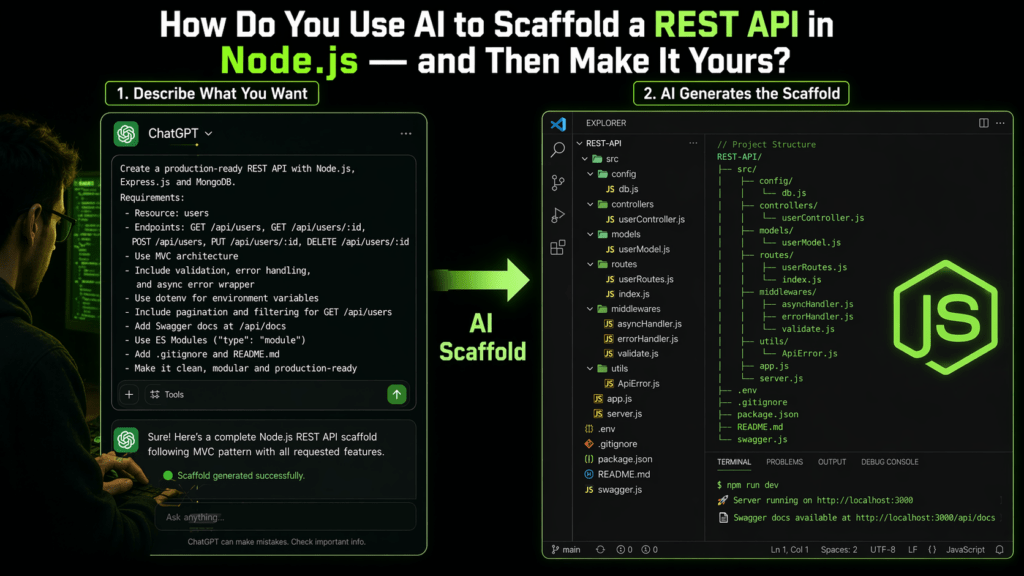
“Scaffold a Node.js REST API using Express.js with the following: MVC folder structure, a
/usersresource with CRUD endpoints, JWT authentication middleware, centralized error handling, and dotenv for environment config. Use ES modules.”
The second prompt gives the AI enough context to generate something genuinely useful. When you use an AI scaffold REST API Node.js approach this way, you skip hours of architectural decision-making that often trips up junior developers.
Step 2: What a Good AI-Generated Scaffold Looks Like
Here’s a typical folder structure an AI might generate for a Node.js REST API:
project-root/
├── src/
│   ├── controllers/
│   │   └── userController.js
│   ├── middleware/
│   │   ├── authMiddleware.js
│   │   └── errorHandler.js
│   ├── models/
│   │   └── userModel.js
│   ├── routes/
│   │   └── userRoutes.js
│   └── app.js
├── .env
├── .gitignore
├── package.json
└── server.js
This is clean, modular, and follows the separation-of-concerns principle. Notice how the AI doesn’t dump everything into a single index.js — it creates distinct layers for routing, business logic (controllers), data access (models), and cross-cutting concerns (middleware).
A typical AI-generated Express route for a GET /users endpoint looks like this:
// routes/userRoutes.js
import express from 'express';
import { getAllUsers, getUserById } from '../controllers/userController.js';
import { authenticate } from '../middleware/authMiddleware.js';

const router = express.Router();

router.get('/', authenticate, getAllUsers);
router.get('/:id', authenticate, getUserById);

export default router;
This is exactly the kind of output a well-prompted AI scaffold REST API Node.js session produces – readable, modular, and immediately runnable.
Step 3: Where Most Developers Go Wrong After Scaffolding
Here’s the trap: you get a working scaffold, run npm install && node server.js, see the green “Server running on port 3000” message – and then ship it.
Don’t.
AI-generated code is a starting point, not a finishing line. There are several critical things an AI scaffold won’t do perfectly for your project:
1. It doesn’t know your data model. The generated userModel.js will likely use hardcoded fields or a mock MongoDB schema. You need to replace this with your actual data requirements, validations, and relationships.
2. It uses generic error messages. An AI scaffold REST API Node.js output typically returns { error: "Something went wrong" }. Production APIs need structured error objects with HTTP status codes, error codes, and developer-friendly messages.
3. Authentication is skeleton-level. The generated JWT middleware will validate a token but won’t enforce role-based access control (RBAC), token refresh logic, or blacklisting revoked tokens. You’ll need to build this layer yourself.
4. There’s no logging. Real-world APIs need structured logging (Winston, Pino) with log levels and request tracing. This is almost never included in a scaffold.
5. Input validation is missing or minimal. You’ll want to integrate a library like zod or joi to validate incoming request bodies before they hit your controller.
Step 4: Making the Scaffold Your Own – Practical Customizations
This is where the real engineering begins. Let’s walk through three high-impact customizations.
a. Replace Placeholder Models with Real Schemas
If the AI generated a Mongoose model, swap out the placeholder fields for your actual schema. Add custom validators, virtuals, and indexes:
// models/userModel.js
import mongoose from 'mongoose';

const userSchema = new mongoose.Schema({
  name: { type: String, required: true, trim: true },
  email: { type: String, required: true, unique: true, lowercase: true },
  passwordHash: { type: String, required: true },
  role: { type: String, enum: ['user', 'admin'], default: 'user' },
  createdAt: { type: Date, default: Date.now }
});

// Never return password in JSON responses
userSchema.methods.toJSON = function () {
  const obj = this.toObject();
  delete obj.passwordHash;
  return obj;
};

export default mongoose.model('User', userSchema);
b. Add a Global Error Handler That Actually Works
// middleware/errorHandler.js
const errorHandler = (err, req, res, next) => {
  const statusCode = err.statusCode || 500;
  res.status(statusCode).json({
    success: false,
    code: err.code || 'INTERNAL_ERROR',
    message: err.message || 'An unexpected error occurred',
    ...(process.env.NODE_ENV === 'development' && { stack: err.stack })
  });
};

export default errorHandler;
This structured error format makes debugging dramatically easier, especially once you have multiple API consumers.
c. Integrate Request Validation with Zod
// middleware/validate.js
const validate = (schema) => (req, res, next) => {
  const result = schema.safeParse(req.body);
  if (!result.success) {
    return res.status(400).json({
      success: false,
      errors: result.error.flatten().fieldErrors
    });
  }
  req.body = result.data;
  next();
};

export default validate;
Wrap any route that accepts a body with this middleware and a corresponding Zod schema. This single addition eliminates entire categories of bugs.
Step 5: Using AI Iteratively, Not Just Once
The best developers don’t use AI just for the initial scaffold — they use it throughout the build cycle. Here are some powerful follow-up prompts to use after your AI scaffold REST API Node.js project is up:
- “Refactor this controller to follow the repository pattern.”
- “Write unit tests for this middleware using Jest and Supertest.”
- “Generate OpenAPI 3.0 documentation for these routes.”
- “Audit this code for common Node.js security vulnerabilities.”
AI becomes a pair programmer, not a replacement. You stay in control of architecture and business logic; the AI accelerates implementation and catches gaps.

Step 6: Final Checklist Before Going Live
Before deploying an API that started as an AI scaffold, run through this checklist:
- ✅ All environment variables are in
.envand listed in.env.example - ✅ Sensitive data (passwords, tokens) never logged or returned in responses
- ✅ Input validation on all
POST,PUT,PATCHroutes - ✅ Rate limiting added (
express-rate-limit) - ✅ Helmet.js configured for security headers
- ✅ CORS configured to allow only known origins
- ✅ Database connection handles reconnection on failure
- ✅ All routes return consistent JSON response shapes
- ✅ API versioning implemented (
/api/v1/...) - ✅ At least basic integration tests written
An AI scaffold REST API Node.js setup can pass all of these checks – but only if you take the time to go through each one yourself. The AI gets you to 40% complete very quickly; you own the other 60%.
Why This Workflow Is the New Baseline for Node.js Developers
We’re past the point of debating whether developers should use AI. The conversation now is about how to use it with judgment. The AI scaffold REST API Node.js workflow is one of the clearest examples of AI augmenting developer skill rather than replacing it. You still need to understand Express middleware, REST design principles, security practices, and data modeling, but you no longer need to type out the plumbing by hand.
The developers who thrive in this era won’t be the ones who refuse AI out of principle, nor the ones who blindly trust everything it generates. They’ll be the ones who treat AI like a very fast intern: productive, helpful, and always needing a senior review before anything ships.
Conclusion
Scaffolding a REST API in Node.js with AI is now a skill every backend developer should have in their toolkit. Start with a detailed, specific prompt. Review and understand every file the AI generates. Then systematically replace the generic parts, models, error handling, validation, authentication with code that reflects your actual requirements and engineering standards.
The goal of an AI scaffold REST API Node.js session isn’t to skip the thinking. It’s to skip the typing, so you can spend your mental energy where it actually matters.
Have questions about customizing an AI-generated API scaffold? Drop them in the comments — we’d love to help you go from generated to production-ready. For a more informative blog, visit Newtum.
About The Author