AI coding assistants have transformed software development, but they have also introduced a new class of subtle, hard-to-catch bugs. Knowing how to debug AI-generated code is quickly becoming one of the most valuable developer skills in modern engineering workflows. Whether you use GitHub Copilot, ChatGPT, or other AI tools, the code they produce can look polished while hiding serious logic flaws, security vulnerabilities, or performance bottlenecks.
This guide provides a systematic workflow to debug AI-generated code efficiently. By the end, you will understand the patterns AI systems get wrong, the tools that accelerate diagnosis, and the practical techniques professionals use to ship reliable software.
What Does It Mean to Debug AI-Generated Code?
To debug AI-generated code means validating the correctness, safety, and performance of code produced by artificial intelligence systems. Unlike traditional debugging, where the developer understands the design intent, AI-generated code is produced through statistical pattern matching rather than reasoning.
As a result, developers must verify:
- Logical correctness
- Dependency validity
- Security safety
- Performance efficiency
- Edge-case handling
Treat AI output as a fast first draft – not production-ready code.
Why Debugging AI-Generated Code Is Different
Traditional debugging assumes the author understood the system requirements. AI systems, however, do not understand intent — they predict likely code patterns based on training data.
When you debug AI-generated code, common issues include:
- Functions that work only for ideal inputs
- Outdated library usage
- Incorrect assumptions about data types
- Missing validation logic
- Silent failure conditions
The code may look correct at first glance, which makes disciplined debugging essential.
Step-by-Step Workflow to Debug AI-Generated Code
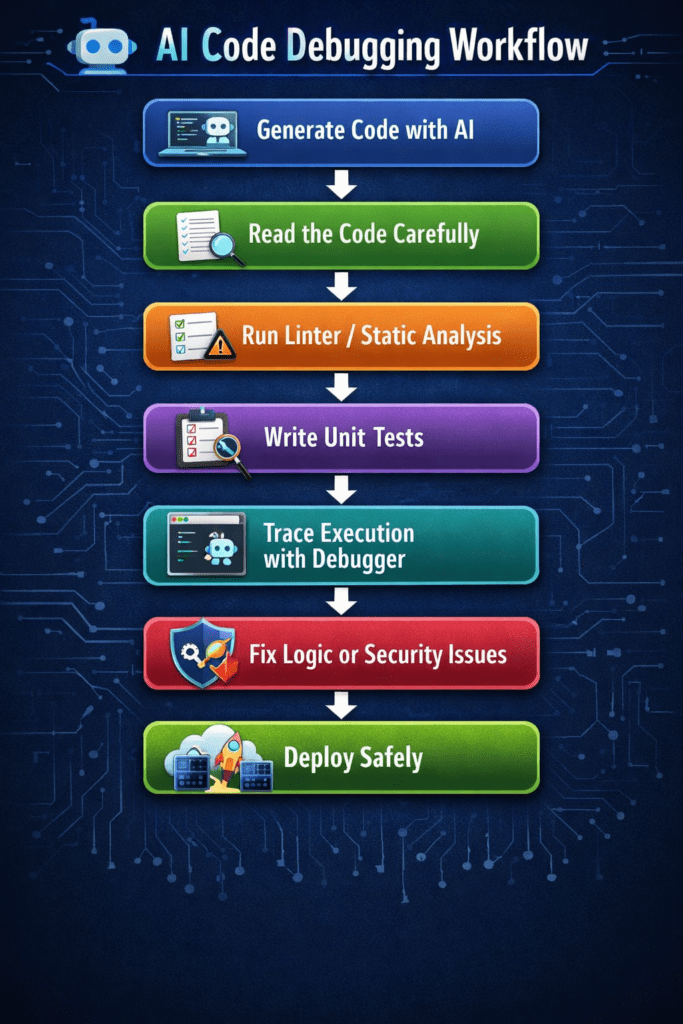
Step 1: Read Before You Run
The first rule when you debug AI-generated code is simple: never execute unknown code blindly.
Spend two to three minutes reviewing the entire snippet before running it. Look specifically for:
- Nonexistent libraries or imports
- Hard-coded configuration values
- Missing error handling
- Unvalidated user input
- Incorrect assumptions about data structure
Careful inspection prevents avoidable runtime failures and reduces debugging time significantly.
Step 2: Run Linters and Static Analysis Tools
Before writing tests, run static analysis tools to detect syntax errors, type mismatches, and code quality violations.
Common tools used to debug AI-generated code include:
| Tool | Purpose | Best Use Case |
|---|---|---|
| ESLint | Static analysis | JavaScript projects |
| Ruff | Fast linting | Python applications |
| SonarQube | Code quality scanning | Enterprise systems |
| mypy | Type validation | Python type checking |
| VS Code Debugger | Runtime inspection | General debugging |
Static analysis automates detection of low-level errors so developers can focus on logic validation.
Step 3: Write Unit Tests Around the AI Output
One of the most reliable ways to debug AI-generated code is to test behavior under multiple input conditions.
AI models often optimize for the most obvious scenario but fail on boundary conditions.
Test three categories of input:
- Expected inputs
- Boundary inputs
- Invalid inputs
If a boundary test fails, you immediately identify the weak point in the logic.
Example: Debugging a Real AI-Generated Python Function
Broken AI Code
def average(numbers):
    return sum(numbers) / len(numbers)
Problem
The function crashes when the list is empty.
Fixed Version
def average(numbers):
    if not numbers:
        return 0
    return sum(numbers) / len(numbers)
Lesson
AI-generated code frequently ignores edge cases. Always validate boundary conditions before deployment.
Step 4: Use the Rubber Duck + Prompt-Back Technique
Rubber duck debugging – explaining code aloud, becomes more powerful when combined with AI self-review.
To debug AI-generated code effectively:
- Paste the code back into the AI
- Ask it to identify potential bugs
- Request edge-case scenarios
- Validate the response manually
Example prompts:
- “What edge cases could break this function?”
- “Are there security risks in this code?”
- “What happens if input data is empty?”
This technique converts AI from a generator into a reviewer.
Step 5: Trace Execution with a Debugger
When logic errors persist, step through execution using an interactive debugger.
Set breakpoints at:
- Function entry points
- Conditional branches
- Data transformations
- External API calls
Watch how variables change during runtime. Many AI bugs result from unexpected state changes rather than syntax errors.
Security Risks When You Debug AI-Generated Code
Security validation is one of the most critical responsibilities when working with AI-generated software.
Common security risks include:
- SQL injection
- Missing authentication checks
- Unsafe file handling
- Hard-coded credentials
- Insecure API requests
Vulnerable Code Example
query = "SELECT * FROM users WHERE id = " + user_id
Secure Version
query = "SELECT * FROM users WHERE id = %s"
database.execute(query, (user_id,))
Always validate inputs and use parameterized queries when interacting with databases.
How to Debug Performance Issues in AI-Generated Code
AI-generated programs may function correctly but perform inefficiently. Performance debugging ensures scalability and reliability.
Look for:
- Nested loops with high complexity
- Redundant API calls
- Excessive memory allocation
- Unoptimized algorithms
- Blocking synchronous operations
Example Performance Problem
Inefficient algorithm complexity:
O(n²)
Optimized alternative:
O(n log n)
Reducing algorithm complexity dramatically improves runtime performance.
Common Patterns in AI-Generated Bugs
After repeatedly working to debug AI-generated code, developers observe recurring issues.
Watch for these patterns:
- Hallucinated library functions
- Deprecated API usage
- Incorrect loop boundaries
- Silent exception handling
- Invalid type conversions
Recognizing these patterns accelerates diagnosis.
Biggest Mistakes When You Debug AI-Generated Code
Avoid these common errors:
- Running code without reading it
- Trusting generated tests blindly
- Ignoring warning messages
- Deploying without boundary testing
- Skipping security validation
- Assuming the AI handled edge cases
Disciplined debugging prevents production failures.
Best Practices to Build a Reliable Debugging Workflow
Professional developers follow structured processes when working with AI-generated software.
Recommended workflow principles:
- Read before running
- Lint before testing
- Test before deploying
- Validate security
- Monitor performance
- Review logs continuously
Consistency is more important than speed.
FAQ: Debug AI-generated Code
- Why is AI-generated code difficult to debug?
Because the code may be syntactically correct while containing hidden logical flaws or missing edge-case handling. - Can AI debug its own code?
Yes, AI systems can identify issues when prompted to review code, but human validation remains essential. - What tools help debug AI-generated code fastest?
Linters, unit testing frameworks, and interactive debuggers provide the fastest feedback during development. - Is AI-generated code safe for production?
Only after testing, security validation, and performance review. - How often should AI-generated code be reviewed?
Every time it is introduced into a production system.
Final Thoughts: Build a Debugging Workflow You Can Trust
Learning to debug AI-generated code is not about distrusting technology, it is about applying engineering discipline to automated outputs. AI tools dramatically accelerate development, but reliability still depends on human oversight.
Developers who master debugging workflows will deliver faster releases, reduce production incidents, and build more resilient systems. In modern software engineering, the ability to debug AI-generated code is quickly becoming a core competency rather than an optional skill.
Treat AI as a powerful assistant – not an infallible developer. Learn more about AI with Newtum.
About The Author