If you’re a junior backend developer right now, you’re entering the field at the most interesting and most confusing time in software history.
On one hand, every hiring post wants someone with “2+ years of experience.” On the other hand, AI tools have quietly made it possible for a motivated junior to build what used to take a mid-level engineer weeks. The gap is no longer just about experience. It’s about workflow.
The problem? Most backend tutorials still teach you to write CRUD endpoints line by line, configure your ORM by hand, and debug errors by staring at stack traces until something clicks. That’s not how the best developers work anymore.
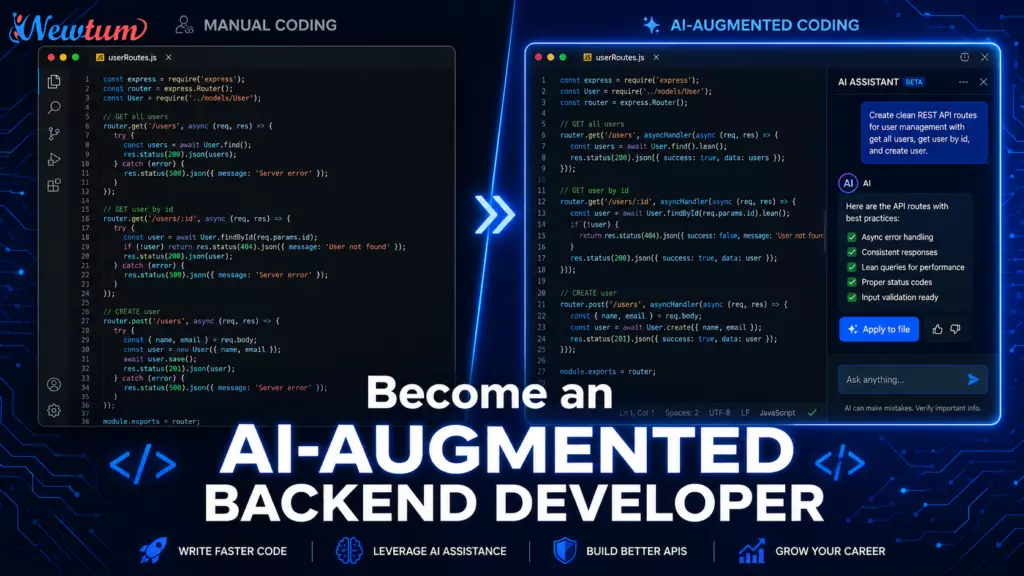
The AI-augmented backend developer doesn’t replace their thinking with AI. They use AI to move faster through the parts that don’t require deep thought, boilerplate, schema drafting, test generation — so they can spend real energy on architecture, business logic, and system reliability.
This roadmap is your step-by-step guide to making that shift. We’ll cover how to design APIs with AI assistance, how to run productive pair-programming sessions, how to generate and validate database schemas, how to debug smarter, and how to wire AI into your deployment workflows, all from the ground up as a junior developer.
What Does It Actually Mean to Be an AI Augmented Backend Developer?
Before diving into tools and techniques, it’s worth being precise about what being an AI-augmented backend developer actually means — because there’s a lot of noise around this topic.
It does not mean:
- Copying whatever code ChatGPT or Copilot produces without reading it
- Replacing your understanding of SQL, HTTP, or system design with AI guesses
- Outsourcing all your thinking to a language model
It does mean:
- Treating AI as a senior pair-programmer who is fast, available 24/7, but needs your direction
- Using AI to eliminate the grunt work of repetitive code so your cognitive load stays on what matters
- Building a workflow where AI handles the “what does this boilerplate look like?” question and you handle the “is this the right architecture for our problem?” question
As an AI-augmented backend developer, your value shifts. You become a director of logic rather than a typist of syntax. But — and this is critical — you only become a good director if you first understand the syntax well enough to spot when the AI gets it wrong.
This is the foundational mindset. Keep it in mind through every section that follows.
Your Baseline Skills Before Layering in AI
AI amplifies what you already know. It doesn’t replace what you haven’t learned yet.
Before you build the habits of an AI-augmented backend developer, make sure you’re solid on these fundamentals:
- HTTP and REST basics.
You should understand request/response cycles, status codes, and whyPUTandPATCHaren’t the same. AI will generate REST APIs quickly, but if you can’t read the output critically, you’ll ship broken contracts. - One backend language, reasonably well.
Python (FastAPI or Django), Node.js (Express), Java (Spring Boot), or Go. You don’t need to master all of them. Pick one and get to the point where reading AI-generated code in that language feels natural. - SQL fundamentals.
Joins, indexes, and basic schema design. AI can write your queries, but you need to understand what aLEFT JOINactually returns to know whether the AI’s output is correct for your use case. - Git basics.
Branching, committing, and pull requests. This is table stakes for any developer in 2026.
Once these are in place, you’re ready to start building the AI-augmented backend developer workflow layer by layer.
If you want to future-proof your software career, read our guide on How to Become an AI-Augmented Developer to learn how developers are using AI for coding, debugging, testing, and deployment workflows.
API Design with AI – From Spec to Working Endpoint
This is where the AI-augmented backend developer workflow starts to separate itself from traditional development.
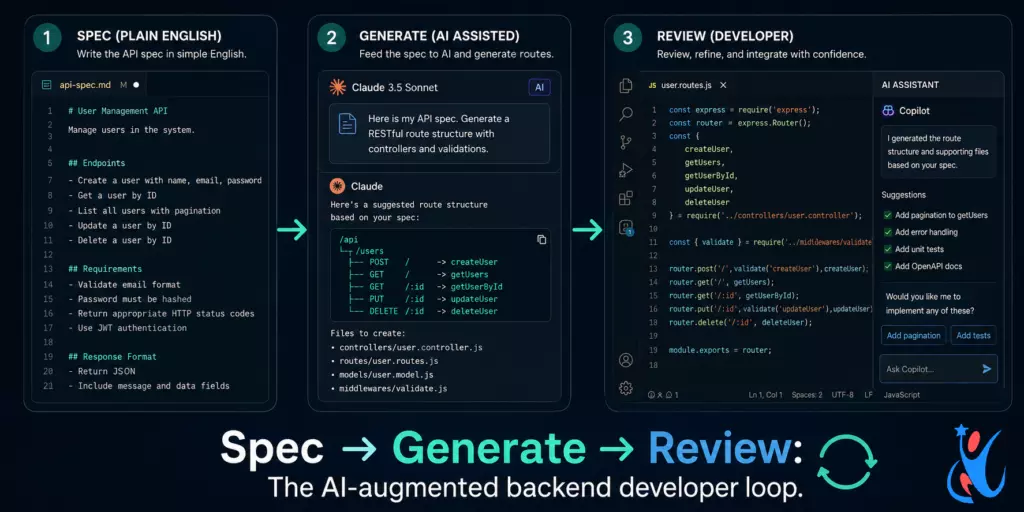
Step 1 – Write the spec first, in plain English
The single biggest mistake junior developers make with AI is going straight to “write me an API.” The output is generic, often wrong for your use case, and requires as much editing as writing from scratch.
Instead, write a plain English spec before you prompt:
“I need a REST API for a task management app. Users can create tasks, assign them to other users, mark them complete, and filter by status. Each task has a title, description, due date, assignee ID, and status (pending, in-progress, done). Authentication is JWT-based.”
That spec becomes your AI prompt. The AI-augmented backend developer feeds context, not commands.
Step 2 – Use AI to generate the route structure
From that spec, ask your AI tool to produce:
- Route definitions (paths, HTTP methods, expected request/response shapes)
- Input validation rules
- Error response structure
Review the output critically. Check: are the HTTP verbs semantically correct? Does the response shape match what a frontend would actually need? Are status codes appropriate?
Step 3 – Generate the controller logic, then read every line
Let AI generate the controller functions. Then read every function as if you wrote it. Ask yourself: what happens if the user doesn’t exist? What if the database is down? Does the AI handle those cases, or does it assume the happy path?
This review habit is what separates a careless AI user from a competent AI-augmented backend developer.
AI Pair Programming – How to Run a Session That Actually Works
Pair programming with AI is different from pair programming with a human colleague. There’s no shared understanding of your codebase, no memory between sessions (unless you configure context), and no judgment about whether your question is “dumb.”
That last part is an advantage. Use it.
Here’s how to run an effective AI pair programming session as an AI-augmented backend developer:
- Open every session with context.
Don’t just ask “how do I paginate this query?” Instead, paste the relevant model definition, your current query, and the framework you’re using. Then ask. The quality of the output scales directly with the quality of the context you provide. - Use the “explain before generate” pattern.
Before asking the AI to write code, ask it to explain the approach it would take. This does two things: it surfaces any misunderstanding early, and it helps you learn the reasoning, not just copy the output. - Treat the AI like a junior you’re mentoring.
When the AI generates something, give feedback: “That works, but I need this to be idempotent — how would you change the approach?” This back-and-forth produces better output and builds your own understanding simultaneously. - Set boundaries on what you let AI generate.
As a general rule for the AI-augmented backend developer workflow: let AI generate tests, boilerplate, and first drafts. Never let AI make final calls on security logic, business rules, or data access patterns without your explicit review and approval.
Database Schema Generation – Speed Without Sloppiness
Schema design is one of the most consequential decisions in backend development. A bad schema choice in week one becomes a painful migration in month six.
AI can help you draft schemas faster, but the AI-augmented backend developer uses a specific workflow to avoid AI schema mistakes:
Start with your entities and relationships in plain English
Before asking AI to generate a schema, write out your entities:
“Users can belong to multiple organizations. Each organization has many projects. Each project has many tasks. Tasks can be assigned to one user. Tasks have statuses.”
Ask AI to produce an entity-relationship description first
Don’t jump straight to SQL or ORM model generation. Ask the AI to describe the relationships in plain language first. Review it. If the relationship cardinalities look wrong, correct them before any code gets generated.
Generate the ORM models or SQL migration
Once the relationship logic is confirmed, let the AI generate the migration or model files. For Django, ask for models.py. For Prisma, ask for the schema.prisma file. For raw SQL, ask for the CREATE TABLE statements.
Validate for three specific failure modes
The AI-augmented backend developer always checks AI-generated schemas for:
- Missing indexes — AI often generates correct column structures but forgets to add indexes on foreign keys and frequently-queried fields.
- Cascade behavior — Does
ON DELETE CASCADEmake sense here, or should deletions be soft? AI defaults to what’s common, not what’s correct for your domain. - Field type precision — AI frequently uses
TEXTwhereVARCHAR(255)is more appropriate, or usesFLOATwhere monetary values should useDECIMAL.
Catching these three things turns an AI-generated schema from a draft into a production-ready foundation.
AI-Assisted Debugging — A Smarter Approach to Error Loops
Every junior developer has experienced the debugging loop: read the error, search Stack Overflow, try something, same error, repeat for two hours.
The AI-augmented backend developer breaks that loop faster — not because AI always has the answer, but because AI changes how you frame the problem.
- Give the AI the full error context, not just the error message.
Paste: the error message, the stack trace, the function where the error occurs, and what you expected to happen. A full-context prompt produces dramatically better debugging assistance than “why is my API returning a 500?” - Ask the AI to explain the error before suggesting a fix.
This is the most underused pattern. If you ask “why might this error occur?” before “how do I fix this?”, you understand the root cause rather than just applying a patch. That understanding compounds into faster debugging over time. - Use AI to generate test cases that reproduce the bug.
Once you understand what caused the error, ask the AI to generate a unit test that reproduces it. This gives you a regression test and confirms when the fix actually works. - Know when AI is the wrong tool for debugging.
Race conditions, environment-specific issues, and performance bottlenecks often require profiling tools, logs, and distributed tracing — not AI prompts. The AI-augmented backend developer knows which bugs need tools and which ones need conversation.
Wiring AI Into Your Deployment Workflow
The final layer of the AI-augmented backend developer stack is deployment. This is where many junior developers’ AI usage stops — at the code level — and where there’s still significant untapped leverage.
AI for writing and reviewing CI/CD pipeline configs
YAML for GitHub Actions, Dockerfile configurations, and Kubernetes manifests are notorious for being syntactically fussy and poorly documented. AI is excellent at generating these from plain-English descriptions:
“Write a GitHub Actions workflow that runs my pytest tests on push to main, builds a Docker image, and pushes it to Docker Hub only if the tests pass.”
The AI-augmented backend developer then reviews the generated YAML line by line — not because AI gets it wrong often, but because deployment pipelines touch production, and that’s always your responsibility.
AI for environment variable and secrets management review
Ask AI to review your deployment config and flag any hardcoded secrets, missing environment variable validations, or misconfigured service connections. This is a quick safety check that’s easy to forget under deadline pressure.
AI for writing rollback procedures
When things go wrong in production — and they will — having a documented rollback procedure matters. Use AI to draft rollback runbooks based on your deployment architecture. Then review and adapt them. The AI-augmented backend developer doesn’t just deploy fast; they deploy safely.
What AI cannot do in your deployment workflow
AI cannot see your actual infrastructure, know your production load patterns, or predict how your specific users will behave. For those things, observability tools (Datadog, Grafana, CloudWatch) and load testing are irreplaceable. AI assists your deployment workflow; it doesn’t replace infrastructure knowledge.
Building Your AI-Augmented Backend Developer Habit Stack
Knowing the techniques is different from making them habitual. Here’s a weekly habit structure that helps junior developers internalize the AI-augmented backend developer workflow:
- Monday: Spec before you code.
Whatever feature or fix you’re starting this week, write a plain-English description of what it should do before opening your editor or an AI chat. This takes five minutes and changes the quality of everything downstream. - Tuesday–Wednesday: Generate, then review.
Use AI to produce your first drafts — routes, models, tests. Then review each output with fresh eyes before integrating it. Time yourself: if reviewing takes longer than writing from scratch would have, your prompts need more context. - Thursday: Debug session debrief.
After any debugging session this week, spend 10 minutes asking AI to explain why the bug occurred at a system level. Write one sentence in a dev journal capturing what you learned. This turns debugging from frustration into compounding knowledge. - Friday: Deployment check.
Review any changes going to production this week. Use AI to do a quick “what could go wrong” analysis of your deployment config. Then decide for yourself whether the risk is acceptable.
This rhythm, practiced consistently over three to six months, is what transforms a junior developer into a genuinely productive AI-augmented backend developer — not the individual tool choices, but the disciplined workflow.
The Career Advantage of Being an AI-Augmented Backend Developer in 2026
Let’s be honest about why this matters for your career, not just your productivity.
The developer job market in 2026 is not about volume — it’s not about who can write more lines of code. It’s increasingly about who can take a problem from specification to deployed, tested, production-ready solution with fewer people and fewer hours.
That is exactly what the AI-augmented backend developer skill set delivers.
When you walk into an interview and can describe a workflow where you designed an API from a plain-English spec, generated the schema and validated it for production concerns, ran pair programming sessions to build out the business logic, and wired up a CI/CD pipeline — that’s not a junior developer story anymore. That’s a mid-level output delivered by someone early in their career.
The companies that understand this are already preferring candidates who demonstrate AI fluency over those with a year or two of extra experience. Being an AI-augmented backend developer is not a nice-to-have credential. It’s becoming the baseline expectation for developers who want to grow fast.
Conclusion: Start With One Section This Week
You don’t need to overhaul your entire workflow in a week. The AI-augmented backend developer skill set compounds — each habit you add makes the others more effective.
Start with the section that felt most relevant to where you’re stuck right now. If API design feels slow and repetitive, start with the spec-first prompting workflow. If debugging is eating your time, start with the full-context debugging prompts. If schema decisions make you anxious, start with the entity-relationship-first approach.
The developers who will define backend engineering over the next five years won’t be the ones who resisted AI or the ones who handed everything to it. They’ll be the ones who became deliberate, systematic, and skilled in the AI-augmented backend developer workflow — the ones who learned to direct the machine rather than compete with it or be replaced by it.
That developer can be you. Start this week.
Have questions about any step in this roadmap? Drop them in the comments — we’d love to help you build your AI-augmented backend developer workflow from the ground up. Keep visiting Newtum website to learn how to adapt AI for a better career.
Quick Reference: AI-Augmented Backend Developer Roadmap
| Phase | What You’re Building | Key AI Use |
|---|---|---|
| Foundation | Core backend skills (HTTP, SQL, one language) | None yet — learn first |
| API Design | Spec-to-endpoint workflow | Route generation, validation logic |
| Pair Programming | Productive AI collaboration habits | Code drafts, explanations, refactoring |
| Schema Design | Entity-first schema generation | Draft schemas, relationship mapping |
| Debugging | Context-first bug analysis | Root cause explanation, test generation |
| Deployment | CI/CD and rollback workflows | YAML generation, config review |
About The Author