This is the defining threat of AI-assisted development in 2026: AI hallucinations in code.
Unlike traditional bugs — caused by human oversight, misread requirements, or plain exhaustion — AI hallucinations in code emerge from a fundamentally different failure mechanism. The model is not tired. It is not confused about the requirements. It is statistically confident, generating output that perfectly mimics the form of correct code while quietly fabricating the substance. Invented function names. Non-existent package methods. OAuth flows missing a verification step. Dependency imports pointing to packages that were never published. Edge case handlers that return the right type of answer but the wrong value.
What this blog covers is the specific anatomy of real production failure patterns driven by AI hallucinations in code: what they look like, why they pass standard review, what they cost when they land in production, and how to build a defensive engineering practice that catches them before they do.
What Makes AI Hallucinations in Code Different from Ordinary Bugs
AI hallucinations in code have no reasoning trail. The model produces output that is statistically consistent with correct code because it was trained on millions of examples of correct code. The hallucinated method name fits the library’s naming convention. The invented parameter matches the style of real parameters. The fabricated dependency uses a name that sounds completely plausible. There is no smell. There is only a quiet confidence that turns catastrophic at runtime.
That is the asymmetry developers must internalize: with human-written bugs, the review catches what feels wrong. With AI hallucinations in code, you must verify what looks right — because the appearance of correctness is precisely the failure mode.
Failure Pattern #1: Phantom APIs- When AI Invents the Method You Never Had
What It Looks Like
An AI assistant is asked to write a utility function for querying a user’s role from a PostgreSQL database using the pg-promise library. It produces this:
javascript
// AI-generated code
const getUserWithRole = async (userId) => {
  const user = await db.fetchUserWithRole(userId, {
    includePermissions: true,
    cacheResult: true
  });
  return user;
};
The code is clean. The function name is intuitive. The options object looks reasonable. The problem: db.fetchUserWithRole() does not exist in pg-promise. It was never a real method. The AI invented it wholesale — conjuring a perfectly plausible API surface for a feature the library never had.
Why It Passes Review
pg-promise does have a db object. It does have query methods with option objects. The hallucinated method follows the exact naming convention of real methods. Without opening the actual pg-promise documentation and checking the method index, there is no visual way to distinguish this from valid code. This is why AI hallucinations in code targeting API surfaces are especially dangerous for junior developers who may not have memorized every method of every library in the stack.
The Production Impact
The error is typically caught only when the code path is first executed in production. If getUserWithRole is called only during specific user flows — say, admin-only pages — it may survive staging entirely and surface weeks later when the first admin logs in after deployment.
The Mitigation
- Mandatory API verification: Every method call against a third-party library should be traced to its official documentation entry before the PR is approved. Not the library’s README. The actual API reference. IDE autocompletion is not sufficient — many IDEs will suggest type-inferred completions from similar patterns.
- Sandbox execution gate: All new AI-generated code paths must be executed in an isolated environment with real dependencies installed, against at least one representative input. If it throws
TypeError: db.fetchUserWithRole is not a function, you caught the AI hallucination in code before it caught you.
Failure Pattern #2: Insecure Authentication — The Auth Flow That’s Wrong in One Silent Line
What It Looks Like
A developer asks an AI to generate JWT verification middleware for an Express.js API. The AI produces:
javascript
// AI-generated middleware
const verifyToken = (req, res, next) => {
  const token = req.headers['authorization']?.split(' ')[1];
  if (!token) return res.status(401).json({ error: 'No token provided' });

  try {
    const decoded = jwt.verify(token, process.env.JWT_SECRET);
    req.user = decoded;
    next();
  } catch (err) {
    // Accept expired tokens in development
    if (process.env.NODE_ENV === 'development' && err.name === 'TokenExpiredError') {
      req.user = jwt.decode(token); // decode without verification
      next();
    } else {
      return res.status(401).json({ error: 'Invalid token' });
    }
  }
};
On the surface, this looks like defensive coding — a developer-mode bypass for token expiry during local testing. The problem: jwt.decode() performs no signature verification whatsoever. Any attacker who constructs a token with an arbitrary payload and sets exp to a timestamp in the past will pass this middleware in any environment where NODE_ENV is not explicitly production — which includes staging, QA, internal tools, and any deployment the team forgot to configure.
This is one of the most insidious patterns in AI hallucinations in code related to authentication: the AI generates code that is locally reasonable (expired tokens disrupt development) but globally catastrophic (it creates an authentication bypass tied to an environment variable).
Why It Passes Review
The logic looks intentional. The comment even documents the rationale. A reviewer in a hurry sees “this is a dev convenience” and moves on. The bypass only becomes visible when someone maps out the full execution path and asks: “what happens if NODE_ENV is not production?”
The Production Impact
Authentication bypasses in AI hallucinations in code like this have been the root cause of real post-mortems where staging environments — connected to real user data for integration testing — were compromised. The attack surface is not the expired token. It is the jwt.decode() call that substitutes for jwt.verify().
The Mitigation
Auth-specific red flag checklist:
- Flag every instance of
jwt.decode()in middleware — it never belongs in a verification flow. - Flag environment conditionals inside auth middleware — if behavior differs between
developmentandproduction, the development path creates a real attack surface. - Flag the absence of algorithm pinning:
jwt.verify(token, secret, { algorithms: ['HS256'] })— without this, an AI-generated implementation may be vulnerable to thealg: noneattack. - Always run auth code through a threat model exercise, not just a logic review.
Failure Pattern #3: Broken Edge Cases — The Input Ranges AI Quietly Forgets
What It Looks Like
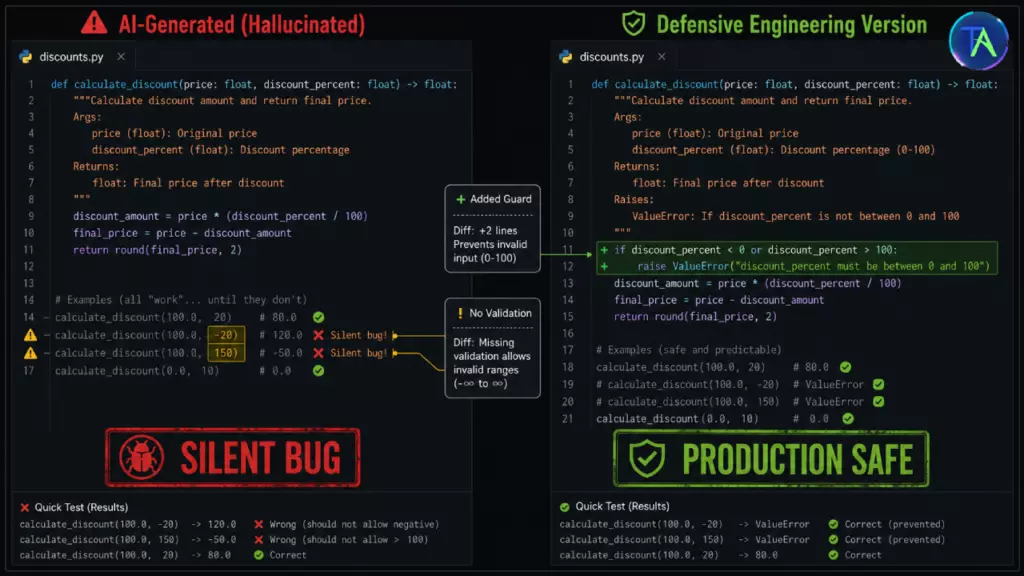
An AI generates a function to calculate a percentage discount for an e-commerce platform:
python
# AI-generated code
def calculate_discounted_price(original_price, discount_percent):
    discount = original_price * (discount_percent / 100)
    final_price = original_price - discount
    return round(final_price, 2)
For the happy path — original_price=100, discount_percent=20 — this returns 80.0. Correct. But AI hallucinations in code related to edge cases leave the following inputs unhandled:
discount_percent=0→ returns100.0(correct, but no guard on zero)discount_percent=100→ returns0.0(correct, but allows free items unintentionally)discount_percent=101→ returns-1.0(negative price: database accepts it, billing charges -£1)original_price=0→ returns0.0(correct, but if downstream code divides byfinal_price, division by zero)discount_percent=-10→ returns110.0(a surcharge instead of a discount — silent data corruption)
None of these crash the function. All of them produce values that pass type validation. Several of them would cause real financial errors in production at scale.
Why It Passes Review
The function is clean. The math is correct for normal inputs. The AI optimizes for the representative case — the most common input it has seen in training data. Edge case handling requires the reviewer to explicitly enumerate the full input domain, not just verify the logic for a typical example.
The Mitigation
Edge case enumeration as a first-class step: Before reviewing any AI-generated function that processes numeric inputs, dates, percentages, counts, or external user data, list every boundary condition explicitly:
- Zero values
- Negative values
- Values exceeding defined maximums
- Null or missing inputs
- Concurrent modification of shared state
These must be checked against the function before approval, not assumed to be handled.
Failure Pattern #4: Dependency Disasters — Ghost Packages and Version Traps
What It Looks Like
An AI generates the following package.json entry for a Node.js utility it recommends:
json
{
  "dependencies": {
    "express": "^4.18.2",
    "user-auth-validator": "^2.1.0",
    "pg-utils-extended": "^1.0.4"
  }
}
user-auth-validator and pg-utils-extended do not exist on npm. The AI has fabricated plausible-sounding package names that follow npm naming conventions. When a junior developer runs npm install and sees the error, the most dangerous response is also the most natural one: searching for “similar” packages and installing one that sounds close. This is precisely the pathway that typosquatting attacks exploit — and AI hallucinations in code create the setup for this attack without any malicious intent.
The Three Dependency Failure Modes
- Ghost Packages: The package simply does not exist. Risk:
npm installfails — the error is caught immediately. Lower risk, but wastes time and erodes trust. - Version Traps: The package exists, but the AI has specified a version that was yanked from the registry after a security vulnerability was disclosed. The code worked historically and the AI confidently reproduces it — but installing it in 2026 means shipping a known CVE.
- Superseded APIs: The package exists and the version installs, but the AI is referencing an API surface from a major version behind.
axios.get()with the options object fromaxios@0.21.xbehaves differently fromaxios@1.x. The code runs but produces unexpected behavior under certain conditions.
Why It Passes Review
Package names in package.json do not look like code. Reviewers who carefully audit function logic often scan dependencies quickly. An invented package name that follows the naming patterns of real packages (pg-utils-extended reads like a legitimate PostgreSQL utility) passes visual inspection at the speed of a line scan.
The Mitigation
Every dependency, every time:
- Verify the package exists on the official registry (npmjs.com, PyPI, crates.io) before installation.
- Check the package’s weekly download count — a newly published package with zero downloads is a red flag.
- Verify the specified version is not flagged in any CVE database (Snyk, npm audit, OSV.dev).
- Pin exact versions in production dependencies —
"user-auth-validator": "2.1.0"not"^2.1.0"— to prevent silent updates pulling in breaking changes.
Automate this in CI: Tools like npm audit, pip-audit, and GitHub’s Dependabot can catch known CVEs in installed packages as a CI gate. But they cannot catch ghost packages before installation — that requires manual verification or a pre-install lockfile check.
Failure Pattern #5: Silent State Mutation — When AI Misunderstands Immutability
What It Looks Like
An AI generates a function to apply a series of transformations to a user settings object:
javascript
// AI-generated
function applyDefaultSettings(userSettings) {
  const defaults = { theme: 'light', notifications: true, language: 'en' };
  return Object.assign(defaults, userSettings);
}
The bug is in Object.assign(defaults, userSettings). This mutates defaults in place and returns the mutated object. If defaults is declared inside the function, this particular call is harmless. But the moment a developer refactors defaults to a module-level constant for reuse — a natural optimization — every call to applyDefaultSettings permanently modifies the shared defaults object. The next call receives the previous caller’s settings as the “defaults.” This is a shared-state corruption bug that produces wildly inconsistent behavior depending on call order.
AI hallucinations in code involving mutability are among the hardest to detect because the bug is not in the AI’s logic — the AI is using Object.assign() correctly per its documentation. The failure is a misunderstanding of where the function lives in a larger system context that the AI has no visibility into.
The correct implementation:
javascript
// Defensive version
function applyDefaultSettings(userSettings) {
  const defaults = { theme: 'light', notifications: true, language: 'en' };
  return Object.assign({}, defaults, userSettings); // spread into empty target
}
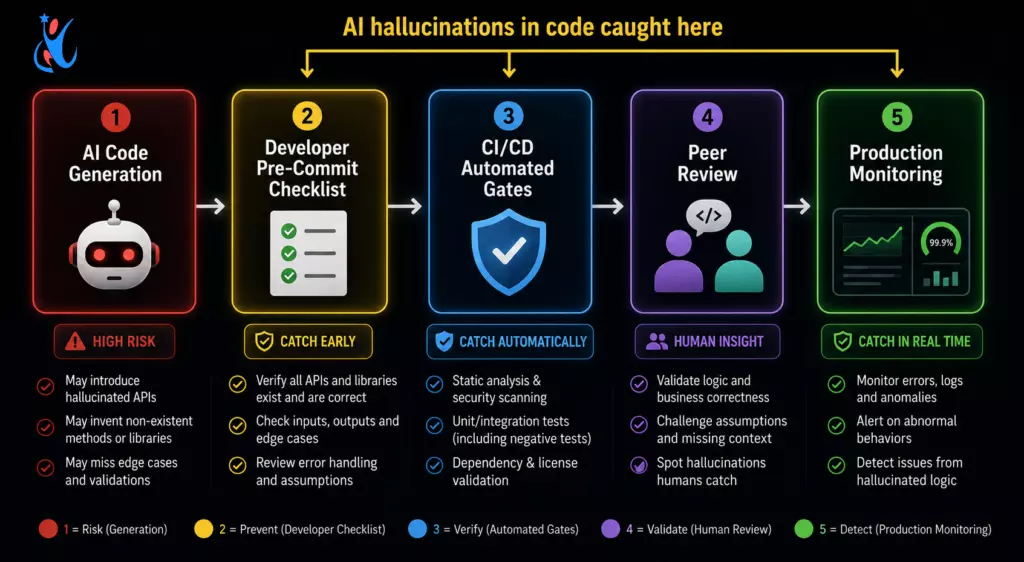
The Defensive Engineering Stack: Mitigation Checklists for Production Teams
Understanding individual failure patterns is necessary but not sufficient. What separates teams that ship reliable AI-assisted code from teams that suffer preventable production incidents is a systematic, repeatable defensive engineering practice applied to every AI-generated contribution.
Pre-Commit Verification Checklist
Apply this before any AI-generated code leaves a developer’s local machine:
| Check | Target | Tool/Method |
|---|---|---|
| All library methods verified | Every third-party call | Official docs, not IDE autocomplete |
| All imports resolvable | Every package | npm install / pip install dry run |
| Package versions verified | All new deps | npm registry + npm audit |
| Edge case enumeration complete | Every function with numeric/date/user input | Manual trace of boundary values |
| Auth logic checked for decode vs. verify | JWT/OAuth middleware | Manual code trace |
| Environment conditionals flagged | Any if (NODE_ENV === ...) in security code | Code search + review |
| No hardcoded secrets | All files | git-secrets or trufflehog pre-commit hook |
| Object mutation verified | Functions accepting/returning objects | Trace mutation vs. copy behavior |
CI/CD Gates for AI-Generated Code
These automated checks should block the merge queue if any fails:
- Static Analysis: Semgrep rules for injection patterns,
eval(), unsafe deserialization, andjwt.decode()in non-test files. - Dependency Audit:
npm audit --audit-level=moderateorpip-auditfailing the build on any known CVE. - Test Coverage Enforcement: AI-generated functions must have test coverage including at least one boundary input and one invalid input. Enforce via coverage threshold gates.
- Secret Scanning: Gitleaks or GitHub Advanced Security scanning all commits for API keys, tokens, and credentials.
- Type Checking: TypeScript strict mode or mypy catching method signature mismatches before runtime.
Production Monitoring as the Final Catch
Even with rigorous pre-merge checks, some AI hallucinations in code slip through. Production observability is the last line of defense:
- Structured error logging: Every caught exception should log the function name, input shape, and error type — making hallucinated API failures immediately visible in log aggregators.
- API error rate alerts: A sudden spike in
TypeErrororAttributeErrorrates from a specific service after a deployment is a strong hallucination signal. - Feature flag staged rollouts: AI-generated features should roll out to 1% → 10% → 100% of traffic, with automated rollback triggers on error rate thresholds.
For Junior Developers: Building Your Defensive Instinct
Junior developers are simultaneously the most frequent users of AI coding tools and the most exposed to AI hallucinations in code — because the knowledge gaps that make AI tools attractive are the same gaps that make hallucinated output hard to detect.
Three practices that build defensive instinct faster than anything else:
- Read the changelog. When an AI uses a library you’re less familiar with, don’t just read the README — read the recent changelog. Methods get deprecated. Signatures change. The AI’s training data skews toward older, more common patterns. The changelog tells you what changed recently, which is exactly where hallucinations tend to hide.
- Run every code path, not just the happy path. Before submitting any PR with AI-generated code, manually execute or write a test for the error path, the empty input, and the maximum value. If you don’t know what the maximum value is, that is itself a signal to investigate the function’s constraints.
- Keep a hallucination log. When you catch an AI hallucination in code — an invented method, a wrong parameter, a missing edge case — write it down. After a month, patterns emerge. You will discover which libraries the AI consistently misrepresents, which error scenarios it habitually ignores, and which security patterns it gets subtly wrong. That log becomes your personal detection advantage.
For Senior Developers: Hardening the Team’s AI Workflow
Senior developers face the challenge of scale: it is not just their own AI-generated code that needs hardening, but every contributor’s. The patterns that enable AI hallucinations in code to reach production are almost always organizational, not individual.
- Institutionalize the verification gate. PR templates should include a mandatory AI code checklist section. If a PR includes AI-generated code, specific checklist items — dependency verification, edge case enumeration, auth pattern review — should be required fields before the PR can be merged. This is not bureaucracy. It is the engineering equivalent of requiring seatbelts.
- Define your stack’s hallucination profile. Through your team’s experience with AI tools, you will accumulate knowledge of which libraries, patterns, and domains the AI most frequently hallucinates about. Document this in a shared wiki. “The AI consistently invents methods in
pg-promise.” “The AI gets Stripe webhook signature verification wrong.” “The AI generates deprecated Flask patterns.” This shared profile dramatically accelerates detection for every engineer on the team. - Add AI-sourced code as a PR label category. Knowing that code was AI-generated should change the review posture of the reviewer. An explicit label ensures reviewers apply appropriate scrutiny rather than default to human-authored trust levels. The code is not worse for being AI-generated — but it warrants a different kind of attention.
Conclusion: Confidence Is Not Correctness
The most important thing to understand about AI hallucinations in code is not that they are common — it is that they are invisible. A model that confidently generates a phantom API method is not signaling uncertainty. A hallucinated jwt.decode() in an auth flow does not announce itself. A ghost package name in package.json does not look different from a real one.
This is why defensive engineering around AI hallucinations in code is not optional for professional development teams. The baseline assumption cannot be “AI output is probably right.” The baseline must be “AI output requires verification at every external boundary” — every library call, every dependency, every auth flow, every function that touches unbounded user input.
The production failures that AI hallucinations in code can cause are not inevitable. They are preventable — by developers who understand the failure patterns, build the right defenses, and treat AI-generated output with the same rigorous verification they would give any untested external dependency.
Because in the end, that is exactly what it is.
Have you encountered a production incident caused by AI hallucinations in code? Share your pattern in the comments — your experience could be the entry that saves another developer’s Saturday night. Learn to adapt AI with Newtum for the best career.
FAQ’s
What exactly are AI hallucinations in code and how do they differ from regular bugs?
AI hallucinations in code occur when a language model generates syntactically valid, stylistically convincing code that references APIs, methods, or packages that do not exist, or implements logic that is subtly incorrect in ways that are not visible without domain knowledge. Unlike human-written bugs, they leave no reasoning trail and often pass visual review precisely because they are designed — by training — to look correct.
Are AI hallucinations in code more common with certain programming languages or libraries?
Yes. Languages and libraries with less representation in training data tend to produce more hallucinations. Newer library versions, niche frameworks, and recently deprecated APIs are higher-risk zones. Python and JavaScript ecosystems generally produce fewer hallucinations for common libraries, but edge cases and newer library versions remain risky in all stacks.
Can automated tools catch all AI hallucinations in code?
No. Automated tools (linters, SAST scanners, type checkers) catch a meaningful category of hallucinations — undefined method calls in typed languages, known insecure patterns, missing packages. But logic errors, state mutation bugs, and context-specific architectural mismatches require human judgment. Automation and human review are complementary, not interchangeable.
How should I tell my team that a bug came from AI-generated code?
Treat it as you would any bug with an interesting root cause — as a learning opportunity, not an assignment of blame. The relevant question is not “who accepted the AI output” but “what detection gate failed and how do we add it to our checklist?” This framing is more productive and more accurate, since the real failure is almost always systemic, not individual.
Is the risk of AI hallucinations in code increasing or decreasing as models improve?
Both, simultaneously. Newer models hallucinate on common patterns significantly less often. But as AI tools are used for more complex, higher-stakes code — distributed systems, authentication flows, financial logic — the failure modes of remaining hallucinations become more consequential. The net risk is context-dependent: simpler tasks are getting safer; higher-complexity uses require continued vigilance.
Should teams avoid AI coding tools because of hallucination risk?
No. The productivity gains from AI-assisted development are real and significant. The answer is not avoidance but defensive engineering: building the checklists, gates, and review practices that make AI-generated code as trustworthy as human-written code — and in many categories, more consistent. Teams that build strong defensive practices around AI hallucinations in code get the productivity benefits without the production incidents.
About The Author