There’s a specific kind of panic junior developers are experiencing in 2026 that nobody’s talking about honestly.
You’re staring at a stack trace. The error is in a function you didn’t write. You accepted it from GitHub Copilot three days ago, it passed code review, it ran fine in staging, and now it’s failing in production. You scroll through the logic trying to reconstruct what the AI was thinking. You can’t. You don’t know what it was optimizing for. You don’t know what edge case it didn’t account for. You don’t even know where to start.
Welcome to the defining debugging challenge of the AI era.
Traditional debugging tutorials teach you to trace your own logic. But when AI writes most of the code, the logic isn’t yours — and the debugging process has to change fundamentally. This guide gives you the AI debugging workflow you actually need: a structured process for tracing AI-generated logic you didn’t design, building reliable reproductions, instrumenting your code with observability, and knowing when and how to roll back safely.
Why Traditional Debugging Fails on AI-Generated Code
When you write code yourself, you carry mental context: why you chose that data structure, which edge cases you were accounting for, what assumption you made about the input. When something breaks, you have a hypothesis within seconds.
AI-generated code strips that context away completely. The model had no knowledge of your specific business logic, your database schema quirks, or the edge cases your users actually hit. It produced statistically plausible code — code that looks like it should work — with no understanding of whether it actually fits your system.
This creates three specific failures in the traditional debugging approach:
- Breakpoint-first debugging breaks down.
When you set a breakpoint in AI-generated code, you’re stepping through logic you never designed. You can follow execution, but you can’t anticipate what should happen at each step. Debugging becomes pure archaeology instead of informed investigation. - Reading the error message leads you to the wrong place.
AI-generated code often fails several layers away from the actual problem. The model might have structured a function correctly in isolation while making a flawed assumption about what the calling code provides. - “Fix the line that’s red” doesn’t work.
Stack traces point to symptoms, not causes. In hand-written code, experienced intuition bridges that gap. In AI-generated code, you have no intuition about the design intent. A targeted AI debugging workflow replaces that intuition with a repeatable process.
The TRACE Framework: Your AI Debugging Workflow
Here is the structured AI debugging workflow designed specifically for junior developers working in AI-augmented codebases. It stands for: Triage, Reproduce, Analyze, Confirm, Exit (or Rollback).
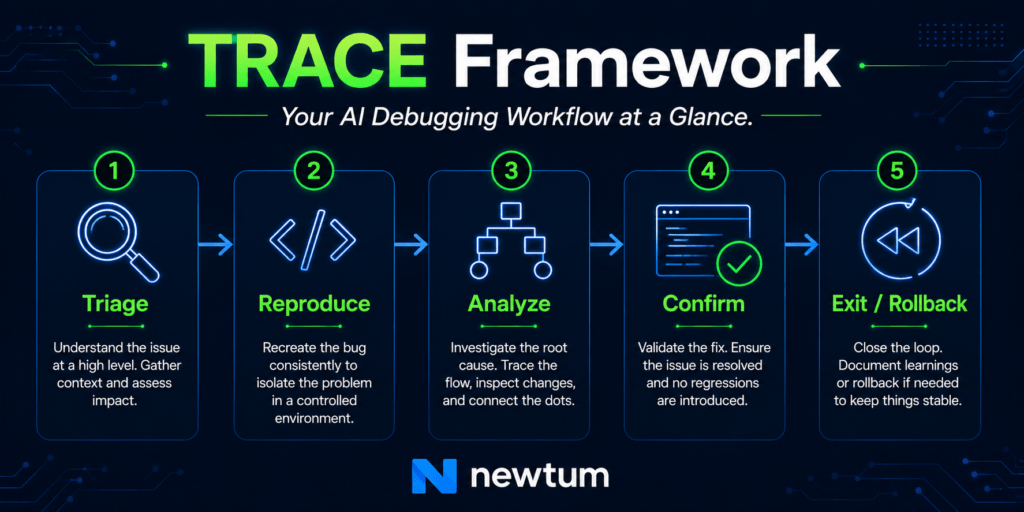
Step 1 — T: Triage Before You Touch Anything
The first move in any productive AI debugging workflow is classification, not investigation. Before you open a single file, answer these three questions:
Is this a logic bug or an integration bug? Logic bugs live inside the AI-generated function itself — wrong algorithm, wrong condition, missed edge case. Integration bugs live at the boundary — the AI-generated code works correctly in isolation, but it was plugged into the wrong place or received different input than it expected.
Is this reproducible deterministically? If the bug happens every time with the same input, you can trace it systematically. If it’s intermittent, you’re likely dealing with a race condition, a state mutation problem, or an environment-specific issue. These require different tools.
What changed since it last worked? Run git log --oneline -20 immediately. If the bug appeared after a specific commit where AI-generated code was merged, that commit is your starting point. If nothing changed in the codebase and the bug appeared on its own, look at data or environment changes first.
This triage step typically takes five minutes and saves two hours of investigating the wrong file.
Step 2 — R: Reproduce with a Minimal Case
The single highest-leverage action in your AI debugging workflow is building a minimal reproducible example — a stripped-down version of the failing scenario that you can run in isolation.
This matters more for AI-generated code than for hand-written code because the AI may have introduced dependencies between parts of the logic that aren’t obvious from reading the code. Isolating the failure surface helps you see those hidden dependencies.
How to build a reproduction for AI-generated code:
python
# Original AI-generated function (from your codebase)
def process_user_order(user_id: int, cart_items: list, discount_code: str = None) -> dict:
    # AI generated 40+ lines of logic here
    pass

# Your minimal reproduction — strip everything you don't need
def test_failing_scenario():
    # Use the exact input values that caused the failure
    user_id = 1042            # the actual failing user ID from logs
    cart_items = [            # exact items from the failing request
        {"sku": "PROD-99", "qty": 3, "price": 29.99}
    ]
    discount_code = "SAVE10"  # the discount code from the request

    result = process_user_order(user_id, cart_items, discount_code)
    print(result)
    # Run this standalone before touching anything else
The goal is to reproduce the failure in under ten lines. If you cannot isolate it that cleanly, the bug is likely an integration issue — which changes your approach entirely.
One important rule: always pull the exact failing values from your logs, not values you guess might be similar. AI-generated code sometimes fails on inputs that look ordinary but have a specific property the model didn’t account for — an empty list where it expected at least one item, a None where it expected an empty string, a float where it expected an integer.
Step 3 — A: Analyze the AI’s Logic Chain
This is where the AI debugging workflow diverges most sharply from traditional debugging. You’re not reading your own code. You’re reading a model’s output and reconstructing the assumptions it encoded.
A useful technique: read the function in reverse. Start at what it returns and work backward. What does the return value depend on? What does that intermediate variable depend on? This reverse-trace approach often surfaces the flawed assumption faster than reading top-to-bottom.
Use structured logging to make the AI’s logic visible:
python
import logging

logger = logging.getLogger(__name__)

def process_user_order(user_id: int, cart_items: list, discount_code: str = None) -> dict:
    logger.debug("process_user_order called", extra={
        "user_id": user_id,
        "cart_item_count": len(cart_items),
        "has_discount": discount_code is not None,
    })

    # AI-generated subtotal calculation
    subtotal = sum(item["price"] * item["qty"] for item in cart_items)
    logger.debug("subtotal computed", extra={"subtotal": subtotal})

    # AI-generated discount logic — this is where bugs often hide
    if discount_code:
        discount = apply_discount(subtotal, discount_code)
        logger.debug("discount applied", extra={
            "discount_code": discount_code,
            "discount_amount": discount,
            "subtotal_before": subtotal,
            "subtotal_after": subtotal - discount
        })
        subtotal -= discount

    return {"user_id": user_id, "total": subtotal, "items": cart_items}
This pattern — logging the inputs and outputs of every significant sub-step in AI-generated logic — makes the invisible chain of assumptions visible. You’re not guessing what the AI computed at each stage; you’re reading it directly.
Ask the AI to explain itself. This is one of the most underused moves in the AI debugging workflow. Paste the failing function back into your AI assistant and ask: “What assumptions does this function make about its inputs? What input values would cause it to fail?” The model that generated the code often surfaces its own blind spots quickly when prompted this way. Treat the answer as a hypothesis checklist, not a definitive answer.
Learn How Developers Use AI Agents to Handle Repetitive Engineering Tasks
Step 4 — C: Confirm with Observability Before Shipping the Fix
A common junior developer mistake: find what looks like the bug, change a line, run it once locally, declare it fixed, and push. In AI-generated codebases, this is how regressions are introduced. The AI’s logic often has multiple interconnected parts. Fixing one condition can silently break another.
Your AI debugging workflow needs a confirmation step with real observability before any fix ships.
Structured log correlation using trace IDs:
python
import uuid

def process_request(request_data: dict):
    trace_id = str(uuid.uuid4())  # generate once per request

    result = process_user_order(
        user_id=request_data["user_id"],
        cart_items=request_data["items"],
        discount_code=request_data.get("discount"),
        trace_id=trace_id  # pass through every AI-generated function
    )

    logger.info("request completed", extra={
        "trace_id": trace_id,
        "result_total": result["total"],
        "status": "success"
    })
    return result
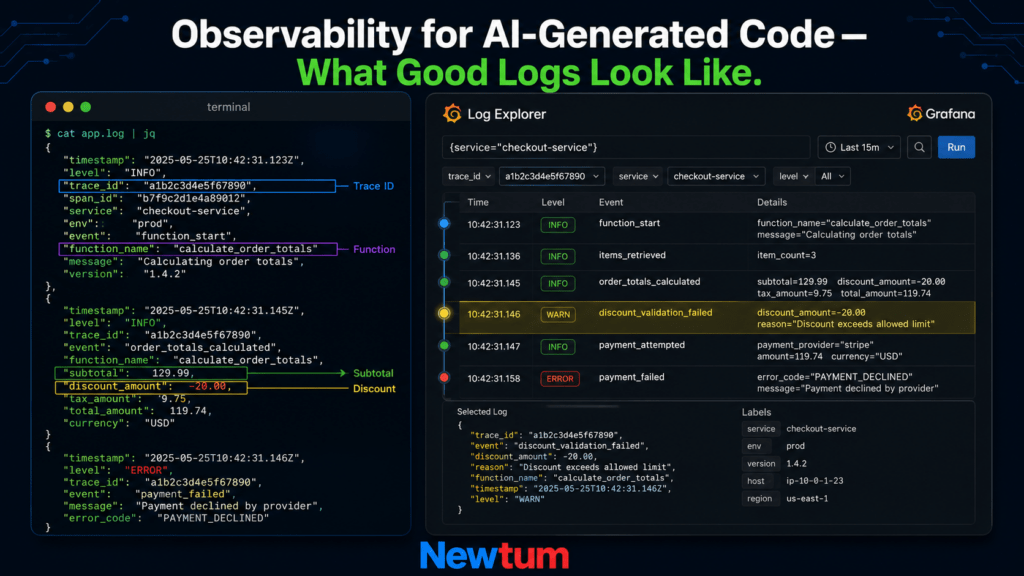
With trace IDs flowing through your logs, you can reconstruct exactly what happened inside the AI-generated logic for any specific request — before your fix and after. This is the minimum observability you need to confidently confirm that a fix didn’t break something adjacent.
Before pushing your fix, verify three things:
- The original failing input now produces the correct output in your reproduction test
- At least five other representative inputs produce correct outputs
- Your structured logs show the intermediate values you expect at each step
Step 5 — E: Exit Strategy — Rollback When the Fix Isn’t Safe
Sometimes the right move isn’t to fix the AI-generated code — it’s to roll it back and replace it with something you understand and can control. Knowing when to roll back is as important as knowing how to debug. This is the step most junior developers skip because it feels like admitting defeat. It isn’t. It’s engineering judgment.
Roll back when:
- The bug touches payments, authentication, or data writes
- You’ve spent more than three hours without a clear reproduction
- Your fix requires changes to more than two functions
- You’re not confident you understand what the AI’s original logic was doing
Git rollback — fast and safe:
bash
# Find the last working commit
git log --oneline

# Create a rollback branch (never roll back directly on main)
git checkout -b hotfix/rollback-order-processing

# Revert the specific commit that introduced the AI-generated code
git revert <commit-hash> --no-commit

# Review the diff before committing the revert
git diff --staged

# Commit and push the rollback
git commit -m "revert: roll back AI-generated order processing (debugging in progress)"
git push origin hotfix/rollback-order-processing
Feature flag rollback (when reverting isn’t practical):
If the AI-generated code is already deeply integrated, use an environment variable feature flag to disable the new code path without changing deployment state:
python
import os

def process_user_order(user_id: int, cart_items: list, discount_code: str = None) -> dict:
    # Route to legacy implementation during AI debugging
    if os.getenv("USE_LEGACY_ORDER_PROCESSING") == "true":
        return _legacy_process_order(user_id, cart_items, discount_code)

    # New AI-generated implementation
    return _ai_generated_process_order(user_id, cart_items, discount_code)
Set the environment variable to true in production to instantly disable the AI-generated path without a redeployment. This gives you time to fix the logic safely, without leaving users exposed to a broken experience.
Building Long-Term Observability into AI-Generated Code
The TRACE framework handles active debugging. But a mature AI debugging workflow also includes a layer of proactive instrumentation — building observability in from the start, so that when the next bug appears, you spend minutes diagnosing instead of hours.
Two practices have the highest return for junior developers:
- Structured JSON logging from day one.
Configure your application to emit JSON logs with consistent fields: timestamp, level, trace_id, function_name, and a data object. This makes logs parseable by tools like Datadog, Grafana Loki, or simplejqqueries in the terminal. - Health check assertions at AI-generated boundaries.
AI-generated functions often make silent assumptions about their inputs. Add explicit assertion checks at function entry points:
python
def process_user_order(user_id: int, cart_items: list, discount_code: str = None) -> dict:
    # Assertions document the AI's assumptions and fail loudly instead of silently
    assert isinstance(user_id, int) and user_id > 0, f"Invalid user_id: {user_id}"
    assert isinstance(cart_items, list) and len(cart_items) > 0, "cart_items must be non-empty"
    assert all("price" in item and "qty" in item for item in cart_items), \
        "Each cart item must have 'price' and 'qty'"

    # Rest of AI-generated logic follows
These assertions don’t fix bugs — they surface them immediately at the boundary, with a clear message, instead of letting them propagate silently into incorrect results.
Using AI to Debug AI
There’s a productive loop available in the AI debugging workflow that many junior developers underuse. Once you have a minimal reproduction and structured logs, paste both into your AI assistant with this prompt:
“Here is a function and the exact inputs that caused it to fail. Here are the log values at each step. Explain what assumption in the logic is incorrect and suggest a fix that preserves the function’s contract.”
This is different from asking AI to generate a fix blindly. You’re giving it the failure evidence and asking for reasoning, not just code. The output should be treated as a hypothesis, not a solution — verify it against your reproduction test before shipping anything.
Quick Reference: AI Debugging Workflow Cheatsheet
| Stage | Key Action | Time Budget |
|---|---|---|
| Triage | Classify bug type, run git log | 5 minutes |
| Reproduce | Build minimal failing test with exact log values | 15–30 minutes |
| Analyze | Reverse-trace logic, add structured logging | 30–60 minutes |
| Confirm | Verify fix with trace IDs and 5+ input variations | 15 minutes |
| Exit / Rollback | Git revert or feature flag if fix is unsafe | 10 minutes |
Final Thought: Ownership of Code You Didn’t Write
The most important mindset shift in the AI debugging workflow isn’t technical — it’s about ownership. When AI generates code and you commit it, that code is yours. The blame frame matters: not “the AI wrote a bug” but “I shipped code I hadn’t fully understood.”
The TRACE framework exists to close that understanding gap systematically. Triage gives you orientation. Reproduction gives you control. Analysis gives you comprehension. Confirmation gives you confidence. Rollback gives you an exit when confidence isn’t there yet.
Junior developers who build this workflow now — who treat AI-generated code as something to understand and instrument, not just copy and ship — will be the engineers teams trust with production systems in the next three years.
That trust is built one debugged function at a time.
Ready to strengthen your AI development fundamentals? Explore Newtum’s developer courses and build the skills to work confidently in AI-augmented engineering environments.
About The Author