If you have spent any time in developer circles lately, you have almost certainly heard about Cursor. This AI-native code editor is rapidly reshaping how programmers write, review, and refactor code. Every cursor AI coding tool review you come across seems to carry the same mix of excitement and caution: yes, it is powerful; no, it is not infallible.
This blog is different. Instead of just listing features, we dig into how Cursor actually generates code under the hood, where its suggestions are almost always safe to accept, and crucially, the specific situations when you, the developer, need to step in and override it. Whether you are a solo indie hacker or part of a large engineering team, understanding this balance is the difference between shipping great software and quietly introducing subtle bugs.
What Is Cursor AI? (A Quick Orientation)
Cursor is a fork of Visual Studio Code built from the ground up to integrate large language models (LLMs) directly into the editing experience. Unlike GitHub Copilot, which operates primarily as an autocomplete plugin, Cursor embeds a full conversational AI assistant alongside your editor, letting you chat with your codebase, ask it to refactor entire files, or instruct it to hunt and fix bugs across multiple files at once.
Under the hood, Cursor uses frontier models including Claude and GPT-4-class models, with a proprietary context system that feeds the model your open files, recent edits, imported libraries, and even your terminal output. This is what makes any serious cursor AI coding tool review so interesting: the tool is not just autocomplete; it is a context-aware coding co-pilot.
How Does the Cursor AI Coding Tool Actually Work?
Cursor operates through several distinct modes, each relying on a different level of context:
1. Tab Autocomplete
The most immediate feature. As you type, Cursor predicts the next lines of code based on your current file and cursor position. It is fast often faster than you can think and handles boilerplate, repetitive patterns, and obvious completions well.
2. Inline Edit (Cmd+K)
You highlight a block of code, press Cmd+K, and describe what you want. Cursor rewrites the selected code and presents a diff for you to accept or reject. This is where context awareness really shines or occasionally stumbles.
3. Chat / Composer Mode
The most powerful mode. You open the sidebar, describe a feature or a problem, and Cursor can read, write, and edit multiple files simultaneously. It can read your terminal errors, search the web for documentation, and even run terminal commands. This is the feature that elevates every cursor AI coding tool review beyond a simple comparison with autocomplete tools.
4. Codebase Indexing
Cursor indexes your entire project so the AI understands your naming conventions, existing patterns, and module structure. Instead of generating generic boilerplate, it tries to match your style – a meaningful distinction when you are working on an established codebase.
What Cursor AI Gets Right: Strengths Worth Knowing
No honest cursor AI coding tool review skips the genuine wins. Here is where Cursor consistently delivers:
Boilerplate Elimination
CRUD operations, REST endpoints, form handlers, configuration files – Cursor handles these at near-human speed. Tasks that used to take 20 minutes now take 2.
Refactoring at Scale
Need to rename a data model across 15 files or convert callback-based code to async/await? Cursor’s Composer mode handles multi-file edits that would be tedious and error-prone manually.
Explaining Legacy Code
Ask Cursor to explain a confusing function written by a developer who left the team three years ago. Its explanations are often clearer than the original comments.
Test Generation
Feed Cursor a function and ask it to write unit tests. It understands mocking, edge cases, and common testing frameworks well enough to produce a usable first draft.
Rapid Prototyping
For new projects or experimental features, Cursor lets you scaffold something working in minutes. It is a serious accelerator for the ideation and proof-of-concept phase.
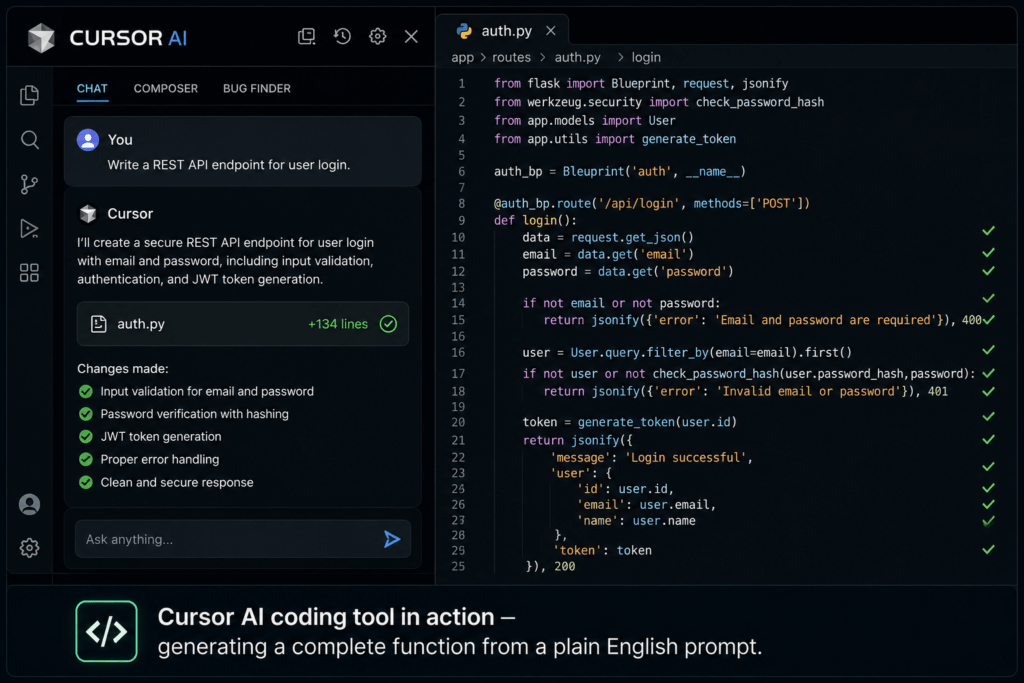
When Cursor AI Writes Code Well (And When It Doesn’t)
Context is everything. The cursor AI coding tool review from most developers reveals a consistent pattern: Cursor performs best when the problem is well-defined, the codebase context is clear, and the desired output follows established conventions.
Cursor writes good code when:
- The task is narrowly scoped (e.g., ‘add input validation to this function’)
- Your codebase is indexed and it can see your conventions
- You are working in a well-documented language or framework
- You provide a specific, detailed prompt rather than a vague request
Cursor struggles when:
- The task requires deep business domain knowledge it cannot infer from code alone
- You ask it to reason about performance at scale without benchmark data
- Security-sensitive logic is involved (authentication, authorization, cryptography)
- The problem crosses architectural boundaries and requires holistic system thinking
Want to make Cursor AI even more powerful for backend development? Learn how effective prompts can generate cleaner database logic in this guide on Prompt Engineering for SQL Queries.
5 Situations When You Should Override Cursor AI
This is the part most cursor AI coding tool reviews gloss over. Knowing when not to trust the suggestion is just as important as knowing when to accept it. Here are the five most critical override scenarios:
1. Security-Critical Code
Authentication flows, permission checks, input sanitization, and cryptographic implementations are areas where even a small AI error can open a serious vulnerability. Cursor may generate code that looks correct but uses a deprecated hashing algorithm or misses an edge case in a JWT validation flow. Always manually review — and ideally have a second human reviewer — for any security-related code Cursor produces.
2. Code That Touches Your Data Model
Cursor does not know your business rules. If you ask it to write a database migration or restructure a schema, it will produce syntactically correct SQL — but it will not know that a particular column is tied to a third-party integration, or that nullability rules exist for compliance reasons. Your data model carries institutional knowledge the model simply cannot have. Override and verify every time.
3. Performance-Sensitive Logic
AI-generated algorithms are often optimized for readability, not performance. A sorting function it writes for a small dataset might become a bottleneck at scale. Cursor won’t know your traffic patterns, your database index structure, or how your caching layer works. When performance is a real constraint, treat Cursor’s output as a starting point — then profile and optimize manually.
4. Architectural Decisions
Asking Cursor to suggest how to structure a new microservice or which design pattern to use for a complex feature is tempting, but risky. The AI will give you a textbook-valid answer. It will not account for your team’s skill set, your existing infrastructure debt, your deployment constraints, or your future roadmap. Architectural decisions require human judgment that goes beyond pattern recognition.
5. When the Suggestion ‘Feels Off’
Experienced developers develop intuition. If a Cursor suggestion seems overly verbose, slightly inconsistent with the rest of the codebase, or solves the problem in an unexpected way — trust that instinct. The cursor AI coding tool review from senior engineers consistently reveals that the most costly AI mistakes are the ones that were accepted because the code compiled and the tests passed, even though something subtle was wrong. Your intuition is a feature. Use it.
Real Developer Experiences: What the Community Is Saying
Across Reddit, Hacker News, and developer communities on X (formerly Twitter), the cursor AI coding tool review consensus looks something like this:
Junior developers report dramatic productivity boosts — often 2x to 3x faster at completing tickets — but also acknowledge they accepted code they did not fully understand. This creates a dangerous learning gap: moving faster without building deeper understanding.
Senior developers use Cursor differently. They use it to handle tedious scaffolding so they can focus on higher-order thinking. They also reject suggestions more often — and more quickly — because they can immediately spot when context has been misunderstood.
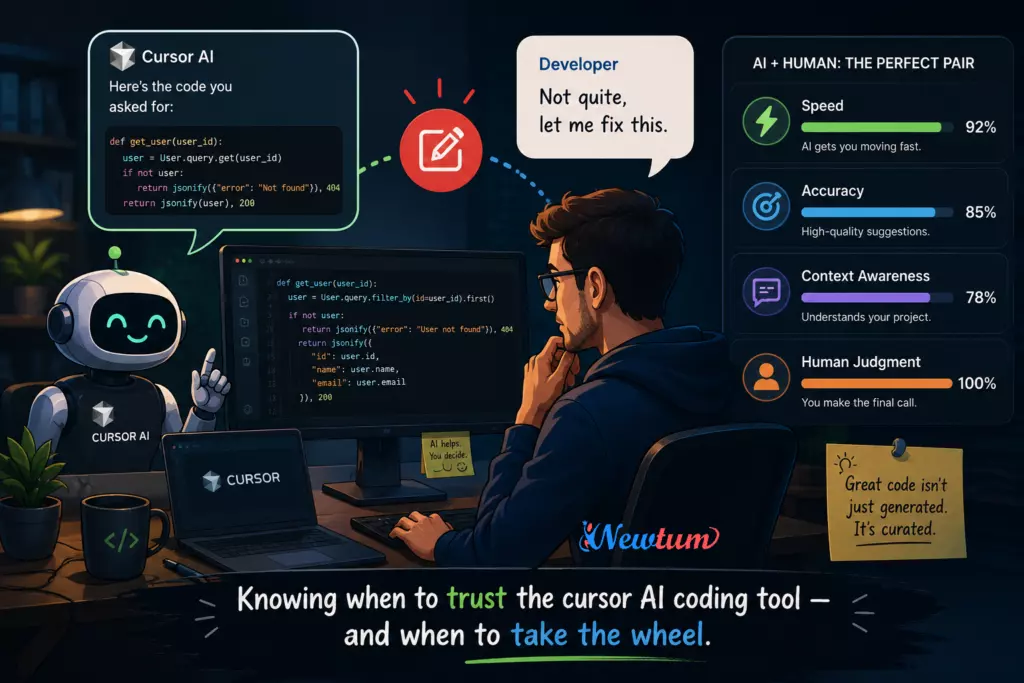
One frequently cited insight: Cursor is best thought of as a very fast, very confident junior developer. It will always produce an answer. It will never tell you ‘I’m not sure.’ That confidence is its greatest strength and its most significant risk factor.
Cursor AI Coding Tool Review: Verdict
After a thorough cursor AI coding tool review, here is the honest assessment:
Cursor is exceptional at:
- Reducing time spent on repetitive, well-defined code tasks
- Making refactoring less painful and more consistent
- Helping developers explore unfamiliar frameworks faster
- Generating first-draft tests and documentation
Cursor requires oversight for:
- Security, authentication, and data integrity logic
- Domain-specific business rules and compliance requirements
- Performance optimization and system architecture
- Any code where correctness is more important than speed of generation
Rating: 4.3 / 5 — A genuinely transformative tool when used by developers who know its limits. The cursor AI coding tool earns high marks for daily productivity, with the caveat that it performs best as a collaborator, not an autonomous agent.
Conclusion
The future of software development is not humans vs. AI — it is humans directing AI. Cursor is one of the clearest examples of what that collaboration looks like in practice. Used well, the cursor AI coding tool reduces the friction of implementation so you can focus your energy on what matters: solving the right problems, in the right way, with the right design.
The developers who will get the most out of Cursor are not those who hand it the wheel — they are the ones who stay in the driver’s seat, use Cursor to go faster, and know exactly when to tap the brakes. That skill — knowing when to override — is the real competitive advantage in the age of AI-assisted coding.
As the cursor AI coding tool continues to improve with each release, the floor on what it can handle autonomously will rise. But the ceiling — the judgment, context, and creativity that great software demands — will always belong to you. Learn with Newtum how to adopt AI for a better career.
Frequently Asked Questions (FAQs)
Is Cursor AI free to use?
Cursor offers a free tier with limited AI requests per month. Pro and Business plans unlock more usage, faster models, and team features. Check cursor.sh for the latest pricing.
How is Cursor different from GitHub Copilot?
Copilot is primarily an autocomplete plugin embedded in editors like VS Code. Cursor is a full editor built around AI, with chat, multi-file editing, and codebase indexing that go well beyond line-by-line autocomplete.
Can Cursor AI understand large codebases?
Yes — Cursor indexes your project and uses that context in its suggestions. However, very large codebases may exceed context window limits, and the model’s understanding of complex interdependencies can still be incomplete.
Does using Cursor AI make developers lazy?
It can — if used passively. Developers who accept suggestions without reading them carefully risk shipping code they do not understand. Used actively, as a thinking partner rather than an answer machine, Cursor accelerates growth rather than replacing it.
Is the cursor AI coding tool safe for production code?
Cursor-generated code can absolutely go to production — but it should follow the same review process as any human-written code. For security-sensitive or business-critical logic, additional scrutiny is strongly recommended.
What programming languages does Cursor support?
Cursor supports all major programming languages including Python, JavaScript, TypeScript, Java, C++, Go, Rust, Ruby, and many more. Its performance is strongest in languages with large training data, such as Python and JavaScript.
About The Author