Understanding “fahrenheit to celsius conversion in java” is essential for anyone delving into programming and real-world applications. Need to convert weather data or tackle temperature-sensitive calculations effectively? Mastering this task solves such challenges with ease. Intrigued? Keep reading as we simplify the process and help you confidently implement this useful skill in your projects.
How to Perform Fahrenheit to Celsius Conversion in Java?
Temperature conversion is one of the most common beginner-level programming exercises in Java. It helps new developers understand arithmetic operations, variables, formulas, and user input handling. Converting Fahrenheit to Celsius is widely used in weather applications, scientific calculations, healthcare systems, and temperature-monitoring devices.
Learning this Java program also improves problem-solving skills because it introduces mathematical formulas and practical coding implementation together.
What Is Fahrenheit to Celsius Conversion?
Temperature can be measured using different scales. The two most common temperature scales are Fahrenheit and Celsius.
Fahrenheit Scale
The Fahrenheit scale is primarily used in countries like the United States. In this scale:
- Water freezes at 32°F
- Water boils at 212°F
Celsius Scale
The Celsius scale is widely used around the world and in scientific calculations. In this scale:
- Water freezes at 0°C
- Water boils at 100°C
Difference Between Fahrenheit and Celsius
The main difference between these scales is their reference points and interval measurements. Celsius is considered simpler for scientific calculations, while Fahrenheit provides more detailed temperature gradations for daily weather reporting.
Formula for Fahrenheit to Celsius Conversion
The standard formula used to convert Fahrenheit into Celsius is:
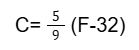
Where:
- C = Temperature in Celsius
- F = Temperature in Fahrenheit
Example Calculation
Suppose the temperature is 100°F.
Subtract 32 from 100:
100 - 32 = 68
Now multiply by 5/9:
68 × 5/9 = 37.78°C
So, 100°F equals approximately 37.78°C.
Algorithm for Fahrenheit to Celsius Conversion in Java
Follow these simple steps to create the program:
- Start the program
- Declare required variables
- Input temperature in Fahrenheit
- Apply the conversion formula
- Display the Celsius value
- End the program
Java Program for Fahrenheit to Celsius Conversion
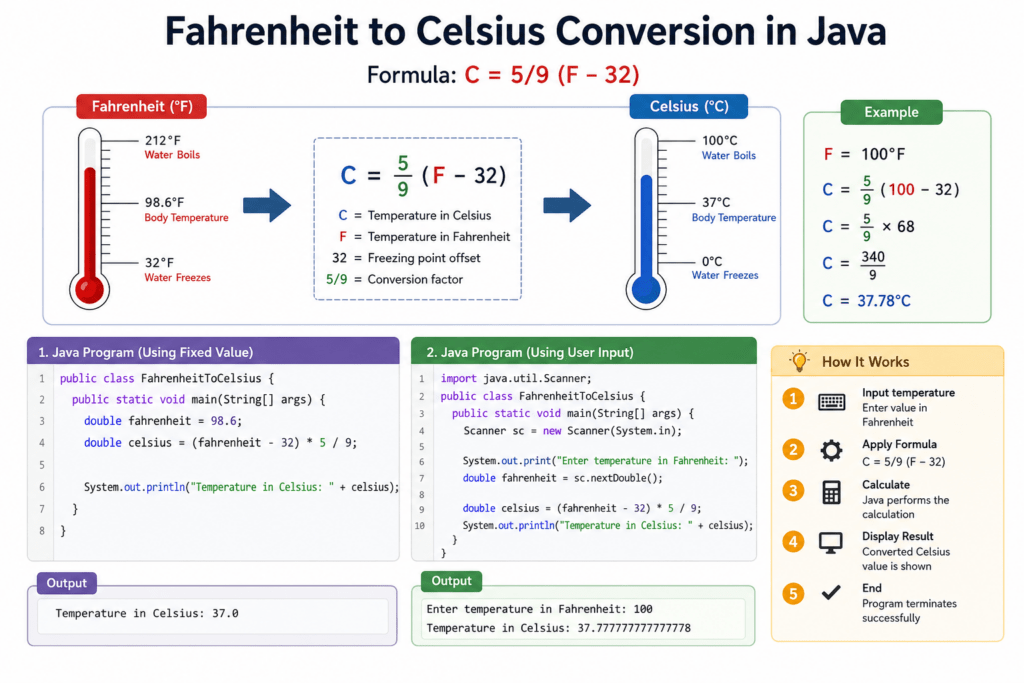
Using Fixed Value
public class FahrenheitToCelsius {
    public static void main(String[] args) {
        double fahrenheit = 98.6;
        double celsius = (fahrenheit - 32) * 5 / 9;

        System.out.println("Temperature in Celsius: " + celsius);
    }
}
Explanation
In this program:
- A fixed Fahrenheit value is stored in the variable
fahrenheit - The conversion formula calculates the Celsius value
- The result is printed using
System.out.println()
Java Program Using User Input
Fahrenheit to Celsius Conversion with Scanner Class
import java.util.Scanner;

public class FahrenheitToCelsius {
    public static void main(String[] args) {
        Scanner sc = new Scanner(System.in);

        System.out.print("Enter temperature in Fahrenheit: ");
        double fahrenheit = sc.nextDouble();

        double celsius = (fahrenheit - 32) * 5 / 9;

        System.out.println("Temperature in Celsius: " + celsius);
    }
}
Explanation
This version allows users to enter their own temperature value during program execution. The Scanner class is used to read input from the keyboard.
Output Example
Enter temperature in Fahrenheit: 100
Temperature in Celsius: 37.77777777777778
Explanation of the Java Code
Variable Declaration
Variables are used to store Fahrenheit and Celsius values.
double fahrenheit;
double celsius;
The double data type is used because temperature values may contain decimal numbers.
Formula Calculation
The conversion formula is implemented as:
double celsius = (fahrenheit - 32) * 5 / 9;
This statement converts the Fahrenheit temperature into Celsius.
Scanner Class Usage
The Scanner class helps take input from the user.
Scanner sc = new Scanner(System.in);
The following line reads the entered value:
double fahrenheit = sc.nextDouble();
Printing the Output
The final result is displayed using:
System.out.println("Temperature in Celsius: " + celsius);This prints the converted Celsius temperature on the screen.
Common Errors in Temperature fahrenheit to celsius conversion in java
While creating a Fahrenheit to Celsius conversion program in Java, beginners often make a few common mistakes. Understanding these errors can help you write more accurate and efficient programs.
Incorrect Formula Usage
One of the most common mistakes is using the wrong conversion formula. The correct formula is:
C=95(F−32)
Some beginners mistakenly write:
celsius = fahrenheit * 5 / 9 - 32;
This gives incorrect results because subtraction should happen before multiplication.
Integer Division Mistakes
Using integer values instead of decimal values can produce inaccurate outputs.
Incorrect example:
int celsius = (fahrenheit - 32) * 5 / 9;
Since integers do not store decimal values, the result may lose precision.
Wrong Data Type Selection
Using int instead of double can truncate decimal numbers.
Correct approach:
double celsius = (fahrenheit - 32) * 5 / 9;
The double data type ensures accurate decimal calculations.
Best Practices for fahrenheit to celsius conversion in java Programs
Following coding best practices improves readability, accuracy, and maintainability.
1. Use double Instead of int
Temperature values often contain decimals. Always use double for better precision.
double fahrenheit = 98.6;
2. Validate User Input
Check whether the user enters valid numeric input before processing calculations. This prevents runtime errors.
3. Keep Formulas Readable
Use parentheses properly to make formulas easy to understand.
Good example:
double celsius = (fahrenheit - 32) * 5 / 9;
4. Use Meaningful Variable Names
Avoid unclear variable names like a or x.
Preferred naming:
double fahrenheit;double celsius;
Meaningful names improve code readability and debugging.
Practical Applications – fahrenheit to celsius conversion in java
- Weather Applications:
Popular companies like AccuWeather often convert temperatures for their global users. They use Fahrenheit for the US market but need Celsius for international users.
Here’s a quick code snippet showing the conversion in Java:
double fahrenheit = 98.6;
double celsius = (fahrenheit – 32) * 5/9;
System.out.println(fahrenheit + “°F is ” + celsius + “°C”);
When implemented, the output for the user’s preferred temperature scale is accurate, improving user experience globally. - Fitness Trackers:
Fitbit, a leader in the wearable tech industry, uses temperature conversions for tracking body metrics during workouts. These devices measure temperature in Celsius but convert it to Fahrenheit for user reports in the US.
Consider the code snippet below:
For Fitbit, the conversion supports accurate data presentation in user dashboards, essential for providing vital health insights.double fahrenheit = 75;
double celsius = (fahrenheit - 32) * 5/9;
System.out.println(fahrenheit + "°F is " + celsius + "°C"); - Automobile Climate Control Systems:
Car manufacturers like Tesla include temperature controls where Fahrenheit to Celsius conversion is crucial. This is particularly important for their international models.
Have a look at this piece of code:
The efficacy of the climate system hinges on precise conversions, ensuring user comfort irrespective of where they are driving.double fahrenheit = 32;
double celsius = (fahrenheit - 32) * 5/9;
System.out.println(fahrenheit + "°F is " + celsius + "°C");
Interview Prep: Java Conversion
When you’re diving into the world of Java programming, specifically dealing with conversions like Fahrenheit to Celsius, you might find yourself pondering a range of queries. Here are some frequently asked yet less commonly addressed questions to guide you through this fascinating topic:-
How do you handle negative Fahrenheit numbers effectively in Java?
Negative numbers can be converted just like any other number. The formula remains the same: subtract 32 and multiply by 5/9, ensuring no data loss.
-
What’s the simplest way to debug if my conversion code is incorrect?
UseSystem.out.println()to print intermediate results, helping you understand where the logic might be failing.
-
Can I create a method specifically for the conversion in Java?
Absolutely! It’s good practice. Here’s a sample method:
This approach promotes code reusability.double convertFahrenheitToCelsius(double fahrenheit) { return (fahrenheit - 32) * 5 / 9; }
-
How can I handle user input for temperature conversion?
UtilizeScannerfor collecting user input, allowing dynamic conversion based on user-provided values.
-
Is it necessary to handle exceptions?
While basic conversions don’t inherently throw exceptions, incorporate input validation to ensure only numerical inputs are considered.
-
How do I display results to 2 decimal places?
UseString.format()orDecimalFormatto format the output like so:String.format("%.2f", celsiusTemperature) -
What are common mistakes beginners make in this conversion?
Often, beginners forget operator precedence or misuse variable types. Ensure you’re clear about operation order and correct data types.
-
How can this conversion be used in a real-world application?
Such conversions can be essential for weather apps, science projects, or any application requiring temperature data processing.
Experience the future of coding with our AI-powered Java online compiler. Instantly write, run, and test your code, harnessing the power of AI for real-time feedback and enhanced learning. Dive into seamless coding with minimal effort, letting technology streamline your programming journey and bring your Java projects to life.
Conclusion
Fahrenheit to Celsius conversion in Java is an excellent beginner-friendly program for understanding formulas, variables, and user input handling. By practicing temperature conversion programs, you can strengthen your Java fundamentals and improve problem-solving skills. Explore more Java programming tutorials and practical coding examples on Newtum to continue learning and building real-world programming knowledge.
Edited and Compiled by
This article was compiled and edited by @rasikadeshpande, who has over 4 years of experience in writing. She’s passionate about helping beginners understand technical topics in a more interactive way.
FAQ- fahrenheit to celsius conversion in java
What is the formula for Fahrenheit to Celsius conversion in Java?
This formula converts Fahrenheit temperature into Celsius.
Why do we use double in temperature conversion?
The double data type stores decimal values accurately, which is important because temperature conversions usually produce fractional results.
Can I convert Celsius to Fahrenheit in Java?
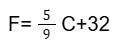
Yes. You can use the following formula:
F=5 C+32
9
This converts Celsius temperature into Fahrenheit.
Which Java class is used for user input?
The Scanner class from the java.util package is commonly used for taking user input in Java programs.
Example:
Scanner sc = new Scanner(System.in);
About The Author