In today’s world, knowing how to replace multiple line breaks with one JavaScript is a handy skill. This topic is essential for cleaning up messy text input, preventing unwanted whitespace in web pages, and enhancing user experience. Dive in to discover practical solutions and make your coding journey smoother!
What Are Multiple Line Breaks in JavaScript?
In JavaScript, line breaks are special characters used to move text to a new line. They are commonly found in user input, text files, API responses, and textarea content.
Understanding \n and \r\n
JavaScript mainly uses two types of line break characters:
| Line Break | Meaning | Common Platform |
|---|---|---|
\n | New Line | Linux, macOS |
\r\n | Carriage Return + New Line | Windows |
Example of \n
const text = "Hello\nWorld";
console.log(text);
Output:
Hello
World
Example of \r\n
const text = "Hello\r\nWorld";
console.log(text);
Output:
Hello
World
Although both create a new line, Windows systems usually use \r\n while Unix-based systems use \n.
Difference Between Single and Multiple Line Breaks
A single line break creates one new line between text.
Example:
Hello
World
A multiple line break creates extra empty lines.
Example:
Hello


World
Raw text representation:
"Hello\n\n\nWorld"
This often happens when:
- Users press Enter multiple times
- Content is copied from documents
- APIs return unformatted text
- Textareas contain extra spacing
Why Remove Extra Line Breaks?
Extra blank lines can make content look unstructured and difficult to read.
Improves Readability
Removing unnecessary spacing makes text cleaner and easier to scan.
Prevents Messy UI Formatting
Too many blank lines can break layouts in:
- Chat applications
- Comment sections
- Text editors
- Web pages
Cleans User-Generated Content
Users often paste content with inconsistent formatting. Cleaning line breaks helps standardize text.
Useful Before Storing Text in Databases
Normalized text:
- Saves storage space
- Maintains consistent formatting
- Simplifies searching and processing
How to Replace Multiple Line Breaks With One in JavaScript
The easiest way to replace multiple line breaks with a single line break is by using JavaScript regex.
Basic Solution Using Regex
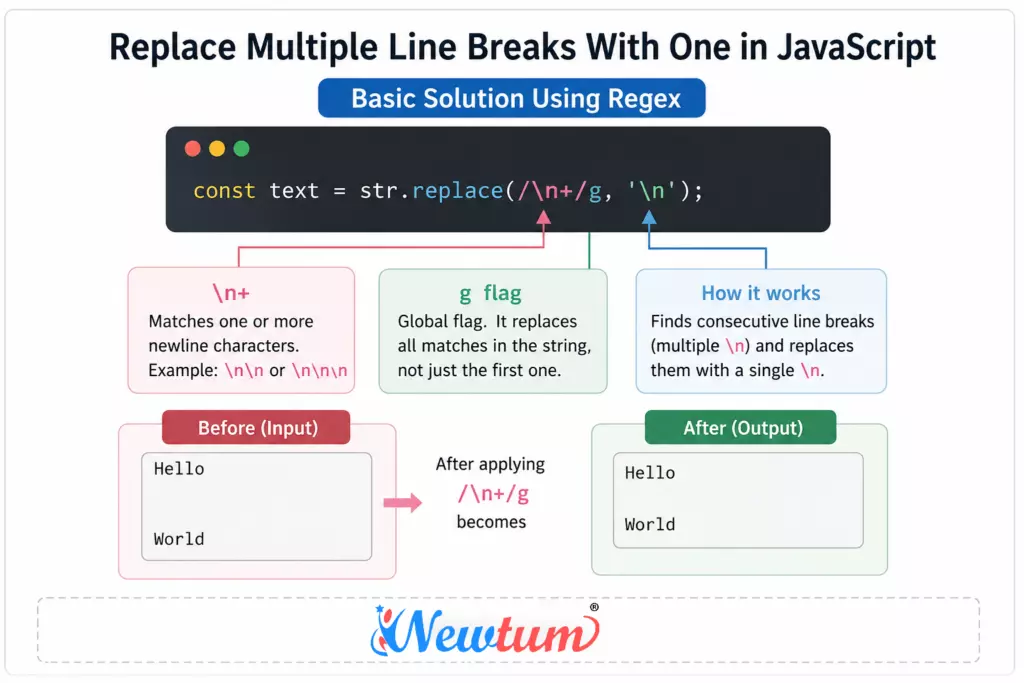
const text = str.replace(/\n+/g, '\n');
This replaces consecutive newline characters with a single newline.
Explanation of the Regex
\n+
\n+
Meaning:
\n→ Matches a newline character+→ Matches one or more occurrences
So this pattern finds:
\n\n\n\n\n- Any repeated newline sequence
and replaces them with a single \n.
g Flag
/g
The g stands for global.
Without it, JavaScript replaces only the first match.
With the g flag:
- All repeated line breaks in the string are replaced.
How the Regex Works
Example:
const str = "Hello\n\n\nWorld";

const text = str.replace(/\n+/g, '\n');

console.log(text);
Output:
Hello
World
The regex:
- Finds multiple consecutive
\n - Replaces them with a single newline
Handle Windows Line Breaks (\r\n)
Different operating systems use different line endings. To support both Windows and Unix-style line breaks, use this regex:
const cleaned = str.replace(/(\r\n|\n)+/g, '\n');
Cross-Platform Compatibility Explained
What This Regex Matches
(\r\n|\n)+
Breakdown:
| Pattern | Meaning |
|---|---|
\r\n | Windows line break |
\n | Unix/Linux/macOS line break |
| ` | ` |
+ | One or more occurrences |
This ensures your code works consistently across:
- Windows
- macOS
- Linux
- Browser textareas
- API responses
Example
const str = "Hello\r\n\r\n\r\nWorld";

const cleaned = str.replace(/(\r\n|\n)+/g, '\n');

console.log(cleaned);
Output:
Hello
World
Remove Blank Lines Completely
If you want to remove empty lines entirely instead of reducing them to one, use this regex:
const cleaned = str.replace(/^\s*[\r\n]/gm, '');
How This Regex Works
| Pattern | Meaning |
|---|---|
^ | Start of line |
\s* | Optional whitespace |
[\r\n] | Matches line breaks |
g | Global search |
m | Multiline mode |
This removes lines that contain:
- Only spaces
- Tabs
- Empty line breaks
Example
const str = `
Hello


World
`;

const cleaned = str.replace(/^\s*[\r\n]/gm, '');

console.log(cleaned);
Output:
Hello
World
Common Use Cases
Cleaning Paragraphs
Useful when formatting:
- Blog content
- Markdown text
- Imported documents
Processing Textarea Content
Helps sanitize user input before:
- Saving to a database
- Rendering on a webpage
- Sending through APIs
Simplifying Text Formatting with JavaScript
- Handling User Text Input at Facebook
Facebook allows users to enter text to update statuses or send messages. Sometimes, users unintentionally add multiple line breaks which can disrupt the readability.
let inputText = "Hello World!


This is Facebook.";
let cleanedText = inputText.replace(/
+/g, '
');
console.log(cleanedText); // Output: "Hello World!
This is Facebook." - Email Formatting at Google
Google’s email services, such as Gmail, require neat formatting. Excessive line breaks can make emails look cluttered.
let emailBody = "Dear User,


Thank you for choosing Gmail!";
let formattedEmail = emailBody.replace(/
+/g, '
');
console.log(formattedEmail); // Output: "Dear User,
Thank you for choosing Gmail!" - Blog Content Clean-up at WordPress
Bloggers sometimes face the issue of messy content due to multiple accidental line breaks. WordPress streamlines this for better aesthetics.
let blogContent = "Welcome to WordPress


Enjoy writing!";
let tidyContent = blogContent.replace(/
+/g, '
');
console.log(tidyContent); // Output: "Welcome to WordPress
Enjoy writing!" - Comment Section at YouTube
YouTube comments benefit from clean formatting. Removing extra line breaks enhances text appearance and user engagement.
let comment = "Great video!


Keep it up!";
let cleanComment = comment.replace(/
+/g, '
');
console.log(cleanComment); // Output: "Great video!
Keep it up!"
Real-World Example-Replace multiple line breaks with one javascript
Cleaning User Input Before Saving
When users submit content through forms or textareas, they often add unnecessary blank lines. Cleaning the text before storing it helps maintain consistent formatting in your database and UI.
Example Function
function cleanText(text) {
  return text.replace(/(\r\n|\n)+/g, '\n');
}
This function:
- Detects multiple line breaks
- Replaces them with a single newline
- Works for both Windows and Unix-style line endings
Input vs Output Example
Input
Hello


Welcome to JavaScript.


This is a test.
Raw string representation:
"Hello\n\n\nWelcome to JavaScript.\n\n\n\nThis is a test."
Cleaned Output
Hello
Welcome to JavaScript.
This is a test.
Complete Example
function cleanText(text) {
  return text.replace(/(\r\n|\n)+/g, '\n');
}

const input = "Hello\n\n\nWelcome to JavaScript.\n\n\n\nThis is a test.";

const output = cleanText(input);

console.log(output);
Performance Considerations
JavaScript regex operations are generally fast and optimized for text manipulation. However, following best practices can improve efficiency when handling large amounts of text.
Regex Is Efficient for Most Text Operations
Methods like replace() with regex are:
- Built into JavaScript engines
- Optimized internally
- Suitable for everyday text cleanup
For normal applications such as:
- Forms
- Chat systems
- Blogs
- CMS editors
regex performance is usually more than sufficient.
Avoid Repeated Replacements in Loops
Bad approach:
for (let i = 0; i < arr.length; i++) {
  arr[i] = arr[i].replace(/\n+/g, '\n');
}
If possible:
- Batch process content
- Reduce unnecessary repeated regex execution
This becomes important when processing:
- Large datasets
- Thousands of records
- Large files
Best for Medium and Large Text Processing
Regex works especially well for:
- Textarea cleanup
- API response formatting
- Markdown processing
- Content normalization
For extremely large files, streaming or chunk-based processing may be more memory efficient.
Common Mistakes to Avoid-Replace multiple line breaks with one javascript
Forgetting the Global g Flag
Incorrect:
str.replace(/\n+/, '\n');
This replaces only the first occurrence.
Correct:
str.replace(/\n+/g, '\n');
The g flag ensures all matches are replaced.
Ignoring Windows Line Endings
Many developers handle only \n and forget \r\n.
Incorrect:
str.replace(/\n+/g, '\n');
Better cross-platform solution:
str.replace(/(\r\n|\n)+/g, '\n');
This works consistently across:
- Windows
- Linux
- macOS
Replacing All Line Breaks Accidentally
Some regex patterns remove every newline entirely.
Incorrect:
str.replace(/\n/g, '');
Output becomes:
HelloWorldJavaScript
This can destroy paragraph formatting.
Instead, reduce multiple line breaks to one.
Alternative Methods
Using split() and filter()
Another way to remove empty lines is by splitting the string into an array.
Example
const cleaned = str
  .split('\n')
  .filter(Boolean)
  .join('\n');
How It Works
| Method | Purpose |
|---|---|
split('\n') | Converts text into an array |
filter(Boolean) | Removes empty lines |
join('\n') | Rebuilds the cleaned string |
Example
const str = "Hello\n\n\nWorld";

const cleaned = str
  .split('\n')
  .filter(Boolean)
  .join('\n');

console.log(cleaned);
Output:
Hello
World
Regex vs split() and filter()
| Feature | Regex | split/filter |
|---|---|---|
| Shorter syntax | ✅ | ❌ |
| Easier to read | ✅ | ✅ |
| Handles complex patterns | ✅ | ❌ |
| Good for beginners | Moderate | Easy |
| Performance | Faster | Slightly slower |
| Cross-platform handling | Better | Needs extra handling |
When to Use Regex
Use regex when:
- You need compact code
- Handling multiple newline formats
- Processing large text efficiently
- Performing advanced text cleanup
When to Use split() and filter()
Use this method when:
- Simplicity matters more than optimization
- Teaching beginners
- Working with small text inputs
- You want more control over array processing
Interviews: Line Breaks -Replace multiple line breaks with one javascript
- How can JavaScript handle multiple line breaks in a text input?
You can use JavaScript’s `replace` method with a regular expression to replace multiple line breaks with one. Here’s a simple example:
This code snippet finds consecutive line breaks and replaces them with a single line break.let str = "Hello
World";
str = str.replace(/(
)+/g, '
');
console.log(str); - Is it possible to achieve this with a different approach than regex?
Yes, you can split the string by line breaks and then filter the array to remove empty elements before joining it back.
This method also replaces multiple line breaks with a single one.let str = "Hello
World";
str = str.split('
').filter(Boolean).join('
');
console.log(str); - Can I apply this to an HTML textarea’s value?
Absolutely! You can manipulate the text directly by accessing the `value` property of the textarea element. Assume `textarea` is your HTML element:
This will update the textarea’s content on the fly.textarea.value = textarea.value.replace(/(
)+/g, '
'); - Does replacing multiple line breaks affect text formatting?
It largely depends on your use case; generally, it makes text cleaner and more readable without excess whitespace. - What should I do if I also want to remove spaces along with line breaks?
Extend the regex to incorporate spaces:
This replaces consecutive spaces or line breaks with a single space.str = str.replace(/[
s]+/g, ' ');
Discover our AI-powered js online compiler, where you can instantly write, run, and test your code. Our intelligent compiler simplifies your coding experience, offering real-time suggestions and debugging tips, streamlining your journey from coding novice to expert with ease. Explore it today and boost your coding skills!
Conclusion
In conclusion, “Replace multiple line breaks with one JavaScript” not only enhances data readability but also boosts your competence in handling text processes. Isn’t conquering small coding challenges like this rewarding? So why not give it a go today? And if you’re eager to dive deeper into the world of programming languages like Java, Python, C, C++, and more, check out Newtum for further learning adventures. The world of coding is as vast as it is exciting!
Edited and Compiled by
This article was compiled and edited by @rasikadeshpande, who has over 4 years of experience in writing. She’s passionate about helping beginners understand technical topics in a more interactive way.
About The Author