“Check if String Starts with String Javascript” might sound like a mouthful, but trust me, it’s a handy skill in your coding toolkit. Ever wondered how search engines locate similar results or how emails get filtered? By mastering this concept, you can simplify string comparisons, making your code more efficient. Keep reading to unravel its magic.
What is ‘Check if String Starts with String Javascript’?
In JavaScript, checking if a string starts with another string is a handy concept often used in coding. This involves verifying if a particular string—known as the prefix—begins a target string. The method commonly used for this task is `.startsWith()`. It’s both straightforward and efficient! Here’s the basic syntax: `targetString.startsWith(prefix);`. If `targetString` begins with `prefix`, it returns `true`, otherwise `false`. This is especially useful when you’re dealing with tasks like validating user input, filtering data, or creating search functionalities. It helps in making your code concise and improving readability.
To check if a string starts with another string in JavaScript, you can use the `startsWith` method. Here's a basic syntax:

javascript
let str = 'Hello, world!';
console.log(str.startsWith('Hello')); // returns true


The method returns `true` if the string starts with the specified text.
Check if String Starts with String Javascript
function startsWith(mainString, searchString) {
  return mainString.startsWith(searchString);
}

// Example usage
const mainStr = "Hello, world!";
const searchStr = "Hello";
const result = startsWith(mainStr, searchStr);
console.log(result); // Outputs: true
Explanation of the Code
The code provided is a simple JavaScript function that checks if a given string starts with another string. Let’s break it down step by step to better understand how it works:
- The function `startsWith` accepts two parameters: `mainString` and `searchString`. These represent the string to be checked and the string to look for at the start, respectively.
- Inside the function, we use JavaScript’s `.startsWith()` method on `mainString`. This built-in method returns `true` if `mainString` indeed starts with the `searchString`, or `false` if it doesn’t.
- An example follows, where `mainStr` holds the text `”Hello, world!”`, while `searchStr` contains `”Hello”`. The result is stored in `result`, which, when logged to the console, outputs `true`, indicating that `mainStr` begins with `searchStr`
This simple function is an excellent illustration of how concise JavaScript can be in solving everyday coding tasks.
Output
trueCheck if String Starts with String Javascript Method 1 -Using startsWith()
Syntax
string.startsWith(searchString, position)
Example
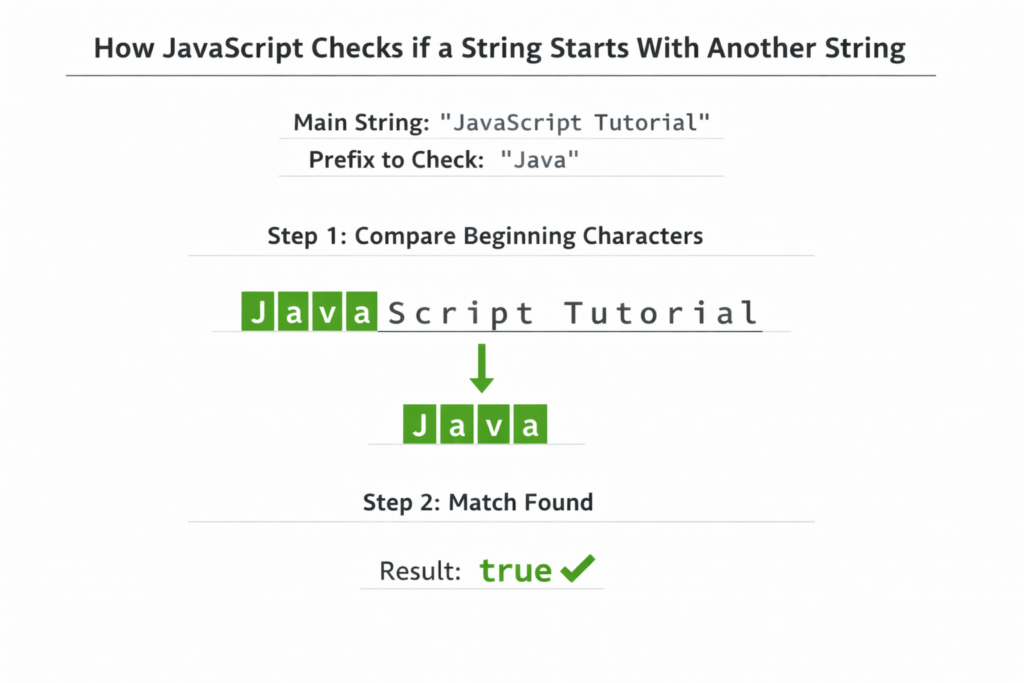
let text = "JavaScript Tutorial";

console.log(text.startsWith("Java"));
Output
true
Why Use startsWith()
- Modern and readable syntax
- Optimized for prefix checking
- Native JavaScript method (ES6+)
- Better performance and clarity than alternatives
Check if String Starts with String Javascript Method 2 – Using indexOf()
Example
let text = "JavaScript Tutorial";

if (text.indexOf("Java") === 0) {
    console.log("String starts with Java");
}
Output
String starts with Java
When to Use
- Supporting older browsers (e.g., legacy environments without ES6)
- Maintaining backward compatibility in existing codebases
Check if String Starts with String Javascript Method 3 – Using Regular Expressions (Regex)
Example
let text = "JavaScript Tutorial";

let result = /^Java/.test(text);

console.log(result);
Output
true
When to Use
- Pattern-based matching
- Case-insensitive validation
- Advanced or complex string rules
Case-Insensitive Check
Example
let text = "javascript tutorial";

console.log(
    text.toLowerCase().startsWith("javascript")
);
Output
true
Alternative (Regex Case-Insensitive Flag)
let text = "javascript tutorial";

let result = /^javascript/i.test(text);

console.log(result);
Check Multiple Prefixes
Example
let fileName = "image.png";

let result =
    fileName.startsWith("image") ||
    fileName.startsWith("photo");

console.log(result);
Output
true
Best Practice to Check if String Starts with String Javascript
When checking many prefixes, use an array with .some():
let fileName = "image.png";

let prefixes = ["image", "photo", "img"];

let result = prefixes.some(prefix =>
    fileName.startsWith(prefix)
);

console.log(result);
Why this matters:
- Cleaner code
- Easier to maintain
- Scales well when prefixes increase
Practical Uses of Checking String Start in JavaScript
- Spotify Playlist Filtering
Spotify often needs to filter through vast lists of songs. To quickly find whether a song belongs to a particular genre, they might check if a song’s title or artist starts with a certain string. For instance, to find all tracks starting with “Love”, they could use JavaScript’sstartsWith()method.
This output helps Spotify dynamically generate user playlists containing tracks starting with “Love”.
      const songTitle = "Love Me Do";
      const searchTerm = "Love";
      console.log(songTitle.startsWith(searchTerm)); // Output: true
- Amazon Product Catalog
Amazon uses string checks to categorically organize and filter products. For example, if someone searches for “Apple”, Amazon might check if product titles start with “Apple” to display relevant results quicker.
This code ensures quick identification of all products starting with “Apple”, enhancing customer search experiences.
      const productTitle = "Apple iPhone 13";
      const searchQuery = "Apple";
      console.log(productTitle.startsWith(searchQuery)); // Output: true
- Netflix Content Categorization
To efficiently organize shows and movies, Netflix may use string checks to see if a title starts with certain keywords. It helps in categorizing items under tags like “Thriller” or “Comedy”.
This application aids Netflix in grouping content appropriately under the “Thriller” tag, facilitating genre-specific browsing for users.
      const movieTitle = "Thriller Nights";
      const genreTag = "Thriller";
      console.log(movieTitle.startsWith(genreTag)); // Output: true
Check if String Starts with String Javascript- Interview Questions Overview
Jumping into the world of JavaScript can be quite thrilling, especially when you’re exploring different ways to manipulate strings. One commonly asked subject is checking if a string starts with another string. As you dive in, you might find some questions popping up. I’ve skimmed through various forums and discussion boards to bring you some intriguing and unique queries that haven’t been extensively covered elsewhere, just for you! Let’s explore them.
- How can I check if a string starts with another string without using String’s startsWith method?
You can achieve this using theslicemethod or regular expressions. Here’s a simple example usingslice:
let string = 'hello world';
let startsWith = 'hello';
console.log(string.slice(0, startsWith.length) === startsWith); // true - Why does my string comparison return false even when the string clearly starts just like in the example?
Pay attention to leading, trailing spaces, or even case sensitivity. Make sure you trim your strings and match cases if necessary. - Is there a performance difference between using slice versus startsWith?
The performance difference is negligible for regular string operations, butslicemight be marginally slower for large datasets due to the extra operations involved. - Can I implement the startsWith check for multi-byte characters, such as emojis?
Yes, you can! Most methods likestartsWith,slice, and regex will handle multi-byte characters effectively since JavaScript supports UTF-16 encoding. - How can I check if a string starts with multiple potential prefixes?
You can loop through the list of potential start strings or use a regular expression to match any of them at the start. Here’s an example:
let string = 'happy coding';
let candidates = ['happy', 'sad'];
console.log(candidates.some(candidate => string.startsWith(candidate))); // true - Does using `startsWith` improve code readability compared to other methods? What’s a real-life coding scenario?
Absolutely, thestartsWithmethod is more concise and improves readability. In a project where clarity is key, such as when defining URL paths or command structures,startsWithclearly communicates the intention. - Can the startsWith method be used for case-insensitive string checks?
No, JavaScript’sstartsWithis case-sensitive by default. You can convert strings to the same case before checking:
let string = 'JavaScript is fun';
let prefix = 'javascript';
console.log(string.toLowerCase().startsWith(prefix.toLowerCase())); // true - Is it possible to make startsWith work for arrays or objects?
WhilestartsWithis intended for strings, you can achieve similar functionality for arrays by checking the first element(s) with array indices. For objects, check key-value pairs where keys could match the starting string criteria.
Discover our AI-powered js online compiler, where you can instantly write, run, and test your code. Our intelligent compiler simplifies your coding experience, offering real-time suggestions and debugging tips, streamlining your journey from coding novice to expert with ease. Explore it today and boost your coding skills!
Conclusion
Completing ‘Check if String Starts with String Javascript’ can enhance your coding skills and boost your confidence in handling string-related tasks. Why not give it a try and experience the satisfaction for yourself? For more programming insights, visit Newtum and explore various languages.
Edited and Compiled by
This article was compiled and edited by @rasikadeshpande, who has over 4 years of experience in writing. She’s passionate about helping beginners understand technical topics in a more interactive way.
About The Author