Encode String to Base64 JavaScript is a nifty skill every coder should have in their toolkit. Ever struggled with safely transporting data or ensuring it displays correctly across platforms? Mastering this can solve those issues effortlessly. Curious? Dive in to understand why and how to practically use this in your projects.
How Do You Encode a String to Base64 in JavaScript?
Base64 encoding is a method used to convert text or binary data into a string format that can be safely transmitted over the internet. Instead of sending raw binary data, Base64 converts it into readable ASCII characters, making it easier to store or transfer data between systems.
Developers commonly use Base64 when working with APIs, authentication tokens, file uploads, and data transfer. It ensures that data remains intact when sent through systems that only support text-based formats.
You may need to encode strings to Base64 when:
- Sending credentials in HTTP headers
- Embedding images in HTML or CSS
- Transferring files through APIs
- Storing binary data in JSON
JavaScript provides different ways to perform Base64 encoding depending on the environment:
- Browser → Use
btoa() - Node.js → Use
Buffer
Understanding the difference between these environments helps prevent common errors during encoding.
What Is Base64 Encoding in JavaScript?
Base64 encoding in JavaScript is the process of converting data into a text-based format using a set of 64 characters. These characters include uppercase letters, lowercase letters, numbers, and symbols like + and /.
In simple terms:
- Encoding converts readable text into Base64 format
- Decoding converts Base64 data back into the original text
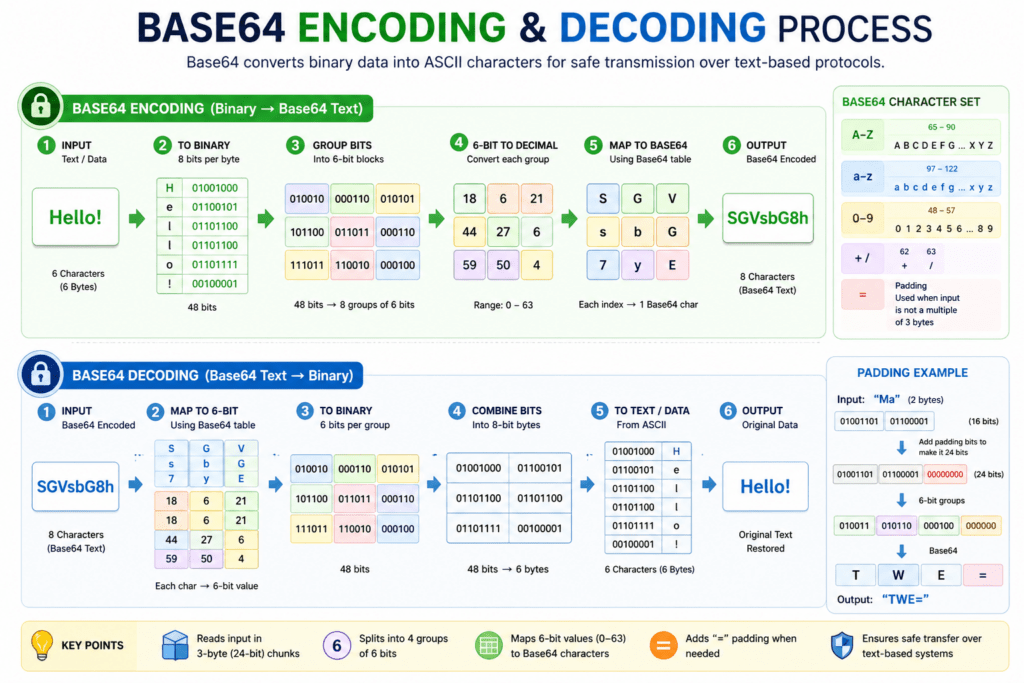
ASCII and Binary Conversion
Computers store data in binary format (0s and 1s). Base64 encoding groups binary data into 6-bit chunks and maps them to ASCII characters. This transformation allows binary data to be safely transmitted through text-based systems such as emails, APIs, and web forms.
Data Representation
Base64 does not compress or encrypt data. Instead, it changes how the data is represented so it can be handled by systems that expect text input.
Real-World Uses of Base64
Developers use Base64 encoding in many practical scenarios:
- Authentication Tokens
Used in HTTP Basic Authentication headers. - API Communication
Helps transmit binary or structured data safely. - Image Encoding
Allows embedding images directly into HTML or CSS. - File Transfer
Used when sending files through JSON or web services.
How to Encode a String to Base64 in JavaScript (Browser)
Method 1 – Using btoa()
The btoa() function is a built-in JavaScript method available in web browsers. It converts a string into Base64 format quickly and efficiently.
Syntax
btoa(string)
Example Code
const str = "Hello World";
const encoded = btoa(str);

console.log(encoded);
Output
SGVsbG8gV29ybGQ=
Explanation
btoa()takes a string as input- It converts the string into Base64 format
- The encoded result is returned as a new string
This method works in all modern browsers.
How to Encode a String to Base64 in Node.js
Method 2 -Using Buffer
In Node.js, Base64 encoding is typically done using the Buffer class. Unlike browsers, Node.js does not support the btoa() function by default.
Why btoa() Doesn’t Work in Node.js
btoa() is part of the browser’s Web API, not the Node.js runtime environment. Node.js uses Buffer to handle binary data operations.
Encoding Process
The process involves:
- Creating a buffer from the string
- Converting the buffer into Base64 format
Example Code
const str = "Hello World";

const encoded = Buffer
  .from(str)
  .toString("base64");

console.log(encoded);
Output
SGVsbG8gV29ybGQ=
Explanation
Buffer.from()converts the string into binary data.toString("base64")converts the binary data into Base64 format
This is the standard method for Base64 encoding in Node.js applications.
How to Encode Unicode Strings to Base64 in JavaScript
Unicode characters such as emojis or non-English text can cause errors when using btoa(). This happens because btoa() only supports ASCII characters.
Why Unicode Causes Errors
Unicode characters require more than one byte to represent, while btoa() expects single-byte ASCII characters.
UTF-8 Handling
To safely encode Unicode strings, the string must first be converted into UTF-8 format.
Modern Solution
Use encodeURIComponent() before calling btoa().
Example Code
const str = "Hello 😊";

const encoded = btoa(
  encodeURIComponent(str)
);

console.log(encoded);
This approach ensures compatibility with Unicode characters.
Base64 Encoding vs Decoding in JavaScript
Base64 operations typically involve two processes:
- Encoding data into Base64
- Decoding Base64 back into the original data
Encoding
String → Base64
Decoding
Base64 → String
Quick Comparison Table
| Operation | Browser Method | Node.js Method | Purpose |
|---|---|---|---|
| Encode | btoa(string) | Buffer.from(string).toString("base64") | Convert text to Base64 |
| Decode | atob(base64) | Buffer.from(base64, "base64").toString("utf-8") | Convert Base64 to text |
| Unicode Support | Requires encoding step | Built-in support | Handle non-ASCII text |
| Environment | Browser | Server-side | Platform usage |
Common Errors When Encoding Base64 in JavaScript
Even though Base64 encoding is straightforward, developers frequently encounter a few predictable issues. Understanding these errors helps prevent bugs in production systems and improves reliability when handling data.
1. Unicode Character Error
One of the most common problems occurs when encoding strings that contain Unicode characters such as emojis or non-English text.
Why it happens:
The btoa() function only supports ASCII characters. Unicode characters require multi-byte encoding, which causes runtime errors.
Typical Error Message
InvalidCharacterError: The string to be encoded contains characters outside of the Latin1 range
Solution
Convert the string to UTF-8 before encoding.
const str = "Hello 😊";

const encoded = btoa(
  encodeURIComponent(str)
);

console.log(encoded);
Key takeaway:
Always handle UTF-8 encoding when working with international text or emojis.
2. Using btoa() in Node.js
Another frequent mistake is attempting to use the browser-specific btoa() function in a Node.js environment.
Why it happens:btoa() is part of the browser Web API and is not available in Node.js by default.
Incorrect Code
const encoded = btoa("Hello");
Correct Solution
Use the Buffer class instead.
const encoded = Buffer
  .from("Hello")
  .toString("base64");
Key takeaway:
Use:
btoa()→ BrowserBuffer→ Node.js
3. Invalid Base64 String
Errors can occur when decoding malformed or incomplete Base64 data.
Common Causes
- Corrupted data during transmission
- Missing padding characters (
=) - Manual string modification
- Incorrect encoding format
Example Problem
atob("Invalid_Base64!");
This will throw an error because the string is not valid Base64.
Best Practice
Validate input before decoding, especially when receiving data from external sources such as APIs or user input.
4. Encoding Large Files
Encoding very large files into Base64 can lead to performance and memory issues.
Why it happens
Base64 increases data size by approximately:
33%
This means:
- Larger memory usage
- Slower processing
- Increased network bandwidth
Example
Original file: 3 MB
Base64 encoded: ~4 MB
Recommended Approach
For large files:
- Use streaming instead of full in-memory encoding
- Consider file uploads using binary formats
- Avoid Base64 when performance is critical
Key takeaway:
Base64 is best suited for small to medium-sized data payloads.
When Should You Use Base64 Encoding?
Base64 encoding is useful when systems require data to be transmitted as plain text while preserving the original binary content. It is widely used in web development, APIs, and data exchange workflows.
Here are practical scenarios where Base64 is appropriate.
Sending Data in APIs
APIs often require data to be transmitted in text format. Base64 ensures binary data can be safely included in JSON or HTTP requests.
Example Use Cases
- File uploads via REST APIs
- Image transmission
- Secure token exchange
Storing Binary Data in JSON
JSON only supports text values. Base64 allows binary data such as images or documents to be stored as strings.
Example
{
  "fileName": "report.pdf",
  "fileData": "JVBERi0xLjQKJc..."
}
Why it matters
This approach ensures compatibility with systems that rely on JSON-based communication.
Embedding Images in HTML
Base64 enables images to be embedded directly into HTML or CSS without requiring separate file requests.
Example
<img src="data:image/png;base64,iVBORw0KGgoAAAANSUhEUg..." />
Benefits
- Reduces HTTP requests
- Simplifies asset delivery
- Useful for small icons or logos
Authentication Headers
Base64 is commonly used to encode credentials in HTTP Basic Authentication.
Example Header
Authorization: Basic dXNlcm5hbWU6cGFzc3dvcmQ=
Important Note
Base64 is not encryption. It only encodes data for transport.
JavaScript Base64 Encoding Cheat Sheet
This quick reference summarizes the most commonly used Base64 operations in JavaScript.
Browser — Encode
btoa(string)
Node.js — Encode
Buffer.from(string).toString("base64")
Browser — Decode
atob(base64)
Node.js — Decode
Buffer.from(base64, "base64").toString("utf-8")
Quick Memory Rule for Developers
Browser → btoa() / atob()
Node.js → Buffer
This distinction prevents the majority of Base64-related runtime errors in JavaScript applications.
Real-Life Uses of Encoding Strings to Base64 in JavaScript
Sure thing! Here’s a list of practical scenarios where companies might use ‘Encode String to Base64 JavaScript’. These examples show how Base64 encoding is applied through JavaScript, complete with code snippets and the output.
- Secure Data Transmission:
Companies like Dropbox use Base64 encoding to securely transmit data over the web. Encoding sensitive information like tokens or credentials ensures they’re not easily readable during transmission.
Base64 encoding converts the string into a safe ASCII string which doesn’t contain special characters and therefore can be transmitted over the internet securely.
    const exampleString = "mySecureKey;
    const encodedString = btoa(exampleString);
    console.log(encodedString); // Output: "bXlTZWN1cmVLZXk="
- Image Embedding in HTML:
Websites like Pinterest use Base64 encoding to embed small-sized images directly within HTML or CSS files to reduce HTTP requests.
The encoded string is embedded directly in the HTML, making the page load faster since additional image requests are avoided.
    //Base64 of a sample image string
    const base64Image = "data:image/png;base64,iVBORw0KGgoAAAANSUhEUg...";
    document.getElementById("image").src = base64Image;
- Storing Data in Local Storage:
Twitter might use Base64 to store stringified and encoded user data locally without exposing it in a readable format.
When you retrieve this stored data, you’ll need to decode it, ensuring it’s kept safe and optimised during storage.
    const userData = "username=JaneDoe;cookieConsent=true";
    const encodedData = btoa(userData);
    localStorage.setItem("savedUser", encodedData);
These scenarios highlight how Base64 encoding provides both security and optimisation for real-world applications.
Encode String to Base64 JavaScript Queries
- How do you encode a string to Base64 using JavaScript without using any library?
You can use the built-inatob()andbtoa()functions to handle Base64 encoding and decoding. Here’s a quick example:
let string = "Hello World!";
let encodedString = btoa(string);
console.log(encodedString); // Outputs: "SGVsbG8gV29ybGQh" - Can Base64 encoding be reversed, and if so, how?
Yes, it can be reversed using theatob()function, like this:let encodedString = "SGVsbG8gV29ybGQh";
let decodedString = atob(encodedString);
console.log(decodedString); // Outputs: "Hello World!" - What are some real-world use cases for Base64 encoding?
Base64 encoding is handy for when you need to encode binary data, like images or files, to send via text-based protocols that only parse ASCII characters, like JSON or XML. - Does using Base64 add any security to my data?
Absolutely not. Base64 is a form of data representation, not encryption or hashing. It’s easy to decode, offering no security by itself. - Are there any limitations to using Base64 encoding in JavaScript?
The primary limitation is that you can only encode ASCII strings, and the output string size is roughly 1.33 times the input string size, so it’s not space-efficient for large data. - How can Base64 encoding be used in web development?
In web development, Base64 encoding is commonly used in data URIs to embed images directly in HTML/CSS files, reducing the number of HTTP requests. - Can I use Base64 encoding for UTF-8 strings in JavaScript?
Yes, but you must first convert UTF-8 to binary usingTextEncoderbefore encoding, as direct Base64 encoding only supports ASCII. - What’s the quickest method to decode a Base64 string in a Node.js environment?
You can use Buffer’s built-in methods like so:
let encodedString = "SGVsbG8gV29ybGQh";
let decodedString = Buffer.from(encodedString, 'base64').toString('utf-8');
console.log(decodedString); // Outputs: "Hello World!"
Discover our AI-powered js online compiler, where you can instantly write, run, and test your code. Our intelligent compiler simplifies your coding experience, offering real-time suggestions and debugging tips, streamlining your journey from coding novice to expert with ease. Explore it today and boost your coding skills!
Conclusion
“Encode String to Base64 JavaScript” offers an insightful glimpse into transforming data securely. By mastering this skill, you’ll boost your coding repertoire, gaining confidence to tackle similar challenges. Why not give it a go? Discover more about various programming languages like Java and Python through Newtum and broaden your coding horizons.
Edited and Compiled by
This article was compiled and edited by @rasikadeshpande, who has over 4 years of experience in writing. She’s passionate about helping beginners understand technical topics in a more interactive way.
About The Author