AI coding assistants are everywhere now – GitHub Copilot, Claude, ChatGPT, Gemini. Every developer has at least tried one. Most developers have also experienced the same frustration: the AI writes something, but it’s not quite right. It ignores edge cases, picks the wrong language, returns boilerplate noise, or produces code you’d never actually ship.
The tool isn’t broken. The prompt is. That’s where prompt engineering for developers comes in – and getting it right is the difference between a 20-second win and a 20-minute debugging session.
This guide covers the core principles, practical patterns, and common mistakes of prompt engineering for developers who want consistently better code output from any AI model. No Python libraries, no production pipelines – just clear, reusable techniques you can apply starting today.
What Is Prompt Engineering for Developers?
At its core, prompt engineering for developers is the practice of writing instructions for AI models that reliably produce high-quality, usable code. Think of it less like talking to a search engine and more like pair-programming with a very capable but context-blind colleague. The AI doesn’t know your codebase, your team’s style guide, your framework version, or whether you’re writing a hobby script or a security-critical service. Your prompt is the entire briefing.
Prompt engineering for developers is distinct from general prompt engineering because code has hard requirements that prose doesn’t. A blog post with a minor inaccuracy is annoying. A function with a subtle off-by-one error ships to production, fails silently, and wakes you up at 3 a.m.
Unlike general prompt tutorials that focus on creative writing or summarization, prompt engineering for developers must account for: language and version specifics, existing context (functions, types, APIs), output format constraints, error handling expectations, and test coverage.
Why Vague Prompts Produce Vague Code
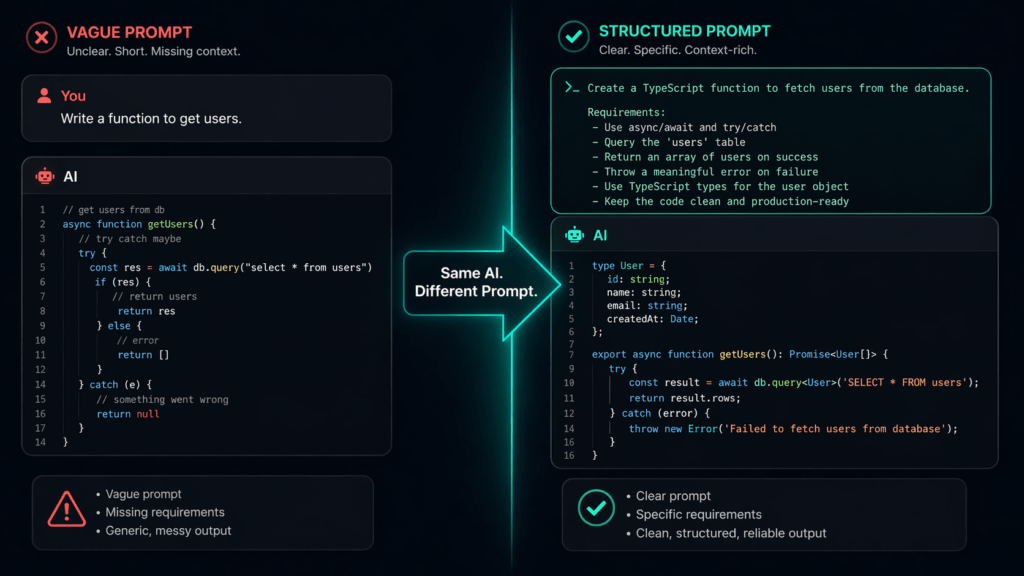
Here is one of the most instructive examples in prompt engineering for developers. Compare these two prompts sent to any modern AI coding assistant:
| Prompt Type | The Prompt | Likely Result |
|---|---|---|
| ❌ Vague | “Write a function to sort users.” | Alphabetical sort on a generic array. No types, no edge cases, probably JavaScript with no null handling. |
| ✅ Specific | “Write a TypeScript function that sorts an array of User objects (interface: id: number, name: string, createdAt: Date) by createdAt descending. Return a new array; do not mutate the original. Handle empty arrays gracefully.” | Typed, immutable, edge-case-aware function you can paste directly. |
The AI model isn’t lazy – it’s filling gaps with its best guess. When you practice prompt engineering for developers, your job is to eliminate the guesses.
The Anatomy of a Developer Prompt
The best prompt engineering for developers follows a consistent internal structure, even when it’s written as flowing natural language. Think of every solid developer prompt as having five components:
1. Role or Context
Tell the AI who it is or what context it’s operating in. "You are a senior backend developer working with Node.js 20 and Express." This narrows the vocabulary, patterns, and style the model draws from.
2. Task Definition
Be explicit about what you want. Not “make a login function” — but “write an async function that accepts email and password, validates both are non-empty strings, queries a PostgreSQL users table using parameterized queries, and returns a JWT on success.”
3. Constraints & Requirements
This is the most underused lever in prompt engineering for developers. List what the code must and must not do: immutability requirements, library restrictions ("do not use lodash"), error handling style ("throw a custom AppError, not a generic Error"), performance considerations, and any existing interfaces to match.
4. Output Format
Specify how the AI should structure its response. Do you want just the function? The function plus a test? The function with inline JSDoc comments? Saying "Return only the function body with no explanation" saves you from wading through paragraphs of preamble.
5. Examples (Optional but Powerful)
Few-shot prompting — giving the AI one or two examples of the pattern you want — is one of the highest-leverage moves in prompt engineering for developers. Even one example of your existing code style tells the model more than three paragraphs of description.
💡 Pro Tip
When working in a large codebase, paste a representative existing function before your request. The model will mirror its naming conventions, error handling style, and structure automatically.
5 Prompt Patterns Every Developer Should Know
These are the repeatable, tested patterns that make prompt engineering for developers genuinely systematic rather than hit-or-miss.
Pattern 1 – The Spec Prompt
Write the prompt like a mini technical spec. Include inputs, outputs, types, behavior, and constraints in one block.
Write a Go function `MergeMaps` that:
- Accepts two map[string]interface{} arguments
- Returns a new map (does not mutate either input)
- If a key exists in both maps, the second map's value wins
- Keys with nil values in either map should be excluded from the result
- Include a brief comment above the function signature
Pattern 2 – The Refactor Prompt
Paste the existing code, then describe exactly what to change and why.
Refactor the following JavaScript function to:
1. Use async/await instead of .then().catch() chains
2. Add early return guards for invalid inputs
3. Replace the inline magic numbers with named constants
[paste your code here]
Do not change the function signature or return type.
Pattern 3 – The Debug Prompt
The most important rule in prompt engineering for developers for debugging: include the error, the code, and the expected behavior together.
The following Rust function compiles but panics at runtime:
[paste code]
Error: “index out of bounds: the len is 3 but the index is 3” Expected: It should return None when the index is out of range, not panic. Fix the function and explain what caused the panic in one sentence.
Pattern 4 – The Test-First Prompt
Ask the AI to write tests before or alongside code. This forces the model to think about edge cases before generating the implementation.
Write Jest unit tests for a function called `parseCurrency(input: string): number`.
Cover: valid inputs like "$1,234.56", negative values "-$99.00", zero "$0",
and invalid inputs like null, empty string, and "abc".
Use describe/it blocks. After the tests, write the implementation that passes them.
Pattern 5 – The Constraint Inversion Prompt
Tell the AI explicitly what not to do. Negative constraints are one of the most underused tools in prompt engineering for developers.
Write a Python function to deduplicate a list of dictionaries by a given key.
Do NOT use pandas. Do NOT use any third-party libraries.
Do NOT sort the result. Preserve original order of first occurrences only.
Common Mistakes in Prompt Engineering for Developers
Even developers who understand prompt engineering for developers in theory make these mistakes in practice.
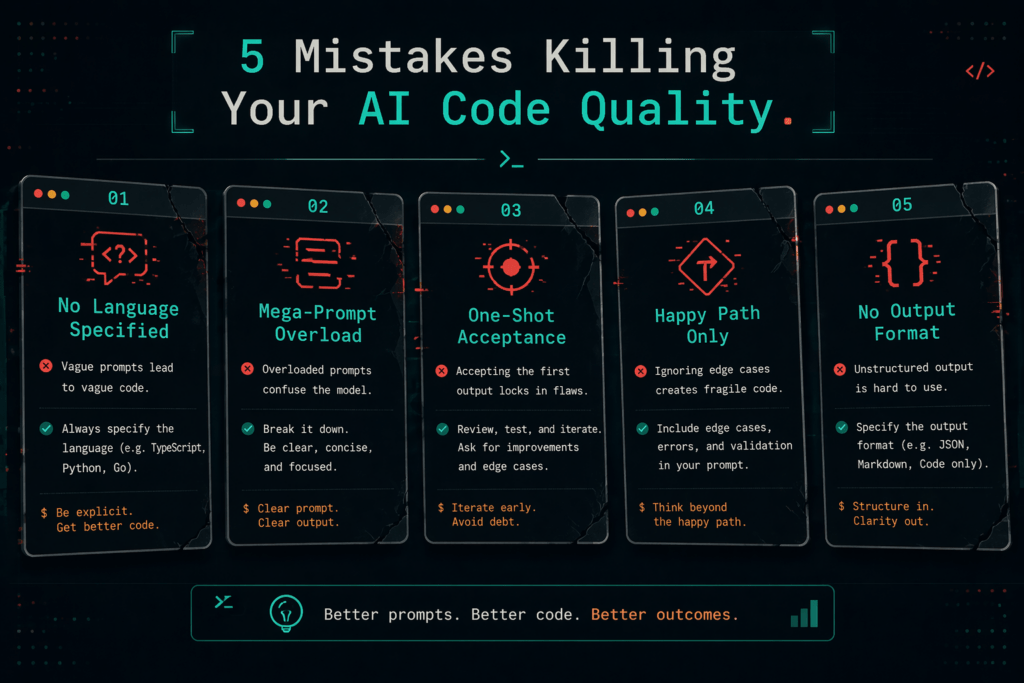
Mistake 1 -Omitting the Language or Runtime Version
"Write a class for user authentication" could mean PHP 5, Java 17, Python 3.12, or Ruby 3.3. They have completely different idioms. Always include language and version. This single habit alone dramatically improves the quality of output in prompt engineering for developers.
Mistake 2 – Asking Too Many Things at Once
“Write the function, add tests, document it, refactor it to be more performant, and add logging.” Break compound tasks into sequential prompts. The model’s coherence degrades with scope. A focused sequence beats a sprawling mega-prompt.
Mistake 3 – Accepting the First Output
Prompt engineering for developers is inherently iterative. The first response is a draft. Reply with targeted corrections: “The null check is missing for the userId parameter” or “Use a switch statement instead of chained if-else.” Treat each exchange as a code review.
Mistake 4 – Not Specifying Error Handling
AI models default to happy-path code. If you don’t mention errors, you’ll get none. Always state your error handling strategy: exceptions, result types, error codes, or logging expectations.
⚠️ Warning
Never ship AI-generated code without review, regardless of how precise your prompt was. Prompt engineering for developers improves output quality – it does not replace code review or testing.
Prompt Engineering Across Different Languages & Tools
One strength of prompt engineering for developers is that the principles are language-agnostic, but the application differs by ecosystem. Here’s how to adapt:
| Language / Stack | Key Prompt Adjustments |
|---|---|
| TypeScript / JS | Specify strict mode, interface shapes, whether you use ESM or CJS, and whether async code should use Promises or async/await. |
| Rust | Mention ownership expectations, whether to return Result or panic, and any lifetime constraints. Rust prompts benefit most from the Spec Pattern. |
| SQL | Always name the database engine (PostgreSQL, MySQL, SQLite). Include schema snippets. Specify whether CTEs are acceptable and whether to optimize for readability or performance. |
| Shell / Bash | Specify the target shell (bash vs zsh vs sh), OS, and whether the script should be POSIX-compliant. Include whether stderr handling is needed. |
| GitHub Copilot | Since Copilot reads your active file, good prompt engineering for developers means writing a detailed comment block above the cursor before triggering suggestions. |
| Claude / ChatGPT | Use system-style framing (“You are working on a React 18 app that uses Zustand for state management”) at the start of the conversation and maintain it throughout. |
Iteration: How to Refine Prompts Like a Pro
The best practitioners of prompt engineering for developers treat prompts as living documents, not one-shot requests. Here is a simple iteration loop that works across all AI tools:
- Step 1 – Draft a specific prompt using the anatomy from Section 3. Run it once and assess the output against your mental spec.
- Step 2 – Identify the failure mode. Is it the wrong language feature? Missing error handling? Wrong output format? Name the specific problem before replying.
- Step 3 – Correct surgically. Don’t rewrite the entire prompt. Reply with a targeted correction: “The function uses a for loop — rewrite it as a reduce instead” or “Add a check: if items is null, return an empty array immediately.”
- Step 4 – Save winning prompts. This is where prompt engineering for developers becomes a compounding skill. Keep a personal library of prompt patterns that reliably produce good results for your stack. A simple markdown file or Notion doc is enough.
📌 Note
The goal of iterating in prompt engineering for developers isn’t to write a perfect prompt on the first try — it’s to converge on a great result in the fewest exchanges possible.
Over time, your prompt library becomes one of your most valuable personal developer assets. Senior engineers who master prompt engineering for developers consistently report that their personal prompt templates cut first-draft iteration time by more than half.
Quick-Reference Cheatsheet
Use this as your daily reference for prompt engineering for developers. Print it, paste it in your IDE notes, or keep it in a snippet manager.
✅ ALWAYS include:
   - Language + version (e.g., "TypeScript 5.3 with strict: true")
   - Input/output types or shapes
   - Error handling expectations
   - What NOT to use (libraries, patterns, mutations)
   - Output format ("function only", "with tests", "with JSDoc")

✅ POWER MOVES:
   - Paste an existing function as a style reference
   - Ask for tests first, then implementation
   - Use negative constraints ("do not use X")
   - End with: "Explain any non-obvious decisions in one sentence each"

❌ AVOID:
   - One-sentence prompts for complex tasks
   - Asking 5+ things in a single prompt
   - Accepting first output without review
   - Skipping language/framework version
   - Forgetting edge cases (null, empty, large inputs)
Conclusion: Prompting Is a Developer Skill Now
AI is not going to replace developers who understand prompt engineering for developers. It is going to replace developers who treat AI as a magic box, fire off vague requests, and wonder why the output is mediocre.
The developers who will stand out are those who treat prompt engineering for developers with the same discipline they apply to code itself: precision, iteration, constraint thinking, and continuous refinement. The patterns in this guide — Spec Prompts, Refactor Prompts, Test-First Prompts, Constraint Inversion — are not tricks. They are ways of thinking clearly about what you need before you ask for it.
Start with one pattern today. Pick the Spec Prompt. The next time you reach for an AI tool, spend 60 seconds writing a proper prompt instead of a one-liner. The difference in output will be immediate and obvious.
Prompt engineering for developers is a skill with real, measurable returns. Build it deliberately, maintain a prompt library, and review AI output the way you review code. That discipline is what separates the developers getting 10× value from AI tools from the ones still frustrated by mediocre suggestions.
🚀 Next Steps
Try rewriting one prompt you used this week using the Spec Pattern. Notice the difference. Then save the winning version to your personal prompt library. That’s how prompt engineering for developers compounds over time.
Visit the Newtum website for more informative blogs like this.
About The Author