You land your first junior developer role. You open your editor. A ticket arrives: “Build a REST endpoint that validates user age and returns an access token.” You open ChatGPT, type the task in, paste the code back into your file, and it works. First try.
Weeks go by. Then months. The code keeps working. But one morning, your tech lead asks a single question: “Why did you use a 256-bit key here instead of 512?” You freeze. You did not decide. The AI decided. You just copied.
This is the dependency trap, and it catches more junior developers than any technical error ever will. The solution is not to stop using AI—that would be career suicide in 2026. The solution is to learn programming with AI safely: using AI as an accelerator for your thinking, not a replacement for it. This post gives you three concrete pillars and a 30-day plan to do exactly that.
What It Really Means to Learn Programming with AI Safely
When developers talk about using AI to code faster, they almost always talk about speed how many lines are generated per hour, how many tickets closed per sprint. Nobody talks about what is quietly eroding underneath all that velocity: your ability to reason independently.
To learn programming with AI safely means building a deliberate practice where your understanding of code grows with your use of AI, not in spite of it. It means refusing to accept AI output as a black box. It means treating every generated function as a learning artifact rather than a deployable asset something to be inspected, questioned, and understood before it goes anywhere near a commit.
This post is built around three pillars -a Verification-First Learning System, deliberate Debugging Exercises, and the VAPE Critical Thinking Framework that together form a complete system for any junior developer who wants to learn programming with AI safely without sacrificing the cognitive muscle they will need for the rest of their career.
Pillar 1: The Verification-First Learning System
The most dangerous four words in a junior developer’s vocabulary are: “It runs. Ship it.”
AI-generated code runs all the time. Incorrect code runs all the time. Insecure code runs all the time. Running is not understanding.
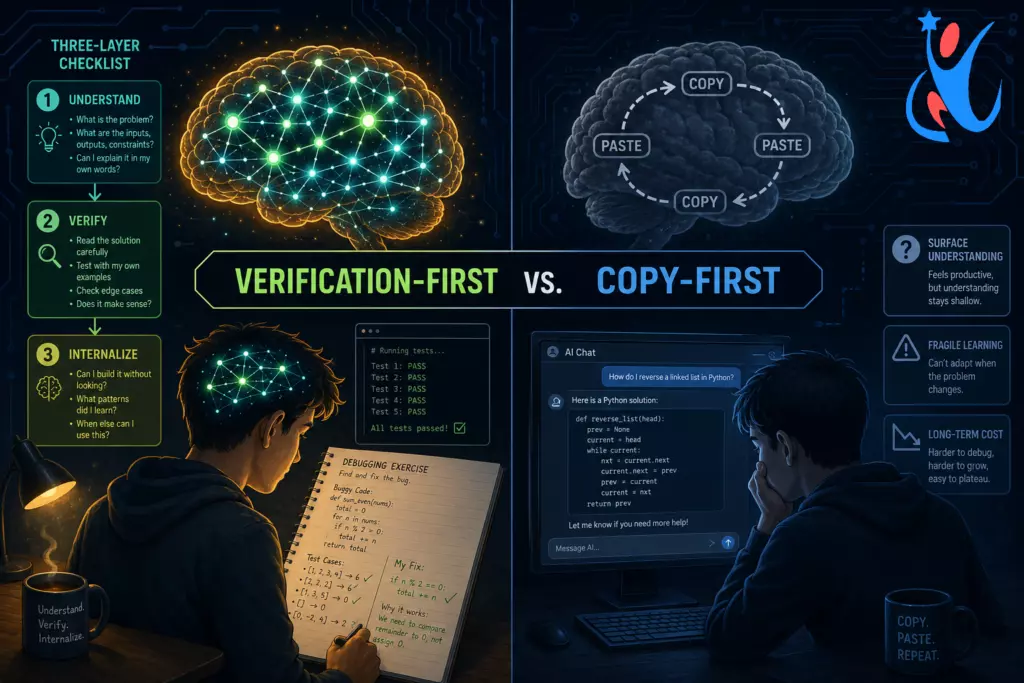
The verification-first principle states: you must understand a piece of code before you use it, not after. This sounds obvious. It is almost never practiced.
The Three-Layer Verification Checklist
Every time you receive code from an AI assistant, run it through this three-layer mental check before your fingers touch the paste shortcut.
- Layer 1 – Readability Pass (2 minutes)
Read the entire function. Not skim—read. Can you explain, in plain English, what each line does and why? If you hit a line you cannot explain, stop. Investigate that line before proceeding. - Layer 2 – Intent Check (3 minutes)
Does the code solve your actual problem, or a slightly different version of it? AI models frequently solve the problem they infer from your prompt rather than the problem you have. Write down, in one sentence, what the function is supposed to do. Then verify the code achieves exactly that outcome. - Layer 3 – Edge Case Audit (5 minutes)
Identify at least three inputs that could break or behave unexpectedly: an empty string, a null value, an extremely large number, a Unicode character in an unexpected position. Does the code handle them correctly?
python
# AI-generated function — run through verification before using

def calculate_discount(price: float, discount_pct: float) -> float:
    """Apply a percentage discount to a price."""
    return price - (price * discount_pct / 100)

# --- Your Verification Audit ---
# Layer 1: price minus (price times discount_pct divided by 100). Clear. OK.
# Layer 2: Does this match the ticket? "Apply discount to gross price." ✅

# Layer 3: Edge cases to test:
#   calculate_discount(0, 10)      → 0.0    ✅ Expected
#   calculate_discount(100, 0)     → 100.0  ✅ Expected
#   calculate_discount(100, 110)   → -10.0  ⚠️  Negative result — is this valid business logic?
#   calculate_discount(-50, 10)    → -45.0  ⚠️  Negative price — should we reject this input?
#   calculate_discount(100, -5)    → 105.0  ⚠️  A "discount" that increases price

# After this audit, you know the function has no input validation.
# That knowledge is yours now — not the AI's.
Practicing verification-first is the most direct way to learn programming with AI safely because it forces your brain to engage with every line of code, even the lines someone else- or something else- wrote. The AI produced the syntax. You own the understanding.
Pillar 2: Debugging Exercises That Build Real Reasoning Muscles
Here is a hard truth: the fastest way to weaken your debugging ability is to let AI debug everything for you.
Debugging is not about finding the error. It is about training your brain to form hypotheses, test them systematically, and revise your mental model of the code. This is the reasoning process that separates competent developers from exceptional ones. AI cannot build this process for you—it can only bypass it. And bypassing it long enough makes it disappear.
Exercise 1: The Intentional Bug Hunt
Take any function you recently wrote (or that AI generated for you, now verified). Introduce three deliberate bugs: one syntax-adjacent error, one logic error, and one off-by-one or boundary error. Set it aside. The next morning, debug it without AI assistance.
python
# Original, correct function
def find_most_frequent(items: list) -> str:
    counts = {}
    for item in items:
        counts[item] = counts.get(item, 0) + 1
    return max(counts, key=counts.get)


# Deliberately bugged version — find all three errors before reading on

def find_most_frequent_bugged(items: list) -> str:
    counts = {}
    for item in items:
        counts[item] = counts.get(item, 1) + 1   # Bug 1: starts at 1 instead of 0
    return min(counts, key=counts.get)             # Bug 2: min() instead of max()
    # Bug 3 (hidden): no guard for empty list — min({}) raises ValueError
When you find each bug without AI assistance, you are actively training the hypothesis-forming circuitry that will carry you through production incidents your AI tools will never anticipate.
Exercise 2: The Explanation-Before-Fix Protocol
When a bug appears in code you did not write, follow this rule before asking any AI to fix it: write a one-paragraph explanation of why you think the bug exists. Be wrong. It does not matter. The act of forming a hypothesis—even an incorrect one—activates the reasoning pathways that pure copy-paste suppresses.
Only after writing your hypothesis should you investigate the actual cause (with or without AI). Then compare your hypothesis to the reality. Track the accuracy of your diagnoses over time. Watch it improve.
Exercise 3: The No-AI Block Challenge
Once a week, spend a two-hour block working on a coding problem without any AI assistance. Use documentation, your language’s stdlib reference, and your own reasoning. This is not about proving AI is bad. It is about ensuring your independent reasoning muscles never atrophy. Athletes do not skip conditioning sessions just because they have good equipment.
The goal of all three exercises is the same: to learn programming with AI safely by ensuring AI accelerates your thinking rather than replacing it.
Pillar 3: The VAPE Critical Thinking Framework
Critical thinking applied to AI output is a skill, and like all skills it requires a deliberate framework until it becomes instinct. The VAPE method gives junior developers a repeatable mental protocol for evaluating any code or explanation they receive from an AI assistant.
- V – Verify the Claim
Is the syntax correct? Does the API the AI referenced actually exist and work exactly as described? Run a targeted documentation lookup for every external function or library the AI introduces. AI tools hallucinate library methods with striking regularity. Verifying before trusting is a core habit of developers who learn programming with AI safely. - A – Ask Why
Why is this approach being used rather than a simpler alternative? Ask this question to the AI itself: “Why did you choose a recursive approach here instead of an iterative one? What are the trade-offs?” Force the AI to justify its choices. If its justification contradicts documentation or your own reasoning, that is a red flag worth investigating. - P – Probe Alternatives
Explicitly prompt the AI for at least one alternative approach: “Show me a different way to solve this problem.” Then evaluate both approaches against your actual constraints, performance requirements, readability standards, team conventions, available library versions. This builds the comparative reasoning ability that is the hallmark of an experienced developer. - E – Evaluate Trade-offs
Nothing in software engineering is free. Every design decision carries trade-offs. Make a habit of asking: “What does this approach sacrifice?” Readability for performance? Flexibility for simplicity? Making trade-offs explicit converts AI output from a magic answer into a reasoned engineering decision.
python
# Demonstrating the VAPE Framework on a real AI suggestion

# AI output: Flatten a nested list using recursion
def flatten(lst):
    result = []
    for item in lst:
        if isinstance(item, list):
            result.extend(flatten(item))  # Recursive call
        else:
            result.append(item)
    return result

# V — Verify: Does this actually run?
# flatten([1, [2, [3, 4]], 5])  →  [1, 2, 3, 4, 5]  ✅

# A — Ask Why: "Why recursive?"
# AI: "More readable for arbitrary nesting depth." — plausible, but probe further.

# P — Probe Alternative: Request the iterative version.
from collections import deque
def flatten_iterative(lst):
    result = []
    queue = deque(lst)
    while queue:
        item = queue.popleft()
        if isinstance(item, list):
            queue.extendleft(reversed(item))
        else:
            result.append(item)
    return result

# E — Evaluate Trade-offs:
# Recursive:  Readable, but risks RecursionError beyond ~1000 nesting levels (Python default limit).
# Iterative:  More verbose, but handles arbitrary depth without stack overflow risk.
# Decision:   Use iterative in production where input depth is unknown or user-controlled.
This framework is not about distrusting AI. It is about using AI responsibly, which is exactly what it means to learn programming with AI safely at a professional standard.
How to Use AI as a Tutor, Not a Code Vending Machine
The most underutilized capability of any AI coding assistant is its ability to teach—not just generate. Junior developers who consistently learn programming with AI safely use AI as a Socratic tutor rather than a code dispenser.
The shift is simple. Instead of asking:
“Write a function that sorts a list of dictionaries by a nested key.”
Ask:
“I want to sort a list of dictionaries by a nested key. Before giving me the solution, walk me through the conceptual steps I would need to take. Then show me the implementation and explain every non-obvious line.”
This single prompt structure change produces dramatically different learning outcomes. You are no longer outsourcing the thinking—you are using AI to scaffold your own reasoning process.
Three Socratic Prompt Templates for Learning
For new concepts:
“I am learning [concept]. Before explaining the solution, explain why this problem is hard and what the naive approach would get wrong. Then explain the correct approach and why it works.”
For debugging:
“Here is my buggy code and the error message. Do not give me the fix immediately. Ask me two diagnostic questions that will lead me toward finding the root cause myself.”
For code review:
“Review my code for this function. Do not just list what is wrong—explain the reasoning principle behind each suggestion so I understand the rule, not just the correction.”
These templates turn every AI interaction into a teaching moment rather than a transaction. This is what it means to learn programming with AI safely: ensuring every session builds understanding, not just output volume.
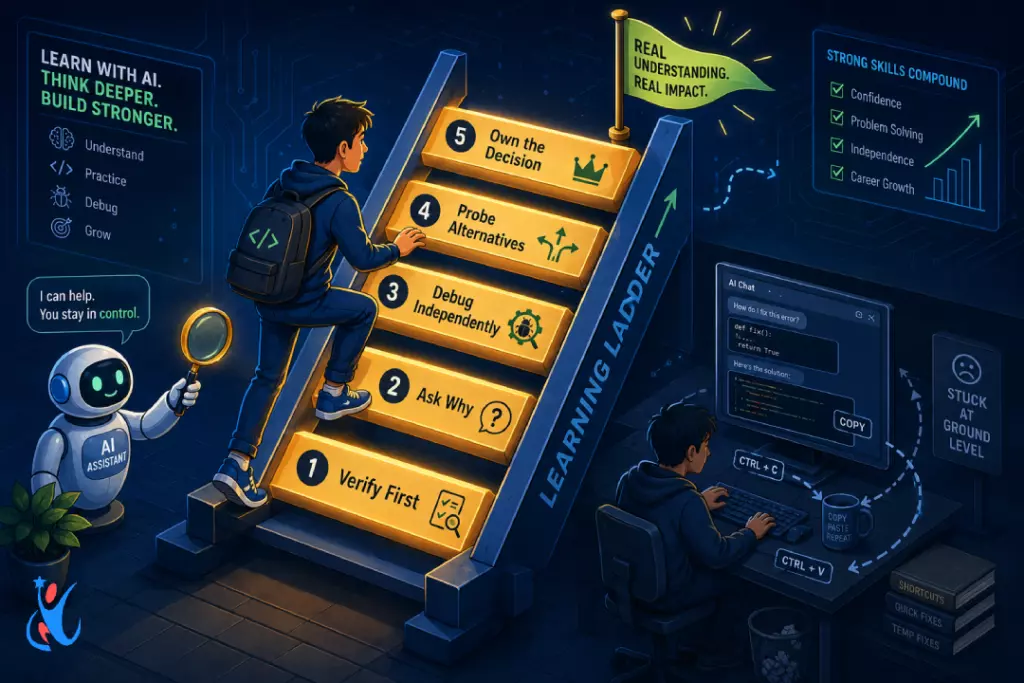
The 5 Warning Signs You Are Becoming Dependent on AI
To learn programming with AI safely, you must also recognize the early warning signs of over-reliance before they calcify into permanent skill gaps.
- Sign 1: You cannot read code without running it
If your only strategy for understanding a function is to execute it and observe the output, you have lost the ability to trace code mentally. Fix: Spend ten minutes each day doing paper-based or whiteboard code tracing. - Sign 2: You feel anxious coding without an AI tab open
This is not a personality trait—it is a trained dependency response. Fix: The No-AI Block Challenge from Pillar 2. - Sign 3: You cannot explain your own code during a review
If a reviewer asks why you used a particular pattern and your honest answer is “the AI suggested it,” you are carrying technical debt of understanding, not just code. Fix: Before every pull request, write a two-sentence justification for every non-trivial design decision. - Sign 4: You know where files live but not why they interact
Developers who understand their codebase can describe how data flows through the system. Developers who copy-paste AI output often know the file tree but cannot describe the logic map. Fix: After completing any feature, draw the data flow diagram from memory before opening the codebase. - Sign 5: You reopen AI to re-understand your own past code
If you need an AI tool to explain code you yourself wrote three weeks ago, both your documentation and your understanding have failed. Fix: Write a comment block above every non-trivial function explaining the business reason for its existence, not just its mechanics.
A 30-Day Independence Ladder for Junior Developers
The following four-week plan builds reasoning independence while keeping AI as a productivity accelerator. It is the practical implementation of everything covered above.
- Week 1 – Observation Mode
Use AI freely but run the full three-layer verification checklist on every single output before accepting it. Document what you discover in a locallearning-log.mdfile. The goal is awareness, not restriction. - Week 2 – Hypothesis Mode
Before prompting AI for any bug fix or implementation, write a short hypothesis of what the solution will involve. After receiving AI output, compare. Track how often your hypothesis aligned with the actual approach. You will be surprised how quickly your accuracy improves. - Week 3 – Socratic Mode
Replace all direct solution prompts with Socratic versions using the three templates provided above. Do not accept code without an explanation of the reasoning behind it. - Week 4 – Independence Mode
For small, isolated functions—utility helpers, input validators, simple transformers—code them independently first without any AI assistance. Use AI only to review your solution afterward, not to generate it. Note how often your solution and the AI’s review agree.
By the end of this 30-day plan, you will not use AI less. You will use it better. That is the entire goal: to learn programming with AI safely in a way that compounds your skill rather than quietly replacing it.
For Senior Developers: Creating Environments Where Juniors Learn Programming with AI Safely
Senior developers have a direct responsibility in how junior teammates develop their relationship with AI tools. The following practices help build team cultures that encourage speed without sacrificing reasoning ability.
- Require “Explain Before You Merge” code reviews
Make it a team norm that junior developers verbally explain any complex AI-generated code before it merges. Not to police AI use—to ensure that understanding transfers from the chat window to the human. - Run deliberate no-AI debugging sessions
Assign weekly debugging exercises where juniors receive a broken system with no AI assistance allowed for the first 30 minutes. This simulates the high-stakes debugging scenarios—production incidents, live client demos—where AI tools may not be available or reliable. - Design onboarding tasks that require independent reasoning
If the first ten tasks a junior developer completes can all be fully solved by prompting an AI, you have taught them that prompting is their job. Design at least three onboarding tasks that explicitly require consulting documentation and reasoning through unfamiliar code unaided. - Model think-aloud debugging in pair sessions
When senior developers narrate their own hypothesis-formation and systematic elimination process during pair programming, juniors observe that professional debugging is a structured cognitive discipline, not a feeling. This reasoning model cannot be transmitted by observing copy-paste.
The senior developer’s role is not to ban AI but to create the scaffolding within which junior developers can genuinely learn programming with AI safely and build lasting technical judgment.
Conclusion: The Smarter You vs. the Faster You
There are two directions a junior developer can go with AI tools. The first direction is pure speed: every problem goes into the prompt box, every output goes into the codebase, every sprint velocity metric goes up while every reasoning muscle quietly atrophies.
The second direction is compounded intelligence: AI handles the boilerplate, the syntax lookup, the routine pattern generation—while you handle the thinking, the verification, the judgment. The second developer is not slower. They are more valuable, more promotable, and far more resilient when AI tools fail, change, or mislead.
Learn programming with AI safely. Build the verification habit. Practice deliberate debugging. Apply the VAPE framework. Use AI as a tutor. Know the warning signs. Climb the 30-day ladder.
The goal was never to copy faster. The goal was always to think better. AI can absolutely help with that- if you let it teach you instead of letting it replace you. Learn to adapt AI with Newtum for a better change.
FAQs
Q1: Is it bad to use AI to write code as a junior developer?
No, but it becomes harmful when you use it without understanding what the code does. The key is to learn programming with AI safely by verifying, questioning, and taking full ownership of every line you ship.
Q2: How do I build problem-solving skills if AI can solve most problems for me?
Use the Socratic prompting approach from this post—ask AI to walk you through reasoning, not just hand you answers. Also, practice the No-AI Block Challenge weekly to keep your independent reasoning muscles active.
Q3: What is the verification-first principle?
It means you must understand a piece of code before you use it- not after. Read it, explain it in plain English, identify edge cases, and audit its assumptions before touching the paste shortcut.
Q4: How long does it take to recover from AI over-dependence?
The 30-day ladder in this post is designed to rebuild independent reasoning progressively. Most junior developers notice measurable improvement in code comprehension and debugging accuracy within three to four weeks of consistent practice.
Q5: Should senior developers allow juniors to use AI tools freely?
Yes, but with structured accountability. Require juniors to explain AI-generated code in reviews, run regular no-AI debugging sessions, and model think-aloud debugging so juniors can see what expert reasoning actually looks like in practice.
About The Author