Imagine this: You are assigned a ticket to build a new API endpoint. You open a tab for ChatGPT or Claude, type “Write a Node.js Express endpoint for user registration,” copy the code, paste it into your IDE, hit an error, copy the error back into the AI chat, get a fix, paste it again, break a different part of your application, and repeat.
Two hours later, you have a working endpoint, but your git diff looks like a crime scene, your understanding of the underlying logic is fuzzy, and you have completely lost your flow state.
This is the reality of random prompting. It is chaotic, reactive, and highly inefficient. For a JuniorDeveloper, relying on ad-hoc text queries turns the LLM into a digital crutch rather than an accelerator. To level up, you must stop treating AI as an all-knowing oracle and start treating it as an execution pipeline. You need to transition from frantic chat boxes to a formal AI Engineering workflow.
By designing a systematic AI Engineering workflow, you transform your daily coding tasks into reproducible, scalable, and predictable engineering processes. This comprehensive guide will show you exactly how to design, implement, and maintain a high-performance AI Engineering workflow tailored to your daily software engineering life.
What is a Personal AI Engineering Workflow?
Before diving into execution, we must define what an AI Engineering workflow actually means at an individual level.
An AI Engineering workflow is a repeatable framework that integrates Large Language Models (LLMs) directly into your software development lifecycle (SDLC) through structured task pipelines, parameterized templates, and formal documentation loops. Instead of asking open-ended questions, an automated AI Engineering workflow relies on strict input-output boundaries, contextual constraints, and programmatic execution.
[Software Development Lifecycle Task]
               │
               ▼
┌──────────────────────────────────────────────┐
│       Your AI Engineering Workflow          │
│                                              │
│  1. Task Decomposition & Pipeline Filtering  │
│  2. Context Assembly & Reusable Prompting    │
│  3. Execution & Automated Iteration          │
│  4. Knowledge Capture & System Documentation │
└──────────────────────────────────────────────┘
               │
               ▼
     [Production-Ready Code]
When you operate within an intentional AI Engineering workflow, you treat the AI as a compiler for intent. You feed it highly specific data, guide it with strict structural constraints, and evaluate its output against predetermined criteria. This rigorous AI Engineering workflow approach ensures that your code remains clean, your architectural decisions remain intentional, and your learning curve accelerates exponentially.
Core Pillar 1: Daily Workflow Design & Task Pipelines
The foundation of a personal AI Engineering workflow is task decomposition. You cannot optimize an AI Engineering workflow if you throw an entire user story at an LLM and pray for a perfect pull request. A successful AI Engineering workflow breaks down software development into discrete, pipeline-friendly stages.
1. The Tri-Phase Pipeline Model
To maximize efficiency, structure your daily AI Engineering workflow around three distinct, isolated phases:
- Phase 1: The Context Gathering & Architecture Phase: Use your AI Engineering workflow here to brainstorm system designs, analyze trade-offs between libraries, and clarify edge cases before any code is generated.
- Phase 2: The Modular Generation Phase: Execute your AI Engineering workflow to write highly targeted, granular functions, unit tests, and utility scripts based strictly on the architecture established in Phase 1.
- Phase 3: The Verification & Review Phase: Run your AI Engineering workflow as an independent code reviewer, looking for security vulnerabilities, performance bottlenecks, and adherence to style guides.
2. Guardrails and Filters
A robust AI Engineering workflow features explicit rules detailing when not to use AI. Your AI Engineering workflow should mandate manual coding for core business logic or highly proprietary algorithms, while offloading boilerplate configuration, regex patterns, data transformations, and unit test generation to the AI pipeline. This separation of concerns keeps your AI Engineering workflow efficient and secure.

Core Pillar 2: Architectural Blueprints for Reusable Prompts
The most visible part of an AI Engineering workflow is the prompt layer. Random prompting fails because it lacks structure, variables, and constraints. In a mature AI Engineering workflow, you never write a prompt from scratch; you instantiate a pre-configured, parameterized prompt template.
Every reusable template within your AI Engineering workflow should follow a strict markdown architecture:
Markdown
# SYSTEM ROLE
[Define the exact persona, technical stack, and seniority level]

# CONTEXT & OBJECTIVE
[Provide the background information, business goals, and current system state]

# INPUT VARIABLES
- Code: {{VARIABLE_CODE}}
- Tech Stack: {{VARIABLE_STACK}}
- Constraint: {{VARIABLE_CONSTRAINT}}

# CONSTRAINTS & CRITERIA
1. Do not use external libraries unless specified.
2. Return ONLY valid JSON or executable code.
3. Include inline documentation for complex logic.

# OUTPUT FORMAT
[Define the exact structure of the response, e.g., Markdown, JSON schema]
Let’s look at a concrete example. Instead of randomly prompting an LLM to debug an error, a software engineer practicing a structured AI Engineering workflow will execute a standardized Debugging Prompt Template:
The Defensive Debugging Blueprint
Markdown
# ROLE
You are an expert Principal Staff Engineer specializing in systems diagnostics and deterministic debugging across modern web stacks.

# OBJECTIVE
Analyze the provided error stack trace, cross-reference it with the source code, identify the root cause, and output a minimal, resilient fix alongside a preventative strategy.

# DATA INPUTS
- Runtime Environment: {{ENV}}
- Error Log:
```{{ERROR_LOG}}```
- Relevant Source File:
```{{SOURCE_CODE}}```

# EXECUTION CONSTRAINTS
- Do not guess or hallucinate components not visible in the source code.
- If the error stems from an architectural mismatch, clearly flag it.
- Prioritize native language fixes over third-party updates.

# REQUIRED OUTPUT FORMAT
## Root Cause Analysis
[Provide a 2-sentence explanation of why the failure occurred at the memory/runtime level]

## Resolution Code Block
```{{LANGUAGE}}
// Fixed code here
Prevention Strategy
- [Specific unit test assertion to catch this in CI/CD]
- [Linter rule or type constraint if applicable]
By storing these blueprints in your personal repository, your **AI Engineering workflow** remains completely uniform, generating predictable, high-quality answers every single time.

---

## Core Pillar 3: AI-Driven Documentation and Knowledge Management Systems

The biggest risk for a **JuniorDeveloper** using AI is the "Knowledge Leak." When you paste code, receive a fix, and immediately move on, you learn absolutely nothing. The information evaporates. A premier **AI Engineering workflow** solves this by establishing an explicit documentation and knowledge capture system.

### 1. The Continuous Markdown Ledger
Your **AI Engineering workflow** must mandate that every major architectural decision or complex debugging session is documented. Maintain a local folder of markdown files called `ai-logs/`. For every major task, log the input parameters, the structural code generated by your **AI Engineering workflow**, and the core architectural concepts learned during the process.

### 2. Automatic TIL (Today I Learned) Generation
At the end of an engineering sprint, integrate a workflow step where you feed your chat history or terminal logs back into a specialized **AI Engineering workflow** prompt to extract a clean, summarized `TIL.md` file. This ensures that the technical insights surfaced during your **AI Engineering workflow** are preserved for your long-term career growth.

### 3. The Local Snippet System
When your **AI Engineering workflow** outputs an exceptionally clean helper function or a custom script, do not let it sit buried in a git commit. Your **AI Engineering workflow** should guide you to immediately catalog that output into a structured, searchable snippet manager or a local markdown file, building a personal library of reusable assets over time.

---

## Step-by-Step Guide to Implementing Your AI Engineering Workflow

Now that you understand the pillars of a comprehensive **AI Engineering workflow**, let's build your personal workspace from the ground up. Follow this step-by-step implementation guide to integrate this **AI Engineering workflow** into your daily routine.

### Step 1: Set Up a Dedicated Configuration Repository
Do not leave your prompt templates floating around in random notepad apps. Create a private GitHub repository named `personal-ai-engineering-workflow`. Inside this directory, create the following folder structure to house your **AI Engineering workflow** assets:

```text
personal-ai-engineering-workflow/
├── templates/
│   ├── architecture-designer.md
│   ├── component-generator.md
│   ├── unit-tester.md
│   └── code-reviewer.md
├── scripts/
│   └── context-compiler.sh
└── system-prompts/
    ├── backend-engineer.json
    └── frontend-architect.json
Want to go beyond prompt engineering? Learn how AI-augmented backend developers use structured workflows to automate CRUD generation and accelerate development.
Step 2: Build an Automated Context Compiler
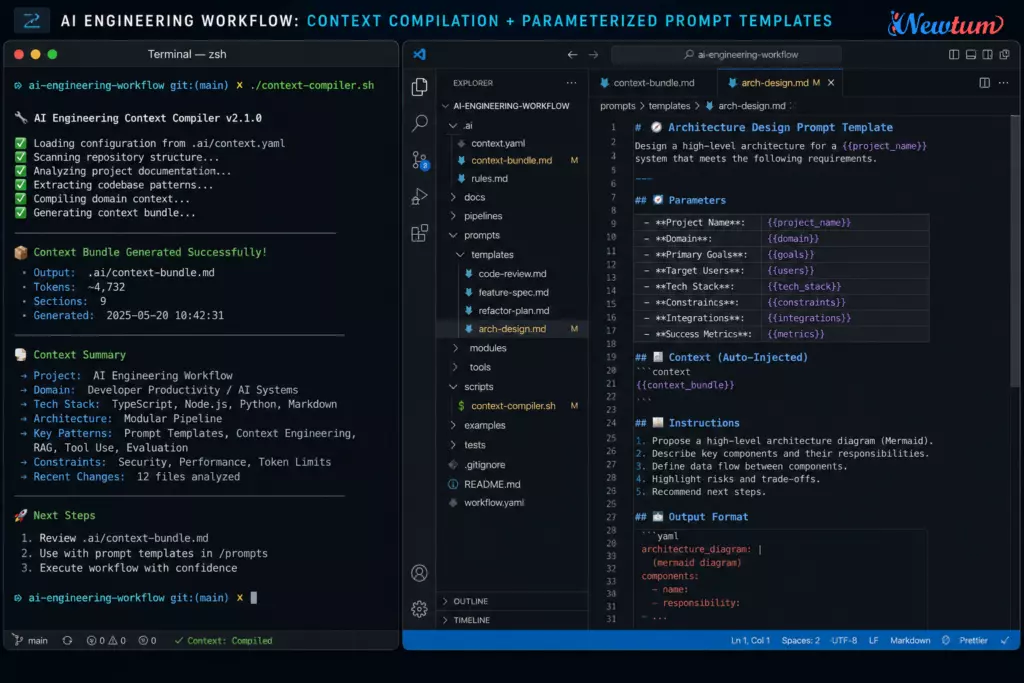
LLMs are only as good as the context you feed them. A major bottleneck in any manual AI Engineering workflow is copying and pasting files into the prompt box. To streamline your AI Engineering workflow, write a simple bash script (context-compiler.sh) that concatenates relevant project files, strips out node_modules or build artifacts, and wraps them in appropriate markdown blocks.
Here is an example script you can integrate into your AI Engineering workflow:
Bash
#!/bin/bash
# context-compiler.sh - A core component of your AI Engineering workflow

OUTPUT_FILE="ai_context.md"
echo "# PROJECT CONTEXT" > $OUTPUT_FILE
echo "Generated on: $(date)" >> $OUTPUT_FILE
echo "" >> $OUTPUT_FILE

for file in "$@"
do
    if [ -f "$file" ]; then
        echo "## File: $file" >> $OUTPUT_FILE
        echo "\`\`\`" >> $OUTPUT_FILE
        cat "$file" >> $OUTPUT_FILE
        echo "\`\`\`" >> $OUTPUT_FILE
        echo "" >> $OUTPUT_FILE
    else
        echo "Warning: File $file not found. Skipping in AI Engineering workflow context compilation."
    fi
done

echo "Context successfully compiled into $OUTPUT_FILE for your AI Engineering workflow pipeline."
By executing this script via your terminal (./context-compiler.sh src/models/User.js src/controllers/authController.js), your AI Engineering workflow instantly creates a clean context bundle ready to be parsed by your template.
Step 3: Implement IDE Custom System Prompts
Whether you are using VS Code, Cursor, or Neovim, your editor’s AI extensions allow you to define custom system prompts. Stop using the default configuration. Inject your specialized AI Engineering workflow guidelines into your editor’s settings.
Force the embedded AI agent to write clean code by anchoring it with this precise system configuration in your AI Engineering workflow:
JSON
{
  "ai.systemPrompt": "You are an elite, security-first software engineer. When generating solutions within this AI Engineering workflow, you must enforce strict typing, avoid external dependencies unless requested, write exhaustive unit tests, and never omit code sections with comments like '// TODO: implement later'. Your output must be production-grade code."
}
Step 4: Define a Strict Execution Protocol
When a new ticket is assigned to you, do not open an AI tool immediately. Run through this mandatory four-step execution protocol within your AI Engineering workflow:
- Read and Brainstorm: Manually draft your technical approach in a local markdown file.
- Context Compilation: Run your script to collect the relevant file states.
- Template Execution: Select the matching template from your AI Engineering workflow repository, fill in the variables, and run the pipeline.
- Local Validation: Take the code generated by your AI Engineering workflow, run it locally, run your tests, and verify its validity before committing.
Measuring the Success of Your AI Engineering Workflow
How do you know if your newly built AI Engineering workflow is actually working? You cannot improve what you do not measure. A successful AI Engineering workflow shifts your core engineering metrics significantly. Track these indicators to see how your AI Engineering workflow is performing:
| Performance Metric | Random Prompting Era | Structured AI Engineering Workflow Era |
| Context Switching Frequency | High (constantly moving between browser chat tabs and IDE) | Low (AI pipelines executed directly inside the IDE or terminal) |
| PR Rejection Rate | High (frequent syntax mismatches and broken architectural logic) | Very Low (code is pre-reviewed against strict system standards) |
| Time to First Commit | Delayed (wasted time trying out random prompt strings) | Accelerated (instant instantiation of prompt blueprints) |
| Knowledge Retention | Low (code works, but developer cannot explain the system logic) | High (structured markdown ledgers document the entire cycle) |
If you notice your time spent searching for random fixes dropping, and your confidence during code reviews increasing, your personal AI Engineering workflow is working effectively.
Advanced Task Pipelines: Turning Manual Loops into Code
As you grow comfortable with your personal AI Engineering workflow, you can begin automating the manual steps entirely. Instead of copying markdown text templates into your terminal, you can write lightweight python wrappers or use CLI tools to pipe your project context directly into LLM APIs.
For example, an advanced AI Engineering workflow pipe might look like this:
Bash
cat src/components/Button.js | ai-pipe --template unit-tester.md > tests/Button.test.js
This represents the ultimate evolution of a modern software engineer’s workspace. By treating prompt orchestration as an operational script, your AI Engineering workflow matches the speed, precision, and repeatability of your existing linting, testing, and compilation suites. You become a highly leveraged developer who spends less time typing syntax and more time designing resilient systems architecture.
Conclusion: Evolving from a Prompter to an AI-Augmented Engineer
The difference between a mediocre developer and an elite engineer in the age of artificial intelligence does not lie in who can copy-paste from a chat window faster. It lies in who can build a more deterministic, structured, and resilient automated environment.
Random prompting is a fragile loop that keeps you trapped in a cycle of reactive debugging and surface-level implementation. Building a comprehensive, formalized AI Engineering workflow liberates you from that trap. It forces you to think like a systems architect, to organize your technical context intentionally, to parameterize your developer prompts systematically, and to document your discoveries diligently.
Stop treating your AI extensions like a novelty search engine. Implement a dedicated AI Engineering workflow repository today, build your automated context compilation scripts, deploy strict markdown templates, and turn your daily development environment into an absolute powerhouse of engineering execution. Your code, your team, and your long-term career velocity will thank you.
Learn to adapt AI with Newtum for a better career.
FAQ’s about AI Engineering workflow
What exactly is a personal AI Engineering workflow?
An AI Engineering workflow is a predictable framework that transforms random text prompts into structured, reproducible task pipelines within your development environment.
Why is random prompting harmful to a developer’s long-term efficiency?
Random prompting creates a chaotic feedback loop of fragmented fixes that slows down software delivery and degrades the architectural integrity of your codebase.
How does a structured AI Engineering workflow save time?
It uses parameterized blueprints and context automation scripts to instantly generate accurate, production-ready code blocks without manual browser copying.
What core tool do I need to initialize my personal AI Engineering workflow?
You need a dedicated Git configuration repository to store, version control, and organize your reusable markdown prompt templates and bash scripts.
How can I track if my new AI Engineering workflow is successful?
Success is indicated by a significant drop in browser context-switching, lower code review rejection rates, and higher personal technical knowledge retention.
About The Author