The Wild West of AI spending is officially over, and if you’re preparing for your first developer job, this is the most important industry news you’ll read this year.
In May 2026, Microsoft began canceling most of its internal Claude Code licenses. The deadline? June 30, 2026. Engineers across its massive Experiences & Devices division, the team responsible for Windows, Microsoft 365, Outlook, Teams, and Surface, are being redirected toward GitHub Copilot CLI. Meanwhile, Uber’s CTO publicly admitted the company burned through its entire 2026 AI budget in just four months after deploying Claude Code to roughly 5,000 engineers, with some heavy users racking up $500 to $2,000 per month individually.
This isn’t a story about AI failing. This is the story of a new, non-negotiable skill entering every tech job description: AI cost management for developers.
What Actually Happened? (And Why It Matters More Than You Think)
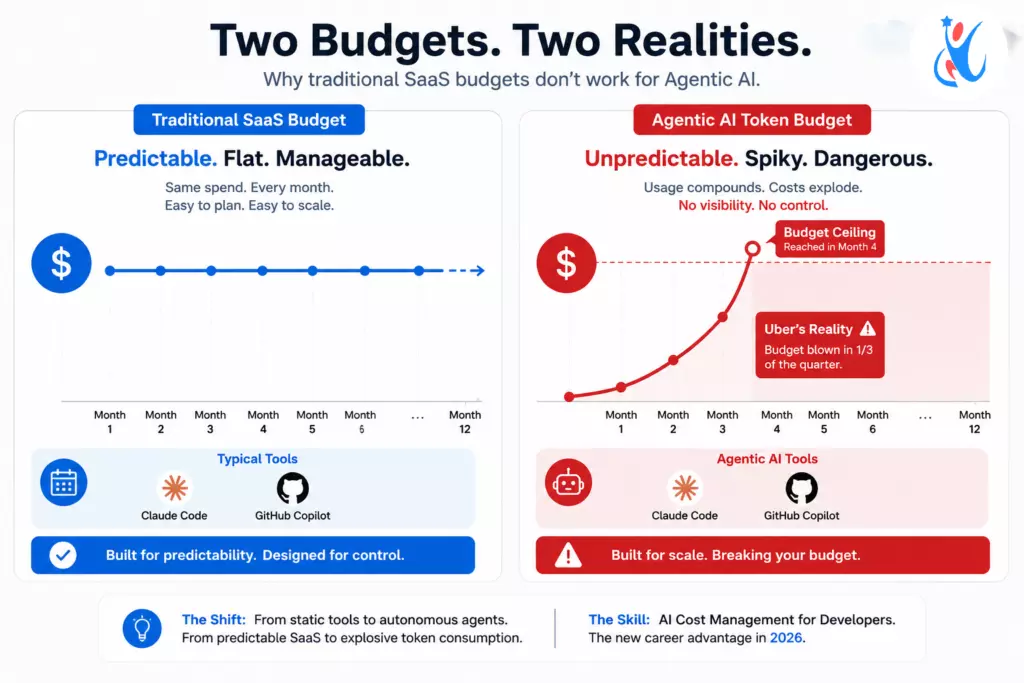
The mechanism behind this meltdown is surprisingly simple. Classic enterprise software runs on flat monthly seat licenses, predictable, easy to budget, and no surprises. Agentic AI tools like Claude Code run on token-based usage pricing. The more your background agents run, the more you pay. When developers started spinning up autonomous coding agents to fix bugs, generate boilerplate, and refactor files all at once, all day the bills became unmanageable almost overnight.
The Structural Trap: Flat-Rate vs. Consumption Billing
To understand why this happened, you have to look at the billing models. Standard tools like GitHub Copilot operate on a flat monthly fee—a company pays a fixed price per user, and developers can use it as much as they want. Tools like Claude Code, however, use consumption-based pricing. You pay for every single token. When an autonomous agent loops through thousands of lines of code in the background without human supervision, it consumes millions of tokens in minutes.
Amazon internally called this behavior “toxenmaxx.” Meta employees built an internal tracking system called “Claudeonomics.” Microsoft watched the same pattern unfold inside its own walls: enthusiastic adoption, zero financial guardrails, and a budget crisis that forced a hard reset.
A 2025 survey by Mavvrik found that 85% of companies miss their AI cost forecasts by more than 10%. Goldman Sachs has projected that agentic systems could cause a 24-fold jump in token consumption. These are not edge cases, they are the new normal.
The Era of AI-Smart Engineers Has Begun
Here’s the reframe that changes everything: companies don’t want developers who avoid AI. They want developers who use AI intelligently. The question they’re now asking in interviews isn’t “Do you use AI tools?” It’s “Do you understand what those tools cost us?”
That’s a completely different skill. And right now, most bootcamp grads and CS graduates don’t have it.
AI cost management for developers is becoming as foundational as knowing how to write clean code. Think of it like this: older generations of developers had to write memory-efficient code because RAM was expensive. Your generation has to write token-efficient code because compute is expensive. The constraint has changed; the discipline hasn’t.
3 Skills That Will Make You the Developer Every Tech Lead Wants to Hire (AI cost management for developers)
1. AI FinOps — Treating Compute Costs as an Engineering Constraint
Financial Operations for AI (AI FinOps) means making deliberate decisions about which model you use for which task. It’s not about being cheap — it’s about being precise.
In 2025, the default move was to throw everything at the most powerful model available. Claude Opus for a CSS fix. GPT-4o for renaming a variable. That approach is now a red flag in engineering interviews.
In 2026, the expectation is model arbitrage: use DeepSeek or a lightweight model for routine backend scripts, lean on GitHub Copilot for real-time autocomplete, and reserve powerful models strictly for complex architecture decisions or multi-file refactors. A junior dev who can explain this reasoning to a tech lead in a job interview is instantly worth more than one who can’t.
Solid AI cost management for developers starts with knowing that not all problems are created equal and neither are all models.
2. Token Literacy – Writing Prompts Like a Professional
Token literacy is the 2026 equivalent of writing efficient SQL queries. It’s a craft. And like any craft, it separates professionals from beginners.
The specific behavior that burned Microsoft and Uber was recursive agent loops — AI workflows where background agents keep calling other agents, generate redundant boilerplate, and consume thousands of tokens solving problems that needed ten. Left unchecked, these loops don’t just waste money; they produce messy, bloated codebases that take senior engineers hours to clean up.
💡 Quick Step for Beginners
Go to your Anthropic Console or OpenAI Developer Dashboard today and click on the “Usage” tab. Look at the ratio between input tokens (the code the AI reads) and output tokens (the code it writes). Learning to read this dashboard is the first step toward modern AI cost efficiency.
Token-literate developers know how to:
- Write scoped, single-purpose prompts instead of open-ended instructions
- Set strict token limits and output constraints before running any agent task
- Build human-in-the-loop checkpoints so an AI workflow pauses for review before the next expensive step
- Audit their agent logs to catch runaway consumption before it hits the finance team’s desk
This is not an advanced topic. It’s a table-stakes skill for any developer who wants to work inside a modern enterprise environment. AI cost management for developers means being the person in the room who prevents the $150,000 bill — not the one who generated it.
3. GitHub Copilot CLI Mastery — The Tool Microsoft Just Made Mandatory
This one is the most immediately actionable. Microsoft is actively steering its entire engineering workforce toward GitHub Copilot CLI. The reason is strategic: Microsoft owns GitHub outright, so redirecting engineers to Copilot lets the company absorb compute costs internally rather than cutting checks to external AI providers.
That decision is going to ripple across the industry. When Microsoft normalizes a tool for tens of thousands of its own engineers, enterprise hiring managers start expecting candidates to already know it. GitHub Copilot CLI is no longer a “nice to have” — it’s the enterprise standard.
If you don’t have hands-on experience with Copilot CLI today, that’s where your practice time should go. Learn how to use it for terminal-based code generation, how to integrate it into a real project workflow, and how to combine it with Azure-native environments. These are the specific signals that tell a hiring manager you understand how modern engineering teams actually work.
You can also read How to Become an AI-Augmented Developer to understand why developers who learn AI workflow optimization, prompting, and tool orchestration will have a major advantage in the 2026 job market.
The 2025 vs. 2026 Playbook: What Changed and What You Need to Do About It
| Concept | The Old 2025 Way | The New 2026 Reality |
|---|---|---|
| Model Usage | Using the most powerful model for every task | Model arbitrage: right model for the right job |
| AI Workflows | Letting agents run freely to fix bugs | Capped autonomy with token limits and checkpoints |
| Tool Stack | Heavy reliance on expensive external SaaS | Mastery of GitHub Copilot CLI and Azure-integrated tools |
| Interview Answer | “I use Claude for everything” | “I optimize AI spend across our development pipeline” |
The developers who understand this shift — and can demonstrate it — are the ones who will stand out in hiring pipelines that are increasingly flooded with AI-assisted portfolios.
Developer Workflow Comparison (AI cost management for developers)
| Workflow | Cheap | Expensive |
|---|---|---|
| Fix typo | Copilot CLI | Claude Opus |
| Refactor small file | Lightweight model | Full agent |
| Architecture reasoning | Frontier model | — |
This makes the concept instantly understandable.
What to Say in Your Next Interview
If you walk into a technical interview this year and the conversation turns to AI tools (and it will), here’s the framing that signals genuine seniority, even if you’re entry-level:
“I approach AI tooling the same way I approach any engineering resource — with cost and efficiency in mind. I use GitHub Copilot for day-to-day autocomplete, leverage lightweight models for routine scripting tasks, and reserve more powerful models for architecture or complex refactoring decisions. I also make sure any agentic workflows I set up have token caps and review checkpoints so they don’t run away from me.”
That answer demonstrates AI cost management for developers in a way that most candidates — including many with years of experience — won’t be able to match.
The Bottom Line for Aspiring Developers

What’s Next? Master AI Cost Management With Us.
Microsoft and Uber didn’t give up on AI; they gave up on unmanaged AI.
Because AI cost optimization is now a mandatory skill to get hired, we are launching a complete AI FinOps for Developers series here on the Newtum Blog. In our upcoming posts, we will cover:
- Part 2: How to configure token caps and strict system prompts in your IDE.
- Part 3: A guide to Local LLMs (Ollama) to run dev workflows for $0.
- Part 4: Real-world prompt engineering frameworks that cut token usage by 50%.
That’s how you stand out. That’s how you get hired. And that’s how you add real value on day one of your first dev job, before you’ve even shipped a single feature. If you want to learn “AI Pragmatism,” comment “AI” under the blog, and we will soon cover this topic.
Want to build these skills before your next interview? Explore Newtum’s developer courses, designed to reflect how engineering teams actually work in 2026.
About The Author