Every fresher’s portfolio tells the same story — a to-do app, a weather widget, and maybe a clone of Netflix’s homepage if they were feeling ambitious. Recruiters have seen it thousands of times. Hiring managers scroll past it in seconds.
Here is the hard truth: building another to-do app does not prove you can solve real problems. It proves you followed a tutorial.
If you are a fresher genuinely trying to stand out in a brutal job market, the smartest move you can make right now is to pick projects for freshers to build that mirror what companies actually need: tools that handle data, talk to APIs, solve everyday friction, or demonstrate product thinking.
This blog walks you through five such projects each one designed to signal skills that matter, open conversations in interviews, and make your GitHub profile something a recruiter actually wants to explore.
Why Your To-Do App Is Hurting Your Portfolio
Before diving into the five projects, it is worth understanding why the to-do app has become a career liability rather than a stepping stone.
When you build a to-do app, here is what you demonstrate:
- You can render a list
- You know what
useStatedoes (or its equivalent) - You watched at least one beginner tutorial all the way through
That is it. You do not demonstrate API integration, data persistence strategy, error handling, deployment, or any kind of product reasoning. Recruiters are not looking for proof that you finished a tutorial, but they want evidence that you can think like a developer who ships things people use.
The projects for freshers to build listed below are chosen specifically because each one forces you to encounter and solve a real engineering challenge. That challenge becomes your interview story. That story is what gets you hired.
1. Personal Finance Dashboard with Real Bank-Style Logic
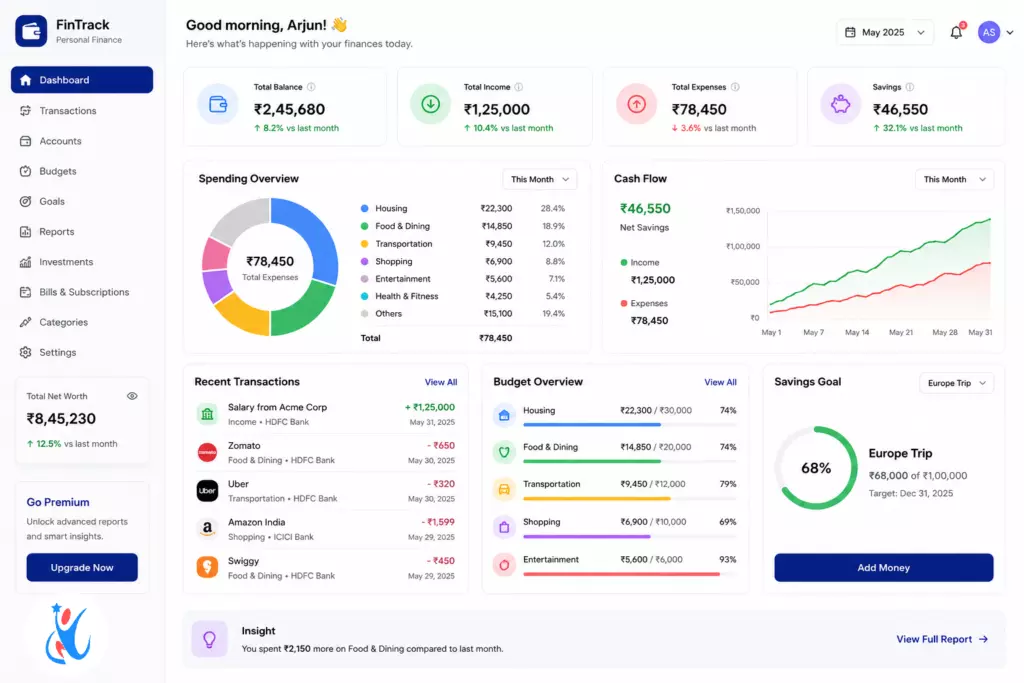
What it is: A web or mobile app that lets users log income and expenses, categorise spending, set monthly budgets, and visualise where their money goes using charts.
Why it works for your portfolio:
Finance apps are used by real people with real stakes. Building one forces you to think about data modelling (how do you structure transactions?), state management (how do you keep running totals accurate?), and UI clarity (how do you make a pie chart actually readable?).
Unlike a to-do app, a personal finance dashboard has conditional logic, persistent data, and visual output, three pillars that show up in almost every production application.
Skills you’ll demonstrate:
- CRUD operations with a real database (SQLite, Firebase, or PostgreSQL)
- Chart libraries (Chart.js, Recharts, or D3.js)
- User authentication — because no one wants their bank data public
- Date filtering and aggregation logic
Stretch goal: Add a CSV export feature so users can download their transaction history. This alone shows you understand that software does not live in isolation — it talks to other tools.
Interview talking point: “I had to figure out how to handle transactions that span two months when the user sets a budget cycle that doesn’t align with the calendar month. That edge case taught me a lot about data normalisation.”
This is one of the most impressive projects for freshers to build because it mirrors SaaS product thinking from day one.
2. Real-Time Collaborative Notes App (Like a Mini Notion)
What it is: A web app where multiple users can create, edit, and organise notes in real time — changes by one user appear instantly for another.
Why it works for your portfolio:
Real-time functionality is one of the most in-demand skills in product companies right now. WhatsApp, Figma, Google Docs — every collaborative tool you have ever loved uses the same foundational technology: WebSockets or a real-time database.
Building a collaborative notes app puts you in that conversation.
Skills you’ll demonstrate:
- WebSocket integration (Socket.io is a great starting point)
- Real-time state synchronisation
- Conflict resolution (what happens if two people edit the same line?)
- Room-based architecture (different “workspaces” for different groups of users)
Stack suggestion: React + Node.js + Socket.io + MongoDB (or Firebase Realtime Database for a simpler path).
Stretch goal: Add markdown rendering inside notes. This introduces you to parsing and sanitisation concepts that appear constantly in content-heavy applications.
Interview talking point: “Handling simultaneous edits without data loss was the hardest part. I explored operational transformation at a high level and ended up using a last-write-wins approach with timestamps, which I’d improve with CRDT in a production system.”
When recruiters hear that kind of answer from a fresher, they put your CV in a different pile.
These kinds of projects for freshers to build are especially valuable because collaborative tools are a vertical that is actively growing — edtech, HR tech, and startup tooling all need developers who understand real-time systems.
3. Automated Job Application Tracker with Email Parsing
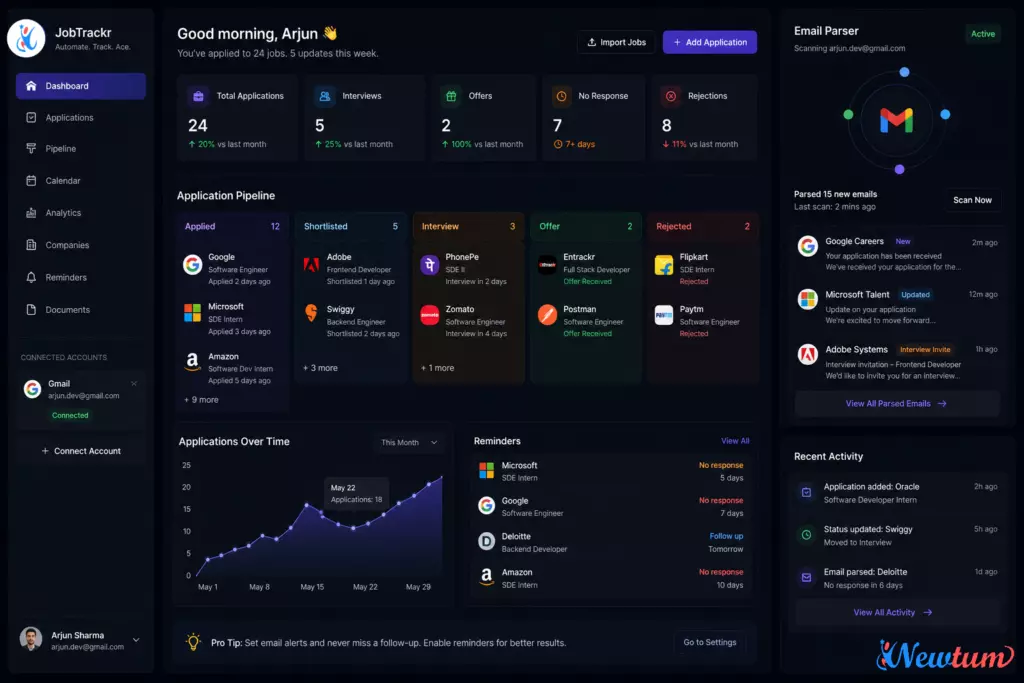
What it is: A tool that lets job seekers (like you!) track which companies they have applied to, what stage each application is at, and — with a stretch implementation — automatically parse confirmation emails to update the tracker.
Why it works for your portfolio:
This project is clever for one reason: you built it because you needed it. That origin story is powerful in an interview. It shows you notice problems, think about solutions, and actually execute.
Beyond the narrative, the technical depth here is real.
Skills you’ll demonstrate:
- OAuth integration (connecting to Gmail or Outlook APIs)
- Email parsing and natural language extraction
- Dashboard UI with status pipelines (Applied → Shortlisted → Interview → Offer/Reject)
- Notification logic (remind me if I haven’t heard back in 7 days)
Stack suggestion: Next.js + Prisma + PostgreSQL + Gmail API (via Google Cloud Console).
Stretch goal: Add a browser extension that detects when you submit a job application on LinkedIn or Naukri and auto-logs it. This is genuinely impressive and touches browser extension development — a skill almost no fresher portfolio includes.
Interview talking point: “I used the Gmail API with OAuth 2.0, which taught me a lot about token refresh flows and scopes. It was frustrating at first, but understanding why Google restricts access the way it does made me a much better API consumer.”
Among all the projects for freshers to build on this list, this one has the most “built it because I lived the problem” energy — and that authenticity is something no tutorial project can fake.
Want to take your projects even further with AI-powered workflows? Learn how modern apps use structured AI responses and tool integrations in our guide on LLM Function Calling & Structured Outputs.
4. News Aggregator with Personalised Topic Feeds
What it is: A web app that pulls news from multiple sources using public APIs (NewsAPI, Guardian API, or RSS feeds), lets users select topics they care about, and curates a clean, personalised reading experience.
Why it works for your portfolio:
This project is deceptively simple to start and endlessly expandable. At its core, it is a REST API consumer — but the moment you add personalisation, caching, pagination, and search, it becomes a genuinely full-featured application.
Skills you’ll demonstrate:
- Third-party API consumption with error handling and rate limiting awareness
- User preference storage and personalisation logic
- Search and filter functionality
- Frontend performance (lazy loading, pagination, skeleton screens)
Stack suggestion: React + Node.js backend (to proxy API calls and hide your API key) + LocalStorage or a lightweight database for user preferences.
Stretch goal: Add a “Read Later” bookmarking feature with a browser extension or PWA (Progressive Web App) support so articles are accessible offline.
Interview talking point: “I learned about API rate limits the hard way when my app hit the free tier ceiling during testing. I ended up building a simple caching layer that stored responses for 15 minutes, which also improved load time significantly.”
This is one of those projects for freshers to build that teaches you the full frontend-to-API cycle in a context that feels real — because you are literally reading the news you pulled.
5. Developer Portfolio with a Built-In Blog & CMS
What it is: Not just a static portfolio page — but a full portfolio website with a content management system (CMS) that lets you write and publish blog posts without touching code.
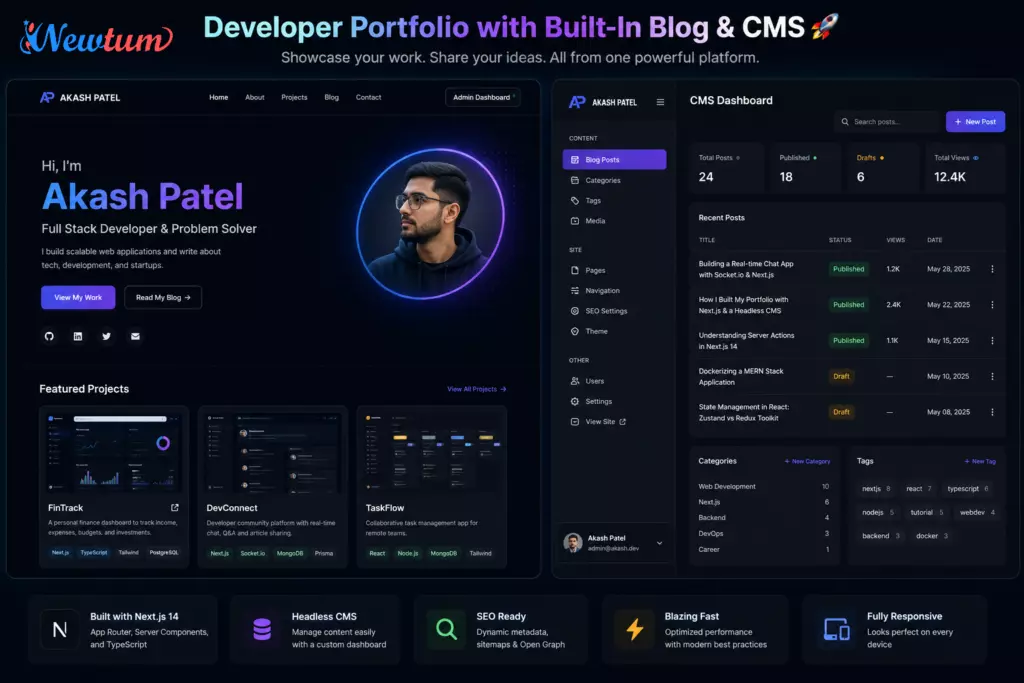
Why it works for your portfolio:
Meta, right? You build a portfolio to put in your portfolio. But there is a twist: the technical ambition here is what matters. A static HTML portfolio page takes an afternoon. A portfolio with a headless CMS, dynamic routing, SEO metadata generation, and a working blog takes a week — and proves you can architect a real product.
Skills you’ll demonstrate:
- Headless CMS integration (Contentful, Sanity.io, or Strapi)
- Dynamic routing and static site generation (Next.js is ideal here)
- SEO metadata management (Open Graph, Twitter Cards, canonical URLs)
- Deployment and CI/CD (Vercel + GitHub Actions is a common, job-ready stack)
- Markdown rendering with syntax highlighting for code blocks
Stretch goal: Add a contact form with email delivery (Resend or Nodemailer) and spam protection via a CAPTCHA or honeypot pattern.
Interview talking point: “I wanted my portfolio to be easy to update without redeploying every time I wrote a new blog post. That’s what led me to a headless CMS architecture — I connected Contentful to Next.js and set up ISR (Incremental Static Regeneration) so new posts appear within 60 seconds of publishing.”
If a recruiter is reading your portfolio on the very site you built using these techniques, you have already impressed them before saying a word.
This rounds out the projects for freshers to build in this guide and it is the one that keeps paying dividends, because every article you publish on your developer blog adds to your professional presence.
How to Make Any of These Projects Interview-Ready
Building the project is step one. Presenting it is step two. Here is how to do both right:
1. Write a proper README.
Include what the project does, why you built it, the tech stack, how to run it locally, and what you would improve next. A strong README signals communication skills, something every team values.
2. Deploy it.
A live URL is worth ten screenshots. Vercel, Railway, and Render all offer free tiers. A recruiter should be able to click a link and see your work in 30 seconds.
3. Document one hard problem you solved.
Write a short section in your README or a blog post about one specific technical challenge you encountered. This becomes your interview story.
4. Keep your commit history clean.
Commit often and write meaningful commit messages (“fix: resolve race condition in socket room join” tells a better story than “update stuff”). Your commit log is a window into how you work.
5. Connect projects to skills on your resume.
Each of these projects for freshers to build maps directly to skills that appear in job descriptions. Be explicit: “Built real-time collaboration using WebSockets (Socket.io)” rather than “Built a notes app.”
Choosing the Right Project for Your Stack
Not every project suits every learner. Here is a quick guide:
| Your Focus | Best Project to Start |
|---|---|
| Frontend / React | News Aggregator with Personalised Feeds |
| Full Stack | Collaborative Notes App |
| Backend / APIs | Job Application Tracker with Email Parsing |
| Career Narrative | Portfolio with Blog & CMS |
| Data / Analytics | Personal Finance Dashboard |
Pick one. Finish it. Deploy it. Then move to the next.
The biggest mistake freshers make with projects for freshers to build is starting five and finishing none. A single well-documented, deployed, well-explained project beats a GitHub full of half-built repositories every single time.
Conclusion
The to-do app had its moment. That moment has passed.
Recruiters today are pattern-matching at speed. They are looking for evidence of product thinking, real API usage, deployment awareness, and the ability to solve problems that are not handed to you in a tutorial. The five projects for freshers to build in this guide do exactly that.
Each one pushes you into territory that genuinely teaches something whether that is real-time sync, OAuth flows, CMS architecture, or data visualisation. Each one gives you an interview story worth telling. And each one, done properly, tells a recruiter something tutorials never can: that you build things because you want to, not because you were told to.
Start with the project that interests you most. The curiosity you bring to it is already a differentiator. Learn how to adapt AI with Newtum.
About The Author