Most junior developers think “working with AI” means writing a clever prompt and reading the paragraph that comes back. That assumption will hold you back. Real production software cannot parse a sentence—it needs predictable, machine-readable data. This is exactly where LLM function calling structured outputs come in.
In this guide, you will learn what LLM function calling and structured outputs actually are, why they matter more than prompt engineering alone, and how to implement them step by step so your AI can talk to databases, APIs, and backend services like a professional system—not a chatbot.
1. The Paragraph Problem
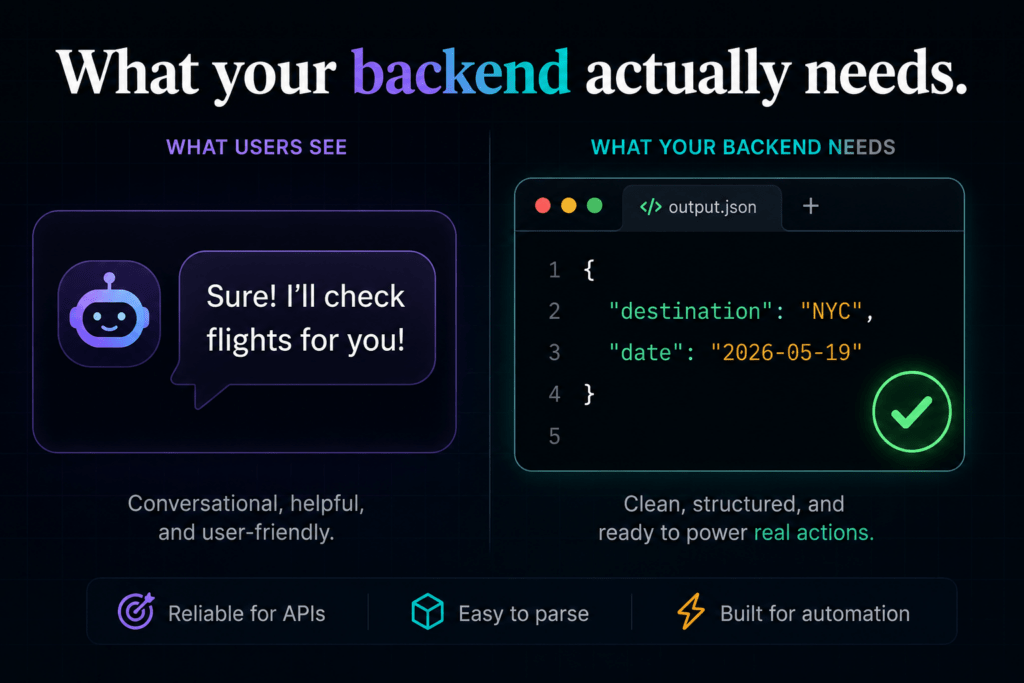
Imagine a user types: “Book me a flight to New York tomorrow.”
A basic chatbot might respond with: “Sure! I’ll look up flights to New York for you tomorrow, May 19, 2026. Shall I proceed?”
That’s a lovely sentence. Your API can’t do anything with it.
A real booking system needs:
json
{
  "destination": "NYC",
  "date": "2026-05-19",
  "passengers": 1
}
This is the core problem that LLM function calling and structured outputs solve. They force the model to respond with machine-parsable data instead of conversational text—turning an AI from a fancy text generator into a programmable component in your software architecture.
What Is LLM Function Calling?
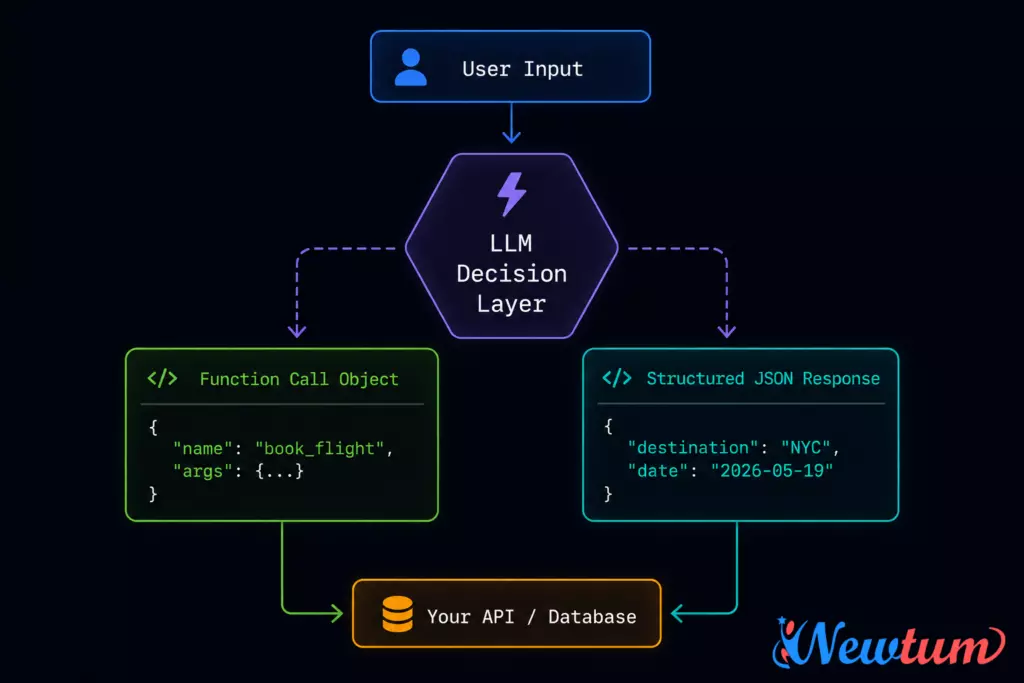
LLM function calling is a feature that lets you define a set of functions — with names, descriptions, and parameter schemas — and pass them to a language model. When the model decides that one of those functions should be invoked based on the user’s message, it returns a structured call object instead of a plain-text reply.
The key insight: the LLM doesn’t execute the function. It just tells your code which function to call and with what arguments. Your application then actually makes the API call, hits the database, or triggers the service.
This means LLM function calling turns a model into a decision-making router—a brain that interprets user intent and maps it to machine actions.
Why it matters
- The model’s output becomes reliably parseable
- You can chain multiple function calls for complex workflows
- The model learns from function descriptions, so you get smarter routing without custom training
- It is the standard pattern for agentic AI systems
What Are Structured Outputs?
Structured outputs are a related but slightly different concept. Instead of declaring functions, you provide a JSON schema to the model and instruct it to respond only with data that matches that schema—nothing else, no preamble, no explanation.
OpenAI introduced a dedicated “Structured Outputs” mode in 2024 that uses a response_format parameter with a strict JSON schema. This guarantees the response will always conform to the defined shape.
LLM function calling and structured outputs are often used together: function calling decides what to do, and structured outputs define what shape the data should take.
Function Calling vs. Structured Outputs – What’s the Difference?
| Feature | Function Calling | Structured Outputs |
|---|---|---|
| Purpose | Route user intent to a function | Force a fixed JSON shape on any response |
| Declared as | List of function schemas | JSON Schema in response_format |
| LLM decides? | Yes — the model picks which function to call | No — the schema is always applied |
| Best for | Multi-step agentic tasks | Single-turn data extraction |
| Supported by | OpenAI, Gemini, Claude, Mistral | OpenAI (strict mode), Gemini |
Both are examples of LLM function calling and structured outputs working at different layers of the same pipeline.
Real-World Use Case: The Flight Booking Problem
Here is how LLM function calling handles the flight booking scenario end-to-end.
Step 1 — User input:
“Book me a flight to New York tomorrow.”
Step 2 — You define a function schema:
json
{
  "name": "book_flight",
  "description": "Books a flight for a user",
  "parameters": {
    "type": "object",
    "properties": {
      "destination": {
        "type": "string",
        "description": "IATA code or city name"
      },
      "date": {
        "type": "string",
        "description": "Travel date in YYYY-MM-DD format"
      },
      "passengers": {
        "type": "integer",
        "description": "Number of passengers"
      }
    },
    "required": ["destination", "date"]
  }
}
Step 3 — The model returns a function call object:
json
{
  "name": "book_flight",
  "arguments": {
    "destination": "NYC",
    "date": "2026-05-19",
    "passengers": 1
  }
}
Step 4 — Your code executes the actual API call:
python
import json

def handle_llm_response(response):
    tool_call = response.choices[0].message.tool_calls[0]
    args = json.loads(tool_call.function.arguments)
    result = flight_api.book(
        destination=args["destination"],
        date=args["date"],
        passengers=args.get("passengers", 1)
    )
    return result
The LLM never touches the database. It simply translates human language into a structured instruction that your code can act on. That’s the entire power of LLM function calling and structured outputs in one flow.
Implementing LLM Function Calling with OpenAI
Here is a minimal working implementation using the OpenAI Python SDK.
python
from openai import OpenAI
import json

client = OpenAI()

tools = [
    {
        "type": "function",
        "function": {
            "name": "get_weather",
            "description": "Get current weather for a city",
            "parameters": {
                "type": "object",
                "properties": {
                    "city": {
                        "type": "string",
                        "description": "The city name"
                    },
                    "unit": {
                        "type": "string",
                        "enum": ["celsius", "fahrenheit"]
                    }
                },
                "required": ["city"]
            }
        }
    }
]

response = client.chat.completions.create(
    model="gpt-4o",
    messages=[{"role": "user", "content": "What's the weather in Mumbai?"}],
    tools=tools,
    tool_choice="auto"
)

# Parse the function call
tool_call = response.choices[0].message.tool_calls[0]
args = json.loads(tool_call.function.arguments)
print(args)
# Output: {"city": "Mumbai", "unit": "celsius"}
Notice how tool_choice="auto" lets the model decide whether to call a function or respond conversationally. If you set tool_choice={"type": "function", "function": {"name": "get_weather"}}, you force it to always call that specific function—a stricter form of LLM function calling and structured outputs that removes ambiguity entirely.
Implementing Structured Outputs (OpenAI Strict Mode)
When you do not need function routing and just want guaranteed JSON shape, use OpenAI’s Structured Outputs feature with response_format:
python
from openai import OpenAI
from pydantic import BaseModel

client = OpenAI()

class FlightDetails(BaseModel):
    destination: str
    date: str
    passengers: int

response = client.beta.chat.completions.parse(
    model="gpt-4o-2024-08-06",
    messages=[
        {"role": "user", "content": "Book me a flight to New York tomorrow for 2 people"}
    ],
    response_format=FlightDetails,
)

flight = response.choices[0].message.parsed
print(flight.destination)  # NYC
print(flight.date)         # 2026-05-19
print(flight.passengers)   # 2
Using Pydantic models with parse() is the cleanest way to work with LLM function calling and structured outputs in Python—the SDK validates the schema automatically and raises an error if the model produces invalid output.
Gemini’s Approach: Function Declarations
Google Gemini handles LLM function calling through its function_declarations parameter in the API configuration. The pattern is nearly identical to OpenAI’s but uses slightly different naming conventions.
python
import google.generativeai as genai

genai.configure(api_key="YOUR_KEY")

tools = genai.protos.Tool(
    function_declarations=[
        genai.protos.FunctionDeclaration(
            name="search_product",
            description="Search for a product in the catalog",
            parameters=genai.protos.Schema(
                type=genai.protos.Type.OBJECT,
                properties={
                    "query": genai.protos.Schema(type=genai.protos.Type.STRING),
                    "max_price": genai.protos.Schema(type=genai.protos.Type.NUMBER),
                },
                required=["query"]
            )
        )
    ]
)

model = genai.GenerativeModel("gemini-1.5-pro", tools=[tools])
response = model.generate_content("Find headphones under ₹5000")

# Extract the function call
fc = response.candidates[0].content.parts[0].function_call
print(dict(fc.args))
# Output: {"query": "headphones", "max_price": 5000}
Gemini also supports a response_mime_type: "application/json" parameter combined with a schema prompt for structured outputs without function declarations—useful for data extraction tasks.
Claude’s Approach: Tool Use
Anthropic’s Claude uses the term tool use instead of function calling, but the concept is identical. You pass a tools array with each tool’s input schema, and Claude returns a tool_use content block when it decides a tool should be invoked.
python
import anthropic

client = anthropic.Anthropic()

response = client.messages.create(
    model="claude-sonnet-4-20250514",
    max_tokens=1024,
    tools=[
        {
            "name": "create_calendar_event",
            "description": "Create an event in the user's calendar",
            "input_schema": {
                "type": "object",
                "properties": {
                    "title": {"type": "string"},
                    "start_time": {"type": "string", "description": "ISO 8601 format"},
                    "duration_minutes": {"type": "integer"}
                },
                "required": ["title", "start_time"]
            }
        }
    ],
    messages=[{"role": "user", "content": "Schedule a standup meeting for 9am tomorrow"}]
)

# Find the tool_use block
for block in response.content:
    if block.type == "tool_use":
        print(block.name)   # create_calendar_event
        print(block.input)  # {"title": "Standup meeting", "start_time": "2026-05-19T09:00:00"}
Claude’s LLM function calling and structured outputs implementation is particularly strong at reasoning about when not to call a tool—a subtle skill that matters in production pipelines.
Common Mistakes Junior Developers Make
Even when developers know about LLM function calling and structured outputs, they often fall into these traps:
- Mistake 1: Trusting the model blindly Always validate the parsed JSON against your schema before passing it to downstream APIs, even when using strict mode. Models can hallucinate parameter values even when the shape is correct.
- Mistake 2: Putting too much logic in the function description The description trains the model’s routing decisions. Keep it factual and specific: “Retrieves a user’s order history from the database by user ID” is better than “Gets order stuff.”
- Mistake 3: Not handling the no-call case When
tool_choice="auto", the model may decide not to call any function. Your code must handle a plain text response as a fallback. - Mistake 4: Ignoring required vs. optional parameters Mark parameters as
requiredonly when the API will fail without them. Optional parameters with good defaults let the model make smarter calls with incomplete user input. - Mistake 5: Forgetting to send the tool result back In multi-turn function calling, after you execute the function you must return the result to the model in a
toolrole message. Otherwise the model doesn’t know the action succeeded and will hallucinate or loop.
When to Use Which Approach
| Scenario | Best Approach |
|---|---|
| User triggers a specific backend action | Function calling |
| Extracting structured data from a document | Structured outputs |
| Multi-step agent with branching logic | Function calling with multiple tools |
| Building a form filler or data parser | Structured outputs |
| Real-time API integration (booking, ordering) | Function calling |
| Classification or entity extraction | Structured outputs |
The practical answer: most real applications use LLM function calling and structured outputs together. Function calling routes intent; structured outputs guarantee the data shape of each function’s arguments.
Conclusion
The developers who thrive in the AI era are not the ones who write the most creative prompts; they are the ones who treat language models as programmable components in a larger system. LLM function calling and structured outputs are the bridge between natural language and the deterministic world of software engineering.
Once you master LLM function calling and structured outputs, you stop seeing AI as a black box that produces paragraphs and start seeing it as an intelligent dispatcher that maps user intent to machine actions. That shift in thinking is what separates a chatbot builder from a real AI engineer.
Pick one provider- OpenAI, Gemini, or Claude implement the flight booking example from this guide, and trace every step from user message to database call. The click into place when you see that first clean JSON object arrive from the model will change how you build software permanently.
Visit Newtum to learn how to adapt AI.
About The Author