SQL has long been the backbone of data-driven applications. But writing flawless SQL, especially for complex joins, nested subqueries, or performance-sensitive reports, can be a time-consuming challenge even for experienced developers. That’s where prompt engineering SQL queries changes everything.
With the rise of AI coding assistants like ChatGPT, GitHub Copilot, and Claude, developers now have powerful tools at their fingertips. The secret to unlocking their full potential? Knowing how to prompt them correctly. This blog walks you through the strategies, templates, and real-world examples that make prompt engineering SQL queries a career-changing skill.
What Is Prompt Engineering in the Context of SQL?
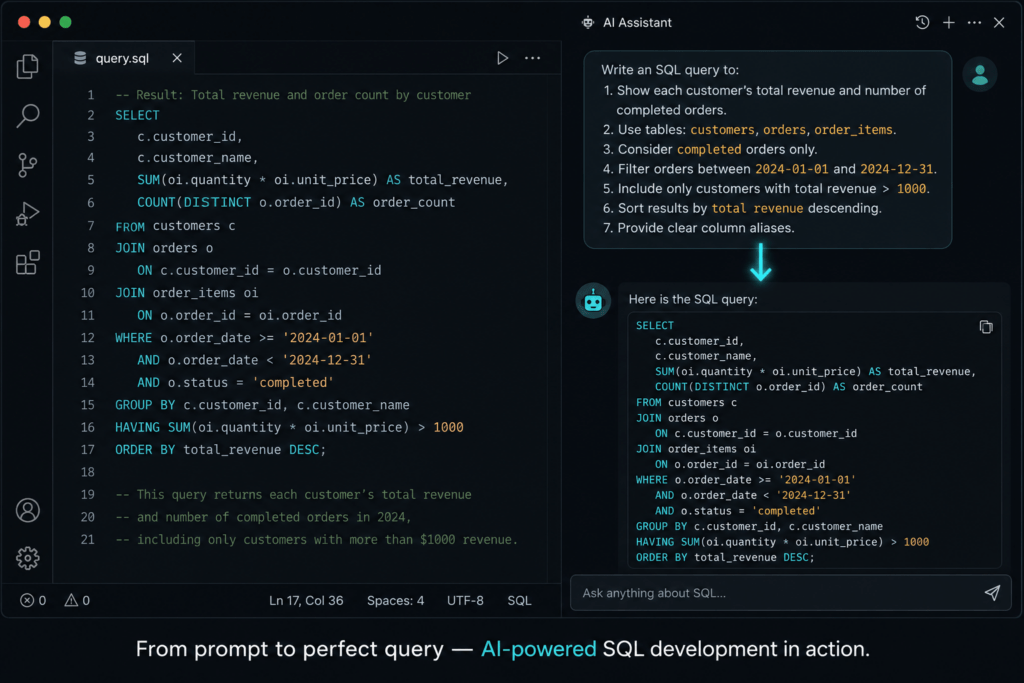
Prompt engineering is the practice of crafting precise, context-rich instructions to guide an AI model toward generating the exact output you need. When applied to databases, prompt engineering SQL queries means giving an AI assistant enough information about your schema, intent, and constraints so it returns accurate, optimized SQL on the first try or very close to it.
Think of it this way: a vague instruction like “give me a sales report” will produce a generic guess. But a well-structured prompt that includes table names, relationships, filters, and expected output format will generate production-ready SQL almost instantly.
Why Does Prompt Engineering SQL Queries Matter?
Before diving into techniques, it’s worth understanding why this skill is worth your time:
- Speed: A well-crafted prompt cuts query-writing time from hours to minutes.
- Accuracy: AI tools with proper context produce SQL that correctly handles edge cases like NULL values, duplicate rows, and date ranges.
- Learning: Beginners can accelerate their SQL learning curve by studying the AI-generated queries that result from strong prompts.
- Debugging: You can prompt AI to explain, refactor, or optimize existing queries — not just write new ones.
- Consistency: Teams using prompt engineering SQL queries frameworks produce more standardized, reviewable code across projects.
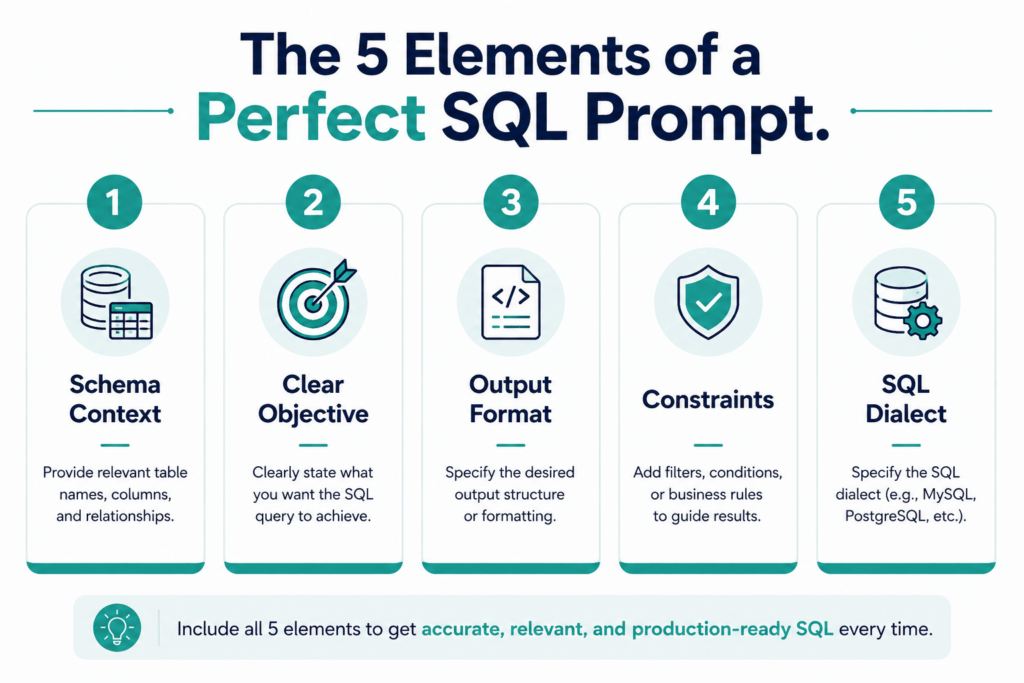
The 5 Core Elements of a Strong SQL Prompt
Every effective SQL prompt should include these five components:
1. Schema Context
Always tell the AI what tables exist and how they relate. Don’t assume it knows your database structure.
Example: “I have two tables: orders (order_id, customer_id, order_date, total_amount) and customers (customer_id, name, region).”
2. Clear Objective
State exactly what you want the query to accomplish — don’t leave room for interpretation.
Example: “I want the top 5 customers by total spend in Q1 2024.”
3. Output Format Expectations
Tell the AI what columns you want, what order results should be sorted in, and whether you need aggregation.
Example: “Return customer name, region, and total spend. Sort by total spend descending.”
4. Constraints and Edge Cases
Mention filters, NULL handling, date ranges, and any business rules that apply.
Example: “Exclude orders with a status of ‘cancelled’. Include only customers from the ‘North’ region.”
5. Preferred SQL Dialect
AI tools can write MySQL, PostgreSQL, SQL Server, or SQLite syntax. Always specify.
Example: “Use PostgreSQL syntax.”
Prompt Engineering SQL Queries: Practical Templates
Here are ready-to-use prompt templates you can adapt for your own projects. These templates represent the best practices of prompt engineering SQL queries in real-world scenarios.
Template 1: Simple Aggregation Query
Context: I have a table called `sales (sale_id, product_id, salesperson_id, sale_date, amount)`.

Task: Write a SQL query to find the total revenue generated by each salesperson in the year 2023.

Requirements:
- Group results by salesperson_id
- Show total revenue rounded to 2 decimal places
- Sort from highest to lowest revenue
- Use MySQL syntax
Why it works: The AI gets table structure, time constraint, formatting preference, sort order, and dialect — all in one clean prompt.
Template 2: Multi-Table JOIN
Context:
- Table 1: employees (emp_id, name, department_id, hire_date, salary)
- Table 2: departments (department_id, department_name, location)

Task: Write a query to list each employee's name, department name, and location for employees hired after January 1, 2020.

Requirements:
- Use an INNER JOIN
- Filter by hire_date > '2020-01-01'
- Sort alphabetically by employee name
- PostgreSQL syntax
Template 3: Subquery for Ranking
Context: Table — products (product_id, category, product_name, units_sold, price)

Task: Find the top 3 best-selling products in each category based on units_sold.

Requirements:
- Use ROW_NUMBER() or RANK() window function
- Return: category, product_name, units_sold, rank
- Use SQL Server (T-SQL) syntax
Template 4: Debugging an Existing Query
Here is a SQL query that is supposed to return customers who have placed more than 3 orders in the last 30 days, but it is returning incorrect results. Please identify the bug and fix it.

[Paste your SQL here]

Database: MySQL
Table structure: customers (customer_id, name), orders (order_id, customer_id, order_date)
This is one of the most underused applications of prompt engineering SQL queries — using AI not just to write, but to debug and explain your existing code.
Advanced Techniques in Prompt Engineering SQL Queries
Once you’ve mastered the basics, these advanced strategies take your SQL prompting to the next level.
Chain-of-Thought Prompting for Complex Logic
Ask the AI to explain its reasoning before generating the query. This reduces errors in complex multi-step logic.
Example prompt addition: “Before writing the query, explain in plain English what steps you’ll take to solve this.”
This technique is especially useful when your prompt engineering SQL queries involve window functions, CTEs (Common Table Expressions), or conditional aggregation.
Role Prompting for Domain Context
Tell the AI what role to play to align its output with your use case.
Example: “You are a senior database administrator at an e-commerce company. Write a performant query that…”
Role prompting shapes the AI’s vocabulary, assumption set, and priorities — making it tune SQL toward performance and best practices automatically.
Iterative Refinement
The best results from prompt engineering SQL queries rarely come from a single prompt. Use iterative refinement:
- Generate the initial query with a full-context prompt.
- Run the query and observe results.
- Prompt the AI with: “The query returns duplicate rows. Fix it using DISTINCT.”
- Prompt again: “Now optimize this for a table with 10 million rows.”
Each iteration narrows the gap between the AI’s output and your exact requirement.
Few-Shot Prompting
Show the AI one or two examples of queries you’ve already written that it should model its output after. This is called few-shot prompting, and it’s powerful for maintaining team code style.
Example:
Here are two SQL queries that match our internal coding style:

[Example 1]
[Example 2]

Now write a query that follows the same style to accomplish the following: [your task]
Common Mistakes to Avoid When Prompt Engineering SQL Queries
Even experienced developers fall into these traps:
- Omitting table structure: Without schema context, AI tools guess your column names and often guess wrong. Always provide table definitions.
- Being too vague: “Get me user data” is not a prompt — it’s a wish. Specify what data, from which table, filtered how, and in what format.
- Ignoring edge cases in the prompt: Prompt engineering SQL queries should always mention how to handle NULLs, empty results, or ambiguous joins. If you don’t, the AI won’t either.
- Not specifying the SQL dialect: The syntax for date functions, string operations, and pagination varies significantly between MySQL, PostgreSQL, and SQL Server. Always name the dialect.
- Accepting the first output blindly: AI-generated SQL should always be reviewed. Prompt engineering SQL queries is a collaboration, not a full delegation. Always test the output.
Prompt Engineering SQL Queries for Performance Optimization
Writing correct SQL is half the battle. Writing fast SQL is the other half. Here’s how prompt engineering SQL queries can help with optimization:
- Ask for index-aware queries: “Write this query assuming that
customer_idandorder_dateare indexed. Avoid full table scans.” - Request EXPLAIN output interpretation: “Here is the EXPLAIN output for my slow query. Identify bottlenecks and suggest rewrites: [paste EXPLAIN result]”
- Ask for CTE vs subquery recommendations: “Should I use a CTE or a subquery for this logic? Show both versions and explain the performance trade-offs.”
Performance-focused prompt engineering SQL queries can dramatically reduce query execution time — often without touching indexes or hardware.
Best AI Tools for Prompt Engineering SQL Queries
Several AI tools are particularly well-suited for SQL generation and optimization:
- Claude (Anthropic): Excellent for complex multi-step reasoning, schema understanding, and query explanation. Great for long, context-heavy prompts.
- GitHub Copilot: Best for inline SQL completion inside code editors. Works well when schema context is available in the same file.
- ChatGPT (GPT-4): Strong general SQL assistant. Works well with structured few-shot prompts and iterative refinement.
- Gemini (Google): Good integration with Google Cloud data tools. Useful for BigQuery SQL.
Each of these tools responds well to the prompt engineering SQL queries techniques covered in this blog — but the quality of output is always proportional to the quality of your prompt.
A Checklist for Perfect SQL Prompts
Before you submit your next AI prompt for a SQL task, run through this quick checklist:
- Have I included the relevant table names and column definitions?
- Have I clearly stated what the query should return?
- Have I specified filters, conditions, or business rules?
- Have I mentioned how to handle NULLs or edge cases?
- Have I stated the SQL dialect (MySQL, PostgreSQL, etc.)?
- Have I indicated the desired output order and format?
- Have I given a performance hint if the table is large?
A prompt that checks all seven boxes will consistently produce better results from prompt engineering SQL queries than one that skips even two or three of them.
Real-World Use Cases
- E-commerce: Prompt engineering SQL queries to generate cohort analysis — finding customers who made their first purchase in one quarter and returned in the next.
- HR Analytics: Writing complex queries to calculate attrition rates, average tenure by department, or headcount changes over rolling 12-month windows.
- Finance: Generating ledger reconciliation queries, aging reports, and period-over-period comparison queries using AI-assisted prompting.
- Healthcare: Structuring prompts to query patient records with proper date logic, avoiding HIPAA-sensitive field exposure.
In all these cases, prompt engineering SQL queries reduces the expertise barrier and democratizes database work across teams.
Conclusion
Mastering prompt engineering SQL queries is no longer optional for developers who want to stay competitive in an AI-augmented world. Whether you’re writing your first JOIN or optimizing a billion-row analytics pipeline, the quality of your AI prompts determines the quality of your SQL output.
Start with the five core elements: schema context, clear objective, output format, constraints, and SQL dialect. Progress to advanced techniques like chain-of-thought prompting, role prompting, and iterative refinement. And always review the AI’s output before sending it to production.
The goal isn’t to replace your SQL skills — it’s to amplify them. With the right approach to prompt engineering SQL queries, you’ll ship better database code, faster than ever before. To learn how to effectively adapt to AI in coding, continue exploring Newtum
FAQs- prompt engineering SQL queries
Q1: Can prompt engineering SQL queries work for beginners?
Absolutely. In fact, beginners benefit the most — AI-generated SQL can serve as a learning tool, helping new developers understand query structure and logic by studying well-constructed outputs.
Q2: What’s the best AI tool for SQL query generation?
Claude and ChatGPT both perform excellently. The best tool depends on your workflow — Claude is ideal for long, complex schema-heavy prompts, while GitHub Copilot is better for inline completion.
Q3: Is AI-generated SQL safe to use in production?
With review, yes. Prompt engineering SQL queries should always be treated as a starting point. Review for correctness, test on sample data, and validate performance before deploying.
Q4: How do I handle proprietary schema information when using AI?
Use anonymized or placeholder table/column names in your prompts if working with sensitive schemas. The structure matters more than the actual names when generating SQL logic.
Q5: Can I use prompt engineering SQL queries for NoSQL databases?
The principles apply, but the output syntax differs. Always specify whether you’re targeting SQL (relational) or a NoSQL query language like MongoDB’s aggregation pipeline.
About The Author