“Arrays in C++ are a core concept every budding programmer needs to master. They help organise data efficiently, allowing you to tackle problems like sorting inventories or managing game scores effortlessly. Dive deeper into this topic to enhance your coding skills and unlock new capabilities. Keep reading to discover how arrays can transform your projects!”
What Are Arrays in C++ and How Do You Declare and Initialize Them?
When working with programs, developers often need to store multiple values of the same data type. Writing separate variables for each value can make the code lengthy and difficult to manage. This is where arrays in C++ become extremely useful.
Arrays help programmers store multiple values under a single variable name, making programs cleaner, faster, and easier to handle. For example, instead of creating five separate variables to store student marks, you can store all marks inside one array.
Arrays are widely used in software development, game programming, data processing, scientific calculations, and embedded systems. They are one of the most fundamental concepts every C++ beginner should learn.
What Is an Array in C++?
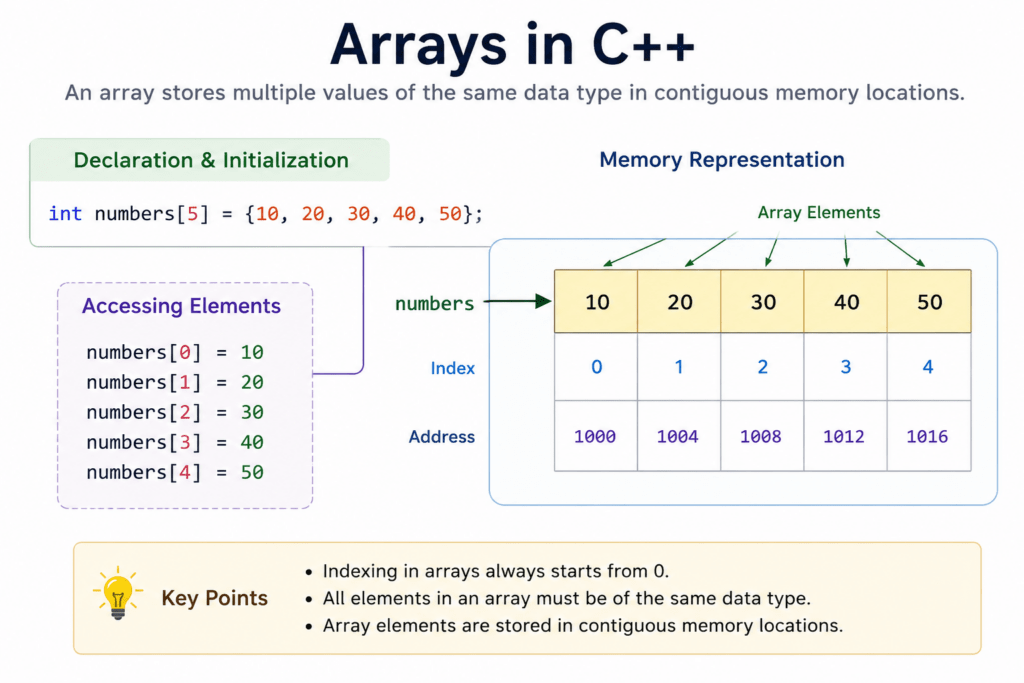
An array in C++ is a collection of elements of the same data type stored in contiguous memory locations. Each value inside the array can be accessed using an index number.
Arrays are called derived data types because they are created from fundamental data types like int, float, or char.
Advantages of Arrays in C++
- Store multiple values using one variable name
- Reduce repetitive code
- Allow fast data access using indexes
- Work efficiently with loops
- Improve code organization
Example
int marks[5];
In this example:
intis the data typemarksis the array name5is the size of the array
This array can store five integer values.
Why Do We Use Arrays in C++?
Arrays simplify programming when dealing with large amounts of similar data.
Without arrays, programmers would need multiple variables like:
int mark1, mark2, mark3, mark4, mark5;
Using arrays, the same data can be stored more efficiently:
int marks[5];
Benefits of Using Arrays
- Store Multiple Values of the Same Type
Arrays can hold many values inside one structure. - Reduce Repetitive Variables
They eliminate the need to create numerous variables manually. - Easy Data Processing with Loops
Arrays work perfectly with loops, allowing automatic processing of data.
Example:
for(int i = 0; i < 5; i++) {
    cout << marks[i];
}
Real-Life Use Cases of Arrays
- Student Marks
Store marks of multiple students in one array. - Temperature Records
Save daily temperature readings for analysis. - Game Scores
Track scores of players in games.
Syntax for Declaring Arrays in C++
The general syntax for declaring an array in C++ is:
data_type array_name[array_size];
Example
int numbers[5];
Explanation of Syntax
| Part | Meaning |
|---|---|
int | Data type of array elements |
numbers | Name of the array |
5 | Total number of elements the array can store |
This declaration creates an integer array capable of storing five values.
How to Initialize Arrays in C++
Initialization means assigning values to the array elements.
Method 1 – Initialize During Declaration
You can assign values at the time of array creation.
int numbers[5] = {1, 2, 3, 4, 5};
Here, all five elements are initialized immediately.
Method 2 – Partial Initialization
You can initialize only some elements.
int numbers[5] = {1, 2};
In this case:
numbers[0]becomes1numbers[1]becomes2- Remaining elements automatically become
0
Result:
{1, 2, 0, 0, 0}
Method 3 – Size Omitted
C++ can automatically determine the array size from the number of values provided.
int numbers[] = {10, 20, 30};
The compiler automatically creates an array of size 3.
This method is useful when you already know all values during declaration.
Working with Arrays
cpp #includeusing namespace std; int main() { // Declare and initialize an array int numbers[5] = {10, 20, 30, 40, 50}; // Access and print elements of the array for (int i = 0; i < 5; i++) { cout << "Element at index " << i << ": " << numbers[i] << endl; } // Modify an element of the array numbers[2] = 60; // Print modified array cout << "Modified array: "; for (int i = 0; i < 5; i++) { cout << numbers[i] << " "; } cout << endl; return 0; }
Explanation of the Code
In the provided C++ code, we're diving into the basics of arrays and how they're used in programming. First, let's break it down:
- The program begins by including the iostream library, a must-have for input and output operations. The `using namespace std;` line simplifies code use.
Inside the `main` function, an array named `numbers` is declared and initialized with five integers. This array holds values 10, 20, 30, 40, and 50, in that order. A `for` loop follows, iterating through the array to print each element's value alongside its index. This is your window into each "house" in your array. Next, the program changes the value at the third position of the array (index 2) from 30 to 60, demonstrating how easily elements are updated.
Finally, the code prints the updated array, showing how modifications reflect in the output.
Output
Element at index 0: 10
Element at index 1: 20
Element at index 2: 30
Element at index 3: 40
Element at index 4: 50
Modified array: 10 20 60 40 50
Accessing Array Elements in C++
Each value stored inside an array is called an element. In C++, array elements are accessed using their index number.
Understanding Array Indexing
Array indexing always starts from 0 in C++.
For example:
- First element → Index
0 - Second element → Index
1 - Third element → Index
2
This means the index value is always one less than the position number.
Example
cout << numbers[0];
This statement prints the first element of the array.
If the array contains:
int numbers[] = {10, 20, 30};
Then the output will be:
10
Memory Representation of Arrays
| Index | Value |
|---|---|
| 0 | 10 |
| 1 | 20 |
| 2 | 30 |
Arrays store elements in continuous memory locations, which helps achieve faster access and efficient processing.
Complete C++ Program for Arrays
The following example demonstrates array declaration, initialization, and accessing elements using a loop.
#include <iostream>
using namespace std;

int main() {
    int marks[5] = {90, 85, 78, 92, 88};

    for(int i = 0; i < 5; i++) {
        cout << marks[i] << " ";
    }

    return 0;
}
Output
90 85 78 92 88
Program Explanation
marks[5]creates an array of size 5- Values are initialized during declaration
- The
forloop accesses each element one by one marks[i]retrieves values using indexes
Common Mistakes While Using Arrays in C++
Beginners often make several common errors while working with arrays.
Accessing Invalid Index
Trying to access an index outside the array size can cause unexpected behavior.
Incorrect example:
int numbers[3] = {1, 2, 3};
cout << numbers[5];
The valid indexes are only 0, 1, and 2.
Wrong Size Declaration
Declaring an array with insufficient size can create issues.
Example:
int numbers[2] = {1, 2, 3};
This may produce a compilation error because the array size is smaller than the provided elements.
Mixing Data Types
Arrays can only store elements of the same data type.
Incorrect example:
int numbers[3] = {1, 2, "Hello"};
This causes a type mismatch error.
Forgetting Initialization
Using uninitialized arrays may produce garbage values.
Example:
int numbers[3];
cout << numbers[0];
The output may be unpredictable because no value was assigned.
Advantages of Arrays in C++
Arrays provide several important benefits in programming.
- Efficient Storage
Multiple values can be stored under one variable name. - Easy Traversal
Loops can process array elements quickly and efficiently. - Faster Access Using Index
Elements can be accessed directly using their index number, making retrieval very fast.
Limitations of Arrays in C++
Although arrays are useful, they also have some limitations.
- Fixed Size
The size of an array cannot usually be changed after declaration. - Same Data Type Only
Arrays can store only one type of data at a time. - Memory Wastage Possibility
Unused array elements still occupy memory space.
Arrays vs Variables in C++
| Feature | Variable | Array |
|---|---|---|
| Stores | Single value | Multiple values |
| Memory | Single location | Continuous locations |
| Access | Direct | Using index |
This comparison shows why arrays are preferred when handling large collections of similar data.
When Should You Use Arrays in C++?
Arrays are best used when working with multiple values of the same data type.
- Repeated Data Storage
Use arrays for storing lists of values like marks, prices, or scores. - Loop-Based Operations
Arrays are ideal for programs involving loops and repetitive processing. - Beginner Programming Problems
Most beginner coding exercises involving collections of data use arrays because they are simple and efficient.
Practical Uses of Arrays in C++
Let's dive into how arrays in C++ are used by some well-known companies, highlighting their practical applications and code snippets. You’ll see that arrays are not just theoretical but are actively used in real-world coding tasks!
- Google - Data Manipulation
Google makes huge use of arrays for data manipulation, especially when dealing with page rank algorithms. By using arrays, they store and process data efficiently.
Output: Listing of page ranks.#include <iostream>
using namespace std;
int main() {
int pageRanks[5] = {1, 3, 4, 2, 5};
for (int i = 0; i < 5; i++) {
cout << "Page " << i + 1 << " rank: " << pageRanks[i] << endl;
}
return 0;
} - Amazon - Inventory Management
Amazon uses arrays to efficiently manage and track inventory data. An array can hold the quantity of items in various warehouses across the world.
Output: Display of inventory counts in each warehouse.
#include <iostream>
using namespace std;

int main() {
    int inventory[3] = {120, 200, 150};
    for (int i = 0; i < 3; i++) {
        cout << "Warehouse " << i + 1 << " has: " << inventory[i] << " items" << endl;
    }
    return 0;
} - Netflix - User Recommendations
Netflix uses arrays to store viewing histories and preference scores of users, enabling personalised recommendations.
Output: Display of user preferences for shows.#include <iostream>
using namespace std;
int main() {
int userPreference[4] = {5, 4, 3, 5};
for (int i = 0; i < 4; i++) {
cout << "Preference score for show " << i + 1 << ": " << userPreference[i] << endl;
}
return 0;
}
C++ Array Questions
Curious about arrays in C++ and want to dive into some common questions that haven’t been widely dissected elsewhere? You're not alone! Here's an ordered list of some frequently asked questions by programmers on popular forums like Google, Reddit, and Quora that might just pique your interest.-
How can you find the size of an array without using the sizeof function?
You can use a technique involving pointer arithmetic. First, take the address of the first element and the last element, then subtract them and divide by the size of the element.
This code calculates the number of elements between the start and end.int arr[] = {10, 20, 30, 40, 50}; int* start = &arr[0]; int* end = &arr[4]; int size = (end - start + 1);
-
Is it possible to change the size of an array after its declaration?
No, once an array is defined in C++, its size is fixed. If you need dynamic sizing, consider using vectors instead.
-
Can functions return arrays directly?
Functions in C++ can’t return arrays directly but you can return a pointer to an array or use std::array or std::vector for a tidy alternative.
-
What’s the difference between an array and a pointer in C++?
Though they’re related, arrays hold the memory addresses of the elements they contain. On the other hand, a pointer is a variable that stores the memory address of another variable.
-
How do you pass an array to a function in C++ without decaying into a pointer?
You could pass the array by reference to avoid decay into a pointer, maintaining the array’s semantics.
This way, the function knows the actual size of the array.template
Our AI-powered cpp online compiler makes coding a breeze! With just a click, you can instantly write, run, and test your code. Our intelligent system offers real-time feedback, making sure you understand and fix mistakes right away. Dive into coding effortlessly and efficiently today!
Conclusion
Arrays in C++ are a powerful tool that can vastly improve your coding skills, offering the ability to work with multiple data items efficiently. Mastering them gives you a strong sense of accomplishment and boosts your confidence. Ready to expand your programming knowledge? Check out Newtum for more learning resources.
Edited and Compiled by
This article was compiled and edited by @rasikadeshpande, who has over 4 years of experience in writing. She's passionate about helping beginners understand technical topics in a more interactive way.
About The Author