Whether you prompted ChatGPT, Claude, or Copilot to write a database query, you’ve probably stared at the output and thought: what exactly is this doing? Reading AI-generated SQL is quickly becoming one of the most practical skills a developer, analyst, or data professional can have in 2025. You don’t need to memorize SQL syntax to ask an AI to write it – but you absolutely need to understand what it produces before running it on a production database.
This guide is your hands-on walkthrough for reading, interpreting, and verifying AI-generated SQL with confidence, even if you’re not a SQL expert yourself.
Why Reading AI-Generated SQL Is a Different Skill
There’s a meaningful difference between writing SQL and reading it. When you write SQL from scratch, you build the logic incrementally and know every decision you made. When you read AI-generated SQL, you’re reverse-engineering a machine’s interpretation of your natural-language prompt — and that comes with unique challenges.
AI tools are trained to produce syntactically valid queries, but they optimize for plausibility, not accuracy. The query will often look correct at a glance. The table names will make sense. The columns will seem reasonable. But the logic — especially around joins, groupings, and filter ordering — may silently diverge from what you actually asked for.
Additionally, AI-generated SQL tends to be more verbose than what an experienced developer would write. AI tools often use CTEs (Common Table Expressions) where a simple subquery would do, or add WHERE 1=1 placeholders that serve no runtime purpose. Understanding this style ahead of time helps you read without being misled by extra noise.
Start with the SELECT Clause: What Is Being Asked?
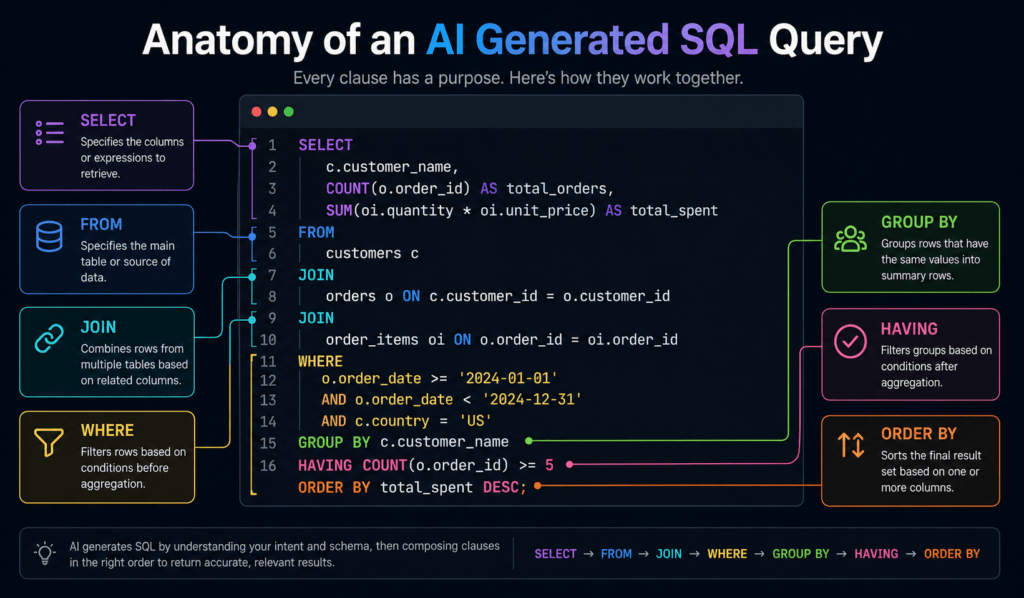
The SELECT clause is your entry point into any AI-generated SQL query. It tells you what the final output will look like — the columns, expressions, and aliases that will appear in your result set.
When reading this section, ask three questions:
What columns are being returned?
Look at each item in the SELECT list. Simple column names like u.name or o.total_amount are easy to follow. More complex expressions like COUNT(DISTINCT oi.product_id) or ROUND(AVG(price), 2) require attention — these are computed values, not raw columns.
Are there aliases?
AI tools almost always alias complex expressions using AS. For example, COUNT(oi.id) AS item_count means the result column will be named item_count. Aliases become especially important when this query is nested inside a larger one.
Are window functions present?
AI generated SQL frequently includes window functions like ROW_NUMBER() OVER (PARTITION BY user_id ORDER BY created_at DESC). These don’t filter rows — they add a computed rank or number alongside each row, which can be confusing if you’re not expecting it.
Once you understand what’s being selected, the rest of the query becomes easier to interpret.
Tracing the FROM and JOIN Logic
The FROM clause and any associated JOIN statements define which tables are involved and how they’re connected. This is where AI-generated SQL most commonly introduces subtle errors.
Start by identifying every table referenced. In a well-written AI query, each table will have a short alias — u for users, o for orders, oi for order_items. Map these aliases mentally before moving on.
Next, examine each join type carefully:
INNER JOIN returns only rows that have matching records in both tables. If a user has no orders, they won’t appear in the results.
LEFT JOIN returns all rows from the left table, even if there’s no match in the right table. Unmatched rows get NULL values for right-table columns.
RIGHT JOIN and FULL OUTER JOIN are rarer in AI-generated SQL but do appear. They include unmatched rows from one or both sides respectively.
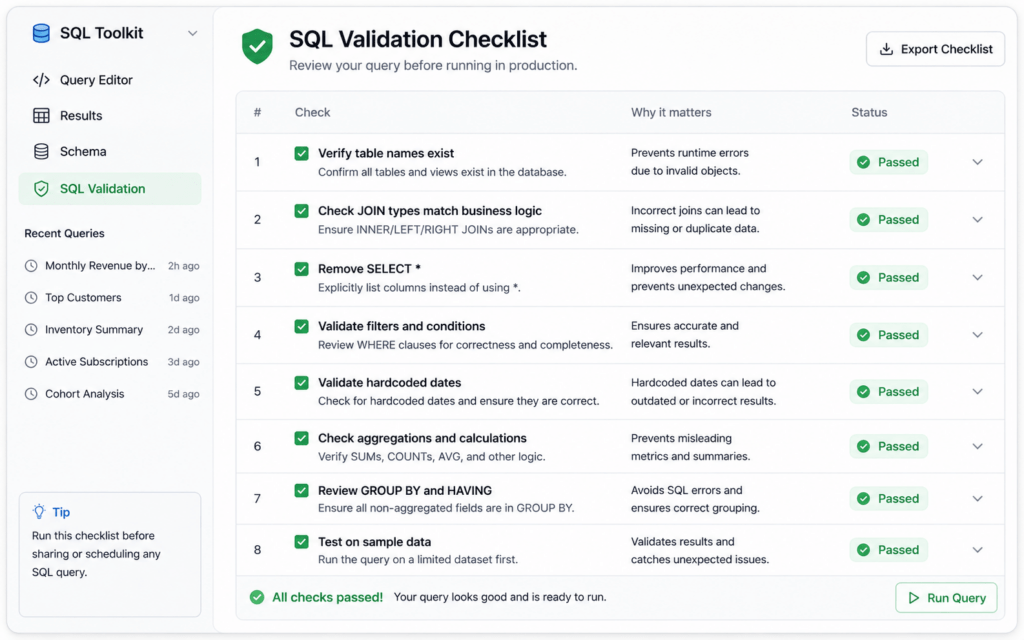
The most common mistake in AI-generated queries is using an INNER JOIN when the user’s intent required a LEFT JOIN — effectively excluding records the user wanted to see. Always verify that join types match your business logic, not just the table structure.
Also check the ON conditions. ON u.id = o.user_id means the query links users to their orders by user ID. If an AI accidentally writes ON u.id = oi.id, it’s a column mismatch that can produce a massive, incorrect Cartesian-like result.
Understanding WHERE, GROUP BY, and HAVING in AI-Generated SQL
Once you’ve traced the data sources, move to the filtering and aggregation logic. This section of AI generated SQL is dense with business intent — and also dense with potential mistakes.
- The WHERE clause filters rows before any aggregation happens.
WHERE o.status = 'active'means only active orders are included. AI tools sometimes add overly restrictive conditions here — like filtering by a date range that’s hardcoded and no longer relevant — so always read every condition explicitly. - The GROUP BY clause tells you how the AI is aggregating data. If you see
GROUP BY u.name, o.total_amount, the query is grouping every unique name-plus-amount combination. A common AI error here is grouping by too many columns, producing near-duplicate rows instead of true aggregations. - The HAVING clause is a post-aggregation filter. It looks similar to
WHERE, but it runs after grouping.HAVING COUNT(oi.id) > 2means the query only returns groups with more than 2 order items. If you see bothWHEREandHAVINGIn AI-generated SQL, remember: WHERE eliminates raw rows early; HAVING eliminates aggregated groups late.
Subqueries and CTEs: How AI Layers Logic
One hallmark of AI-generated SQL is its heavy use of CTEs (Common Table Expressions), introduced with the WITH keyword. AI models love CTEs because they mirror how humans explain multi-step problems.
A typical AI-generated CTE structure looks like this:
sql
WITH active_users AS (
  SELECT id, name FROM users WHERE status = 'active'
),
recent_orders AS (
  SELECT user_id, SUM(total) AS total_spent
  FROM orders
  WHERE created_at >= '2024-01-01'
  GROUP BY user_id
)
SELECT au.name, ro.total_spent
FROM active_users au
JOIN recent_orders ro ON au.id = ro.user_id;
When reading AI-generated SQL that uses CTEs, treat each WITH block as a named temporary table. Read them top to bottom, just as you’d read steps in a recipe. The final SELECT at the bottom ties everything together.
Subqueries embedded inside WHERE or FROM clauses are trickier. A correlated subquery — one that references the outer query’s columns — runs once for every row in the outer query. This can be a significant performance issue. If you see WHERE user_id IN (SELECT id FROM ...), the AI has likely used a non-correlated subquery, which is generally efficient. But WHERE EXISTS (SELECT 1 FROM orders o WHERE o.user_id = u.id AND ...) is correlated and runs row-by-row.
Spotting Common Patterns AI Models Use
After reading enough AI generated SQL, you’ll start recognizing recurring patterns. Here are the most important ones to know:
- The safety filter pattern.
AI tools frequently addWHERE 1=1orWHERE deleted_at IS NULLas a baseline. The first is a no-op placeholder; the second is a soft-delete filter that only applies if your schema uses soft deletes. Check whether it’s relevant. - The over-indexed ORDER BY.
AI generated queries almost always include anORDER BYclause, even when ordering isn’t necessary. This adds a sort step that can slow queries on large tables. If you don’t need sorted output, consider removing it. - The wildcard SELECT.
Sometimes AI generated SQL returnsSELECT *followed by an alias and a subquery. This is lazy but common — it selects all columns from a subquery rather than specifying exactly what’s needed. For production use, replaceSELECT *with explicit column names. - The DISTINCT over-application.
AI frequently addsSELECT DISTINCTwhen it’s unsure whether duplicate rows are expected. While sometimes necessary, it adds overhead. Read whether duplicates could actually occur in your data before accepting the DISTINCT.
Red Flags to Watch For in AI Generated SQL
Not all AI generated SQL is safe to run. Here are warning signs that should prompt careful review before execution:
- Multiple unqualified joins. If a query joins four or more tables without clear, explicit
ONconditions connecting each pair, you risk a partial Cartesian product — an explosion of result rows. - Hardcoded values. Dates, IDs, and status strings hardcoded as literals (
WHERE year = 2023) may have been fabricated by the AI to satisfy the query structure. Verify that these values match your actual data. - Aggregation without GROUP BY. Aggregate functions like
SUM()orCOUNT()used in a SELECT without a GROUP BY clause aggregate the entire table into a single row. This is sometimes intentional, but AI tools occasionally omit the GROUP BY by mistake. - Table or column names that don’t exist. AI models hallucinate schema details. Always verify that every table and column in an AI generated SQL query actually exists in your database before running it.
- Nested CTEs with identical names. In rare cases, AI tools reuse a CTE name across different parts of a query, causing ambiguity. Modern SQL engines will throw an error, but the error message may be cryptic.
📷 Image 2 — Suggested Description
Tools That Help You Read and Validate AI Generated SQL
Reading AI generated SQL manually is important, but tools can accelerate the process significantly.
Database-native EXPLAIN / EXPLAIN ANALYZE. Most SQL databases (PostgreSQL, MySQL, SQLite) support EXPLAIN or EXPLAIN ANALYZE before a query. This shows you the execution plan — how the database actually intends to run the query, which tables it will scan fully, and which indexes it will use. Running EXPLAIN on AI generated SQL before executing it is one of the safest habits you can build.
- SQL formatters. Tools like
pgFormatter,sql-formatter(npm), or built-in IDE formatters can reindent and normalize AI generated SQL into a consistent style. Poorly indented AI output becomes significantly easier to read after formatting. - Schema-aware linters. Tools like
sqlflufforSchemaSpycan validate that the tables and columns in a query actually exist in your schema. This catches hallucinated column names before they reach runtime. - Online visual query builders. Tools like DbSchema or DBeaver can visually render the join relationships in a query, making it easy to see at a glance whether the tables are connected correctly.
- Re-prompting the AI itself. If you’re unsure what a section of AI generated SQL does, paste it back into the AI and ask: “What does this specific CTE do? What would happen if I removed this HAVING clause?” AI tools are excellent at explaining their own output when prompted to do so.
Conclusion
Reading AI generated SQL is not about distrust – it’s about responsibility. AI tools write queries faster than any human, but they have no knowledge of your actual data, your business rules, or the consequences of returning incorrect results. The developer, analyst, or engineer who runs the query owns the outcome.
By developing the habit of reading AI generated SQL clause by clause – starting with SELECT, tracing through joins, examining filters, and checking aggregations – you turn AI from an unpredictable black box into a reliable first draft. Combine that habit with tools like EXPLAIN, sql-formatter, and schema linters, and you have a workflow that captures AI’s speed without sacrificing accuracy.
The best use of AI generated SQL is as a starting point, not an ending point. Read it, understand it, and make it yours.
About The Author