Compare Two Strings in JavaScript is a handy skill for any budding programmer. Whether you’re checking user input for errors, sorting data, or validating forms, understanding how to effectively compare strings can save you loads of time and effort. Curious to learn more? Let’s dive into the nitty-gritty of this essential topic!
What Does It Mean to Compare Strings in JavaScript?
String comparison in JavaScript refers to the process of evaluating two string values to determine whether they are equal, different, or which one comes before the other alphabetically. This comparison can be based on exact character matching, case sensitivity, or even locale-specific rules.
JavaScript compares strings either:
- By value (exact match of characters)
- Lexicographically (based on Unicode values)
Use Cases (Validation, Sorting, Searching)
1. Validation
Used to check if user inputs match expected values.
Example: Confirming if password and confirm password fields are identical.
2. Sorting
Helps arrange strings in alphabetical or custom order.
Example: Sorting a list of names in ascending or descending order.
3. Searching
Used to match or filter content.
Example: Checking if a search term matches a product name or keyword.
Basic Methods to Compare Two Strings in JavaScript
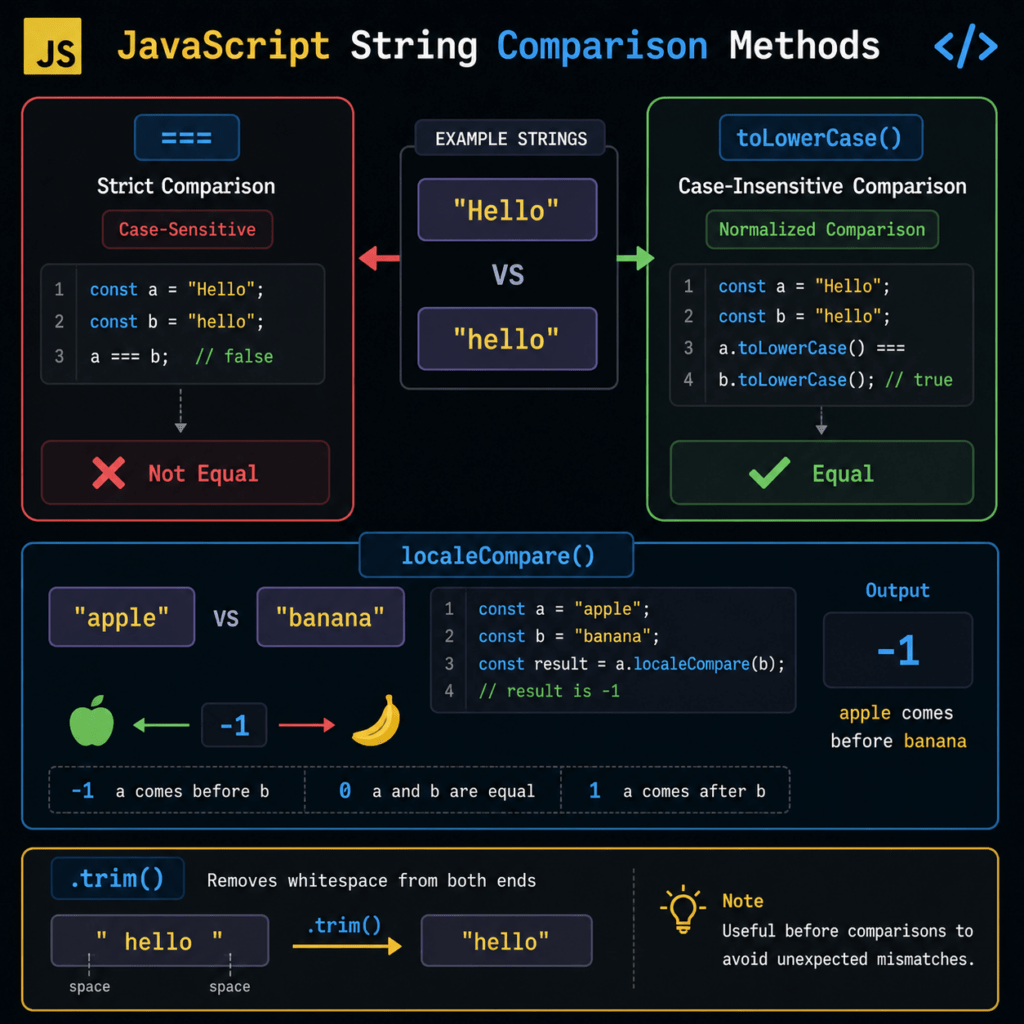
Using == vs ===
Difference Between Loose and Strict Comparison
==(loose equality): Compares values after type conversion===(strict equality): Compares both value and data type without conversion
For strings, both usually behave similarly, but === is recommended for predictable results.
Example and Output
let str1 = "hello";
let str2 = "hello";
let str3 = "Hello";

console.log(str1 == str2);   // true
console.log(str1 === str2);  // true
console.log(str1 === str3);  // false (case-sensitive)
Using localeCompare()
Syntax and Return Values (-1, 0, 1)
string1.localeCompare(string2)
Returns:
0→ strings are equal-1→ first string comes before second1→ first string comes after second
When to Use (Sorting, Internationalization)
- Ideal for alphabetical sorting
- Handles language-specific rules (important for global applications)
Example:
let a = "apple";
let b = "banana";

console.log(a.localeCompare(b)); // -1
Using toLowerCase() / toUpperCase()
Case-Insensitive Comparison
Since JavaScript string comparison is case-sensitive, converting both strings to the same case ensures accurate comparison.
Practical Example
let str1 = "JavaScript";
let str2 = "javascript";

if (str1.toLowerCase() === str2.toLowerCase()) {
  console.log("Strings are equal (case-insensitive)");
}
Output:
Strings are equal (case-insensitive)
This section keeps the explanation practical, code-driven, and aligned with how developers actually implement string comparison.
Comparing Strings Based on Length
Using .length Property
In JavaScript, every string has a built-in .length property that returns the number of characters it contains. You can use this property to compare strings based on their size rather than their content.
This is useful when:
- You need to validate minimum/maximum input length
- You want to prioritize longer or shorter strings
Example Use Case
let str1 = "Hello";
let str2 = "JavaScript";

if (str1.length > str2.length) {
  console.log("str1 is longer");
} else if (str1.length < str2.length) {
  console.log("str2 is longer");
} else {
  console.log("Both strings have equal length");
}
Output:
str2 is longer
Comparing Strings Alphabetically–Compare Two Strings in Javascript
Sorting Logic
Alphabetical comparison in JavaScript is based on Unicode values. By default:
- Uppercase letters come before lowercase letters
- Comparison is done character by character
You can use:
.sort()for arrays.localeCompare()for more accurate and locale-aware sorting
Example with Arrays
let fruits = ["banana", "apple", "cherry"];

fruits.sort();
console.log(fruits);
Output:
["apple", "banana", "cherry"]
Using localeCompare for better control:
let fruits = ["Banana", "apple", "cherry"];

fruits.sort((a, b) => a.localeCompare(b));
console.log(fruits);
Common Mistakes to Avoid-Compare Two Strings in Javascript
Ignoring Case Sensitivity
JavaScript string comparison is case-sensitive by default.
console.log("hello" === "Hello"); // false
Fix: Normalize case before comparing
str1.toLowerCase() === str2.toLowerCase();
Using == Instead of ===
Although both may work for strings, == performs type coercion, which can lead to unexpected results in mixed data comparisons.
console.log("5" == 5);  // true (type conversion happens)
console.log("5" === 5); // false (strict comparison)
Best Practice: Always use === for reliable comparisons.
Not Handling Whitespace
Leading or trailing spaces can cause comparisons to fail.
let str1 = "hello";
let str2 = " hello ";

console.log(str1 === str2); // false
Fix: Use .trim()
str1.trim() === str2.trim();
This section reinforces practical implementation while addressing real-world pitfalls developers frequently encounter.
Real-Life Uses- Compare Two Strings in JavaScript
- Scenario: Email Validation in E-commerce Sites
Many e-commerce companies, like Amazon, need to ensure that users enter valid email addresses when registering for accounts or making purchases. To implement this, they often compare two strings. The first string is the user’s input, and the second is the expected email pattern. A simple mismatch can flag potential errors.
By using this method, companies can reduce incorrect email entries and enhance user experience.const emailPattern = /^S+@S+.S+$/;
const userEmail = "user@example.com";
const isValidEmail = emailPattern.test(userEmail);
console.log(isValidEmail); // Output: true
- Scenario: User Search Functionality in Social Media Platforms
Platforms like Facebook often have to implement search functionalities where users can look up other users. Comparisons between the search input string and stored user name strings need to be made to filter out results effectively.
This ensures case-insensitive comparison, offering better search results.const users = ["Alice", "Bob", "Charlie"];
const searchQuery = "bob";
const matchedUsers = users.filter(user => user.toLowerCase() === searchQuery.toLowerCase());
console.log(matchedUsers); // Output: ["Bob"]
- Scenario: Detecting Plagiarism in Online Education Platforms
Companies like Coursera might employ string comparison to check for plagiarism in student submissions by comparing the similarity of document strings.
By identifying identical or nearly identical strings, the platform can maintain academic integrityconst documentA = "The quick brown fox jumps over the lazy dog";
const documentB = "The quick brown fox jumps over the lazy dog";
const areDocumentsIdentical = documentA === documentB;
console.log(areDocumentsIdentical); // Output: true
Compare Two Strings in Javascript Queries
- How can you compare two strings for equality in JavaScript?
You can use the equality operator (==) or the strict equality operator (===) to compare two strings. While `==` checks for value equality and performs type conversion, `===` checks for both value and type equality, making it more reliable for string comparison.let result = (string1 === string2); - What are some methods to compare two strings case-insensitively?
To perform a case-insensitive comparison, convert both strings to the same case using `toLowerCase()` or `toUpperCase()`, and then compare them.let result = (string1.toLowerCase() === string2.toLowerCase()); - How can you check if one string contains another string?
Use the `includes()` method, which returns true if the substring is found within the string.let result = string1.includes(string2); - What is the difference between `localeCompare()` and normal comparison?
The `localeCompare()` method is used for comparing strings according to the locale settings. It can handle locale-specific needs like accented characters in a more accurate way.let result = string1.localeCompare(string2); - How to compare strings using regular expressions?
Regular expressions can be used with the `match()` method to search for patterns within the string.let result = /pattern/.test(string1); - What’s the best way to handle null or undefined string comparisons?
Use optional chaining or the nullish coalescing operator to avoid errors during comparisons.let safeString = string1 ?? ''; let isEqual = safeString === string2;
Discover our AI-powered js online compiler, where you can instantly write, run, and test your code. Our intelligent compiler simplifies your coding experience, offering real-time suggestions and debugging tips, streamlining your journey from coding novice to expert with ease. Explore it today and boost your coding skills!
Conclusion
Compare Two Strings in Javascript is an essential skill for any aspiring programmer, boosting your proficiency and confidence in handling data. Dive in, try it yourself, and experience the sense of achievement. For more programming knowledge, explore Newtum and discover languages like Java, Python, and C++.
Edited and Compiled by
This article was compiled and edited by @rasikadeshpande, who has over 4 years of experience in writing. She’s passionate about helping beginners understand technical topics in a more interactive way.
About The Author