Understanding “SQL deadlock” is crucial for developers aiming to optimize database performance. Ever felt stuck when concurrent tasks seize up? “SQL deadlock” resolves these logjams by teaching you how to handle resource contention, thereby avoiding costly delays. Curious about ensuring seamless database operations? Keep reading for practical insights and solutions!
What Are Deadlocks in SQL and How Can You Prevent Them?
Deadlocks in SQL are one of the most common and frustrating issues in database systems, especially in high-concurrency environments. In simple terms, a deadlock occurs when two or more transactions are stuck waiting for each other to release resources, and none of them can proceed.
In relational databases, multiple transactions often run simultaneously to improve performance and efficiency. However, when these transactions try to access the same data resources in conflicting ways, a deadlock situation can arise.
The impact of deadlocks is significant. They can cause transaction failures, slow down system performance, and degrade user experience. Most database systems automatically detect deadlocks and terminate one of the transactions, but this still leads to rollback operations and potential delays.
What Is a Deadlock in SQL?
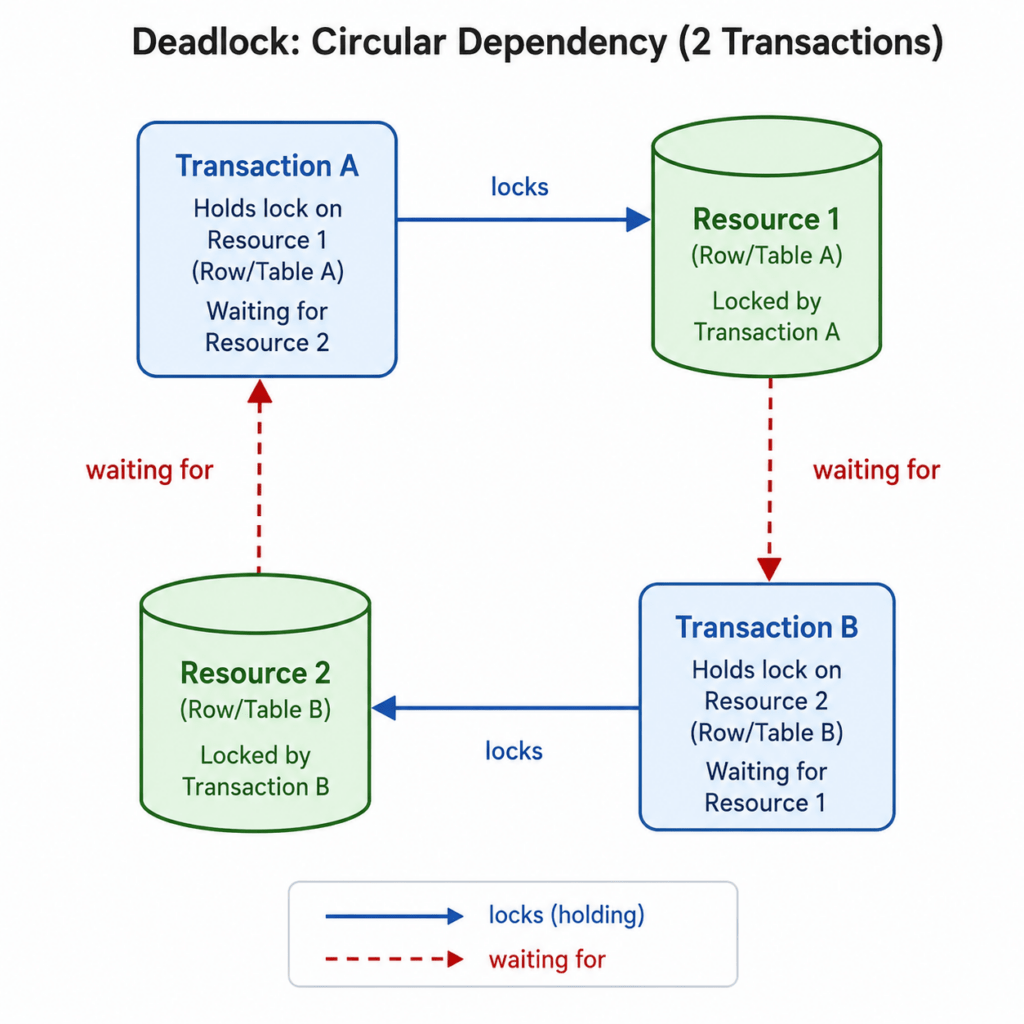
A deadlock in SQL is a situation where two or more transactions are waiting indefinitely for each other to release locks on resources.
For example:
- Transaction A locks Resource 1 and waits for Resource 2
- Transaction B locks Resource 2 and waits for Resource 1
Neither transaction can proceed, resulting in a deadlock.
Simple Real-World Analogy
Imagine two cars stuck at a narrow intersection:
- One car blocks the other’s path
- Neither can move forward unless the other backs up
This is exactly how a deadlock works in a database system.
What Causes Deadlocks in SQL?
Deadlocks usually occur due to poor transaction design or inefficient database operations. Below are the main causes:
Resource Lock Contention
When multiple transactions try to access and lock the same resource simultaneously, conflicts occur. If locks are held in incompatible modes (e.g., exclusive locks), deadlocks can form.
Improper Transaction Order
If different transactions access the same tables or rows in a different sequence, circular dependencies can arise.
Example:
- Transaction A: Table X → Table Y
- Transaction B: Table Y → Table X
This mismatch creates a deadlock risk.
Long-Running Transactions
Transactions that run for a long time hold locks longer, increasing the chance of conflicts with other transactions.
Common causes:
- Large data updates
- Complex queries
- User interaction delays
Missing or Inefficient Indexing
Without proper indexing, the database performs full table scans, which:
- Lock more rows than necessary
- Increase lock duration
- Raise deadlock probability
How Do Deadlocks Work Internally?
Understanding the internal mechanism helps in preventing deadlocks effectively.
Lock Types
- Shared Lock (S): Allows read access
- Exclusive Lock (X): Required for write operations
Conflicts between these locks can block transactions.
Wait-For Graph Concept
Databases internally maintain a wait-for graph, where:
- Nodes represent transactions
- Edges represent waiting dependencies
If a cycle is detected in this graph, a deadlock exists.
Deadlock Detection by DBMS
Modern DBMS systems automatically detect deadlocks and resolve them by:
- Choosing a “victim” transaction
- Rolling it back
- Allowing other transactions to proceed
How to Detect Deadlocks in SQL?
Deadlocks can be diagnosed using database-specific tools and logs.
SQL Server Deadlock Graph
- Visual representation of deadlock
- Shows involved queries and resources
- Helps identify root cause quickly
MySQL / InnoDB Status
- Use
SHOW ENGINE INNODB STATUS - Displays latest detected deadlock
- Includes transaction details
Logs and Monitoring Tools
- Database logs record deadlock events
- Tools like monitoring dashboards help track frequency
- Useful for production systems
How to Prevent Deadlocks in SQL?
Preventing deadlocks requires a combination of good design practices and optimization strategies.
Maintain Consistent Transaction Order
Always access tables and resources in the same order across all transactions.
Why it works:
Eliminates circular wait conditions, which are the root cause of deadlocks.
Keep Transactions Short
Short transactions reduce the time locks are held.
Best practices:
- Avoid unnecessary computations inside transactions
- Commit or rollback quickly
Use Proper Indexing
Efficient indexing ensures:
- Faster query execution
- Reduced lock duration
- Fewer locked rows
Reduce Locking Scope
Limit the amount of data being locked.
Techniques:
- Use row-level locking instead of table-level locking
- Filter queries properly
Use Lower Isolation Levels (When Safe)
Higher isolation levels increase locking.
Example:
- Use
READ COMMITTEDinstead ofSERIALIZABLEwhere possible
This reduces lock contention while maintaining acceptable consistency.
Implement Retry Logic
Since deadlocks cannot always be avoided, applications should:
- Catch deadlock exceptions
- Retry transactions automatically
This ensures system resilience.
Real-World Example of SQL Deadlock
Understanding a deadlock becomes much clearer when you see it step by step.
Scenario Setup
Assume we have two tables:
AccountsTransactions
Two users (or processes) are executing transactions at the same time.
Step-by-Step Deadlock Scenario
Step 1: Transaction A starts
BEGIN TRANSACTION;
UPDATE Accounts SET balance = balance - 100 WHERE id = 1;
- Transaction A acquires an exclusive lock on
Accounts (id = 1)
Step 2: Transaction B starts
BEGIN TRANSACTION;
UPDATE Transactions SET status = 'completed' WHERE id = 10;
- Transaction B acquires an exclusive lock on
Transactions (id = 10)
Step 3: Transaction A requests another resource
UPDATE Transactions SET status = 'completed' WHERE id = 10;
- Transaction A now waits for Transaction B to release the lock
Step 4: Transaction B requests another resource
UPDATE Accounts SET balance = balance - 50 WHERE id = 1;
- Transaction B now waits for Transaction A
Deadlock Occurs
- Transaction A → waiting for Transaction B
- Transaction B → waiting for Transaction A
This creates a circular dependency, and neither transaction can proceed.
How the Database Resolves It
The DBMS automatically:
- Detects the deadlock using a wait-for graph
- Selects one transaction as the victim (usually the one with lower cost)
- Rolls it back
Example outcome:
- Transaction B is rolled back
- Transaction A continues successfully
Key Takeaway
Deadlocks are not bugs in the database—they are a result of how transactions are designed and executed concurrently.
Deadlock vs Blocking in SQL
These two concepts are often confused but are fundamentally different.
Key Differences
| Aspect | Deadlock | Blocking |
|---|---|---|
| Definition | Circular waiting between transactions | One transaction waits for another |
| Resolution | DBMS kills one transaction | Resolved when lock is released |
| Dependency | Cyclic | Linear |
| Outcome | Transaction rollback | Delay only |
| Severity | Critical | Manageable |
Performance Implications
Deadlocks:
- Cause transaction rollbacks
- Waste system resources
- Reduce throughput
- Can impact user experience significantly
Blocking:
- Slows down queries
- Increases response time
- Can escalate into deadlocks if not managed
Simple Analogy
- Blocking: One car waiting behind another at a signal
- Deadlock: Two cars stuck facing each other on a one-lane road
Best Practices to Avoid Deadlocks
Preventing deadlocks requires discipline in both application design and database management.
Summary Checklist
- Always access tables in a consistent order
- Keep transactions short and efficient
- Use proper indexing to avoid full table scans
- Avoid user interaction inside transactions
- Use appropriate isolation levels
- Implement retry logic in applications
- Monitor and analyze deadlock logs regularly
Developer Perspective
From an application standpoint:
- Write optimized queries
- Avoid unnecessary locks
- Ensure consistent transaction flow
- Handle deadlock exceptions gracefully
Focus: Code efficiency and retry mechanisms
DBA Perspective
From a database administration standpoint:
- Monitor deadlock frequency
- Analyze execution plans
- Optimize indexing strategy
- Tune isolation levels and locking behavior
Focus: System-wide performance and stability
Which Brands Use SQL Deadlock and Where?
- Amazon’s Inventory Management System
Amazon deals with numerous database transactions each second. An SQL deadlock can occur when two transactions lock resources the other needs, resulting in a standstill. By implementing deadlock detection and resolution mechanisms, Amazon ensures smooth inventory updates.
Output: By managing deadlocks, Amazon maintains accurate and timely inventory data, preventing order delays and ensuring customer satisfaction.BEGIN TRANSACTION
UPDATE Inventory SET Quantity = Quantity - 1 WHERE ProductID = 101
WAITFOR DELAY '00:00:10'
UPDATE Orders SET Status = 'Processed' WHERE OrderID = 500
COMMIT
- Uber’s Ride Matching System
Matching riders and drivers involves concurrent operations on vast datasets. Deadlocks could slow down this operation. Uber utilises indexing strategies to avoid deadlocks, ensuring efficient ride allocation.
Output: With effective deadlock management, Uber reduces lag time, enhancing user experience by promptly connecting riders and drivers.BEGIN TRANSACTION
UPDATE Rides SET Status = 'Matched' WHERE RideID = 1234
WAITFOR DELAY '00:00:10'
UPDATE Drivers SET Status = 'Allocated' WHERE DriverID = 4321
COMMIT - Netflix’s Content Streaming Database
Handling millions of content requests, Netflix’s databases are under constant threat of deadlocks during peak times. They implement isolation levels to manage concurrent access and ensure uninterrupted streaming service.
Output: Netflix keeps content streaming efficiently, even at high demand, minimizing buffering and playback issues.
    BEGIN TRANSACTION
      UPDATE Streams SET CurrentViewers = CurrentViewers + 1 WHERE EpisodeID = 5678
    WAITFOR DELAY '00:00:10'
      UPDATE Episodes SET LastAccessed = GETDATE() WHERE EpisodeID = 5678
    COMMIT
SQL Deadlock Questions
Learning to code can be quite a journey, don’t you think? Especially when you get to sticky topics like SQL deadlock. This is something that often puzzles developers, leading to sleepless nights and lots of coffee. But worry not, I’ve got some insights for you. Whether you’re new to coding or brushing up on your skills, let’s tackle some of those burning questions you’re likely to find on Google, Reddit, or Quora, ones that traditional sites may not cover.
- How do SQL deadlocks occur in a multi-user environment?
Deadlocks happen when two or more transactions block each other by holding locks that the other transactions need. In a multi-user scenario, this is often due to the complex interdependencies as users simultaneously attempt updates on shared resources. - Is there a way to visually detect a deadlock in SQL Server Management Studio?
Yes, SQL Server Management Studio (SSMS) provides a tool called “Activity Monitor.” By monitoring processes, you can be alerted to deadlocks. Additionally, you can use extended events to get a graphical representation of the deadlock. - What are common misconceptions about SQL deadlocks?
One misconception is that only poor code causes deadlocks; in reality, even well-written code is not immune. Another is thinking deadlocks reflect a server problem, whereas they often arise from logical conflicts in program execution. - Can setting the correct isolation level help prevent deadlocks?
Absolutely! Choosing an appropriate isolation level, like READ COMMITTED SNAPSHOT, helps by reducing lock contention, which in turn decreases the chances of deadlocks. - How can you simulate a deadlock for educational purposes?
You can create two transactions that lock resources in different orders and then try to access each other’s locked resources. Here’s a quick example:
Run these transactions simultaneously to simulate a deadlock.
Transaction 1:
BEGIN TRANSACTION
UPDATE TableA SET Column1 = 1 WHERE ID = 1;
WAITFOR DELAY '00:00:05';
UPDATE TableB SET Column1 = 1 WHERE ID = 1;
COMMIT

Transaction 2:
BEGIN TRANSACTION
UPDATE TableB SET Column1 = 1 WHERE ID = 1;
WAITFOR DELAY '00:00:05';
UPDATE TableA SET Column1 = 1 WHERE ID = 1;
COMMIT - Can SQL deadlock cause data corruption?
No, deadlocks themselves don’t corrupt data. Their primary effect is increasing transaction time as one process is rolled back. SQL Server resolves deadlocks by forcefully terminating one transaction, which is safe for data integrity. - What’s the difference between a SQL lock and a deadlock?
A SQL lock permits one transaction’s use of a resource, ensuring data consistency and preventing conflicts. A deadlock, however, involves two locks that are in conflict, resulting in neither transaction proceeding until one is rolled back. - How can SQL deadlocks impact application performance?
They can slow down performance significantly, as the system needs time to detect and resolve deadlocks by rolling back one of the transactions. It’s an inefficient use of resources that you want to minimize. - Why is it important to handle errors related to deadlocks in SQL applications?
Handling deadlock errors ensures your application can gracefully retry the operation rather than crash. Implementing retry logic helps maintain system reliability and a seamless user experience. - Are there any tools to automatically resolve or avoid deadlocks before they occur?
While SQL Server possesses built-in mechanisms to resolve deadlocks (by terminating one of the transactions), using query tuning tools and SQL Profiler can help you proactively optimize queries to avoid deadlocks.
Oh, you’re going to love our AI-powered sql online compiler! It lets you seamlessly write, run, and test your SQL code instantly. With AI at the helm, coding becomes efficient and straightforward, making tedious tasks a thing of the past. Ready to turbocharge your SQL skills?
Conclusion
SQL deadlock might seem daunting at first, but mastering it fortifies your problem-solving skills, helping unravel complex database issues with ease. Imagine the satisfaction of averting potential bottlenecks! Feeling inspired? Explore more programming wisdom with Newtum and dive into languages like Java, Python, C, C++, and more.
Edited and Compiled by
This article was compiled and edited by @rasikadeshpande, who has over 4 years of experience in writing. She’s passionate about helping beginners understand technical topics in a more interactive way.
About The Author