C# Programs on Date and Time are commonly used to handle calendars, schedules, timestamps, age calculations, reports, and many other real-world tasks in software development. In C#, the DateTime class provides built-in methods and properties to work with dates, times, months, years, and formatting operations efficiently.
Date and time handling is important in applications like attendance systems, booking platforms, banking software, event management systems, and logging systems. Developers frequently use DateTime functions to display current dates, calculate differences between dates, check leap years, and format timestamps.
In this blog, you will learn various C# programs on date, time, and year with examples, including DateTime syntax, leap year programs, date formatting, time calculations, and advanced DateTime operations.
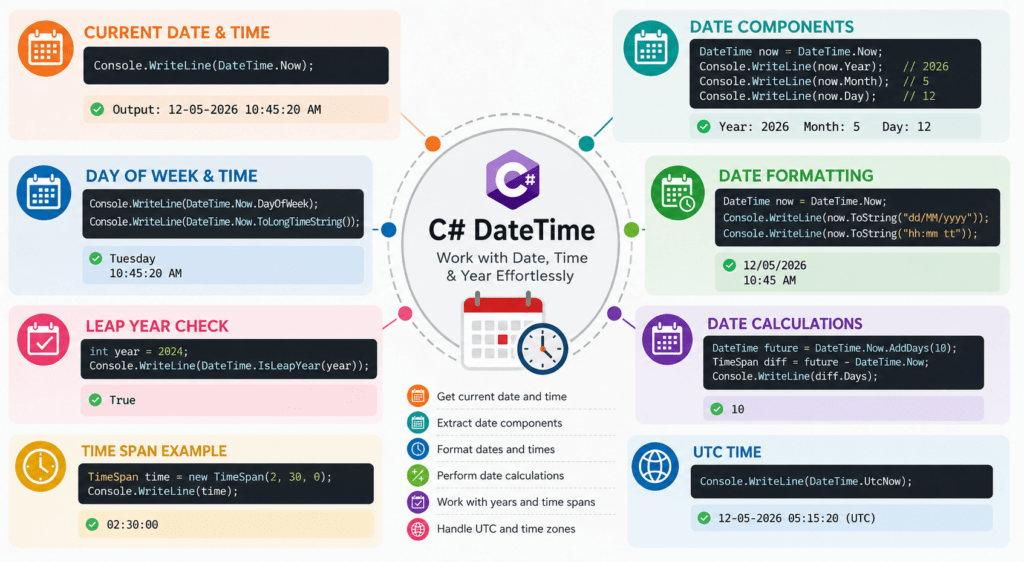
C# Programs on Date and Timecheat sheet infographic
What is DateTime in C#?
The DateTime class in C# is used to represent dates and times. It provides properties and methods to manipulate date and time values easily.
Understanding the DateTime Class
The DateTime class belongs to the System namespace and helps developers perform operations such as:
- Getting current date and time
- Extracting year, month, and day
- Formatting dates
- Comparing dates
- Calculating date differences
It is one of the most commonly used classes in C# programming.
Why Date and Time Handling is Important
Date and time handling plays an important role in modern applications because many systems rely on accurate timestamps and scheduling.
Common use cases include:
- Login and logout tracking
- Online appointment booking
- Financial transaction records
- Age calculation systems
- Attendance management software
- Event reminders and notifications
Without proper DateTime handling, applications may produce incorrect results or formatting issues.
Basic Syntax of C# Programs on Date and Time
The following example shows how to get the current date and time in C#.
using System;

class Program
{
    static void Main()
    {
        DateTime now = DateTime.Now;
        Console.WriteLine(now);
    }
}
Output
12-05-2026 10:45:20 AMBasic C# Programs on Date and Time
Program to Display Current Date and Time
This program displays the current system date and time.
using System;

class Program
{
    static void Main()
    {
        Console.WriteLine(DateTime.Now);
    }
}
Program to Display Current Year
This program extracts and displays only the current year.
using System;

class Program
{
    static void Main()
    {
        Console.WriteLine(DateTime.Now.Year);
    }
}
Output
2026Program to Display Current Month and Day
This program prints the current month and day separately.
using System;

class Program
{
    static void Main()
    {
        DateTime today = DateTime.Now;

        Console.WriteLine("Month: " + today.Month);
        Console.WriteLine("Day: " + today.Day);
    }
}
Program to Print Day of Week
This program displays the current day name.
using System;

class Program
{
    static void Main()
    {
        Console.WriteLine(DateTime.Now.DayOfWeek);
    }
}
Output
TuesdayProgram to Display Current Time Only
This program prints only the current time.
using System;

class Program
{
    static void Main()
    {
        Console.WriteLine(DateTime.Now.ToLongTimeString());
    }
}
C# Programs on Year
Program to Check Leap Year
This program checks whether a year is a leap year or not.
using System;

class Program
{
    static void Main()
    {
        int year = 2024;

        if(DateTime.IsLeapYear(year))
        {
            Console.WriteLine("Leap Year");
        }
        else
        {
            Console.WriteLine("Not Leap Year");
        }
    }
}
Program to Calculate Age from Date of Birth
This program calculates age using the birth year.
using System;

class Program
{
    static void Main()
    {
        DateTime dob = new DateTime(2000, 5, 15);

        int age = DateTime.Now.Year - dob.Year;

        Console.WriteLine("Age: " + age);
    }
}
Program to Find Number of Days in a Year
This program checks the number of days in a given year.
using System;

class Program
{
    static void Main()
    {
        int year = 2024;

        if(DateTime.IsLeapYear(year))
            Console.WriteLine("366 Days");
        else
            Console.WriteLine("365 Days");
    }
}
Program to Compare Two Years
This program compares two years.
using System;

class Program
{
    static void Main()
    {
        int year1 = 2023;
        int year2 = 2026;

        if(year1 > year2)
            Console.WriteLine("Year1 is Greater");
        else
            Console.WriteLine("Year2 is Greater");
    }
}
C# Date Formatting Programs
Convert Date into dd/MM/yyyy Format
using System;

class Program
{
    static void Main()
    {
        DateTime today = DateTime.Now;

        Console.WriteLine(today.ToString("dd/MM/yyyy"));
    }
}
Convert Date into MM-dd-yyyy Format
using System;

class Program
{
    static void Main()
    {
        DateTime today = DateTime.Now;

        Console.WriteLine(today.ToString("MM-dd-yyyy"));
    }
}
Display Date with Month Name
using System;

class Program
{
    static void Main()
    {
        DateTime today = DateTime.Now;

        Console.WriteLine(today.ToString("dd MMMM yyyy"));
    }
}
Output
12 May 2026Program to Format Time in 12-Hour Format
using System;

class Program
{
    static void Main()
    {
        DateTime now = DateTime.Now;

        Console.WriteLine(now.ToString("hh:mm tt"));
    }
}
C# Date Calculation Programs
Add Days to Current Date
using System;

class Program
{
    static void Main()
    {
        DateTime futureDate = DateTime.Now.AddDays(10);

        Console.WriteLine(futureDate);
    }
}
Subtract Days Between Two Dates
using System;

class Program
{
    static void Main()
    {
        DateTime date1 = new DateTime(2026, 5, 1);
        DateTime date2 = new DateTime(2026, 5, 12);

        TimeSpan result = date2 - date1;

        Console.WriteLine(result.Days);
    }
}
Find Difference Between Two Dates
using System;

class Program
{
    static void Main()
    {
        DateTime start = new DateTime(2026, 1, 1);
        DateTime end = DateTime.Now;

        TimeSpan difference = end - start;

        Console.WriteLine("Days: " + difference.Days);
    }
}
Program to Find Future Date
using System;

class Program
{
    static void Main()
    {
        DateTime future = DateTime.Now.AddMonths(2);

        Console.WriteLine(future);
    }
}
Advanced DateTime Programs in C#
Program to Convert String to DateTime
using System;

class Program
{
    static void Main()
    {
        string date = "12-05-2026";

        DateTime result = DateTime.Parse(date);

        Console.WriteLine(result);
    }
}
Program to Compare Date and Time
using System;

class Program
{
    static void Main()
    {
        DateTime d1 = new DateTime(2026, 5, 10);
        DateTime d2 = new DateTime(2026, 5, 12);

        if(d1 > d2)
            Console.WriteLine("Date1 is Greater");
        else
            Console.WriteLine("Date2 is Greater");
    }
}
Program to Get UTC Time
using System;

class Program
{
    static void Main()
    {
        Console.WriteLine(DateTime.UtcNow);
    }
}
Program to Use TimeSpan in C#
using System;

class Program
{
    static void Main()
    {
        TimeSpan time = new TimeSpan(2, 30, 0);

        Console.WriteLine(time);
    }
}
Practical Applications of C# Date and Time Programs
- Scheduling Apps at Microsoft:
Microsoft uses C# programs to manage date and time in their Outlook scheduling apps, enabling users to set appointments and reminders seamlessly.
using System;

namespace OutlookSchedulingApp
{
    class Program
    {
        static void Main(string[] args)
        {
            DateTime appointmentDate = new DateTime(2023, 10, 25, 15, 30, 0);
            Console.WriteLine("Your appointment is scheduled for: " + appointmentDate);
        }
    }
}
Output: “Your appointment is scheduled for: 25/10/2023 15:30:00” - Flight Management Systems at British Airways:
British Airways leverages C# for flight scheduling, ensuring accurate departure and arrival times handle multiple time zones.
Output: “Scheduled Departure Time (UTC): [Current UTC time + 5 hours]”using System;
namespace FlightManagement
{
class Program
{
static void Main(string[] args)
{
DateTime departureTime = DateTime.UtcNow.AddHours(5);
Console.WriteLine("Scheduled Departure Time (UTC): " + departureTime);
}
}
}
- Financial Transactions at HSBC:
HSBC uses C# to timestamp financial transactions, ensuring every transaction is accurately recorded with the real-time date and time.
Output: “Transaction completed at: [Current Date and Time]”
using System;

namespace HSBCTransactionLog
{
    class Program
    {
        static void Main(string[] args)
        {
            DateTime transactionTime = DateTime.Now;
            Console.WriteLine("Transaction completed at: " + transactionTime);
        }
    }
}
Common Errors While Working with C# Programs on Date and Time
Working with DateTime in C# is simple, but beginners often face errors related to formatting, parsing, and time conversions. Understanding these common issues can help you avoid bugs and improve application accuracy.
Invalid Date Format Exception
An invalid date format exception occurs when the input date string does not match the expected format.
Example of Incorrect Code
using System;

class Program
{
    static void Main()
    {
        string date = "31/31/2026";

        DateTime result = DateTime.Parse(date);

        Console.WriteLine(result);
    }
}
Problem
The month value 31 is invalid because months can only range from 1 to 12.
Solution
Always use valid date formats and validate user input before parsing.
using System;

class Program
{
    static void Main()
    {
        string date = "12/05/2026";

        DateTime result = DateTime.Parse(date);

        Console.WriteLine(result);
    }
}
Incorrect Time Conversion
Incorrect time conversion happens when developers use the wrong format specifiers or convert between 12-hour and 24-hour formats improperly.
Example
using System;

class Program
{
    static void Main()
    {
        DateTime now = DateTime.Now;

        Console.WriteLine(now.ToString("HH:mm"));
    }
}
Common Mistake
Using hh instead of HH may produce incorrect results when working with 24-hour time formats.
hh→ 12-hour formatHH→ 24-hour format
Correct Example
using System;

class Program
{
    static void Main()
    {
        DateTime now = DateTime.Now;

        Console.WriteLine(now.ToString("hh:mm tt"));
    }
}
Date Parsing Errors
Date parsing errors occur when converting strings into DateTime objects using unsupported or ambiguous formats.
Example of Parsing Error
using System;

class Program
{
    static void Main()
    {
        string date = "May 45, 2026";

        DateTime result = DateTime.Parse(date);

        Console.WriteLine(result);
    }
}
Problem
The date does not exist because May has only 31 days.
Better Approach
Use DateTime.TryParse() to safely handle invalid input.
using System;

class Program
{
    static void Main()
    {
        string date = "12 May 2026";

        if(DateTime.TryParse(date, out DateTime result))
        {
            Console.WriteLine(result);
        }
        else
        {
            Console.WriteLine("Invalid Date");
        }
    }
}
Best Practices for C# Programs on Date and Time
Using proper DateTime techniques improves performance, readability, and reliability in applications.
Use DateTime.TryParse()
DateTime.TryParse() prevents exceptions by safely validating date input.
Example
using System;

class Program
{
    static void Main()
    {
        string input = "15/05/2026";

        if(DateTime.TryParse(input, out DateTime date))
        {
            Console.WriteLine(date);
        }
        else
        {
            Console.WriteLine("Invalid Date");
        }
    }
}
Benefits
- Prevents runtime exceptions
- Improves input validation
- Safer for user-generated data
Prefer UTC for Global Applications
UTC (Coordinated Universal Time) helps maintain consistent time across different countries and time zones.
Example
using System;

class Program
{
    static void Main()
    {
        Console.WriteLine(DateTime.UtcNow);
    }
}
Why Use UTC?
- Avoids timezone conflicts
- Useful for cloud applications
- Ensures consistent timestamps
Use Proper Date Formatting
Always use standardized formatting to improve readability and avoid confusion.
Example
using System;

class Program
{
    static void Main()
    {
        DateTime today = DateTime.Now;

        Console.WriteLine(today.ToString("dd/MM/yyyy"));
    }
}
Recommended Formats
dd/MM/yyyyMM-dd-yyyyyyyy-MM-dd
Validate User Input Dates
Never assume user-entered dates are valid. Always validate before processing.
Example
using System;

class Program
{
    static void Main()
    {
        string inputDate = "32/01/2026";

        if(DateTime.TryParse(inputDate, out DateTime result))
        {
            Console.WriteLine(result);
        }
        else
        {
            Console.WriteLine("Please Enter a Valid Date");
        }
    }
}
Advantages
- Prevents invalid records
- Reduces application crashes
- Improves user experience
Interview Prep: C# Programs on Date and Time
Learning about ‘C# Programs on Date and Time’ can often feel like trying to solve a puzzle, but don’t fret! Here are some of the most common, yet unique questions people have about this intriguing topic. And yes, these aren’t typically covered by the usual resources. Let’s dive into these queries, shall we?- How can I get the start and end of the day in C#?
To find the start and end of a given day, you can focus on time manipulation. Here’s how you do it:
This creates a start time at 00:00:00 and the end time at 23:59:59.9999999 of the same day.DateTime start = DateTime.Today; DateTime end = start.AddDays(1).AddTicks(-1);
- How do I find the number of weekends between two dates in C#?
Counting weekends is a little tricky, but can be done using a loop:
This code iterates through each date, counting Saturdays and Sundays.int CountWeekends(DateTime start, DateTime end) { int weekends = 0; for (var date = start; date <= end; date = date.AddDays(1)) { if (date.DayOfWeek == DayOfWeek.Saturday || date.DayOfWeek == DayOfWeek.Sunday) { weekends++; } } return weekends; }
- What is the quickest way to convert a string to a DateTime in C# with specific formats?
Use `DateTime.ParseExact`, which demands a format string:
This parses the date strictly according to the provided format.string dateStr = "24/12/2023"; DateTime date = DateTime.ParseExact(dateStr, "dd/MM/yyyy", CultureInfo.InvariantCulture);
- How to calculate age from a date of birth in C#?
Calculating age involves subtracting years:
This accounts for whether the birthday has passed this year.DateTime birthDate = new DateTime(1990, 6, 15); int age = DateTime.Now.Year - birthDate.Year; if (DateTime.Now < birthDate.AddYears(age)) age--;
- Is it possible to format DateTime into ISO standard format in C#?
Yes, use the `ToString` method with format specifiers:
This creates a format compliant with ISO 8601, often used in data exchange.DateTime now = DateTime.Now; string isoFormat = now.ToString("yyyy-MM-ddTHH:mm:ss.fff");
- How can I convert UTC time to local time in C#?
Use the `ToLocalTime()` method, which considers timezone settings:
This conversion adapts to the system's time zone.DateTime utcTime = DateTime.UtcNow; DateTime localTime = utcTime.ToLocalTime();
- How can I find the day of the year for a particular date in C#?
Access the `DayOfYear` property, which does the job seamlessly:
It returns the day's position within the year, starting from 1.DateTime date = new DateTime(2023, 3, 15); int dayOfYear = date.DayOfYear;
- How to add time intervals to a DateTime in C#?
Use methods like `AddYears`, `AddMonths`, etc.:
This shows how to add cumulative time increments to a date.DateTime current = DateTime.Now; DateTime future = current.AddYears(1).AddMonths(6).AddDays(5);
Our AI-powered csharp online compiler lets users instantly write, run, and test code, making coding seamless and efficient. With AI guidance, it’s like having your own coding assistant. This innovative tool helps coders of all levels improve and succeed faster, ensuring a smooth coding journey. Happy coding!
Conclusion
"C# Programs on Date and Time" enhances your understanding of handling date and time effectively in coding. By mastering these skills, you gain confidence in tackling real-world applications. Dive deeper into various programming languages on Newtum and embrace new opportunities. Ready to code like a pro?
Edited and Compiled by
This article was compiled and edited by @rasikadeshpande, who has over 4 years of experience in writing. She's passionate about helping beginners understand technical topics in a more interactive way.
About The Author