‘Sessions in PHP’ are vital for managing user data across web pages without relying on cookies. By understanding this concept, developers can tackle issues like user authentication, maintaining shopping cart contents, and preserving user preferences. Keen to dive in and unravel these mysteries? Let’s make PHP sessions simple and connect the dots together!
How to Use Sessions in PHP for Beginners?
When building dynamic websites, it is important to remember users and their activities while they navigate between pages. PHP sessions help developers store user information temporarily on the server so data can be accessed across multiple pages.
Sessions are commonly used in login systems, shopping carts, dashboards, and multi-step forms. Without sessions, every page request would behave like a completely new visit.
Another important concept to understand is the difference between sessions and cookies. Cookies store data inside the user’s browser, while sessions store data securely on the server and only keep a unique session ID in the browser. Because of this, sessions are considered more secure for handling sensitive information like authentication details.
What Are Sessions in PHP?
PHP sessions are a way to store user-specific information on the server for later use across multiple web pages. Each user receives a unique session ID that helps PHP identify and retrieve the correct session data.
Unlike normal variables that disappear after a page reload, session data remains available until the user closes the browser or the session expires.
For example:
- A login system uses sessions to remember authenticated users.
- An ecommerce website uses sessions to maintain shopping cart items.
- A dashboard uses sessions to keep track of user preferences.
Sessions make websites interactive and personalized without requiring users to repeatedly enter the same information.
Why Use Sessions in PHP?
Store User Login Information
Sessions are widely used for authentication systems. After a user logs in successfully, their login status can be stored in a session variable. This prevents the user from needing to log in again on every page.
Example:
$_SESSION["loggedin"] = true;
Maintain User State Across Pages
HTTP is a stateless protocol, which means webpages do not automatically remember previous interactions. Sessions solve this problem by preserving user data between page requests.
For example:
- Multi-step registration forms
- Online quizzes
- Shopping carts
All these features rely heavily on sessions.
Improve Security Compared to Cookies
Cookies store information directly inside the browser, making them easier to manipulate. Sessions store data on the server, which makes them more secure for sensitive information like user IDs and authentication tokens.
Only a session ID is stored inside the browser.
How PHP Sessions Work
PHP sessions work using a unique identifier called a session ID.
Here is the basic workflow:
- A user visits the website.
- PHP creates a unique session ID.
- The session ID is stored in the browser.
- Actual session data is stored on the server.
- On future requests, the browser sends the session ID back to the server.
- PHP retrieves the corresponding session data.
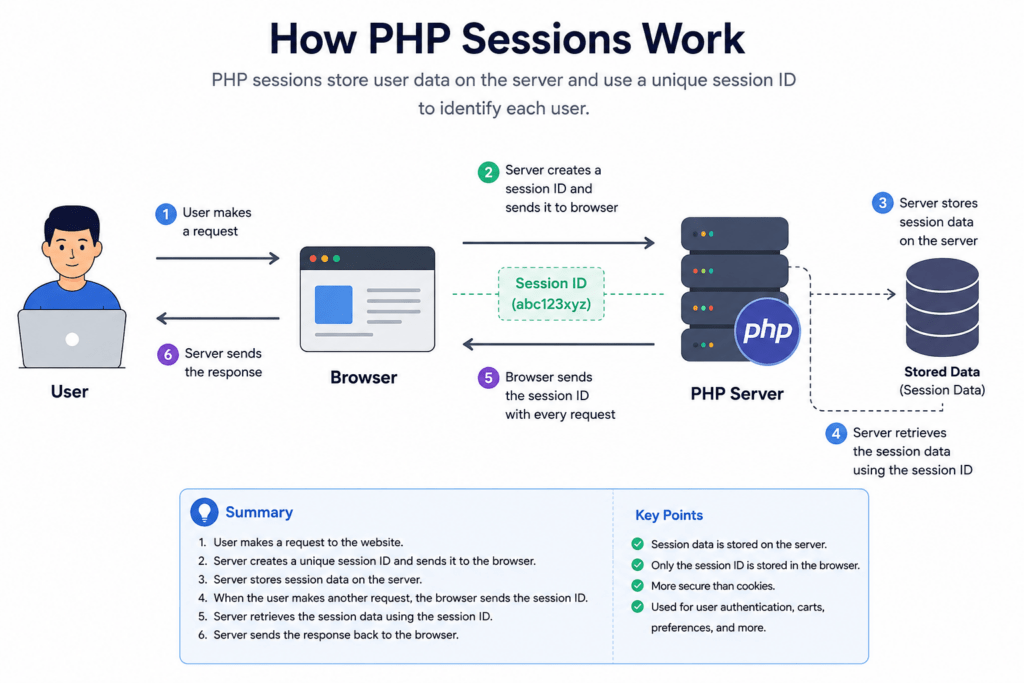
User → Browser → Session ID → PHP Server → Stored Data
This process allows websites to maintain continuity between pages.
How to Start a Session in PHP
Before using sessions, PHP requires the session_start() function.
<?php
session_start();
?>
Why session_start() Is Required
The session_start() function initializes a new session or resumes an existing one. Without it, PHP cannot access session variables.
Must Be Placed Before HTML Output
This function must appear before any HTML content or whitespace because PHP needs to send session-related headers to the browser.
Correct Example:
<?php
session_start();
?>
<!DOCTYPE html>
<html>
<body>
Incorrect Example:
<html>
<?php
session_start();
?>
The incorrect version may produce a “headers already sent” error.
How to Store Data in PHP Sessions
After starting a session, data can be stored using the $_SESSION superglobal array.
<?php
$_SESSION["username"] = "John";
?>
Using $_SESSION Superglobal
The $_SESSION array stores key-value pairs that remain accessible throughout the user’s session.
Example:
$_SESSION["email"] = "john@example.com";
$_SESSION["role"] = "Admin";
Storing Multiple Values
You can store multiple pieces of information inside the same session.
For example:
$_SESSION["username"] = "John";
$_SESSION["cart_items"] = 5;
$_SESSION["loggedin"] = true;
This is useful for applications that require user-specific data.
How to Access Session Data in PHP
Stored session data can be accessed anywhere after calling session_start().
<?php
echo $_SESSION["username"];
?>
Output:
John
This allows developers to personalize webpages using stored session information.
Complete PHP Session Example
The following example demonstrates how to start a session, store data, and retrieve it.
<?php
session_start();

$_SESSION["username"] = "John";

echo "Welcome " . $_SESSION["username"];
?>
Output Example
Welcome John
This is the basic foundation of login systems and user dashboards.
How to Destroy a Session in PHP
Sessions should be destroyed when a user logs out or when sensitive information should no longer remain active.
<?php
session_start();
session_destroy();
?>
Logout Functionality
The session_destroy() function removes all session data from the server. It is commonly used during logout processes.
Example:
<?php
session_start();

session_destroy();

echo "You have been logged out.";
?>
Clearing Session Data Securely
For better security, developers often remove session variables before destroying the session.
Example:
<?php
session_start();

session_unset();
session_destroy();
?>
This ensures all user-related data is completely removed from memory.
Using Sessions in PHP
php
";
echo "Email: " . $_SESSION["email"] . "
";
// Modifying session data
$_SESSION["username"] = "JaneDoe";
// Accessing modified session data
echo "Modified Username: " . $_SESSION["username"] . "
";
// Removing a specific session variable
unset($_SESSION["email"]);
// Destroying the session completely
session_destroy();
?>
Explanation of the Code
Here’s a breakdown of the PHP session code provided above:
- First, the `session_start()` function is called to begin a session. This function is crucial as it lets PHP know you’re working with session data.Next, session variables are created to store user data. In this case, `$_SESSION[“username”]` and `$_SESSION[“email”]` are used to store “JohnDoe” and “john@example.com” respectively. These variables keep user information for the duration of their session.We then retrieve the session data using `echo` to display the username and email on the webpage.To demonstrate that session data can be modified, the username is updated to “JaneDoe” and then echoed to show the change.The `unset()` function is employed to remove the “email” session information, illustrating the selective removal of session data.Finally, `session_destroy()` is used to end the session entirely, erasing all stored data.
Output
Username: JohnDoe

Email: john@example.com

Modified Username: JaneDoe
Sessions in PHP vs Cookies in PHP
Both sessions and cookies are used to store user-related information in web applications, but they work differently. Sessions store data on the server, while cookies store data inside the user’s browser.
Sessions are generally more secure because sensitive information stays on the server side. Cookies are commonly used for storing user preferences like language settings or theme choices.
| Feature | Sessions | Cookies |
|---|---|---|
| Storage | Server | Browser |
| Security | More Secure | Less Secure |
| Size Limit | Larger | Smaller |
| Usage | Authentication | Preferences |
When to Use Sessions
- User authentication
- Shopping carts
- Secure user data
- Dashboard access
When to Use Cookies
- Remember me functionality
- Website preferences
- Language settings
- Theme customization
Common Session Errors in PHP
While working with PHP sessions, beginners often encounter a few common issues. Understanding these errors helps developers debug applications more efficiently.
Headers Already Sent Error
This is one of the most common session-related errors in PHP.
Cause
The error occurs when output is sent to the browser before calling session_start().
Incorrect Example:
<html>
<?php
session_start();
?>
PHP cannot modify headers after HTML output begins.
Solution
Always place session_start() at the top of the file before any HTML, spaces, or output.
Correct Example:
<?php
session_start();
?>
<html>
<body>
Session Not Working on Localhost
Sometimes sessions may not work properly in local development environments.
Common Causes
- Browser cookies are disabled
- Incorrect PHP configuration
- Server not running properly
- Missing
session_start()
Solution
- Enable cookies in the browser
- Restart Apache or XAMPP server
- Verify PHP session settings
- Ensure
session_start()exists on every page using sessions
You can also test session functionality using this example:
<?php
session_start();

$_SESSION["test"] = "Working";

echo $_SESSION["test"];
?>
If the output appears correctly, sessions are functioning properly.
Forgetting session_start()
Another common mistake is trying to access session variables without initializing the session first.
Incorrect Example:
<?php
echo $_SESSION["username"];
?>
This may generate undefined variable warnings.
Correct Example
<?php
session_start();

echo $_SESSION["username"];
?>
Always initialize sessions before storing or retrieving session data.
Best Practices for Sessions in PHP
Following proper session management practices improves both security and application performance.
Regenerate Session IDs
Regenerating session IDs helps prevent session hijacking attacks.
PHP provides the session_regenerate_id() function for this purpose.
Example:
<?php
session_start();

session_regenerate_id(true);
?>
Why It Matters
Attackers sometimes try to steal session IDs. Regenerating IDs after login reduces this risk significantly.
It is recommended to regenerate the session ID:
- After successful login
- During sensitive actions
- Periodically in long sessions
Destroy Sessions After Logout
Always destroy sessions when users log out.
Example:
<?php
session_start();

session_unset();
session_destroy();
?>
Benefits
- Prevents unauthorized access
- Clears user data securely
- Improves application security
This is especially important for banking systems, admin dashboards, and ecommerce applications.
Avoid Storing Sensitive Data
Although sessions are more secure than cookies, sensitive information should still be handled carefully.
Avoid Storing:
- Passwords
- Credit card details
- Personal identification data
Better Alternatives
- Store encrypted tokens
- Use database references
- Implement proper authentication systems
Keeping session data minimal improves both security and performance.
Understanding Real-Life Applications of Sessions in PHP
Let’s dive into some practical examples where companies put ‘Sessions in PHP’ to good use. These are real-world scenarios that show the power and flexibility of sessions.
- Online Shopping Carts: Amazon’s Seamless Shopping Experience
Amazon’s massive online marketplace uses sessions to keep track of users’ shopping carts. When you add an item to your cart, sessions store this data temporarily even if you navigate away from the cart page to explore other products. This continuity makes shopping seamless and fluid.
session_start();
$_SESSION['cart_items'][] = $item_id;
Output: Users see their selected items automatically added to their cart, remaining there as they continue shopping. - User Authentication: Facebook’s Login System
Facebook utilizes sessions to manage user logins. Once you authenticate your user credentials, a session secures your login status, maintaining your access across the site without requiring you to repeatedly log in.
Output: Users stay logged in while browsing, avoiding repeated login requests and maintaining a secure access point.
session_start();
$_SESSION['user_id'] = $fetched_user_id; - Personalised Content Delivery: Netflix’s Customised Suggestions
Netflix takes advantage of sessions to personalise your viewing suggestions. As you watch and interact with different shows, sessions help store your preferences to deliver tailored content recommendations.
Output: Users receive content suggestions aligned with their viewing history, enhancing their experience on the platform.
session_start();
$_SESSION['user_preferences'] = $preferences;
These cases highlight how major companies use PHP sessions to improve user experience, security, and personalisation. Implementing sessions effectively can be a game-changer in the digital landscape!
Sessions in PHP Interview Questions
- How can I extend a session’s lifetime in PHP?
To extend a session’s lifetime, you can set the `session.gc_maxlifetime` directive in your `php.ini` file or use `ini_set` within your PHP script. For example:
Just ensure that your session storage is configured correctly to respect this setting.ini_set('session.gc_maxlifetime', 3600); // Session lasts for one hour - How do PHP sessions work on different domains?
PHP sessions rely on cookies by default; thus, session data is only available on the domain that set the cookie. You’d need to configure session data storage manually to share sessions across domains. - Can I store complex data structures like arrays in a PHP session?
Yes, PHP sessions can store arrays. PHP automatically serialises complex data types when saving them to a session. - Why might my session data disappear unexpectedly with PHP sessions?
This often happens due to session expiration, session data cleanliness settings, or issues in server setup. Verifying configuration for `session.gc_maxlifetime` and `session.save_path` may help. - How can I securely regenerate session IDs in PHP?
Use `session_regenerate_id()` to safely regenerate session IDs and prevent session hijacking. Always do this after successful login or privilege updates. - Is it possible to use sessions without cookies in PHP?
Yes, you can enable session IDs to be passed in URLs by setting `session.use_cookies` to `0`. However, it’s less secure and not recommended. - What are some common errors to avoid when dealing with sessions?
Never call `session_start()` redundantly, and avoid storing sensitive data directly in sessions – always sanitise and validate session inputs and outputs.
Our AI-powered php online compiler offers a seamless coding experience. Instantly write, run, and test your ‘php’ code with the help of AI. It’s designed to streamline your coding process, making it quicker and more efficient. Try it out, and see the difference AI can make!
Conclusion
Finally, “Sessions in PHP” offer the practical know-how you need to build dynamic, user-friendly websites. By putting this into practice, you’ll enhance both your coding skills and confidence. Give it a go, and as you accomplish milestones, don’t forget that you’re mastering valuable skills. For more comprehensive programming languages tutorials like Java, Python, or C++, check out Newtum. The coding world is vast and exciting – dive in and discover endless possibilities!
Edited and Compiled by
This article was compiled and edited by @rasikadeshpande, who has over 4 years of experience in writing. She’s passionate about helping beginners understand technical topics in a more interactive way.
About The Author