Shared vs exclusive locks in SQL are essential mechanisms that help databases manage multiple users accessing the same data simultaneously. Imagine two employees updating the same bank account balance at the same time without coordination; the result could be inaccurate data. SQL locking prevents such conflicts by controlling read and write operations through shared and exclusive locks.
What Is Locking in SQL?
Locking in SQL is a database mechanism used to control concurrent access to data during transactions. A lock temporarily restricts how other users or processes can interact with specific rows, pages, or tables while an operation is being performed.
The primary purpose of locking is to maintain consistency and accuracy in a database system. When multiple users access the same data simultaneously, locks ensure that transactions do not interfere with each other.
Without proper locking, databases can suffer from issues such as:
- Dirty reads
- Lost updates
- Inconsistent data states
- Transaction conflicts
Locking also plays a major role in maintaining the ACID properties of database transactions:
- Atomicity – Transactions complete fully or not at all
- Consistency – Data remains valid after transactions
- Isolation – Transactions do not affect each other improperly
- Durability – Changes remain saved after completion
By enforcing controlled access, SQL locks help databases operate reliably even under heavy concurrent workloads.
Why Are Locks Important in SQL Databases?
Locks are critical in SQL databases because they ensure safe and predictable data operations when many users interact with the same system simultaneously.
Avoid Dirty Reads
A dirty read happens when one transaction reads data that has not yet been committed by another transaction. If the first transaction later fails, the second transaction would have used invalid data.
Locks prevent users from reading temporary or incomplete updates.
Prevent Lost Updates
Without locks, two users updating the same record at the same time may overwrite each other’s changes. This can lead to missing or incorrect information.
Locks ensure updates occur in an organized and controlled sequence.
Handle Concurrent Users
Modern applications often support thousands of simultaneous users. SQL locks help databases manage concurrent read and write requests without corruption or conflicts.
Ensure Data Integrity
Locks maintain the accuracy and consistency of data throughout transaction execution. They guarantee that database operations follow proper transactional behavior even in complex environments.
What Is a Shared Lock in SQL?
A shared lock is a type of SQL lock used when data is being read but not modified. It allows multiple users to access the same data simultaneously for reading purposes.
When a shared lock is applied, other transactions can still read the locked data, but they cannot modify it until the lock is released.
Shared locks are commonly used during SELECT queries.
Example
SELECT * FROM employees WITH (HOLDLOCK)WHERE id = 101;
In this query, the database places a shared lock on the selected row to ensure that no other transaction modifies the data while it is being read.
Key Characteristics of Shared Locks
- Read-Only Access
Shared locks are designed for reading operations only. They do not allow modifications to the locked data. - Multiple Users Can Read Together
Several transactions can hold shared locks on the same resource simultaneously because reading data does not create conflicts. - Blocks Write Operations
While a shared lock is active, other transactions attempting to update or delete the same data must wait until the lock is released.
What Is an Exclusive Lock in SQL?
An exclusive lock is a lock type used when a transaction needs to modify data. It provides complete control over the locked resource and prevents other transactions from reading or writing that data until the operation finishes.
Exclusive locks are typically applied during:
INSERTUPDATEDELETE
operations.
Example
UPDATE employeesSET salary = 70000WHERE id = 101;
In this example, the database places an exclusive lock on the employee record while the salary update is being processed.
Key Characteristics of Exclusive Locks
- Full Control Over Data
An exclusive lock gives a transaction sole access to modify a row, page, or table safely. - Blocks Other Transactions
Other transactions cannot read or write the locked resource until the exclusive lock is released. - Ensures Safe Modifications
Exclusive locks prevent simultaneous changes that could corrupt or overwrite data accidentally. They maintain transaction accuracy and consistency during write operations.
Shared vs Exclusive Locks in SQL
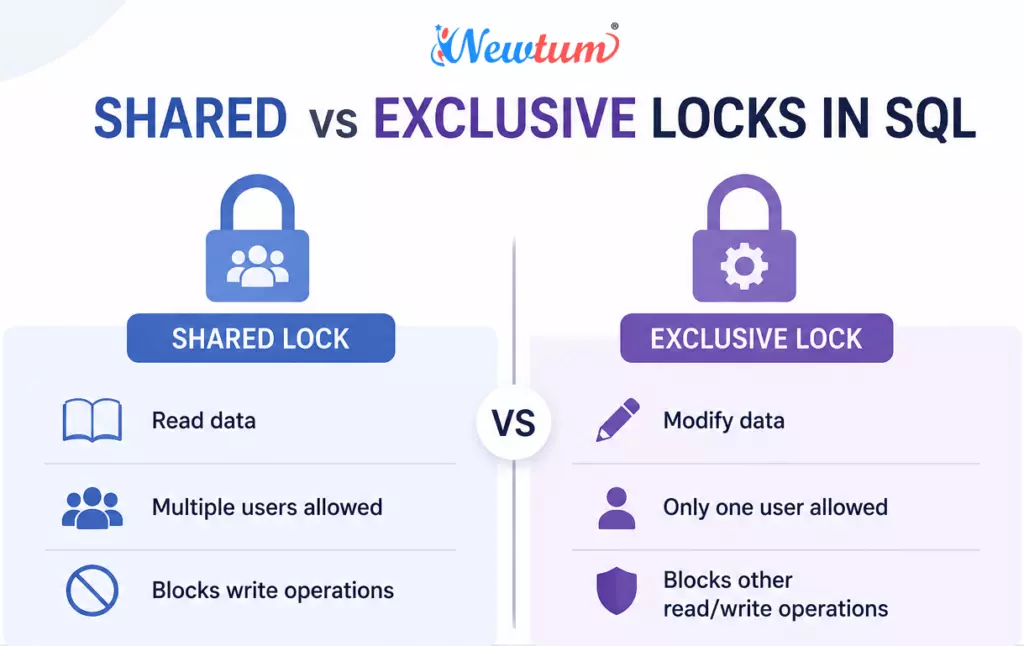
Shared vs Exclusive Locks in SQL
Shared and exclusive locks are the two primary locking mechanisms used in SQL databases to control concurrent access to data. While shared locks allow multiple users to read data simultaneously, exclusive locks restrict access when data modifications occur.
Comparison Table
| Feature | Shared Lock | Exclusive Lock |
|---|---|---|
| Purpose | Read data | Modify data |
| Concurrent Access | Allowed | Blocked |
| Used In | SELECT | INSERT, UPDATE, DELETE |
| Multiple Users | Yes | No |
| Data Modification | Not Allowed | Allowed |
A shared lock focuses on safe reading operations, whereas an exclusive lock ensures secure data modifications without interference from other transactions.
How SQL Server Handles Lock Compatibility
Microsoft SQL Server uses a lock compatibility system to determine whether multiple transactions can access the same resource simultaneously.
This compatibility system prevents conflicts and maintains transaction consistency.
Lock Compatibility Matrix
| Existing Lock | Requested Shared Lock | Requested Exclusive Lock |
|---|---|---|
| Shared Lock | Compatible | Not Compatible |
| Exclusive Lock | Not Compatible | Not Compatible |
Shared + Shared Compatibility
When two transactions only need to read data, SQL Server allows both shared locks simultaneously.
Example Scenario
- User A reads employee data
- User B also reads the same employee data
- Both operations proceed without waiting
This improves database concurrency and performance for read-heavy workloads.
Shared + Exclusive Conflict
If one transaction holds a shared lock and another transaction attempts to modify the same data using an exclusive lock, the second transaction must wait.
Example Scenario
- Transaction A reads a row
- Transaction B attempts to update the same row
- Transaction B remains blocked until Transaction A completes
This prevents inconsistent or partially modified data from being accessed.
Exclusive + Exclusive Conflict
Two exclusive locks cannot exist on the same resource simultaneously.
Example Scenario
- Transaction A updates an order record
- Transaction B also attempts to update the same record
- Transaction B waits until Transaction A releases the lock
This ensures data changes occur safely and sequentially.
Locking Example with Transactions
The following example demonstrates how locks behave during concurrent transactions.
Transaction 1
BEGIN TRANSACTION;SELECT * FROM ordersWHERE id = 1;
This query places a shared lock on the selected order row.
Transaction 2
UPDATE ordersSET status = 'Shipped'WHERE id = 1;
This query requests an exclusive lock to modify the same row.
Step-by-Step Execution Flow
Step 1: Transaction 1 Starts
The first transaction begins and reads the order data.
Step 2: Shared Lock Applied
A shared lock is placed on the row because the transaction is performing a read operation.
Step 3: Transaction 2 Attempts Update
The second transaction tries to update the same row and requests an exclusive lock.
Step 4: Blocking Occurs
Because the shared lock is still active, the exclusive lock cannot be granted immediately.
Transaction 2 enters a waiting state.
Step 5: Transaction 1 Completes
Once Transaction 1 commits or rolls back, the shared lock is released.
Step 6: Exclusive Lock Granted
Transaction 2 now receives the exclusive lock and performs the update successfully.
This locking behavior prevents conflicts and ensures consistent transaction processing.
Common Problems Caused by Locks
Although locks maintain database integrity, improper lock management can create performance and concurrency issues.
Deadlocks
A deadlock occurs when two or more transactions wait indefinitely for each other to release locks.
Example Scenario
- Transaction A locks Table X and waits for Table Y
- Transaction B locks Table Y and waits for Table X
Neither transaction can continue, so the database automatically terminates one transaction to resolve the deadlock.
Blocking
Blocking happens when one transaction prevents another from accessing required data.
Causes of Blocking
- Long-running transactions
- Large update operations
- Uncommitted transactions
Performance Impact
Excessive blocking can slow application performance and reduce database responsiveness.
Lock Contention
Lock contention occurs when many users compete for the same database resources simultaneously.
Common in High-Concurrency Systems
Applications with frequent updates, such as banking systems or e-commerce platforms, often experience lock contention during peak usage periods.
Heavy contention can increase wait times and reduce throughput.
Understanding Real-Life Applications of SQL Locking Mechanisms
- Amazon’s Inventory Management: To manage millions of inventory items seamlessly, Amazon employs SQL locking mechanisms to ensure that changes made by one transaction, such as an update to stock levels, do not interfere with other transactions accessing the same data at the same time.
After implementing locking mechanisms, Amazon observes that inventory discrepancies decrease significantly, ensuring better accuracy in stock level reporting.START TRANSACTION;
LOCK TABLES inventory WRITE;
UPDATE inventory SET stock = stock - 1 WHERE product_name = 'Echo Dot';
COMMIT;
UNLOCK TABLES; - Netflix’s User Recommendations: Netflix uses SQL locks in its databases to update user preferences based on viewing history. This ensures that while a user’s data is being updated by one process, another process is temporarily blocked, preserving data integrity.
By using locking mechanisms, Netflix finds that recommendation errors decline, enhancing user satisfaction with more accurate suggestions.START TRANSACTION;
LOCK TABLES user_data WRITE;
UPDATE user_data SET recommended = 'Stranger Things' WHERE user_id = 12345;
COMMIT;
UNLOCK TABLES; - PayPal’s Transaction Processing: PayPal applies SQL locks during transaction processing to make sure that money transfers are consistent and reliable, blocking simultaneous updates to transaction records that could lead to errors.
The use of locking mechanisms helps in reducing transaction errors, improving trust among users.START TRANSACTION;
LOCK TABLES transactions WRITE;
UPDATE transactions SET status = 'Completed' WHERE transaction_id = 67890;
COMMIT;
UNLOCK TABLES;
shared vs exclusive locks in sql Queries
SQL locking is a strategy for handling data concurrency in databases. It prevents multiple transactions from interfering with each other, ensuring data integrity and consistency—pretty crucial for maintaining accurate records, right?
Shared locks allow multiple transactions to read data simultaneously but prevent data writing. In contrast, exclusive locks keep other transactions from reading or writing, perfect for updates to stay isolated.
A phantom read happens when two identical queries return different rows. Using repeatable read isolation can help prevent this by locking the range of sequential rows.
Row-level locking enables high concurrency because it locks individual rows rather than whole tables or pages, allowing more transactions to occur simultaneously.
Lock escalation shifts from a fine-grained lock to a coarse-grained lock, like table-level, when too many locks are used, to preserve system resources.
By choosing different isolation levels, you can balance the trade-off between accuracy and system overhead, impacting performance greatly, depending on your needs.
You bet! MySQL, PostgreSQL, and SQL Server have nuanced differences in their locking mechanisms, often affecting how you design and optimize queries.
SELECT * FROM sys.dm_tran_locksSetting a lock timeout can prevent indefinite waiting periods, helping transactions fail gracefully and notifying users of contention issues without hanging indefinitely.
Oh, you’re going to love our AI-powered sql online compiler! It lets you seamlessly write, run, and test your SQL code instantly. With AI at the helm, coding becomes efficient and straightforward, making tedious tasks a thing of the past. Ready to turbocharge your SQL skills?
Shared and Exclusive Locks Across Popular Databases
Different database systems implement locking mechanisms differently.
MySQL
MySQL uses storage-engine-specific locking behavior.
- InnoDB supports row-level locking
- MyISAM primarily uses table-level locking
Example Syntax
SELECT * FROM productsLOCK IN SHARE MODE;
PostgreSQL
PostgreSQL uses Multi-Version Concurrency Control (MVCC) alongside locks for improved concurrency.
Example Syntax
SELECT * FROM productsFOR SHARE;
Microsoft SQL Server
SQL Server provides detailed lock granularity options including row, page, and table locks.
Example Syntax
SELECT * FROM employees WITH (HOLDLOCK);
Oracle Database
Oracle Database heavily relies on MVCC and minimizes read locks using undo segments.
Example Syntax
SELECT * FROM employeesFOR UPDATE;
Conclusion
Shared and exclusive locks in SQL are fundamental for maintaining database consistency, concurrency control, and transaction safety. Shared locks support simultaneous read operations, while exclusive locks protect data during modifications. Understanding how these locks work helps SQL developers optimize performance, reduce blocking issues, and build reliable database applications. Explore more SQL tutorials and database concepts on Newtum.
Edited and Compiled by
This article was compiled and edited by @rasikadeshpande, who has over 4 years of experience in writing. She’s passionate about helping beginners understand technical topics in a more interactive way.
About The Author