Control Flow in C programming is a crucial concept every budding coder should master. It helps you direct the execution path of your programs, solving dilemmas like decision-making and repetitive tasks. Struggling with loops or if statements? Understanding this topic is key. Curious about more? Let’s dive deeper!
What Is Control Flow in C Programming?
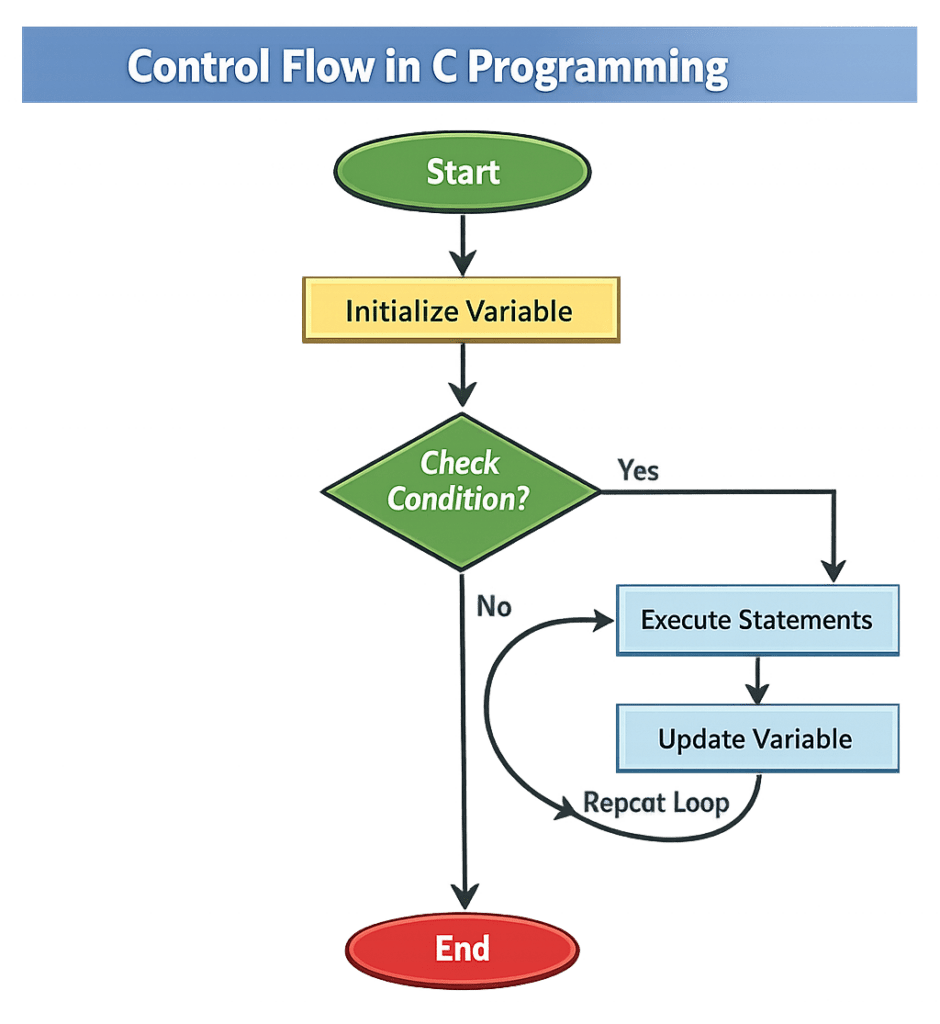
Control flow in C programming refers to the order in which statements and instructions are executed in a program. It determines how the program makes decisions, repeats actions, and moves from one part of the code to another based on conditions and logic.
In simple terms, control flow is the logic that controls the path of execution in a C program.
Types of Control Flow
There are three main types of control flow in C:
- Sequential Control Flow
Statements execute one after another in the order they are written. - Selection Control Flow (Decision-Making)
The program chooses between different paths based on conditions. - Iteration Control Flow (Looping)
The program repeats a block of code multiple times until a condition is met.
Sequential Control Flow
Default Execution Order
Sequential control flow is the default behavior of a C program. The compiler executes statements from top to bottom, one by one, without skipping or repeating any instruction.
This is the simplest form of control flow and requires no conditions or loops.
Example Program
#include <stdio.h>

int main() {
    printf("Step 1: Start Program\n");
    printf("Step 2: Process Data\n");
    printf("Step 3: End Program");
    return 0;
}
When It Is Used
Sequential control flow is used when:
- Instructions must run in a fixed order
- No decision-making is required
- No repetition is needed
- Basic calculations or data processing are performed
Typical scenarios:
- Displaying messages
- Performing arithmetic operations
- Reading input and showing output
Decision-Making Statements (Selection)
Selection statements allow a program to choose different actions based on conditions. These are essential for implementing logic such as comparisons, validations, and branching behavior.
a) if Statement
Syntax
if (condition) {
    // code to execute if condition is true
}
Example
#include <stdio.h>

int main() {
    int age = 20;

    if (age >= 18) {
        printf("You are eligible to vote.");
    }

    return 0;
}
b) if-else Statement
Syntax
if (condition) {
    // code if condition is true
}
else {
    // code if condition is false
}
Example
#include <stdio.h>

int main() {
    int number = 5;

    if (number % 2 == 0) {
        printf("Even number");
    } else {
        printf("Odd number");
    }

    return 0;
}
c) else-if Ladder
Use Case
The else-if ladder is used when multiple conditions need to be checked in sequence. The program executes the first condition that evaluates to true.
Example
#include <stdio.h>

int main() {
    int marks = 75;

    if (marks >= 90) {
        printf("Grade A");
    }
    else if (marks >= 75) {
        printf("Grade B");
    }
    else if (marks >= 50) {
        printf("Grade C");
    }
    else {
        printf("Fail");
    }

    return 0;
}
d) switch Statement
Syntax
switch (expression) {
    case value1:
        // code
        break;

    case value2:
        // code
        break;

    default:
        // code
}
Example
#include <stdio.h>

int main() {
    int day = 3;

    switch (day) {
        case 1:
            printf("Monday");
            break;

        case 2:
            printf("Tuesday");
            break;

        case 3:
            printf("Wednesday");
            break;

        default:
            printf("Invalid day");
    }

    return 0;
}
When to Use switch vs if-else
Use switch when:
- You compare one variable against many fixed values
- Conditions involve equality checks
- Code readability and performance matter
Use if-else when:
- Conditions involve ranges or complex logic
- Multiple variables are compared
- Logical operators (&&, ||) are used
Looping Statements (Iteration)
Looping statements allow a program to repeat a block of code multiple times until a specified condition becomes false. They are fundamental for automation, data processing, and repetitive tasks.
a) for Loop
Syntax
for (initialization; condition; update) {
    // code to repeat
}
Example
#include <stdio.h>

int main() {
    int i;

    for (i = 1; i <= 5; i++) {
        printf("%d\n", i);
    }

    return 0;
}
Best used when:
The number of iterations is known in advance.
b) while Loop
Syntax
while (condition) {
    // code to repeat
}
Example
#include <stdio.h>

int main() {
    int i = 1;

    while (i <= 5) {
        printf("%d\n", i);
        i++;
    }

    return 0;
}
Best used when:
The number of iterations is unknown and depends on a condition.
c) do-while Loop
Syntax
do {
    // code to repeat
} while (condition);
Example
#include <stdio.h>

int main() {
    int i = 1;

    do {
        printf("%d\n", i);
        i++;
    } while (i <= 5);

    return 0;
}
Key Difference from while Loop
| Feature | while Loop | do-while Loop |
|---|---|---|
| Condition Check | Before execution | After execution |
| Execution Guarantee | May run zero times | Runs at least once |
| Use Case | Pre-condition checking | Menu-driven programs |
Control Flow in C Programming Basics
c #includeint main() { int number; printf("Enter a number: "); scanf("%d", &number); // if-else statement if (number > 0) { printf("%d is positive. ", number); } else if (number < 0) { printf("%d is negative. ", number); } else { printf("The number is zero. "); } // switch-case statement switch (number) { case 0: printf("You've entered zero. "); break; case 1: printf("You've entered one. "); break; default: printf("You've entered a number other than zero or one. "); break; } // while loop int i = 1; printf("Counting to three using while loop: "); while (i <= 3) { printf("%d ", i); i++; } // for loop printf("Counting to three using for loop: "); for (int j = 1; j <= 3; j++) { printf("%d ", j); } // do-while loop int k = 1; printf("Counting to three using do-while loop: "); do { printf("%d ", k); k++; } while (k <= 3); return 0; }
Explanation of the Code
This snippet of C code demonstrates control flow using various structures. Here's a breakdown of how it functions:
- The program starts by prompting the user to enter a number, which it captures using `scanf`. It then uses an `if-else` statement to assess if the number is positive, negative, or zero, outputting the appropriate message.Following this, a `switch-case` statement evaluates the number. It specifies responses for when the number is zero or one, and a default for any other number.A `while` loop counts from 1 to 3, printing each number until the condition fails. Similarly, a `for` loop also counts to three, demonstrating another loop option.Lastly, a `do-while` loop counts up to three, ensuring execution of the code block at least once, regardless of the condition’s initial validity.
Output
Enter a number:
5 is positive.
You've entered a number other than zero or one.
Counting to three using while loop:
1
2
3
Counting to three using for loop:
1
2
3
Counting to three using do-while loop:
1
2
3
Jump Statements in C (Control Flow in C Programming)
Jump statements transfer control from one part of a program to another. They are commonly used to exit loops, skip iterations, or jump to specific code sections. The three primary jump statements in C are break, continue, and goto.
break Statement
The break statement immediately terminates the loop or switch statement in which it appears and transfers control to the next statement after the loop.
Syntax
break;
Example
#include <stdio.h>

int main() {
    int i;

    for (i = 1; i <= 10; i++) {
        if (i == 5) {
            break;
        }
        printf("%d\n", i);
    }

    return 0;
}
Output:
1 2 3 4
When to Use
- To exit a loop early
- To stop execution when a condition is met
- Inside
switchstatements to prevent fall-through
continue Statement
The continue statement skips the current iteration of a loop and moves control to the next iteration.
Syntax
continue;
Example
#include <stdio.h>

int main() {
    int i;

    for (i = 1; i <= 5; i++) {
        if (i == 3) {
            continue;
        }
        printf("%d\n", i);
    }

    return 0;
}
Output:
1 2 4 5
When to Use
- To skip specific values in loops
- To avoid executing certain statements under conditions
- To improve loop control without exiting the loop
goto Statement
The goto statement transfers program control to a labeled statement elsewhere in the function.
Syntax
goto label;

/* some code */

label:
    statement;
Example
#include <stdio.h>

int main() {
    int number = -1;

    if (number < 0) {
        goto error;
    }

    printf("Valid number");

error:
    printf("Invalid number");

    return 0;
}
Caution When Using goto
- Makes code harder to read and maintain
- Can create spaghetti code (unstructured control flow)
- Generally avoided in modern programming
- Should only be used in rare cases like breaking out of multiple nested loops or error handling in low-level systems
Best Practice: Prefer structured control flow (if, while, for) instead of goto.
Common Mistakes Beginners Make - Control Flow in C programming
Understanding common errors helps learners debug faster and write more reliable programs.
1. Infinite Loops
An infinite loop occurs when the loop condition never becomes false.
Example
int i = 1;

while (i <= 5) {
    printf("%d", i);
}
Problem:
The variable i is never updated, so the loop runs forever.
Fix
int i = 1;

while (i <= 5) {
    printf("%d", i);
    i++;
}
2. Missing Braces { }
Beginners often forget braces, causing only one statement to execute inside a condition or loop.
Example
if (x > 0)
    printf("Positive");
    printf("Number");
Problem:
Only the first statement is controlled by the if condition.
Fix
if (x > 0) {
    printf("Positive");
    printf("Number");
}
3. Incorrect Conditions
Using the wrong comparison operator or logic can lead to unexpected behavior.
Example
if (x = 5)
Problem:= assigns a value instead of comparing.
Correct
if (x == 5)
Practical Use Cases of Control Flow in C programming
These real-world scenarios demonstrate how control flow constructs are applied in actual programs.
1. Menu-Driven Programs
Control flow is used to display options and perform actions based on user selection.
Example Use Case
- ATM system
- Restaurant ordering system
- Calculator menu
Typical Structure
switch (choice) {
    case 1:
        // Perform operation
        break;

    case 2:
        // Perform operation
        break;

    default:
        printf("Invalid choice");
}
2. Input Validation
Control flow ensures that user input meets required conditions before processing.
Example Use Case
- Password validation
- Age verification
- Form submission checks
Example Logic
if (age < 18) {
    printf("Access denied");
} else {
    printf("Access granted");
}
3. Game Logic Basics
Games rely heavily on loops and conditions to control actions and outcomes.
Example Use Case
- Score tracking
- Player movement
- Win/lose conditions
Example Logic
while (lives > 0) {
    // Game continues
}
Practical Uses of Control Flow in C programming
-
Google's Chrome Browser: Improving Performance
Google uses control flow in C programming to optimise its Chrome browser's rendering engine. By carefully managing loops and conditional statements, they enhance the performance during webpage rendering. This ensures that users experience faster load times and smoother browsing.
By implementing this logic, Google ensures only necessary elements are rendered, improving both speed and efficiency of the browser.for (int i = 0; i < max_elements; i++) { if (elements[i].needsRendering()) { renderElement(elements[i]); } } -
NASA's Space Missions: Ensuring Safety
NASA relies on control flow in C programming to monitor and ensure the safety and accuracy of space missions. Control structures manage decision-making processes in critical systems like onboard computers.
This code snippet helps determine whether it's safe to proceed with a launch, ensuring that missions are only initiated under optimal conditions, which is crucial for the safety of astronauts and spacecraft.if (sensorCheck() == SAFE && propulsionReady()) { initiateLaunchSequence(); } else { abortMission(); } -
Amazon's Automated Warehouses: Streamlining Operations
Amazon uses control flow in C programming in their warehouse robotics to streamline processes. Control flow structures manage robotic tasks, ensuring efficient package sorting and storage.
This logic ensures that packages are moved correctly and efficiently, reducing errors and increasing productivity in Amazon's massive storage facilities.while (robot.isOperational()) { if (package.isAtDestination()) { unloadPackage(); } else { movePackageToNextSpot(); } }
Mastering Control Flow in C Programming
- What happens if I forget to include a 'break' in a switch case?
When you omit the 'break' statement in a switch case, the program continues into the next case, executing the following block of code until it hits a break or the end of the switch. This behaviour is known as "fall-through." It can be useful if you want multiple cases to execute the same code, but often it's just a source of bugs if left unintended.
- Can I use a float in a switch statement?
Nope, you can't use a float in a switch statement. The switch statement in C only works with integer-like values—such as char and int. If you need to evaluate floating-point values, consider using a series of 'if' statements instead.
- What's the difference between 'for,' 'while,' and 'do-while' loops?
The 'for' loop is typically used when the number of iterations is known beforehand. A 'while' loop checks its condition before executing the loop block. The 'do-while' loop will always execute its block at least once, as it evaluates its condition at the end. Here's a basic example:int i = 0; do { printf("%d ", i); i++; } while (i < 5);
- Is it possible to use an 'else' after a 'switch' statement?
Not directly. In C, the switch statement doesn't support an 'else' clause. Instead, you apply the 'default' case for actions where no specifically defined case is met, acting like an 'else'.
- Can a single switch case evaluate multiple conditions?
A single case in a switch statement can't inherently evaluate multiple conditions; however, it can execute any code block. You may structure your code to handle multiple conditions within one case block using 'if' statements.
- Why would someone use 'goto' over structured code blocks?
'Goto' is generally considered harmful as it makes code hard to follow and maintain. However, it can be helpful to quickly exit from deeply nested code when an error is detected, provided it's used sparingly and documented well.
- Is the 'default' case necessary in a switch statement?
Nope, it's not necessary but definitely good practice. Without 'default,' any unmatched case will do nothing. Including a 'default' usually makes your code robust and helps catch unexpected values.
- How can I break out of nested loops in C?
You can use the 'break' statement but it only exits the innermost loop. To escape multiple loops, you'd need to set a flag or use 'goto' to break out completely. Alternatively, restructuring your code for clarity could be a less convoluted approach.
Discover the convenience of our AI-powered 'c' compiler! Instantly write, run, and test code with the click of a button. Our c online compiler ensures a seamless coding experience, allowing you to focus on learning and innovation without the hassle of complex setups.
Conclusion
Control Flow in C programming unlocks fundamental coding concepts, boosting your problem-solving skills and confidence. Dive in and experience the joy of coding hands-on. You'll surely feel accomplished! Ready for more? Discover additional programming insights with Newtum and enhance your programming journey.
Edited and Compiled by
This article was compiled and edited by @rasikadeshpande, who has over 4 years of experience in writing. She's passionate about helping beginners understand technical topics in a more interactive way.
About The Author